1
Epson Stylus CX4600
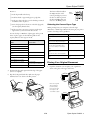
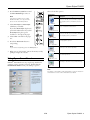
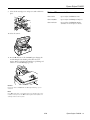
9. Close the ink cartridge cover and press it until it clicks into
place.
Related Documentation
CPD-18248
Epson Stylus CX4600 Start Here
CPD-18250R1
Epson Stylus CX4600 Quick Reference
CPD-18247R1
Epson Stylus CX4600 CD-ROM
(includes on-screen Reference Guide)
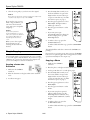
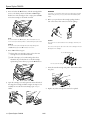
10. Close the scanner.
11. Press the B ink button. The CX4600 begins charging ink
and the On light starts flashing. This takes about one
minute. When it’s finished, the On light stops flashing and
remains on, and the B ink light goes out.
Caution:
Never turn off the CX4600 while the On light is flashing or you’ll
waste ink.
Note:
If the B ink light stays on (not flashing), the ink cartridge may not be
installed correctly. Press the B ink button again and reinstall the ink
cartridge until it clicks into place.
6/04
Epson Stylus CX4600 - 13