1
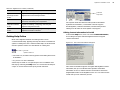
Activating RightFax components without a RightFax server Internet connection If your RightFax server is without Internet access, you may use another computer with Internet access to assist with activation. Requirements for this process are: Computer with Internet access Network access to the RightFax server or access to a removable storage medium such as a compact disc or compact flash drive. 1. Contact your RightFax distributor and purchase the appropriate license. You will be sent a new license card that includes a new SUID (required for activation). 2. Log on to the RightFax server as an administrator. 11. To process your license and generate a license file, click Finish. If successful, click the Download License Activation File link. Save this file (RightFax.XML) to a removable storage medium or otherwise make it available to the RightFax server. When finished, close the Web browser and return to the RightFax server. 12. On the PLU toolbar, click Import. Use the button next to the License File field at the bottom of the PLU to browse to the location of the RightFax.XML file. When finished, click OK. When prompted to overwrite your existing license, click the option to Backup existing license and click Yes. 13. Review your new license summary. When finished, click Close. If you experience problems with activation, call the RightFax product support group at (520) 320-7070. 3. Click Start > All Programs > Captaris > Product Licensing Utility. The Captaris Product Licensing Utility (PLU) opens. 4. In the list of product licenses in left pane, click RightFax. 5. In the right pane, copy and save the characters next to Activation String. 6. Take the activation string to another computer with Internet access and open the following Web page: https://activation.captaris.com/registration/registration.aspx Licensing Brooktrout SR140 Channels The Brooktrout License Manager, provided by Brooktrout allows you to self-active your SR140 license key. Instructions and an activation wizard are included with Brooktrout License Manager. Using this method requires an active Internet connection. Alternatively, you may activate your SR140 channels by contacting RightFax technical support at (520) 320-7070. A support representative will guide you through the activation process. 7. At the activation Web page, type your e-mail address and activation string. 8. Click the drop-down arrow and pick RightFax from the product list. When finished, click Next. Important To activate your SR140 channels, you must have an SR140 license card. This card contains your SR140 license key and is included with the purchase of SR140 channels. 9. Type the information requested at the System Information page and click Next. 10. Enter optional contact information at the next two pages and click Next. Chapter 9 Upgrading and Adding Fax Channels, User Licenses, and Optional Components 67