1
Getting Started
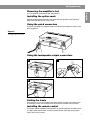
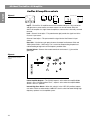
Removing the amplifier’s feet
English
Use a screwdriver to loosen the foot and pull it out.
Installing the option cards
Refer to the installation instructions that come with the equalizer card, Opti-voice®
page card, and Opti-sourceTM source card.
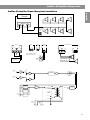
Using the quick connectors
The quick connectors are supplied so you can connect the amplifier to sources and
other equipment.
Figure 2
Installing a quick connector
CAUTION
RISK OF
RICAL SHOC
DO ELECT
NOT OPEN
K
RISQUE
DE CHOC
NE PAS
ELECTRIQUE
OUVR
IR
AVIS
TO RED
UCE THE
DO NOT
WARNING
EXPOSE
RISK OF
REFER
THIS EQU
FIRE OR
TO
OPERATI
ELECTRIC
IPMENT
AND/OR
NG YOUR INSTRUC
TO RAIN
AL SHO
POORPRO
CEDURE TION
OR MOIS
CK,
PERF
S. INCO MANUAL
ORMANC
TURE.
FOR PRO
E. RRECT WIRI
NG MAYPER INSTALLA
RESULT
TION AND
IN DAM
AGE
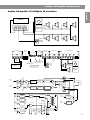
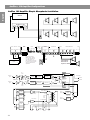
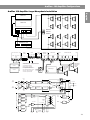
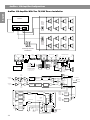
Using the loudspeaker output connectors
2
1
CAUTION
AVIS
RISK OF
DO ELECTRIC
NOT OPENAL SHOCK
RISQUE
CHOC ELECTRIQ
NEDE
PAS
OUVRIR
UE
TO REDUCE
DO
NOT
THE RISK WARNING
OF FIRE
REFER TO EXPOSE THIS
EQUIPM
OR ELECTR
OPERAT
ENT
AND/OR
ING YOUR INSTRU
ICAL SHOCK,
POORPROCED
CTION MANUA TO RAIN OR
PERFORURES.
MOISTURE.
INCORRECT L FOR
MANCE
.
WIRINGPROPER
INSTALLATION
MAY RESULT
IN DAMAGAND
E
3
CAUTION
AVIS
RISK OF
DO ELECTRIC
NOT OPENAL SHOCK
RISQUE
CHOC ELECTRIQ
NEDE
PAS
OUVRIR
UE
TO REDUCE
DO
NOT
THE RISK WARNING
OF FIRE
REFER TO EXPOSE THIS
EQUIPM
OR ELECTR
OPERAT
ENT
AND/OR
ING YOUR INSTRU
ICAL SHOCK,
POORPROCED
CTION MANUA TO RAIN OR
PERFORURES.
MOISTURE.
INCORRECT L FOR
MANCE
.
WIRINGPROPER
INSTALLATION
MAY RESULT
IN DAMAGAND
E
Setting the levels
Each input has its own level control. Use these controls to balance the relative level
of each input source. You control overall volume with the remote volume control.
Installing the remote control
The remote control should be wall mounted in an electrical box (not included) similar
to a light-switch electrical box. Install the remote control where day-to-day adjustments will be easy to make.
7