1
APPENDIX C - USER INTERFACE: DIGITAL DISPLAY
DURING OPERATION
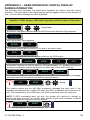
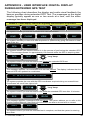
The following chart describes the audio-visual feedback the beacon provides during
activation. The messages on the digital display typically appear as one or two words at a
time, until the entire message has been displayed.
GlobalFix™ iPRO Display, LED/ Audio Signaling and Description of Operation
R
R
long beep
The beacon has been activated and the ACR Electronics Welcome Page appears
Next, the product name appears
EPIRB
ON
The system reports that the beacon is on and in activation mode
GPS
ON
The system reports that the beacon has turned on the GPS engine
GIVE
CLEAR
VIEW
TO
SKY
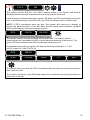
The system reminds you that for optimum GPS performance, i.e., greatest likelihood of
acquiring coordinates, position the beacon so that it has a clear view of the sky.
DO
HOLD
NOT
AERIAL
The system reminds you that for optimum transmission of the emergency message,
allow the beacon to float and do not hold the antenna (aerial).
406
SENT
G
R
beep
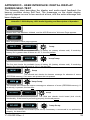
The system reports that the 406 MHz emergency message has been sent. If this
message accompanied by a green LED flash, the GPS coordinates have been sent as
well. If accompanied by a red LED flash, the GPS coordinates have not been sent.
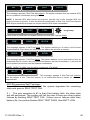
NOTE: If GPS coordinates were not sent, the system will continue to attempt to
acquire the data and add it to the 406 MHz distress signal when available. Updated
GPS coordinates are sent every twenty minutes.
GPS
SENT
G
This message appears only if GPS data was acquired
Y1-03-0233 Rev. J
30