1
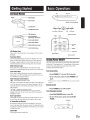
Loading and Unloading Discs
Tum on the power before loading and unloading discs.
Loading discs
1
2
Switching the Source
Front Control Keys
1
Once the disc is partially inserted, it is drawn in
Press SELECT (
will ) to display the Source Select
Menu.
Insert the disc with the label side facing upwards.
2
Press SELECT ( will ) again to cycle through the
different sources.
automatically. Playback starts.
Remote Control
Press DVD, AUX1 or AUX2 to change each source
directly.
• For two-sided DVDs, play one side of the disc to the end, then
unload the disc, turn it over and reload it to play the other side.
• If wrong disc, upside-down discs or dirty discs have been
inserted, "Bad Disc " is displayed. Press ~ and eject the disc.
Press~.
Be sure to remove the disc.
• OSD (On Screen Display) will turn OFF automatically after 5
seconds without use.
• When the source is changed, the power is turned OFF or the ACC
is turned OFF, the device remembers the scene where the internal
DVD stopped and playback will resume from that point.
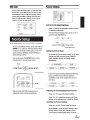
sening the Backlight Brightness
1
Press Dimmer ( • ) on the Front Control Keys,
the DIMM button on the remote control, or select
the Backlight tab in the Picture Settings Menu
(refer to Monitor Setup instructions page 5}.
2
From the Picture Settings menu, press <Ill or
~
to
cycle through High/Mid/Low.
• If the disc is not removed within a few moments,
it will be
reloaded automatically.
• During ACC OFF or while the disc is being loaded ("LOADING"
is displayed), the disc will not be ejected even if you press ~.
Dimmer
Muting the Audio
CIT:£)~ ~$9 CLJ:W OKIRJ
Front Control Keys
Front Control Keys
While the power is ON, press POWER ( <!)) to activate
Wait 8 seconds until OSD disappears; the
the Mute function.
adjustment will be saved automatically ( if
Press POWER ( <!) ) again to turn OFF the Mute
the brightness is adjusted directly using the
function.
Dimmer ( • ) key on the Front Control Keys, the
OSD will disappear after 3 seconds)
Remote Control
Press MUTE to turn it ON and OFF.
Adjusting the Volume
Volume can be controlled from the headphone or your own radio
volume function.
1
2
DVD Control
Press the DVD button on the Front Control Keys to
access the DVD Control menu.
DVD CONTROL
Turn on POWER on the headphone.
Adjust the volume level by turning clockwise for
louder and counter-clockwise for lower on the
headphone.
• Refer to the "Wireless Headphones" section on page 6 for
additional information.
4-EN
EJ~[£,][i]EJ
~~~EJB
CD000000000