1
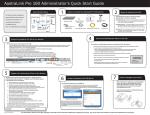
AastraLink RP 540
Installation Guide
41-001245-00
Rev 00
Software License Agreement
Aastra Telecom Inc., hereinafter known as "Seller", grants to Customer a
personal, worldwide, non-transferable, non-sublicenseable and non-exclusive, restricted use license to use Software in object form solely with the
Equipment for which the Software was intended. This Product may integrate programs, licensed to Aastra by third party Suppliers, for distribution
under the terms of this agreement. These programs are confidential and
proprietary, and are protected as such by copyright law as unpublished
works and by international treaties to the fullest extent under the applicable law of the jurisdiction of the Customer. In addition, these confidential
and proprietary programs are works conforming to the requirements of
Section 401 of title 17 of the United States Code. Customer shall not disclose to any third party such confidential and proprietary programs and
information and shall not export licensed Software to any country except in
accordance with United States Export laws and restrictions.
Customer's use of this software shall be deemed to reflect Customer's
agreement to abide by the terms and conditions contained herein. Removal
or modification of trademarks, copyright notices, logos, etc., or the use of
Software on any Equipment other than that for which it is intended, or any
other material breach of this Agreement, shall automatically terminate this
license. If this Agreement is terminated for breach, Customer shall immediately discontinue use and destroy or return to Seller all licensed software
and other confidential or proprietary information of Seller. In no event
shall Seller or its suppliers or licensors be liable for any damages whatsoever (including without limitation, damages for loss of business profits,
business interruption, loss of business information, other pecuniary loss, or
consequential damages) arising out of the use of or inability to use the software, even if Seller has been advised of the possibility of such damages.
AastraLink RP 540 Installation Guide
iii
Software License Agreement
Customer agrees to not reverse engineer, decompile, disassemble or display Software furnished in object code form. Customer shall not modify,
copy, reproduce, distribute, transcribe, translate or reduce to electronic
medium or machine readable form or language, derive source code without the express written consent of the Seller and its Suppliers, or disseminate or otherwise disclose the Software to third parties. All Software
furnished hereunder (whether or not part of firmware), including all copies
thereof, are and shall remain the property of Seller and its Suppliers and
are subject to the terms and conditions of this agreement. All rights
reserved.
Table of Contents
Software License Agreement.....................................................................iii
About This Guide .........................................................................................1
Introduction ..................................................................................................2
Requirements ............................................................................................2
AastraLink RP 540 Gateway Parts..............................................................3
Setting Up Your System ..............................................................................4
Wall-Mounted Unit ....................................................................................4
Desktop Unit ..............................................................................................4
Connecting to Power and the Local Area Network...................................5
Connecting to Power ................................................................................5
Connecting to the Local Area Network ...................................................5
Connecting to the Local Phone Line..........................................................6
Emergency Dialing Considerations ...........................................................7
Power, network, or telephone service outages ......................................7
How to dial 911 ..........................................................................................7
Maintain an alternative means of calling 911 .........................................7
811 feature .................................................................................................7
911 location obligations that may apply to certain owners of Response Point...........................................................................................7
Regulatory Compliance and Safety Information.......................................8
v
Table of Contents
Equipment Installation..............................................................................8
United States Class B Notice - FCC Compliance ...................................8
Canada Class B Notice .............................................................................8
Safety Certification ...................................................................................8
About This Guide
This manual describes how to physically set up your new AastraLink RP 540
Gateway. This guide complements the AastraLink RP Administrator Guide
and the AastraLink RP Quick Start Guide.
AastraLink RP Administrator Guide – is designed for network system
administrators who need information on installing and maintaining this
product.
AastraLink RP Quick Start Guide– is designed for network system
administrators who need basic installation information for the
AastraLink RP solution.
These guides along with release notes, system updates, etc. can be
downloaded from our website at www.aastratelecom.com.
About This Guide
AastraLink RP 540 Installation Guide
1
Introduction
Introduction
Congratulations on your purchase of the AastraLink RP 540 Gateway! The
AastraLink RP 540 Gateway allows you to interconnect a regular analog
phone line from your local service provider to your AastraLink RP
telephone system. The AastraLink RP 540 Gateway has been specifically
designed to operate as part of the AastraLink RP solution, a phone
system that offers breakthrough voice-activated user interface,
simplified setup and user management, and effortless mobility.
AastraLink RP solution is powered by Microsoft® Response Point™.
Requirements
The AastraLink RP 540 Gateway is part of the AastraLink RP solution, and
is designed to work with the following components:
•
•
•
AastraLink RP 500 Base Unit
Aastra phones selected from models 6751i RP, 6753i RP, and
6757i CT RP
Microsoft Response Point Administrator application.
Microsoft ResponsePoint
Administrator Software
Typical Network Setup
6751i RP IP Phone
LAN Ethernet Switch
6753i RP IP Phone
Internet
Router
PSTN
6757i CT RP
IP Phone
AastraLink Rp 540 Gateway
2
AastraLink RP 500 Base Unit
AastraLink RP 540 Installation Guide
CT cordless
AastraLink RP 540 Gateway Parts
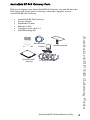
When you unpack your AastraLink RP 540 Gateway you should have the
following parts. If any part is missing, contact the supplier of your
AastraLink RP 540 Gateway.
•
•
•
•
•
•
AastraLink RP 540 Gateway
Power adapter
Installation Guide
Ethernet cable
Telephone line cable x 4
Wall Mounting Kit
AastraLink RP 540 Gateway Parts
Wal
lM
Temount
plat ing
e
Ethernet Cable
Wall Mounting Kit
Install Guide
AastraLink 540
Gateway
Adapter
x4 Telephone Cables
AastraLink RP 540 Installation Guide
3
Setting Up Your System
Setting Up Your System
The AastraLink RP 540 Gateway can be wall-mounted or placed on a
desktop.
Wall-Mounted Unit
The template, screws, and anchors from the wall-mounting kit are used to
mount the AastraLink RP 540 Gateway on the wall. The bottom of the unit
should be against the wall when mounted.
1. Use the provided template to mark locations for mounting screws.
2. Drill holes at marked locations and install anchors.
3. Apply screws to anchors.
4. Align the AastraLink RP 540 Gateway on the screws.
Desktop Unit
Place the AastraLink RP 540 Gateway on a flat surface.
4
AastraLink RP 540 Installation Guide
Connecting to Power
The power adapter required for the AastraLink RP 540 Gateway is
straighforward to install.
•
Connect the power adapter to the AastraLink RP 540 Gateway port
marked
, and plug the other end into an electrical outlet.
Connecting to the Local Area Network
Included with the AastraLink RP 540 Gateway is an Ethernet cable
allowing you to connect to the local area network.
•
Connect the Ethernet cable to the ethernet jack marked LAN on
the AastraLink RP 540 Gateway, and connect the other end to your
local area network (LAN).
Power
LAN Ethernet Switch
AastraLink RP 540 Installation Guide
5
Connecting to Power and the Local Area Network
Connecting to Power and the Local Area Network
Connecting to the Local Phone Line
Connecting to the Local Phone Line
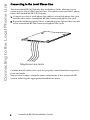
The AastraLink RP 540 Gateway has 4 telephone jacks, allowing you to
connect up to 4 local (FXO) phone lines. You must connect at least 1 phone
line to the AastraLink RP 540 Gateway.
1. Connect one end of a telephone line cable to a local telephone line jack,
and the other into a AastraLink RP 540 Gateway telephone line jack.
2. Repeat for additional phone lines, connecting up to 4 phone lines in total
to the AastraLink RP 540 Gateway telephone line jacks.
Telephone Line Jacks
Confirm that all cables and cords are properly seated into their respective
ports and outlet.
You are now ready to setup the other components of the AastraLink RP
system, following the appropriate Installation Guides.
6
AastraLink RP 540 Installation Guide
Emergency Dialing Considerations
Please read this information carefully, as it applies to calling for help in
emergency situations.
Power, network, or telephone service outages
If there is an outage, disruption, or other degradation of the power,
network, or telephone services at your location, Response Point will not
work.
How to dial 911
Please inform all of your employees, visitors, and Response Point users
that they can either dial 911 or 9-911 to access 911 emergency services.
Maintain an alternative means of calling 911
811 feature
By dialing 811, you can call back the last phone that was used to dial 911.
This information will be stored for only 24-48 hours after 911 is dialed.
Note: This feature may not work if the phone has not been registered with
the Response Point base unit by your phone system administrator.
911 location obligations that may apply to certain owners of
Response Point
Your telephone company may be required under applicable law to provide
a telephone number and address associated with that telephone number to
emergency services when a caller dials 911. Please note that certain U.S.
(state and/or federal) and foreign laws may require the owner of a multiline telephone system (MLTS), such as Response Point, to provide
emergency services with the physical location/address of the phone that
was used to call 911, in addition to the caller’s telephone number.
Compliance with such MLTS laws is your responsibility as the owner of
Response Point. Response Point does not provide to emergency services
the physical location/address of a phone that is used to call 911.
AastraLink RP 540 Installation Guide
7
Emergency Dialing Considerations
You should maintain a backup means of calling 911 emergency services
(for example, by using a phone plugged into a standard telephone line or a
cell phone) in case of a power failure, telephone service outage, or other
problem that may inhibit you from using Response Point.
Regulatory Compliance and Safety Information
Regulatory Compliance and Safety Information
Equipment Installation
WARNING: Only trained and qualified personnel should be allowed to
install, replace, or service this equipment. The equipment must be placed
indoors and connected to indoor networks only.
United States Class B Notice - FCC Compliance
This equipment has been tested and found to comply with the limits for a
Class B digital device, pursuant to part 15 of the FCC Rules. These limits
are designed to provide reasonable protection against harmful interference
in a residential installation. This equipment generates, uses and can
radiate radio frequency energy and, if not installed and used in accordance
with the instructions, may cause harmful interference to radio
communications. However, there is no guarantee that interference will not
occur in particular installation. If this equipment does cause harmful
interference to radio or television reception, which can be determined by
turning the equipment off and on, the user is encouraged to try to correct
the interference by one or more of the following measures:
•
•
•
•
Reorient or relocate the receiving antenna.
Increase the separate between the equipment and receiver.
Connect the equipment into an outlet on a circuit different from
that to which the receiver is connected.
Consult the dealer or an experienced radio/TV technician for help.
Canada Class B Notice
This Class B digital apparatus complies with Canadian ICES-003.
Cet appariel numérique de la classe B est conforme à la norme NMB-003
du Canada.
Safety Certification
This product is in compliance with regulations as follows:
UL 60950-1 (1st Edition)
8
AastraLink RP 540 Installation Guide
Aastra Telecom Inc.
155 Snow Blvd, Concord, Ontario, Canada L4K 4N9
Phone: +1-905-760-4200 - Fax: +1-905-760-4233
www.aastratelecom.com
The information contained in this document is believed to be accurate and
reliable at the time of printing. However, Aastra Telecom, Inc. cannot
guarantee the accuracy of printed material after the date published nor can it
accept responsibility for errors or omissions.
Microsoft® Response Point™ is a trademark of Microsoft Corporation.
© Aastra Telecom Inc. 2008 41-001245-00 Rev 00