1
40 QN CLEANING AND MAINTENANCE
To avoid the possibility of electric shock, before performing any cleaning and maintenance operations always turn off power to the system by pressing the
orange ON/OFF button on the remote controller. Turn
off the outdoor disconnect switch located near the outdoor unit. If the indoor unit is on a separate switch, be
sure it is also disconnected.
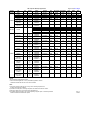
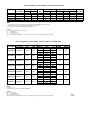
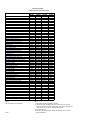
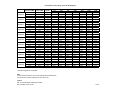
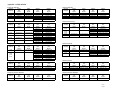
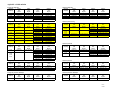
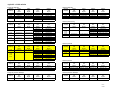
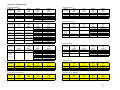
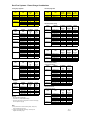
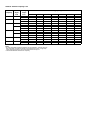
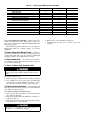
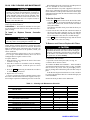
For proper system operation, perform the cleaning and maintenance operations in Table 9.
Lubrication — The indoor-fan automatic air sweep motor, and the outdoor-fan motor are factory lubricated and require no oiling.
To Install or Replace Remote Controller
Batteries
Do not drop the remote controller — damage to the device may result. Avoid getting the controller wet.
When shutting down the system for an extended period of
time, it is advisable to remove the batteries.
Consult distributor if any other equipment is turned on or
shows signs of disrupted operation if you use the wireless
remote controller, or if the system is turned on or shows signs
of disrupted operation when the remote controller of any other
equipment is used.
To Set the Current Time
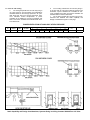
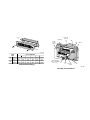
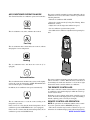
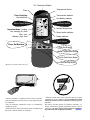
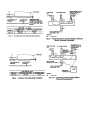
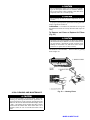
1. Press the TA button (located on the back of the remote
controller; see Fig. 19) with an instrument screwdriver or
similar small, pointed tool, and the current time indication symbol flashes.
Note that the controller comes preset from the factory set
for 6:00 a.m.
2. Set the current time with the hour and minute buttons on
the front of the remote controller (see Fig. 19) while the
current time indication is flashing. Note that a.m. and p.m.
are also indicated as the times are scrolled through.
3. Press TA again. The flashing will stop and the current
time will be reset to the new setting.
To Remove and Clean or Replace Air Filters
NOTE: Before replacing the batteries, note that the remote
controller signal can be affected if electronic fluorescent
lights are installed nearby. The batteries may not need to be
replaced. If you suspect this is the problem, consult your
Carrier distributor.
Batteries should be replaced once a year. Use 2 batteries
(1.5 v, dc-type, AAA alkaline batteries). Never use old or
recharged batteries together with new ones.
To replace batteries:
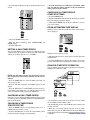
1. Slide the battery cover off from the back of the remote
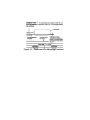
controller. See Fig. 18.
2. Insert the 2 batteries in accordance with the markings
on the remote controller, so that the poles are correct
(+ and −).
3. Press the RST button using an instrument screwdriver
or similar small, pointed tool.
4. Replace the cover securely.
It is time to replace the remote controller batteries when
the remote controller function becomes irregular, or the system no longer responds to commands given close to the unit.
Operating your system with dirty air filters may damage
the indoor unit and can also cause reduced cooling performance, intermittent system operation, frost build-up
on the indoor coil, and blown fuses. Inspect and clean
or replace the air filters monthly.
TO REMOVE AIR FILTERS:
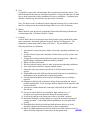
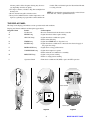
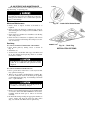
1. Open fan coil unit front panel (lift). See Fig. 20.
2. Pull the filters down to remove.
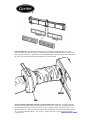
TO CLEAN OR REPLACE FILTERS — Filters should be
vacuumed and washed with warm water (see Fig. 20). Shake
filter to remove any excess water, dry thoroughly, and replace by sliding filter behind front grille until filter snaps in
place.
If the filter has begun to break down or is torn, it needs to
be replaced. Replacement filters are available through your
Carrier distributor.
NOTE: DO NOT put filters in the dishwasher.
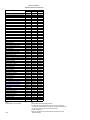
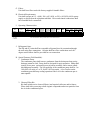
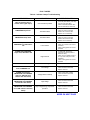
Table 9 — Cleaning and Maintenance Schedule
TASK
INDOOR UNIT
Clean Air Filters
Clean Drain Pipe
Clean Condensate Drain Pan
Replace Batteries in the Remote Controller
Clean Indoor Unit Front Panel
OUTDOOR UNIT
Clean the Fins From Outside
Open the Unit and Clean Fins Inside
Remove Dust From Electrical Parts
Check Electrical Connections are Tight
Clean Outdoor Fan
Check that Outdoor Fan Assembly is Tight
Clean Drain Pan
MONTHLY
QUARTERLY
YEARLY
X
X
X
X
X
X
X
X
X
X
X
X
MORE ON NEXT PAGE