1
DECLARATION OF CONFORMITY
Manufacturer’s Name:
Manufacturer’s Address:
DigiTech
8760 S. Sandy Parkway
Sandy, Utah 84070, USA
Warning
For your protection, please read the following:
declares that the product:
Important Safety Instructions
1. Read these instructions.
2. Keep these instructions.
3. Heed all warnings.
4. Do not use this apparatus near water.
5. Clean only with dry cloth.
conforms to the following Product Specifications:
6. Do not block any ventilation openings. Install in
accordance with the manufacturer’s instructions.
Safety:
IEC 60065 (1998)
7. Do not install near any heat sources such as radiators,
EMC:
EN 55013 (1990)
heat registers, stoves, or other apparatus (including
EN 55020 (1991)
amplifiers) that produce heat.
8. Protect the power cord from being walked on or
Supplementary Information:
pinched particularly at plugs, convenience receptacles,
The product herewith complies with the requirements of the Low
and the point where they exit from the apparatus.
Voltage Directive 72/23/EEC and the EMC Directive 89/336/EEC as
9. Unplug this apparatus during lightning storms or when
amended by Directive 93/68/EEC.
unused for long periods of time.
Vice-President of Engineering
10. No user serviceable parts inside. Refer all servicing to
8760 S. Sandy Parkway
qualified service personnel. Servicing is required when
Sandy, Utah 84070, USA
Date: February 22, 2002
the apparatus has been damaged in any way, such as
power-supply cord or plug is damaged, liquid has been
spilled or objects have fallen into the apparatus, the
European Contact:
Your local DigiTech Sales and
apparatus has been exposed to rain or moisture, does
Service Office or
not operate normally, or has been dropped.
Harman Music Group
11.WARNING:To reduce the risk of fire or electric
8760 South Sandy Parkway
shock, do not expose this apparatus to rain or
Sandy, Utah
84070 USA
moisture.
Ph: (801) 566-8800
12. Refer to labels on the unit, including bottom cover, for
Fax: (801) 568-7583
other markings and pertinent information.
Product name:
Tone Driver
Product option:
all (requires Class II power
adapter that conforms to the
requirements of EN60065,
EN60742, or equivalent.)
WARRANTY: We at DigiTech are proud of our products and back-up each one with the following warranty:
1.The warranty registration card must be mailed within ten days after purchase date to validate this warranty.
2. DigiTech warrants this product, when used solely within the U.S., to be free from defects in materials
and workmanship under normal use and service.
3. DigiTech liability under this warranty is limited to repairing or replacing defective materials that show
evidence of defect, provided the product is returned to DigiTech WITH RETURN AUTHORIZATION,
where all parts and labor will be covered up to a period of one year (this warranty is extended to a
period of six years when the product has been properly registered by mail or through our website).
A Return Authorization number may be obtained from DigiTech by telephone.The company shall not
be liable for any consequential damage as a result of the product's use in any circuit or assembly.
4. Proof-of-purchase is considered to be the burden of the consumer.
5. DigiTech reserves the right to make changes in design, or make additions to, or improvements upon
this product without incurring any obligation to install the same on products previously manufactured.
6.The consumer forfeits the benefits of this warranty if the product's main assembly is opened and tampered with by anyone other than a certified DigiTech technician or, if the product is used with AC voltages outside of the range suggested by the manufacturer.
7.The foregoing is in lieu of all other warranties, expressed or implied, and DigiTech neither assumes nor
authorizes any person to assume any obligation or liability in connection with the sale of this product.
In no event shall DigiTech or its dealers be liable for special or consequential damages or from any
delay in the performance of this warranty due to causes beyond their control.
NOTE:The information contained in this manual is subject to change at any time without notification. Some
information contained in this manual may also be inaccurate due to undocumented changes in the product or
operating system since this version of the manual was completed.The information contained in this version
of the owner's manual supersedes all previous versions.
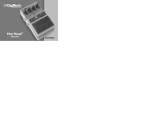
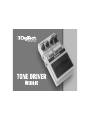
The Tone Driver Distortion is the world’s most advanced overdrive
pedal. DigiTech’s exclusive AudioDNA™ technology is what makes the
Tone Driver more than your standard overdrive stompbox. Rather than
working from a single overdrive circuit, the Tone Driver features a
Morph knob which blends between three totally distinct overdrive types.
You now get a wide variety of different overdrive sounds that can be
dialed in quickly and easily.
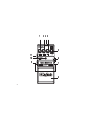
1. Level Knob
Controls the effect’s output level. Turn this knob clockwise to increase
the output level, and counter-clockwise to decrease output level.
2.Tone Knob
Controls the boost or cut of high frequencies. Turn this knob clockwise
to increase the high frequency content, and counter-clockwise to
decrease the high frequency content.
3. AC Adapter Jack
Connect a DigiTech PS200R power supply to this jack. Use the proper
supply for your area’s Mains line voltage.
1
2 3 4
5
11
10
9
6
7
8
4. Gain Knob
Controls the amount of overdrive distortion. Turn this knob clockwise
to increase the amount of distortion, and counter-clockwise to decrease
the amount of distortion.
5. Morph Knob
Morphs the three different overdrive voicings. The minimum position is
an edgy, mid boost overdrive. The 12 o’clock position is a smooth warm
overdrive sound. The maximum position is a classic overdrive with extra
gain for when you need it. Experiment with the knob’s different
positions to hear the wide variety of overdrive tones.
6. Input Jack
Connect your instrument to this jack. Connecting a guitar cable to this
jack engages battery power even though the Indicator LED may not be
lit. To prolong battery life, disconnect all cables from the pedal when not
in use.
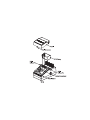
7. Pedal Release Pins
These two pins are spring-loaded hinges that hold the pedal in place.
Push these pins in to release the pedal from the chassis exposing the
battery compartment. (See battery replacement diagram.)
8. Pedal
Turns the effect on and off.
9. Out 1(Amp) Jack
Connect this output to your guitar amplifier.
10. Indicator LED
Indicates when the effect is turned on. If the LED becomes dim or does
not light when the cables are connected, the battery needs to be
replaced.
11. Out 2 (Mixer) Jack
This output features DigiTech’s CIT™ cabinet modeling technology, that
lets you run the pedal directly into a mixer or recorder input without
having to use a guitar amplifier.
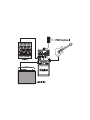
Connections
The Tone Driver has a single input (INPUT) and a pair of outputs (AMP
and MIXER). The two outputs give you the following options: running
into a guitar amplifier, or running directly to a mixing console or
recording device, or both. The MIXER output uses DigiTech’s advance
CIT™ cabinet modeling technology for an authentic guitar amplifier
sound without using an amp.
Follow these setup directions:
1.Turn the volume down on the amplifier/mixer you are connecting to.
2. Connect the pedal output to the amplifier/mixer input.
3. Connect the guitar to the pedal input.
4. Connect the power supply to the pedal (optional).
5.Turn the level control on the pedal to the minimum position.
6.Turn up your amplifier/mixer level to the desired listening level.
7.Turn on the pedal by pressing the pedal switch, and gradually turn up
the level to the desired listening level.
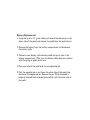
Battery Replacement
1. Using the tip of a 1/4” guitar cable, push one of the release pins in on
either side of the pedal, and remove the pedal from the pedal chassis.
2. Remove the battery from the battery compartment and disconnect
the battery cable.
3. Connect a new battery to the battery cable and put it back in the
battery compartment. Make sure the battery cable does not interfere
with the spring or pedal switch arm.
4. Place one hole of the pedal over its corresponding pin.
5. Push the opposite pin in and lower the other side of the pedal into
place over the depressed pin. Release the pin. When the pedal is
properly fastened, both released pins are flush with the outer side of
the pedal.
SPECIFICATIONS:
• Controls - Level, Gain,Tone, Morph,
On/Off Pedal
• Jacks - Input, Out 1 (Amp), Out 2
(Mixer)
• Input Impedance - 1 MOhms
• Output Impedance - 100 Ohms
• Power Supply - 9V Alkaline Dry Battery
• Power Consumption - 4.8Watts
(w/optional PS200R power supply)
• Battery Life - Approximately 4 hours
(with continuous usage)
• Dimensions - 4 15/16”(L) x 3 1/8”(W)
x 2 1/8”(H)
• Weight - 1.38 lbs.
• Optional Power Supply
PS200R - 100 (100V ~ 50/60Hz)
PS200R - 120 (120V ~ 60Hz)
PS200R - 230 (230V ~ 60Hz)
PS200R - 240 (240V ~ 60Hz)
DigiTech
8760 South Sandy Parkway
Sandy, Utah 84070
PH (801) 566-8800
FAX (801) 566-7005
DigiTech and X-Series are trademarks
of the Harman Music Group Inc.
Copyright - Harman Music Group
Tone Driver Overdrive
Owners Manual 18-1802V-A
Please visit DigiTech
on the World Wide Web at:
www.digitech.com
Printed in China