1
AV-in cable
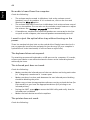
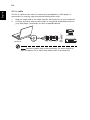
The AV-in cable can be used to connect your notebook to a VHS player or
camcorder for viewing, capturing and recording video clips.
Notebook
AV-in
L
Audio Video
Camcorder
R
R W Y
AV-in
S
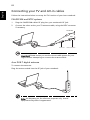
Connect the other ends to the S-video or composite audio/video jacks on
your VHS player, camcorder or other compatible device.
R W Y
2
S
Plug the single end of the cable into the AV-input port of your notebook.
R W Y
1
S
English
84
VHS
Note: Extension cables may not be necessary. For more details on
how to capture TV or video clips please refer to the help file.