1
The EOS digital workflow
ImageBrowser EX
Digital Photo Professional
Canon is the only photographic manufacturer
that can provide a solution for every step of a
photographer’s workflow – from capture
through processing to print.
EOS solutions
Advanced RAW file processing
Supplied with the EOS-1D X is an EOS
Solutions disk, containing applications that
further enhance the performance and
functionality of the camera.
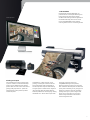
Digital Photo Professional (DPP) is an
image-editing application designed for the
viewing and processing of JPEG and RAW
images. White balance, colour saturation
and exposure compensation of RAW files
can all be set after capture, as part of a
non-destructive workflow. Any traces of
vignetting, distortion and colour fringing
are also easily corrected.
High dynamic range (HDR) images can be
generated in DPP from RAW or JPEG files shot
at different exposures. A number of tonemapping presets are supplied, enabling you
to create the right look for your subject matter.
Single frames can also be combined to form
multiple-exposure composites. And lens
correction can be controlled and applied to
images as you choose.
Images can be cropped and rotated before
they are saved to one of many file formats,
either for output, archive or further editing
in an application like Adobe Photoshop.
Batch processing is available for extra speed
and efficiency.
DPP supports sRGB, Adobe RGB and Wide
Gamut RGB colour spaces, and CMYK printer
simulation allows photographers to preview
how their images will appear as a hard copy.
EOS Utility provides tethered shooting
support and remote camera control over USB,
Ethernet and WiFi. Picture Style editor enables
photographers to create custom Picture Style
presets and upload these to the camera.
Image Browser EX provides a tool for
browsing of JPEG and RAW files on disk.
24