1
24 hour Clock and Timer
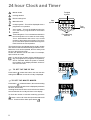
Cookpot
symbol
Minute minder
Cooking duration
End of cooking time
Auto
symbol
Manual function
Cookpot symbol - This will be displayed when a
programme is in operation.
A
U
T
O
A
U
T
O
TIMER
Time
setting
Auto symbol - This will be displayed when the
oven has been programmed for automatic
operation.
Programming
controls
Time setting knob - Turn it clockwise and hold it in
the turned position to increase the time setting.
Turn it anticlockwise and hold it in the turned
position to decrease the time setting. The countup or count-down speed increases the longer the
knob is held in the turned position.
The electronic timer can indicate the time of day, operate
as a minute minder and automatically operate the oven.
Before the oven can be operated, the time of day must
be set on the electronic timer.
Please note that this is a 24 hour clock. For example,
2pm is shown as 14:00.
In case of loss of power, all the settings (time of
day, set programme or programme in operation),
will be cancelled. When the power is restored,
the numbers on the display will flash, and the timer has to be reset.
TIMER
F
TO SET THE TIME OF DAY
Press button , release the button, then turn the time
setting knob until the correct time of day is displayed.
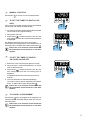
FTO SET THE MINUTE MINDER
Press button
, release the button, then turn the setting
time knob until the duration time is displayed (maximum
23 hours, 59 minutes).
Our diagram shows the timer set for 45 minutes. After a
few seconds the time of day will show in the display.
To check the number of minutes remaining, press the
button. At the end of the timed period an alarm will
sound. To switch off the alarm press button
8
.
TIMER