1
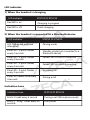
LED indicator
1) When the headset is charging
LED Indicator
STATUS OF BTH010
Red LED is on
Charging in progress
Red LED is off
Finish charging
2) When the headset is connected to a Bluetooth device
LED Indicator
STATUS OF BTH010
LED flashes red and blue
alternately
Pairing mode
Blue LED – 2 quick flashes
every 2 seconds
Standby mode (not connected to a
Bluetooth device)
Blue LED – 2 quick flashes
every 4 seconds
Paired: HFP or A2DP connection
Blue LED – 3 quick flashes
every 4 seconds
Paired: HFP or A2DP connection
Blue LED – 2 quick flashes
every 3 seconds
Incoming call
Blue LED flashes once every
4 seconds
During a call
Indication tone
Indication tone
STATUS OF BTH010
Emits 2 tones every 5 second
During a call (Microphone mute)
Emits 3 “Dong” tones every 20
seconds
Low power