1
2
Basic Functions
Printing
Printing documents
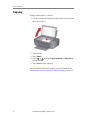
To print a document from your computer:
1.
2.
3.
4.
Open the document.
Select File > Print.
In the Print window, select your ADVENT Printer.
Choose the pages to print, number of copies etc., then click
OK (on a computer with WINDOWS OS) or Print (on
a computer with MAC OS).
Printing pictures
You can print pictures with your all-in-one printer from:
• A memory card inserted into the memory card slot on the
printer.
• Any picture-editing or photo-management software on
your computer.
For more information, see the Extended User Guide at
adventprintersupport.custhelp.com/app/go/manuals.
Printing pictures
from a memory
card
10
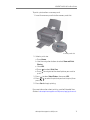
Your printer accepts the following memory cards:
•
•
•
•
•
SD Card
SDHC Card
MMC Card
MEMORY STICK
Variations of the memory cards above that require an
adaptor (for example, MEMORY STICK Duo, miniSD and
microSD)
adventprintersupport.custhelp.com