1
System Requirements
The Microboards GX Auto Printer has the following minimum requirements and compatibilities:
Operating System
Microsoft Windows 2000 with SP4, Windows XP with SP2, or Windows Vista.
Processor
Pentium 4 (or equivalent) CPU, running at 2.0 GHz or faster.
System Memory
Minimum 512 MB of system memory.
Hard Drive Space
Only 10MB of free space is required on the system hard drive for the applications and drivers.
Additional drive space will be required for saved disc labels.
USB Connection
USB 2.0 is recommended. USB 1.1 may be used but is not recommended, as using USB 1.1 may
result in more time being necessary for print images to be passed to the printer.
Assembly and Ink Installation
Assembly Instructions
Input Rods
GX Auto Printer Assembly
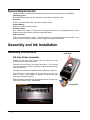
Remove the GX Auto Printer system from the shipping box and
confirm you received all of the items.
Place the GX Auto Printer on a stable, flat surface. You will need
room in front and to the left of the system, as discs will be accessed
from both locations.
The input bin posts are pre-installed, with the wide post to the front.
The Reject Bin is pre-installed on the left side of the GX Auto
Printer. This bin, which slides out, should be emptied when you
know discs have been rejected.
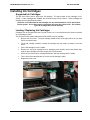
Slide the 50-disc Output Bin into the channel between the feet at the
front of the GX Auto Printer, shown below.
Output Bin
6
• Assembly and Ink Installation