1
Contents
3
Notations Used in This Guide . . . . . . . . . . . . . . . . . . . . . . . . 2
Setting Up the Touch Unit (EB-1430Wi only) . . . . . . . . . . . . . . . . . . . . . . . . . 32
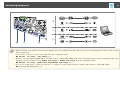
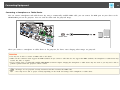
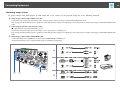
Connecting Equipment . . . . . . . . . . . . . . . . . . . . . . . . . . . . . . . . . . . . . 33
Introduction
Projector Features . . . . . . . . . . . . . . . . . . . . . . . . . . . . . . . . . . . . . . . . . . 9
Interactive Features (Easy Interactive Function) . . . . . . . . . . . . . . . . . . . . . . .
Easily Perform Operations from the Control Pad . . . . . . . . . . . . . . . . . . . . . . .
Project Two Images Simultaneously (Split Screen) . . . . . . . . . . . . . . . . . . . . .
Connecting to a Network and Projecting Images from the Computer's Screen . .
.
.
.
.
. . 9
.. 9
. . 9
. 10
Part Names and Functions . . . . . . . . . . . . . . . . . . . . . . . . . . . . . . . . . . 11
Front/Side . . . . . . . . . . . . . . . . . . . . . . . . . . . . . . . . . . . . . . . . . . . . . .
Top/Side . . . . . . . . . . . . . . . . . . . . . . . . . . . . . . . . . . . . . . . . . . . . . . .
Interface . . . . . . . . . . . . . . . . . . . . . . . . . . . . . . . . . . . . . . . . . . . . . . .
Base . . . . . . . . . . . . . . . . . . . . . . . . . . . . . . . . . . . . . . . . . . . . . . . . . .
Attaching the Feet (Only Models with Feet Supplied) . . . . . . . . . . . . . . .
Control Panel . . . . . . . . . . . . . . . . . . . . . . . . . . . . . . . . . . . . . . . . . . . .
Remote Control . . . . . . . . . . . . . . . . . . . . . . . . . . . . . . . . . . . . . . . . . . .
Replacing the Remote Control Batteries . . . . . . . . . . . . . . . . . . . . . . . .
Remote Control Operating Range . . . . . . . . . . . . . . . . . . . . . . . . . . . .
Interactive Pen . . . . . . . . . . . . . . . . . . . . . . . . . . . . . . . . . . . . . . . . . . .
Replacing the Battery for the Interactive Pen . . . . . . . . . . . . . . . . . . . . .
Replacing the Tip of the Interactive Pen . . . . . . . . . . . . . . . . . . . . . . . .
Pen Tray . . . . . . . . . . . . . . . . . . . . . . . . . . . . . . . . . . . . . . . . . . . . . . . .
Control Pad . . . . . . . . . . . . . . . . . . . . . . . . . . . . . . . . . . . . . . . . . . . . .
Replacing the Batteries for the Control Pad . . . . . . . . . . . . . . . . . . . . . .
Touch Unit (EB-1430Wi only) . . . . . . . . . . . . . . . . . . . . . . . . . . . . . . . . . .
Front . . . . . . . . . . . . . . . . . . . . . . . . . . . . . . . . . . . . . . . . . . . . . . . .
Rear . . . . . . . . . . . . . . . . . . . . . . . . . . . . . . . . . . . . . . . . . . . . . . . . .
.
.
.
.
.
.
.
.
.
.
.
.
.
.
.
.
.
.
.
.
.
.
.
.
.
.
.
.
.
.
.
.
.
.
.
.
.
.
.
.
.
.
.
.
.
.
.
.
.
.
.
.
.
.
.
.
.
.
.
.
.
.
.
.
.
.
.
.
.
.
.
.
11
12
13
15
15
16
17
20
21
21
22
23
24
24
25
27
27
27
Preparing the Projector
Installing the Projector . . . . . . . . . . . . . . . . . . . . . . . . . . . . . . . . . . . . . 30
Installation Methods . . . . . . . . . . . . . . . . . . . . . . . . . . . . . . . . . . . . . . . . . . . 30
When Using the Interactive Features . . . . . . . . . . . . . . . . . . . . . . . . . . . . . . 31
Connecting to the Projector . . . . . . . . . . . . . . . . . . . . . . . . . . . . . . . . . . .
Connecting a Computer . . . . . . . . . . . . . . . . . . . . . . . . . . . . . . . . . . . .
Connecting a Smartphone or Tablet Device . . . . . . . . . . . . . . . . . . . . . . .
Connecting Image Sources . . . . . . . . . . . . . . . . . . . . . . . . . . . . . . . . . .
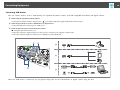
Connecting USB Devices . . . . . . . . . . . . . . . . . . . . . . . . . . . . . . . . . . . .
Connecting External Equipment . . . . . . . . . . . . . . . . . . . . . . . . . . . . . .
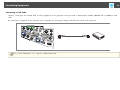
Connecting a LAN Cable . . . . . . . . . . . . . . . . . . . . . . . . . . . . . . . . . . . .
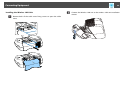
Installing the Wireless LAN Unit . . . . . . . . . . . . . . . . . . . . . . . . . . . . . . .
Connecting Multiple Projectors . . . . . . . . . . . . . . . . . . . . . . . . . . . . . . .
Connecting to the Control Pad . . . . . . . . . . . . . . . . . . . . . . . . . . . . . . . . .
Connections when Projecting with USB Display and when Performing Mouse
Operations Using the Interactive Feature . . . . . . . . . . . . . . . . . . . . . . . .
Connecting Using PC Free . . . . . . . . . . . . . . . . . . . . . . . . . . . . . . . . . .
Connecting a Printer . . . . . . . . . . . . . . . . . . . . . . . . . . . . . . . . . . . . . .
.
.
.
.
.
.
.
.
.
.
.
.
.
.
.
.
.
.
.
.
.
.
.
.
.
.
.
.
.
.
35
35
37
38
40
42
44
45
46
48
. . . 48
. . . 50
. . . 51
Basic Projection Methods
Projecting Images . . . . . . . . . . . . . . . . . . . . . . . . . . . . . . . . . . . . . . . . . 53
From Installation to Projection . . . . . . . . . . . . . . . . . . . . . . . . . . . . . . . . . . . . .
Automatically Detect Input Signals and Change the Projected Image (Source Search)
... ....... ......... ... ....... ......... ... ....... ..........
Projecting with USB Display . . . . . . . . . . . . . . . . . . . . . . . . . . . . . . . . . . . . . .
Necessary Settings . . . . . . . . . . . . . . . . . . . . . . . . . . . . . . . . . . . . . . . . . . .
System Requirements . . . . . . . . . . . . . . . . . . . . . . . . . . . . . . . . . . . . . . . .
Connecting for the First Time . . . . . . . . . . . . . . . . . . . . . . . . . . . . . . . . . . .
Uninstalling . . . . . . . . . . . . . . . . . . . . . . . . . . . . . . . . . . . . . . . . . . . . . . .
53
54
55
55
55
56
57
Adjusting Projected Images . . . . . . . . . . . . . . . . . . . . . . . . . . . . . . . . 59
Correcting Keystone Distortion . . . . . . . . . . . . . . . . . . . . . . . . . . . . . . . . . .
H/V-Keystone . . . . . . . . . . . . . . . . . . . . . . . . . . . . . . . . . . . . . . . . . . . .
Quick Corner . . . . . . . . . . . . . . . . . . . . . . . . . . . . . . . . . . . . . . . . . . . . .
Adjusting the Image Size . . . . . . . . . . . . . . . . . . . . . . . . . . . . . . . . . . . . . .
Adjusting the Position of the Image (Image Shift) . . . . . . . . . . . . . . . . . . . . . .
Adjusting the Vertical Position of the Image (Models Supplied with the Feet Only)
... ....... ......... ... ....... ......... ... ....... ........
.
.
.
.
.
.
.
.
.
.
59
59
60
61
62
. . 63





































































![Epson EB-460 [240v] Enhanced Warranty Education](http://vs1.manualzilla.com/store/data/007232844_1-494e9cd377264c6fcf7922b0cc777270-150x150.png)