1
Features
English
Magic Charger™
ASUS FrontLinker™ is designed with Magic Cables that allow you to
charge your portable devices such as mobile phones, PDAs, and MP3
players with ease. You can charge your devices without turning on the
PC!
Magic Stereo™
ASUS FrontLinker™ allows you to playback music from devices connected
to MP3-In cable via PC stereo speakers. Furthermore, you can enjoy
listening to your music when the PC is turned off. To do so, simply plug the
Magic cables into the corresponding ports on your portable device and turn
on the speaker. Then you can play your portable device as usual.
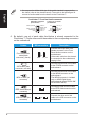
Magic cables usage
The length of the Magic Cables is retractable. You can set the cable length you
want by pulling out the cable to the desired distance. Pull out the cables to the end
and release slowly to retrieve the cables.
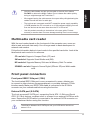
Magic Cable for miniUSB
The Magic Cable for miniUSB allows you to charge the battery of your portable
device or download/upload files between the PC and your portable device.
Simply connect the cable to the miniUSB port of your portable device. When
charging the battery, you may turn off the PC. For file transfers, both PC and
your portable device should be turned on.
Magic Cable for Apple® iPod®
The Magic Cable for iPod® allows you to charge your iPod® battery, and
download/upload files between the PC and iPod®. Simply plug the cable
into the corresponding port on your iPod® to start using the function. For file
transfers and battery charging, both PC and your iPod® should be turned on.
Magic Cable for MP3-In
The Magic Cable for MP3-In allows you to playback the music files stored in
your portable devices by using the PC stereo as the output. Simply plug the
cable into the audio-out port on your portable device to start using the function.