1
ADJUSTMENT (Continued)
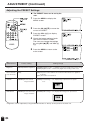
Adjusting the VIDEO ADJUST Settings (Continued)
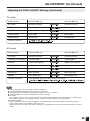
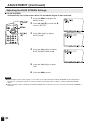
TV mode
Selected item
Press the VOL (–).
Press the VOL (+).
PICTURE
Decrease contrast
Increase contrast
TINT
Toward purple
Toward green
COLOR
Lower color intensity
Higher color intensity
BLACK LEVEL
Less bright
More bright
SHARPNESS
Soft picture
Sharp picture
Selected item
Press the VOL (–).
Press the VOL (+).
PICTURE
Decrease contrast
Increase contrast
TINT/WHITE BALANCE
Toward purple
Toward green
COLOR
Lower color intensity
Higher color intensity
BLACK LEVEL
Less bright
More bright
SHARPNESS
Soft picture
Hard picture
RED-BLUE
More red level
More blue level
GREEN
Less green level
More green level
COLOR SYSTEM
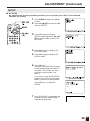
Press the VOL (+)/(–) to select COLOR SYSTEM.
COLOR SYSTEM
AV mode
Note:
■
■
■
■
■
■
TINT is displayed only when N358 or N443 is selected.
COLOR SYSTEM is displayed only when in the AV mode.
In BLUE BACK, PICTURE setting displayed in purple cannot be selected.
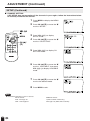
Selecting RESET will return all settings to the factory settings.
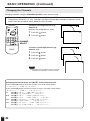
TV mode
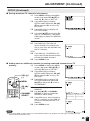
This product is factory set to comply with the color system (NTSC-N358) in the United States. For Brazil (PALM), Argentina (PAL-N) and Uruguay (PAL-N), set the color system before using this product.
COLOR SYSTEM
Set the system to AUTO for normal reception. The AUTO mode automatically detects the receiving signal
system and changes the reception system of the set.
When the picture or sound is not stable, switching to an appropriate system may improve the picture or sound
quality.
21