1
Note
Running additional windows consumes more CPU usage. If CPU usage
reaches 100%, then video lag will occur. Please reduce the number of
windows.
When main window changes the channel to another frequency, sub window(s)
will move to available programs of another frequency. The sub window will
show black if there is no additional program on this frequency.
Sub window has no full screen mode. Please double-click on sub window to
switch program with main window in order to do so.
It is available to hear audio on multiple programs at the same time. You can
mute or un-mute the sound of sub window(s) at any time. However, main
window audio can’t be muted separately from sub window(s).
Video Desktop
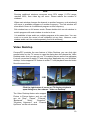
ComproDTV provides the new feature of Video Desktop, you can click right
mouse button on the TV screen to open the dialog box and choose the Video
Desktop mode. And you can set your TV watching screen as the live wallpaper;
it’s more convenient to watch TV and using other application on your Windows’
desktop. It also supports PIP feature to watch TV and playback recorded video
file at the same time.
Click the right button of mouse on TV display window to
open dialog box, then choose “Video on Desktop”
The Video Desktop feature also support
Picture in Picture feature, and you still
can do “Stop”, “Pause”, “Forward”,
“Backward”,
“Mute”,
“Snapshot”,
“Windows Alignment” and “Channel
Up/Down” on the sub window.
19