1
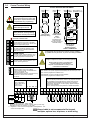
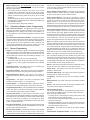
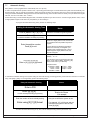
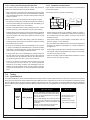
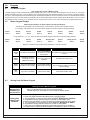
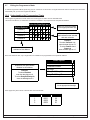
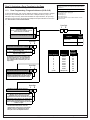
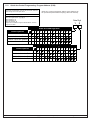
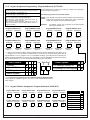
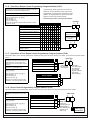
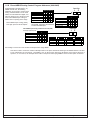
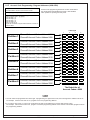
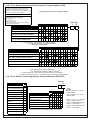
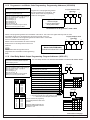
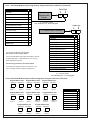
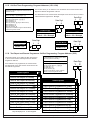
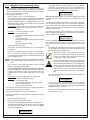
11.12 Emergency Key Programming: Program Addresses (0181-0182)
Example:
To program the Fire Key and the Special Emergency Key as both
having a Steady Alarm.
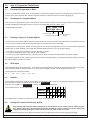
Emergency Key and Panic Key programming disables or activates these
keys (the A, B, and C keys) located on the keypads.
It also determines a silent, pulsed, or steady alarm.
Data Digit 1 = [2], Data Digit 2 = [2].
Enter the Programmer’s Mode: [9] [8] [7] [6] [#] [0]
Enter the Program Address: [0] [1] [8] [1]
Enter Data Digit 1: [2]
Enter Data Digit 2: [2]
Enter the pound key: [#]
Program the next Address, Program a different Address, or Exit the
Programmer’s Mode.
See Glossary (section 6.7) for further details.
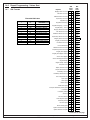
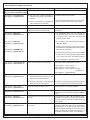
PA 0181
Data Digit
Select Option
Fire Key
A
1
DD
0
Fire Key Disabled
Fire Key = Disabled
Fire Key = Steady Alarm
Fire Key = Pulsed Alarm
2
1
2
3
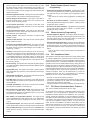
Select Option
Special Emergency Key Disabled
May be forced to a different value when in
Commercial Fire Mode. See section 11.15.3.
DD
0
Special Emergency Key = Silent Alarm
1
Special Emergency Key = Steady Alarm 2
Special Emergency Key = Pulsed Alarm 3
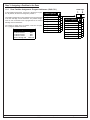
Emergency Key
B
PA 0182
Data Digit
Panic Key
1
C
Select Option
2
0
1
Panic Key = Steady Alarm
Panic Key = Pulsed Alarm
2
3
Status
Power
®
Fire
0
DD
Panic Key Disabled
Panic Key = Silent Alarm
Armed
On
1
2
3
Off
4
5
6
Perimeter
Only
7
8
9
No
Entry
*
0
#
Bypass
System
Reset
Data Digit 2
must be 0
0
A B C
May be forced to a different value when in Commercial Fire Mode. See section 11.15.3.
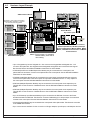
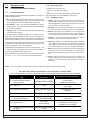
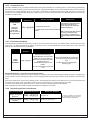
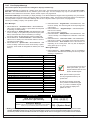
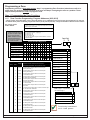
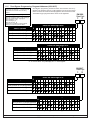
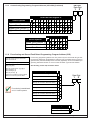
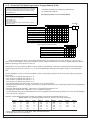
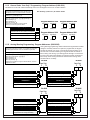
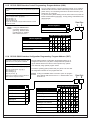
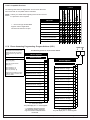
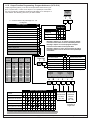
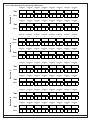
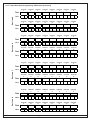
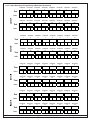
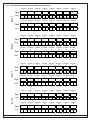
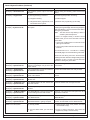
11.13 Custom Arming Programming: Program Addresses (0183-0184)
PA 0183
Data Digit
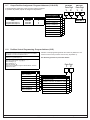
Example:
To program the [4] to Bypass Zone Function 1 only.
1
Data Digit 1 = [1], Data Digit 2 = [0].
Enter the Programmer’s Mode: [9] [8] [7] [6] [#] [0]
Enter the Program Address: [0] [1] [8] [3]
Enter Data Digit 1: [1]
Enter Data Digit 2: [0]
Enter the pound key: [#]
Program the next Address, Program a different
Address, or Exit the Programmer’s Mode.
Enter the Data Digit as a:
Select Options
0 1 2 3
4 5 6 7 8 9 *0 *1 *2 *3 *4 *5
Bypass Zone Function 1
Bypass Zone Function 2
Bypass Zone Function 3
Bypass Zone Function 4
*0 - *5 are Hex values. They will display as A - F at the keypads.
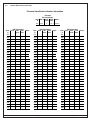
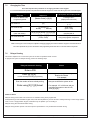
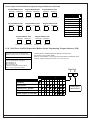
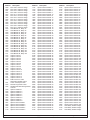
Enter the Data Digit as a:
Select Options
0 1 2 3 4 5 6 7 8 9 *0 *1 *2 *3 *4 *5
Bypass Zone Function 5
Bypass Zone Function 6
Bypass Zone Function 7
Bypass Zone Function 8
*0 - *5 are Hex values. They will display as A - F at the keypads.
DS7400Xi Ver. 3+ Reference Guide
Copyright © 2004 Detection Systems, Inc.
P/N: 28995K
Page 45
2