1
1 August 1996
SERVICE PROGRAM MODE
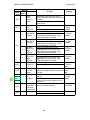
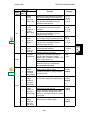
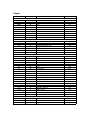
Mode No.
Class
Class 3
1 and 2
Gradation
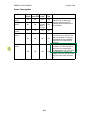
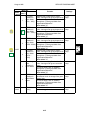
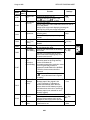
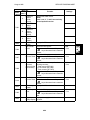
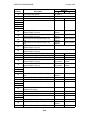
2-905
Type
Laser Pulse
Positioning
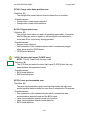
2-907*
Function
This is for the designer’s test purposes.
Do not change the value.
Selects the laser pulse position type that
is used for test pattern printouts (printed
with SP5-902).
Item 3 is not used.
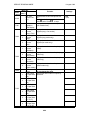
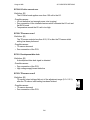
Forced Toner
Supply
2-908
2-909
2-910
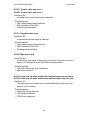
2-911*
2-912*
2-913*
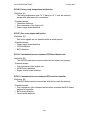
2-916*
2-980
Settings
0: Center
1: Left
2: Right
3:
Concentrated
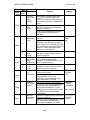
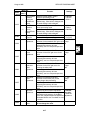
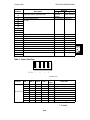
Forces the toner bottle to supply toner to
the toner supply unit for 1.5 minutes.
Toner supply finishes automatically after
1.5 minutes. This process is not normally
needed in the field for this model, as the
machine can handle most cases where
toner runs short temporarily.
Forced
Forces charge roller cleaning.
Charge Roller After selecting "1", press Enter or
to
Cleaning
to stop.
start this feature. Press
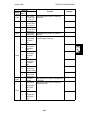
Forced
Forces transfer roller cleaning.
Transfer
After selecting "1", press Enter or
to
Roller
to stop.
start this feature. Press
Cleaning
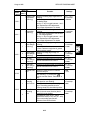
0: No
1: Yes
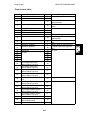
Image Density Selects the humidity coefficients for
Selection
determining VTREF and VTE from the TD
sensor initial setting output.
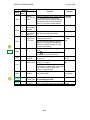
This setting can be adjusted by the key
operator to make image density lighter or
darker (see Replacement and Adjustment
- Image Density Adjustment by Key
Operator).
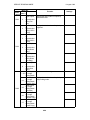
Charge Roller Corrects the charge roller temperature.
Temperature If a copy with a dirty background is made,
Correction
this value should be increased. However,
do not use this SP mode unnecessarily.
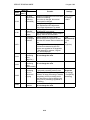
Auto TD
Selects whether or not the TD sensor
Sensor Initial initial setting process is performed
Setting Mode automatically at installation.
Select "No" if the PCU detection
mechanism has a problem. However,
usually do not use this SP mode.
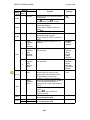
Printer γ Table Selects the printer γ table (GAVD) type.
(GAVD)
This SP mode is only effective in the
Selection
grayscale processing mode.
A larger value gives a darker image.
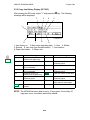
Humidity
Displays the humidity sensor output data
Sensor Output in hex code as %Rh.
Display
0: Darker
1: Dark
2: Normal
3: Light
4: Lighter
4-11
0: No
1: Yes
0: No
1: Yes
-5 ~ +5
1 (25V)/step
0
0: No
1: Yes
1~4
1/Step
2