1
R
TM
m
e
n
w
o
Multi-Format USB/DVD/CD+G Karaoke Player
r
'
s
DVG-777K
a
n
u
a
l
THE SINGER'S ULTIMATE CHOICE
Table of Contents
Safety Instructions ................................................................ 3
FCC Information .................................................................... 4
Welcome ............................................................................. 5
Features and Specifications .................................................... 6
Getting Started..................................................................... 7
• Warranty Information .......................................................... 7
• Package Contents .............................................................. 7
Getting Connected ................................................................ 8
• Audio Connections .............................................................. 8
• Video Connections .............................................................. 10
• USB Device Connection ....................................................... 12
• SD/Mini SD card connection ............................................... 12
General Operations ............................................................... 13
DVD Operations .................................................................... 17
Mp3 and AVI File Operations................................................... 18
Descriptions and Functions .................................................... 19
• Front Panel ....................................................................... 19
• Rear Panel ........................................................................ 20
• Remote Control.................................................................. 21
Setup Menu ......................................................................... 23
• General Setup Page ............................................................ 23
• Speaker Setup Page ........................................................... 23
• Audio Setup Page ............................................................... 24
• Karaoke Setup Page ........................................................... 25
• Preferences Page .............................................................. 26
Troubleshooting .................................................................... 27
2
Safety instructions
CAUTION
RISK OF SHOCK
CAUTION: To reduce the risk of electric shock,
do not remove cover (or back). No
user-serviceable parts inside. Only refer
servicing to qualified service personnel.
Explanation of Graphical Symbols
8. Ventilation - The appliance should be situated so its
location does not interfere with its proper ventilation. For
example, the appliance should not be situated on a bed,
sofa, rug, or similar surface that may block the
ventilation slots.
9. Heat - The appliance should be situated away from
heat sources such as radiators, heat registers,
stoves, or other appliances (including amplifiers)
that produce heat.
10. Power Sources - The appliance should be
connected to a power supply only of the type described
in the operating instructions or as marked on the
appliance.
The lightning flash & arrowhead
symbol, within an equilateral triangle,
is intended to alert you to the
presence of danger.
11. Grounding or Polarization - Precautions should be
taken so that the grounding or polarization means of
an appliance is not defeated.
The exclamation point within an
equilateral triangle is intended to alert
you to the presence of important
operating and servicing instructions.
12. Power-Cord Protection - Power-supply cords
should be routed so that they are not likely to be walked
on or pinched by items placed upon or against them,
paying particular attention to cords at plugs,
convenience receptacles, and the point where they exit
from the appliance.
WARNING
To reduce the risk of fire or electric shock, do
not expose this unit to rain or moisture.
13. Cleaning - Unplug this unit from the wall outlet
before cleaning. Do not use liquid cleaners or
aerosol cleaners. Use a damp cloth for cleaning.
14. Power lines - An outdoor antenna should be
located away from power lines.
1. Read Instructions - All the safety and operating
instructions should be read before the appliance is
operated.
15. Nonuse Periods - The power cord of the appliance
should be unplugged from the outlet when left unused
for a long period of time.
2. Retain Instructions - The safety and operating
instructions should be retained for future reference.
16. Object and Liquid Entry - Care should be taken so
that objects do not fall and liquids are not spilled into the
enclosure through openings.
3. Heed Warnings - All warnings on the appliance and in
the operating instructions should be adhered to.
4. Follow Instructions - All operating and use
instructions should be followed.
5. Attachments - Do not use attachments not
recommended by the product manufacturer as they may
cause hazards.
6. Water and Moisture - Do not use this unit near water.
For example, near a bathtub or in a wet basement and
the like.
7. Carts and Stands - The appliance should be used
only with a cart or stand that is recommended by the
manufacturer.
7 A. An appliance and cart combination
should be moved with care. Quick stops,
excessive force, and uneven surfaces may
cause an overturn.
17. Damage Requiring Service - The appliance should
be serviced by qualified service personnel when:
A.
B.
C.
D.
The power supply cord or plug has been damaged; or
Objects have fallen into the appliance; or
The appliance has been exposed to rain; or
The appliance does not appear to operate normally
or exhibits a marked change in performance; or
E. The appliance has been dropped, or the enclosure
damaged.
18. Servicing - The user should not attempt to service
the appliance beyond that described in the operating
instructions. All other servicing should be referred to
qualified service personnel.
Note:
To CATV system installer's (U.S.A.): This reminder is
provided to call the CATV system installer's attention to
Article 820-40 of the NEC that provides guidelines for
proper grounding and, in particular, specifies that the
cable ground shall be connected as close to the point of
cable entry as practical.
FCC information (U.S.A.)
1. IMPORTANT NOTICE: DO NOT MODIFY THIS
UNIT!: This product, when installed as indicated in the
instructions contained in this manual, meets FCC
requirements. Modifications not expressly approved by
Vocopro may void your authority, granted by the FCC, to
use this product.
2. IMPORTANT: When connecting this product to
accessories and/or another product use only high
quality shielded cables. Cable(s) supplied with this
product MUST be used. Follow all installation
instructions. Failure to follow instructions could void your
FCC authorization to use this product in the U.S.A.
3. NOTE: This product has been tested and found to
comply with the requirements listed in FCC Regulations,
Part 15 for Class "B" digital devices. Compliance with
these requirements provides a reasonable level of
assurances that your use of this product in a residential
environment will not result in harmful interference with
other electronic devices. This equipment
generates/uses radio frequencies and, if not installed
and used according to the instructions found in the
owner's manual, may cause interference harmful to the
operation of other electronic devices. Compliance with
FCC regulations does not guarantee that interference
will not occur in all installations. If this product is found
to be the source of interference, which can be
determined by turning the unit "Off" and "On", please try
to eliminate the problem by using one of the following
measures:
Relocate either this product or the device that is being
affected by the interference.
Use power outlets that are on different branch (circuit
breaker or fuse) circuits or install AC line filter(s).
In the case of radio or TV interference, relocate/reorient
the antenna. If the antenna lead-in is 300-ohm ribbon
lead, change the lead-in to coaxial type cable.
If these corrective measures do not produce satisfactory
results, please contact your local retailer authorized to
distribute Vocopro products. If you can not locate the
appropriate retailer, please contact Vocopro, 1728
Curtiss Court, La Verne, CA 91750.
CAUTION
The apparatus is not disconnected from the AC power
source so long as it is connected to the wall outlet,
even if the apparatus itself is turned off. To fully insure
that the apparatus is indeed fully void if residual power,
leave unit disconnected from the AC outlet for at least
fifteen seconds.
CAUTION:
READ THIS BEFORE OPERATING YOUR UNIT
1. To ensure the finest performance, please read this
manual carefully. Keep it in a safe place for future
reference.
2. Install your unit in a cool, dry, clean place - away from
windows, heat sources, and too much vibration, dust,
moisture or cold. Avoid sources of hum (transformers, v
motors). To prevent fire or electrical shock, do not expose
to rain and water.
3. Do not operate the unit upside-down.
4. Never open the cabinet. If a foreign object drops into
the set, contact your dealer.
5. Place the unit in a location with adequate air
circulation. Do not interfere with its proper ventilation; this
will cause the internal temperature to rise and may result
in a failure.
6. Do not use force on switches, knobs or cords. When
moving the unit, first turn the unit off. Then gently
disconnect the power plug and the cords connecting to
other equipment. Never pull the cord itself.
7. Do not attempt to clean the unit with chemical solvents:
this might damage the finish. Use a clean, dry cloth.
8. Be sure to read the "Troubleshooting" section on
common operating errors before concluding that your unit
is faulty.
9. This unit consumes a fair amount of power even when
the power switch is turned off. We recommend that you
unplug the power cord from the wall outlet if the unit is not
going to be used for a long time. This will save electricity
and help prevent fire hazards. To disconnect the cord, pull
it out by grasping the plug. Never pull the cord itself.
10. To prevent lightning damage, pull out the power cord
and remove the antenna cable during an electrical storm.
11. The general digital signals may interfere with other
equipment such as tuners or receivers. Move the system
farther away from such equipment if interference is
observed.
NOTE:
Please check the copyright laws in your country
before recording from records, compact discs,
radio, etc. Recording of copyrighted material may
infringe copyright laws.
Voltage Selector (General Model Only)
Be sure to position the voltage selector to match the
voltage of your local power lines before installing the
unit.
110V
Welcome
And Thank you for purchasing the DVG-777K from VocoPro, your ultimate choice in
Karaoke entertainment! With years of experience in the music entertainment business,
VocoPro is a leading manufacturer of Karaoke equipment, and has been providing
patrons of bars, churches, schools, clubs and individual consumers the opportunity to
sound like a star with full-scale club models, in-home systems and mobile units. All our
products offer solid performance and sound reliability, and to reinforce our commitment
to customer satisfaction, we have customer service and technical support professionals
ready to assist you with your needs. We have provided some contact information for
you below.
VocoPro
1728 Curtiss Court
La Verne, CA 91750
Toll Free: 800-678-5348
TEL: 909-593-8893
FAX: 909-593-8890
VocoPro Company Email Directory
Customer Service & General Information
[email protected]
Tech Support
[email protected]
Remember Our Website
Be sure to visit the VocoPro website www.vocopro.com for the latest information on
new products, packages and promos. And while you're there don't forget to check out
our Club VocoPro for Karaoke news and events, chat rooms, club directories and even
a KJ Service directory!
We look forward to hearing you sound like a PRO, with VocoPro, your ultimate choice in
Karaoke entertainment.
FOR YOUR RECORDS
Please record the model number and serial number below, for easy reference, in case of loss or theft. These
numbers are located on the rear panel of the unit. Space is also provided for other relevant information
Model Number
Serial Number
Date of Purchase
Place of Purchase
Features and Specifications
Features
•
•
•
•
•
•
•
•
•
•
•
•
•
Multi-format disc player reads DVD, CD, CD+G, Mp3, Mp4, HDCD and VCD
USB, SD and MiniSD card playback
Hard drive playback supports FAT/FAT 32 format
Single Mode automatically stops playback after a track has finished playing
2 microphone ¼” input channels with individual volume controls
Cue function
5.1 channel digital surround sound
Direct Track Access
Digital Echo gives vocals that hard-to-find professional sound
Full-function remote control
PAL/NTSC compatible for worldwide use
LED Display window
Audio Outputs: 5.1 Channel surround sound RCA, L/R Stereo RCA (music only), 2 L/R Karaoke RCA
(music and microphone), Digital Coaxial (music only), Optical (music only)
• Video Ouputs: RCA video, Component RGB, VGA, SCART
Specifications
Power requirements................................................ 100V/240V AC, 50/60Hz
Power consumption ................................................ 25W
Disc compatibility .................................................... DVD, Mp4, VCD 1.0-3.0, Mp3, SVCD, CD+G,
CD, JPEG, CD-R/RW*, DVD+R/-R/RW*
Disc size requirements ............................................ Diameter: 120mm/80mm
Video format .......................................................... NTSC, PAL, Multi System, 480P, 576P, 720P
Video output type .................................................... Video, S-Video, VGA, SCART, YUV, YPbPr
Video output level .................................................... CVBS: 1Vp-p 75Ω
USB jack ............................................................... USB1.1
Remote distance .................................................... 22 feet maximum**, 30º angle
Audio output format ................................................ Stereo, 5.1CH, optical, and coaxial
DVD frequency response.......................................... 20-20kHz
DVD S/N ratio ....................................................... 80dB
DVD harmonic distortion .......................................... 0.3%
Karaoke frequency response .................................... 20-20kHz
Karaoke S/N ratio .................................................. 70dB
Echo level .............................................................. 10 levels
Total harmonic distortion ......................................... 0.5%
*Some burned CDs and DVDs may not play properly on the DVG-777K. If this is the case, try using a
different brand of disc or a differnt disc-burning program.
**Actual maximum distance may vary
6
Package Contents
When unpacking your DVG-777K we recommend that you keep the original receipt or invoice, box and
packing materials in case the product ever needs to be shipped for warranty repair or any other purpose.
Warranty Information
The DVG-777K is covered under a 1-Year Limited Warranty. For detailed warranty information please visit
www.vocopro.com/warranty_standard.html
Extended Limited Warranty
Extended Warranties are also available and can be purchased directly from VocoPro. Visit
www.vocopro.com/warranty_extended.html
for information and purchasing of our Silver and Gold Extended Limited Warranties.
Service Centers
For a list of U.S. and International Authorized VocoPro Service Centers visit
www.vocopro.com/frm_service.html
Package Contents
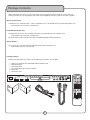
Before using the DVG-777K make sure the following accessories are included:
•
•
•
•
•
•
1
1
1
1
2
1
DVG-777K Multi-Format USB/DVD/CD+G karaoke Player
Remote Control
AC Power Cord
A/V RCA cable (red, white and yellow)
Rack ears
Warranty Card
7
Getting Connected
Audio Connections
Music and Microphone Vocals through the Karaoke Mixed Outputs
The two Karaoke Mixed Output channels allow you to
�����
connect vocals and music to up to two separate audio
input devices (mixer, amp, power speaker, recording
device, etc.).
����������
�
�
�����
�����
�����
� � � � � ����������
�
����
�
������ �
������ � � � � �����������
What you will need:
• 2 RCA L/R (red & white) audio cable
• Up to 2 audio input devices (mixer, amp, power
speaker, recording device, etc.)
�������������
���������
����������
����������
���������
����������
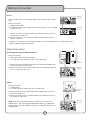
1. Connect one end of the L/R RCA audio cable to one
of the L and R (red & white) RCA Karaoke Mixed
Output channels on the DVG-777K’s rear panel
2. Connect the other end of the L/R RCA audio cable to
the L/R RCA audio inputs on an audio input device
3. To connect to a second device, follow steps 1 and
2 above, except now using the other Karaoke Mixed
Output channel on the DVG-777K’s rear panel
REC OUT
AV OUT
RECORD
AUDIO
AV INPUT
AV3
AV2
����������
����������
STEREO INPUT
AV1
PHONO 3
CD 3
PHONO 2
LINE
CD 2
PHONO 1
LINE
CD 1
PHONO
remote
Digital Audio (Disc audio only, no microphone vocals)
NOTE: Microphone vocals are analog therefore are not present in the digital signal.
Connecting to a 5.1 Surround Sound Receiver (Music only, no microphone vocals)
What you will need:
• 6 RCA-style digital surround sound cables
• A 5.1 digital surround sound receiver or amplifier
���������
����������
1. Connect an end of each RCA cable to the FL, FR, CEN, SL,
SR, and SW outputs on the rear panel of the DVG-777K
2. Connect the other end of each RCA cable to the FL, FR,
CEN, SL, SR, and SW inputs on a 5.1 CH. Surround Sound
receiver or amplifier.
NOTE: When using the 5.1 surround sound outputs, make
sure the DVG-777K is set to 5.1. Press the 5.1 CH button
on the remote control to turn on 5.1 mode.
8
�����
FL - Front Left
FR - Front Right
CEN - Center
SL - Side Left
SR - Side Right
SW - Subwoofer
�����������
•
•
•
•
•
•
�����
NOTE: The actual inputs may be labeled differently on certain
receivers and amplifiers.
�����
�����
�����
�����
�����
�����
�����
������
���������
����������
Getting Connected
Connecting Directly to a Powered Subwoofer
The DVG-777K can be connected directly to a powered subwoofer with
an RCA input.
R
L
What you will need:
• 1 RCA L/R (red & white) audio cable
• A powered subwoofer with an RCA audio input
�����
���������
���������
�������� �������
�����������
������������
����
�����
+
�����
+
-
-
+
���������
����������
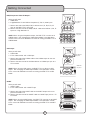
1. Connect one end of the RCA cable to the SW output on the rear
panel of the DVG-777K
2. Connect the other end of the RCA cable to the RCA input on the
powered subwoofer
���������
����������
Stereo RCA
Use the ML and MR outputs for connecting audio from the
disc player (DVD, CD, VCD, etc) to a stereo input device.
What you will need:
• 1 RCA L/R (red & white) audio cable
• 1 audio input device (mixer, amp, power speaker, recording
device, etc.)
���������
����������
1. Connect one end of the L/R RCA audio cable to the ML and
MR RCA jacks on the DVG-777K’s rear panel.
2. Connect the other end of the L/R RCA audio cable to the
L/R RCA audio inputs on an audio input device.
�
�
��������
�����
��
���
���
�����������
���
�������
����������
����������
Optical
Use the Optical output for connecting digital audio to a device with
an optical input.
���������
����������
What you will need:
• 1 Digital Optical cable
• An audio input device with a Digital Optical audio input jack such
as a digital receiver or mixer
1. Connect one end of the Optical cable to the OPTICAL output jack
on the rear panel of the DVG-777K
2. Connect the other end of the Optical cable to an Optical input
jack on a receiver, mixer, etc.
9
����������
����������
Getting Connected
Coaxial
Use the Coaxial output for connecting digital audio to a device with a coaxial
input.
What you will need:
• 1 Digital Coaxial cable**
• An audio input device with a Digital Coaxial audio input jack such as a digital
receiver or mixer
���������
����������
����������
����������
1. Connect one end of the Coaxial cable to the COAXIAL output jack on the
rear panel of the DVG-777K
2. Connect the other end of the Coaxial cable to a Coaxial input jack on a
receiver, mixer, etc.
** Although it is alright to use standard RCA cables, it is recommended that you use Digital RCA audio
cables for optimum digital signal quality.
Video Connections
Connecting Video Using the RCA Video Output
What you will need:
• 1 RCA video cable (usually labeled yellow)
• A TV, video monitor or video mixer with an RCA video input
������
����������
1. Connect one end of the RCA video cable to the yellow RCA VIDEO output
on the rear panel of the DVG-777K
2. Connect the other end of the RCA video cable to an RCA video input jack
on a TV, monitor or video mixer
���������
����������
S-Video
What you will need:
• 1 S-Video Cable
• A TV, video monitor or video mixer with an S-Video input
1. Connect one end of the S-Video cable to the S-Video output on the rear
panel of the DVG-777K
2. Connect the other end of the S-Video cable to an S-Video input jack on a
TV, monitor or video mixer
NOTE: When using the S-Video output, the DVG-777K must be set to
S-VIDEO output. See “Changing the Video Output Mode” in the Operations
section of this manual for detailed instructions on setting the DVG-777K to
S-VIDEO Mode.
10
��������������
����������
���������
����������
Getting Connected
RGB/Component Video HD Outputs
What you will need:
• 1 RGB cable
• A High-Definition TV with RGB or Component (Y, Pb, Pr) video inputs
��������������
����������
1. Connect one end of the RGB/Y,Pb,Pr cable to the Y/R, Pb/G, Pr/B
jacks on the DVG-777K’s rear panel
2. Connect the other end of the RGB/Y,Pb,Pr cable to the RGB or Y, Pb, Pr
inputs on a High Definition TV
���������
����������
NOTE: When using the Component output, the DVG-777K must be set to
YPBPR output. See “Changing the Video Output Mode” in the Operations
section of this manual for detailed instructions on setting the DVG-777K to
YPBPR Mode.
VGA output
What you will need:
• 1 VGA Cable
• A TV or video monitor with a VGA input
��������������
����������
1. Connect one end of the S-Video cable to the S-Video output on the rear
panel of the DVG-777K
2. Connect the other end of the S-Video cable to an S-Video input jack on a
TV or monitor
���������
����������
NOTE: When using the VGA output, the DVG-777K must be set to VGA
output. See “Changing the Video Output Mode” in the Operations section
of this manual for detailed instructions on setting the DVG-777K to VGA
Mode.
SCART
What you will need:
• 1 SCART cable
• A TV or video monitor with a SCART input
1. Connect one end of the SCART cable to the SCART output on the rear
panel of the DVG-777K
2. Connect the other end of the SCART cable to a SCART input jack on a TV
or monitor
NOTE: When using the SCART output, the DVG-777K must be set to SCART
output. See “Changing the Video Output Mode” in the Operations section
of this manual for detailed instructions on setting the DVG-777K to SCART
Mode.
11
��������������
����������
�����
���������
����������
Getting Connected
Connecting a USB Device
The DVG-777K allows you to connect a USB device and play A/V
files using the remote control. Make sure Smart Navi is turned on
in the Preferences section of the Setup Menu. If Smart Navi is off,
no menu will appear on the screen. See the Setup Menu section in
this manual for detailed instructions on turning on Smart Navi.
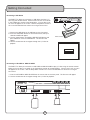
1. Connect the USB device to the USB port on the front panel
2. Press the USB/DISC button on the remote control, the input
selection window will appear
3. Use the arrow buttons to highlight USB DEV (USB device) and
press ENTER to access the USB device. The file menu will
appear.
4. Use the remote control to navigate through the A/V files for
playback
��������
����������������
DVD DRIVE
USB DEV
Connecting an SD CARD or MINI SD CARD
The DVG-777K allows you to connect an SD CARD or MINI SD CARD to play A/V files using the remote control.
Make sure Smart Navi is turned on in the Preferences section of the Setup Menu. If Smart Navi is off, no menu
will appear on the screen. See the Setup Menu section in this manual for detailed instructions on turning on
Smart Navi.
1. Insert the SD CARD or MINI SD CARD into the correct slot on the front panel. The file menu will appear
2. Use the remote control to navigate through the A/V files for playback
������������
�������
12
General Operations
General Operations
Turning on the Power
Main Power
The main power button for the DVG-777K is located on the front panel.
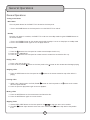
1. Press the POWER button on the front panel to turn the DVG-777K on and off
Standby
Once the main power is turned on, the DVG-777K can be set to standby mode using the STANDBY button on
the remote control.
1. Press the STANDBY button on the remote control while the player is on to set the player to standby mode
2. Press the STANDBY button again to turn the player back on
Inserting a Disc
1. Press the
button on the front panel or remote control to open the disc tray
2. Insert the disc label-side-up
3. Press the
button on the front panel or remote control a second time to close the disc tray
Playing a Disc
1. Insert a disc into the disc tray
2. Press the PLAY/PAUSE
button on the front panel or the
button on the remote control to begin playing
Stopping a Disc
1. Press the STOP button on the front panel or the
playing
button on the remote control to stop a disc while it is
Pausing a Disc
1. While a disc is playing press the PLAY/PAUSE
button on the front panel or the
control to pause the disc
2. Press the pause or play button again to resume playback
button on the remote
Muting a Disc
1. Press the MUTE button on the remote control to silence the disc
2. Press the MUTE button again to un-mute the disc
Skipping Tracks
1. Use the PREV/NEXT buttons on the front panel or the
to skip from one track to another
2. The NEXT
button skips forwards to the next track and the PREV
button skips back to the previous
track
13
General Operations
Scanning through Tracks
1. Use the
buttons on the remote control to scan through tracks
2. The
button scans forwards through the current track and the
backwards through the current track
Adjusting the Disc Music Volume
1. Use the VOL + and VOL - buttons on the remote control to adjust the volume
2. The VOL + button raises the volume and the VOL -- button lowers it
Using Direct Track Access
The Direct Track Access buttons are the number buttons on the front panel and remote control. These allow
you to jump directly to a track or chapter (DVD) by entering its number.
example
To jump directly to track 9:
1. Press the 9 button
2. Press PLAY
3. Track 9 will begin playing
Jumping to a Specific Time on a Disc (CD, VCD and DVD only)
1.
2.
3.
4.
Press the SEARCH button on the remote control
Enter the time on the disc that you want to jump to
Press ENTER
The disc will play at that time
example
To jump directly to 1:45
1.
2.
3.
4.
Press SEARCH on the remote control
Press 0, 1, 4, then 5
Press ENTER on the remote control
The disc will begin playing at 1:45 minutes in the disc
Programming a Custom Track Order
The DVG-777K allows you to create a custom playlist of up to 50 tracks using the PROGRAM button on the
remote control.
1. Press the PROGRAM button on the remote control to access the Program menu. The Program menu will
appear on the TV screen
2. Enter a track number using the number buttons on the remote control
3. Press ENTER on the remote control to enter that track into the playlist and to jump to the next playlist slot
4. Continue this until your playlist is complete
example
To create a playlist in the following order:
14
General Operations
1.
2.
3.
4.
1.
2.
3.
4.
5.
6.
7.
Track
Track
Track
Track
Press
Press
Press
Press
Press
Press
Press
14
7
3
1
the PROGRAM button to enter Program mode
14 and then ENTER
7 and then ENTER
3 and then ENTER
1 and then ENTER
PLAY to begin playing in this order
STOP twice to exit the programmed playlist
Clearing a track in Program Mode
Press the CLEAR button on the remote control to erase the last programmed track.
Using Digital Key Control
Digital Key Control allows you to change the musical key of disc music to fit any singer’s vocal range. The Digital
Key Control buttons are located on the remote control and front panel
b - Lowers the musical key
(remote control only) - Resets the musical key back to the original or natural key
# - Raises the musical key
NOTE: Karaoke mode must be on in order to use Digital Key Control
Turning Karaoke Mode On and Off
Press the KARAOKE button on the remote control to turn Karaoke Mode on and off.
Setting Repeat Options
Press the REPEAT button on the remote control to cycle through the available Repeat options
•
•
•
•
•
REP-ONE: Repeats the same song continuously
REP-ALL: Repeats the entire disc after it has played through
REPEAT OFF: All Repeat options are off
CHAPTER REPEAT (DVD only): Repeats the current chapter on a DVD disc
TITLE REPEAT (DVD only): Repeats the current title on a DVD disc
Switching Between PAL and NTSC Video Modes
The DVG-777K is defaulted to NTSC. Use the P/N button on the remote control to switch between PAL and
NTSC.
1. Press the P/N button on the remote control
2. Press ENTER on the remote control. The video mode will change
PAL: Europe and Asia
NTSC: North America
15
General Operations
Changing the Video Output Mode
The DVG-777K has different video output channels: S-Video, SCART, VGA, Component, Etc. The DVG-777K
must be set to the correct video output mode when using these output channels.
To cycle through the different video output modes:
1. Press the VIDEO button on the remote control
2. Press the ENTER button on the remote control to change to the next video mode
3. Follow steps 1 & 2 to cycle through all of the video output modes until you find the correct one for your setup
Looping a Section of Disc using the A--B Button
1. Press the A--B button on the remote control to set the starting point of the loop
2. Press the A--B button again to set the ending point of the loop and to begin the loop
3. Press the A--B button a third time to cancel the loop and resume normal playback
Setting Single Mode*
Single Mode will stop playback after a single song is finished playing.
1. Make sure Cue is turned off
2. Press the SINGLE MODE button on the remote control to turn Single Mode on and off
Setting the Cue function*
The Cue function will pause a disc at the 5 second mark. This is for use on CD+G karaoke discs with a song-title
screen at the beginning of each song as it allows you to display the song-title for the audience before playing the
song.
1. Make sure Single Mode is turned off
2. Press the CUE button on the remote control to turn Cue on. Each song will pause at the 5 second mark
3. Press PLAY to begin playing each song
*Single Mode and Cue cannot be turned on at the same time. Make sure the one you are not using is
turned off before using the other one.
Using the Digital Equalizer (EQ)
The DVG-777K has seven preset equalizer settings plus one user-programmable one.
1. Press the EQ button on the remote control to open the EQ menu
2. Press the ENTER button on the remote to cycle through the available EQ settings: Standard, Classic, Jazz,
Rock, Pops, Ballad, Dance and Personal.
3. Press the EQ button two more times until EQUALIZER ON appears on the TV screen
Customizing the EQ in Personal EQ mode
1.
2.
3.
4.
Follow the above instructions until PERSONAL is selected
Use the left and right arrow buttons on the remote control to select a band for adjusting
Use the up and down arrow buttons on the remote control to raise and lower the value on each band
Press the EQ button two more times until EQUALIZER ON appears on the TV screen
16
General Operations
Playing One Frame at a Time with the Step Function
The Step function allows you to view one frame at a time on DVDs and VCDs.
NOTE: The Step function does not work on CD+Gs
1. Press the STEP button to enter Step mode and pause the current frame
2. Press it again to jump to the next frame
3. Press PLAY to resume normal playback
Playing Forwards and Reverse in Slow Motion
You can play a disc forwards or reverse at 1/2, 1/4 and 1/8 the normal speed
1. Press the SLOW button on the remote control to cycle through the Slow Motion options
2. Press the PLAY button to return to normal playback
Slow Motion
• SF 1/2X • SF 1/4X • SF 1/8X • SF 1/2X • SF 1/4X • SF 1/8X -
options:
Forwards at 1/2 the normal speed
Forwards at 1/4 the normal speed
Forwards at 1/8 the normal speed
Reverse at 1/2 the normal speed
Reverse at 1/4 the normal speed
Reverse at 1/8 the normal speed
Turning on Random Mode
In Random Mode, the DVG-777K will play the tracks on a disc in random order
1. Press the RANDOM button on the remote control to turn Random Mode on and off.
NOTE: Random Mode does not work on DVD discs.
DVD Operations
Accessing the DVD Menu
Use the MENU button on the remote control to access the main menu on a DVD. Use the arrow buttons on
the remote control to navigate through the main menu and the ENTER button to make selections.
Accessing the Title Screen
Each section on a DVD such as the movie, special features, etc. has its own title screen. Use the TITLE button
on the remote control to access the title screen for the current section.
Turning on Subtitles
Use the SUBTITLE button on the remote control to cycle through the available subtitle languages on a DVD.
NOTE: The available subtitles vary from each DVD and some may not have any at all.
17
General Operations
Changing the Angle View
Use the ANGLE button on the remote control to view multiple angles on a DVD with multiple angles available.
NOTE: Not all discs have multiple angles available.
Accessing Additional Dubbed Languages
Some DVDs have multiple languages dubbed over the original language for speakers of other languages. Use
the AUDIO button on the remote control to cycle through these languages on DVDs with multiple languages
available.
Mp3 and AVI file Operations
When playing a disc, USB device, SD CARD or MINI SD CARD with Mp3 or AVI files in it, the Smart Navi menu
will come up. Use the arrow buttons to navigate through this menu and the ENTER or PLAY button on the
remote control to make selections.
If the Smart Navi menu does not appear it may need to be turned on.
Turning on the Smart Navi Menu:
1. Press SETUP on the remote control
2. Use the down arrow button to highlight PREFERENCES. Press ENTER on the remote control
3. Use the down arrow button to highlight SMART NAVI. Press ENTER on the remote control. Make sure WITH
MENU is shaded
4. If WITH MENU is not shaded, press the left arrow and then the down arrow so that WITH MENU is
highlighted and press the ENTER button
Repeat Options
When in the Smart Navi menu press the REPEAT button on the remote control to cycle through the available
repeat options:
• FOLDER: Plays the current folder through without repeating
• FOLDER REPEAT: Repeats the entire folder
• REP-ONE: Repeats the current song
ROOT
SMART NAVI
ROOT
KARAOKE
FONT
PLAY MODE
FOLDER
18
Front Panel
Front Panel
�
�
�
�
��
�
��
��
1.
2.
3.
4.
�
�
��
�
�
��
�
��
��
��
��
��
��
Main POWER button - Turns the power on and off.
SD CARD slot - Insert an SD CARD here for A/V file playback.
Display screen - Displays the player’s operating status.
Direct Track Access (number) buttons - For use whenever number input is necessary. i.e. Jumping directly
to tracks/chapters, programming tracks in program mode, parental password, etc. See the Operations
section in this manual for detailed instructions.
5. EJECT
button - Opens and closes the disc tray
6. PLAY/PAUSE
button - Plays a disc that is stopped or paused and pauses a disc that is playing.
7. Stop
button - Stops a disc that is playing.
8. PREV and NEXT
buttons - Press PREV to jump to the previous track and NEXT to jump to the next
track.
9. USB/DISC
button - Toggles between disc player and USB input. Select DISC when playing a disc and
USB when connecting a USB device to the player.
10. Digital Key Control - Adjusts the musical key to fit a singer’s vocal range. Press “b” to lower the key and
“#” to raise the key.
11. CUE button
- Turns the Cue function on and off. When the Cue function is on, the player will pause at
5 seconds into every track.This is for use on CD+G karaoke discs with a song title screen at the beginning of
each song as it allows you to display the song-title for the audience before playing the song.
12. SINGLE MODE
button - Turns Single Mode on and off. Single mode will play a single track and then
stop playing when that track is finished.
13. USB input - Connect a USB device here for A/V file playback.
14. MINI SD CARD slot - Insert a MINI SD CARD here for A/V file playback.
15. Disc Tray - Insert discs here.
16. MIC 1 & 2 Input jacks - Connect microphones here using ¼” microphone cables.
17. MIC 1 & 2 Volume controls - For adjusting each microphone’s individual volume. Turn clockwise to raise
the microphone volume and counter-clockwise to lower it.
18. ECHO level control - For adjusting the amount of Echo that is present in the microphone vocals. Turn
clockwise to raise the Echo level and counter-clockwise to lower it.
* The Cue function and Single Mode cannot be turned on at the same time.
19
��
Rear Panel
Rear Panel
�
�
�
�
�
�
�
�
� �� ��
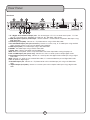
1. 5.1 Digital Surround Sound Output jacks - For connecting to a 5.1 CH. surround sound system. FL -Front
Left, FR - Front Right, SW - Subwoofer, SL -Side Left, SR - Side Right, CEN -Center.
2. RGB/Component (Y,Pb,Pr) Video output - Connect video to a TV with RGB or Component video inputs using
RGB videocables.
3. Video Output jack (RCA) - Connect to a TV/Video monitor using an RCA video cable.
4. Karaoke Mixed Output jacks (mic and music) - Connect to a mixer, amp, or TV audio inputs using two RCA
cables to output the disc music and microphone signal together.
5. VGA output (video) - For Video output using a VGA video cable.
6. SCART - For Video output using a SCART video cable.
7. Power Input - Connect the power cord (included) here.
NOTE: Make sure the power cord is firmly connected to the Power Input before turning the player on.
8. ML and MR Output jacks (music only) - Connect to a mixer or sound system to output digital stereo.
9. Coaxial Output jack (music only) - Connect to a sound system with digital Coaxial audio input using a digital
audio cable.
NOTE: Although it is alright to use standard RCA cables, it is recommended that you use Digital RCA audio
cables for optimum digital signal.
10. S-Video Output jack - Connect to a TV/video monitor with an S-Video input jack using an S-Video video
cable.
11. Optical Output jack (audio) - Connect to a sound system with an Optical audio input using a digital audio
cable.
20
Remote Control
�
�
�
�
�
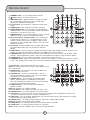
1. STANDBY button - Turns Standby mode on and off.
2.
button - Opens and closes the disc tray.
3. USB/DISC button - Toggles between disc player and USB
input. Select DISC when playing a disc and USB when
connecting a USB device to the player.
4. 5.1 CH button - Set the player 5.1 digital surround-sound
output.
5. STEREO button - Sets the player to stereo L/R output.
�
6. MUSIC MODE button - Use this button to choose between
5 different DSP surround sound modes. Choose the one that
sounds best in the room that you are in.
7. KARAOKE button - Turns Karaoke Mode on and off. Karaoke
mode must be on in order to use Digital Key Control.
�
8. Direct Track Access (number) buttons - For use whenever
number input is necessary. i.e. Jumping directly to tracks/
chapters, programming tracks in program mode, parental
password, etc. See the Operations section in this manual for
detailed instructions.
��
��
9. P/N button - Switches between PAL and NTSC video modes.
To change video modes press the P/N button and then
ENTER.
10. VIDEO button - Cycles through the available video output modes: VGA, S-Video, Y/Pb/Pr, Y/Cb/Cr and
SCART. To change the video output mode press the VIDEO button and then ENTER.
11. SEARCH button - Opens up the GO TO menu which allows you to jump to a certain time on DVDs, VCDs
and CDs. See the Operations section in this manual for detailed instructions on using the Search option.
12. CLEAR button - Erases numbers entered into a menu without closing the menu
13. PROGRAM button - Opens the Program Menu which lets you program a custom playlist order of up to 50
tracks. See the Operations section in this manual for detailed instructions on using the Program Menu.
��
��
��
��
��
14. TITLE button - Accesses the title screen on a DVD.
NOTE: For use on DVDs with title screens. Some DVDs may not
have a title screen.
15. MENU button - Accesses the main menu on DVDs and
other discs with main menus.
16. SETUP button - Accesses the Setup Menu. See the
Setting Up Preferences section in this manual for detailed
��
instructions on using the Setup Menu.
17. REPEAT button - Cycles through the available repeat
��
options. Repeat options vary depending on the type of
disc. See the Operations section in this manual for detailed
instructions on using the Repeat function.
�� ��
��
18. SUBTITLE button - Turns on subtitles for DVDs with
subtitles available.
NOTE: Not all DVDs have subtitles available.
19. Arrow buttons - For navigating through on-screen menus.
20. ENTER button - For making selections in on-screen menus.
21. A-B button - For setting a section on a disc for continuous looping. See the Operations section in this
manual for detailed instructions on using the A-B loop feature.
22. PBC button - Turns on Playback Control (PBC). For use with VCD 2.0 discs, PBC allows you to navigate
more conveniently through VCD 2.0 discs.
23. ANGLE button - For viewing multiple angles on a DVD with multiple angles available.
NOTE: Not all DVDs have multiple angles available.
24. ZOOM button - For zooming in on the picture on DVDs, CD+Gs and VCDs.
25. VIEW button - For viewing specific sections on a VCD disc.
NOTE: The disc must be stopped in order to access the VCD View Menu.
21
�
�
��
��
��
��
Remote Control
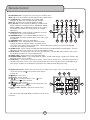
26. RETURN button - Accesses the main menu on a VCD 2.0 disc.
NOTE: PBC must be turned on and the VCD must be a VCD 2.0 disc.
27. AUDIO button - Cycles between the available audio
languages on DVDs with multiple languages available.
�� ��
�� �� ��
NOTE: Not all DVDs have multiple languages available.
28. L/R button - Cycles through the different multiplex CD+G
output modes for canceling the vocals: MONO-LEFT, MONORIGHT, STEREO. See the Operations section in this manual
for detailed instructions on canceling vocals on multiplex
CD+G discs.
��
29. DISPLAY button - Cycles through available disc time info
and displays it on the TV/video monitor.
30. RANDOM button - Turns Random Mode on and off. In
Random Mode, the player randomly picks tracks from a disc
for playback.
31. RESUME button - Closes the Setup Menu.
��
�� ��
��
��
32. EQ button - Turns the equalizer on and off and cycles
through the different equalizer options: Standard, Classic,
Jazz, Rock, Pops, Ballad, Dance and Personal. See the Operations section in this manual for detailed
instructions on setting up the equalizer.
33. SLOW button - Cycles through available Slow-motion Reverse and Slow-motion Forward options. See the
Operations section in this manual for using the slow-motion function.
34. STEP button - For viewing one frame at a time on video discs. See the Operations section in this manual
for detailed instructions on using the Step function.
35. MUTE button - Mutes all disc music and movie audio.
36. SINGLE MODE* button - Turns Single Mode on and off. Single mode will play a single track and then stop
playing when that track is finished.
37. CUE button* - Turns the Cue function on and off. When the Cue function is on, the player will pause at 5
seconds into every track.This is for use on CD+G karaoke discs with a song title screen at the beginning of
each song as it allows you to display the song-title for the audience before playing the song.
��
38. Digital Key Control - Adjusts the musical key to fit a singer’s vocal range. Press “b” to lower the key and
“#” to raise the key and
to return back to the original
(natural) key.
39.
button - Plays a disc.
40. button - Pause the disc.
41.
- For scanning through a track.
scans
backwards and
scans forwards.
42.
button - Stops the disc.
43.
buttons - Press
to jump to the previous track
and
to jump to the next track.
44. VOL + & VOL -- buttons - Adjusts the master music
volume.
* The Cue function and Single Mode cannot be turned on at the
same time.
22
��
��
��
��
��
��
��
��
��
Setup Menu
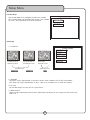
The Setup Menu can be accessed by pressing the SETUP button on the remote control and allows you to
change the DVG-777K’s system settings.
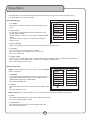
General Setup Page
GENERAL PAGE
PIC MODE
ANGLE MARK
OSD LANG
CAPTIONS
SCREEN SAVER
1. PIC MODE
Set the picture mode that best fits the type of video you are
using.
2. ANGLE MARK
For use when using the ANGLE feature on DVD discs with
multiple angles available.
ON: Will display a mark on the screen when using the ANGLE
feature.
OFF: There will be no mark on the screen when using the
ANGLE feature.
MAIN PAGE
GENERAL SETUP
3. OSD LANGUAGE
Select the language of the text for this System Setup (On-Screen Display) menu.
4. CAPTIONS
For use with discs that have captions available.
ON: Turns captions on, displaying them on the screen
OFF: Turns captions off.
5. SCREEN SAVER
Screen saver is used to protect your TV/video monitor when the player is idle for a significant period of time.
ON: A screen saver will appear after the DVG-777K is idle for a period of time.
OFF: There will be no screen saver.
Speaker Setup Page
SPEAKER SETUP PAGE
DOWN MIX
CENTER
REAR
SUBWOOFER
CENTER DELAY
REAR DELAY
TEST TONE
NOTE: To make changes in this menu, make sure that KARAOKE
mode is turned OFF.
1. DOWNMIX
LT/RT: Sound output is divided with the Left coming out of the
Left speaker and the Right coming out of the Right speaker.
STEREO: Sound output is in Stereo Mode.
OFF: Turns DOWNMIX off.
2. CENTER*
ON: There will be output from the Center speaker (CEN) output
jack.
OFF: The CEN output is off
LOUD SPEAKER SETUP
NOTE: DOWNMIX must be turned off to access any of the other settings in the Speaker Setup Page.
3. REAR*
ON: There will be output from the SL and SR speaker output jacks
OFF: The SL and SR outputs are off.
4. SUBWOOFER*
ON: There will be output from the SUB speaker output jack
OFF: The SUB output is off.
23
Setup Menu
5. CENTER DELAY*
Use this to synchronize the center (CEN) speaker with the rest of the speakers in your Surround Sound
speaker system.
6. REAR DELAY*
Use this to synchronize the SL and SR speakers with the rest of the speakers in your Surround Sound speaker
system.
7. TEST TONE*
Use this after you have connected all of the speakers for the Surround Sound system to test and make sure
there is signal going to all of the speakers.
ON: The text tone will play.
OFF: The test tone will stop playing.
*DOWNMIX must be turned off to access this option
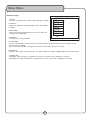
Audio Setup Page
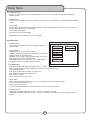
1. SPDIF OUTPUT
Turn the SPDIF output on when using the digital Optical or
Coaxial outputs.
2. DUAL MONO
STEREO OUTPUT: Outputs audio in stereo.
L-MONO: Plays the Left side only through both Left and Right
speaker outputs on a Multiplex disc.
R-MONO: Plays the Right side only through both the Left and
Right speaker outputs on a Multiplex disc.
MIX-MONO: Plays virtual stereo with Left and Right Mono
coming out of the Left and Right speaker outputs.
AUDIO SETUP
SPDIF OUTPUT
DUAL MONO
COMPRESSION
PRO LOGIC
LPCM OUTPUT
MAIN PAGE
AUDIO RELATED
3. COMPRESSION
Setting the compression allows you to play music at a lower
volume without losing the original quality of the sound. Great for late night use.
OFF: No Compression
2/8: High compression for quieter (late night) use
4/8: Medium compression for general use
6/8: Low compression
FULL: Full-volume cinematic sound
4. PRO LOGIC
When using a Surround Sound speaker system, PRO LOGIC must be set to ON or AUTO.
ON: Surround Sound decoder is on.
OFF: Surround Sound is off
AUTO: Automatically detects when Surround Sound format is present on a disc.
5. LPCM OUTPUT
LPCM 48K: For digital audio devices with a maximum sampling rate of 48K.
LPCM 96K: For digital audio devices with a maximum sampling rate of 96K. For use with Progressive Scan
devices.
24
Setup Menu
Karaoke Setup
ON: Karaoke Mode is on and Digital Key Control is available
OFF: Karaoke Mode is off and Digital Key Control is not available.
To use 5.1 Surround Sound this must be turned off.
KARAOKE PAGE
KARAOKE MODE
MAIN PAGE
SETUP KARAOKE FEATURE
Video Page
1. TV DISPLAY
To view the standard
4:3 picture or the cut
standard 4:3 picture
VIDEO PAGE
TV DISPLAY
HD MODE
TV TYPE
VIDEO OUTPUT
4:3 subtitle block to
view the full width of
the widescreen mode
Standard TV set
16:9 To view widescreen
picture with a
widescreen TV set
Widescreen TV set
MAIN PAGE
VIDEO SETUP
2. HD MODE
ON: When using a High Definition TV and discs. Makes 720P available in the TV TYPE menu (below)
OFF: When not using a High Definition TV discs. 720P is not available in the TV TYPE menu (below)
3. TV TYPE
Set the video output to match you TV’s system format
4. VIDEO OUTPUT
Select the right video output based on which Video Output connection you are using on the rear panel of the
DVG-777K
25
Setup Menu
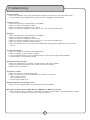
Preferences Page
1. AUDIO
Select the language for discs with multiple languages available.
2. SUBTITLE
Select your preferred subtitle language for discs with subtitles
available.
3. DISC MENU
Select your preferred language for the disc menu with multilanguage menu capabilities.
4. PARENTAL
Set the parental rating for DVDs.
PREFERENCES PAGE
AUDIO
SUBTITLE
DISC MENU
PARENTAL
PASSWORD
DEFAULTS
SMART NAVI
SET PREFERENCES
5. PASSWORD
Create a new password. The first time you change the password you will need to enter the original factory
password which is 3308.
You can also enter 3308 if you forget your new password in order to create a new one.
6. DEFAULTS
Restores all the original factory settings. To restore the default settings, highlight RESET and then press enter.
7. SMART NAVI
NO MENU: There will not be a navigation menu on the TV screen when an Mp3 disc is inserted.
WITH MENU: The SMART NAVI menu will be visible on the TV screen when an Mp3 disc is inserted.
26
Troubleshooting
There is no power
• Make sure the power cord is firmly connected to the back of the DVG-777K and to the power outlet
• If using a power strip/surge-protector, make sure that it is plugged in and switched on
There is no sound
• Make sure everything is connected firmly and properly
• Make sure there are no defective cables
• Make sure all of your components are turned on
• Make sure all of the components (amp, mixer, TV, etc.) are set to the proper inputs
No picture
• Make sure
• Make sure
• Make sure
• Make sure
• Make sure
• Make sure
control
everything is connected firmly and properly
there are no defective cables
all of your components are turned on
all of the components (amp, mixer, TV, etc.) are set to the proper inputs
the TV or monitor is working correctly
the DVG-777K is set to the correct video output mode using the VIDEO button on the remote
The disc does not play
• Make sure the disc is inserted correctly (label-side up)
• Make sure the disc is clean and not scratched
• If using a CD/DVD R/RW, try using a different brand as some brands might not be compatible
• Clean the CD lens using a CD lens cleaner
Remote control does not work
• Make sure the batteries are inserted, inserted correctly, and not out of power.
• Point the remote control directly at the remote sensor on the machine
• Move closer to the machine
The picture is unclear
• Make sure the disc is not dirty or damaged
• Make sure that the TV TYPE (P/N button on the remote) is set correctly:
NTSC: In North America
PAL: In Europe and Asia
• Try restarting the DVG-777K
Digital Key Control is not working on discs
• Make sure that Karaoke Mode is turned ON in the System Setup OSD
Menu does not appear when an Mp3/AVI disc, USB device or SM Card is inserted
• Make sure Smart Navi is turned on in the Preferences Page in the Setup Menu. See the Setup Menu section
in this manual for detailed instructions on turning Smart Navi on
27
�
��
����������������������������
DVG-777K Manual © VocoPro 2007
V 1.0
www.vocopro.com