1
www.mio-tech.be
Revision: R00
Trademarks
Microsoft, Windows, the Windows logo, Windows Media, Outlook and
ActiveSync are registered trademarks or trademarks of Microsoft Corporation in
the United States and/or other countries. Microsoft products are licensed to
OEMs by Microsoft Licensing, Inc., a wholly owned subsidiary of Microsoft
Corporation. All other brand and product names are trademarks or registered
trademarks of their respective companies.
Note
The information in this manual is subject to change without notice.
Table of Contents
Preface .................................................................................................. v
1
Getting Started ............................................................................... 1
1.1 Identifying Hardware Components ......................................................1
Front Components ...............................................................................1
Back Components ...............................................................................3
Left-Side Components .........................................................................4
Right-Side Components.......................................................................5
Top Components .................................................................................5
Bottom Components ............................................................................6
1.2 Getting Your Device Ready for Use ....................................................7
Performing Initial Startup .....................................................................7
Connecting to AC Power and Charging the Battery ............................8
1.3 Using Your Device in a Vehicle ...........................................................9
Using the Car Holder ...........................................................................9
Connecting the Car Charger................................................................9
1.4 Turning Your Pocket PC On and Off .................................................10
Turning Off to Suspend......................................................................10
Turning On to Resume ......................................................................10
1.5 Installing Microsoft ActiveSync ..........................................................10
1.6 Expanding Your Pocket PC ...............................................................12
Using a SD/MMC Card ......................................................................12
Accessories .......................................................................................12
2
Basic Skills ................................................................................... 13
2.1 Using the Stylus.................................................................................13
2.2 Using the Navigation Stick.................................................................14
2.3 Today Screen ....................................................................................14
Landscape View ................................................................................15
2.4 Navigation Bar and Toolbar...............................................................15
2.5 Running Programs.............................................................................16
2.6 Shortcut Menus..................................................................................16
i
2.7 Notifications .......................................................................................17
2.8 Entering Information ..........................................................................17
Entering Text Using the Input Panel..................................................18
Writing on the Screen ........................................................................20
Drawing on the Screen ......................................................................22
Recording a Message........................................................................24
Using My Text....................................................................................25
2.9 Locking Your Pocket PC....................................................................26
3
Managing Your Pocket PC .......................................................... 29
3.1 Managing Power................................................................................29
Low Battery Signals and Actions .......................................................29
Power-Saving Tips.............................................................................30
3.2 Managing Memory .............................................................................30
Storage and Program Memory ..........................................................30
Additional Memory .............................................................................31
3.3 Customizing Your Pocket PC ............................................................31
3.4 Searching and Organizing Information ..............................................33
3.5 Adding or Removing Programs .........................................................34
Adding Programs ...............................................................................34
Removing Programs ..........................................................................35
4
Microsoft Pocket Outlook ........................................................... 37
4.1 Calendar: Scheduling Appointments and Meetings ..........................37
Creating an Appointment ...................................................................38
Using the Calendar Summary Screen ...............................................39
4.2 Contacts: Tracking Friends and Colleagues .....................................40
Creating a Contact.............................................................................40
Using the Contacts Summary Screen ...............................................42
4.3 Tasks: Keeping a To Do List .............................................................43
Creating a Task .................................................................................43
Using the Tasks Summary Screen ....................................................44
4.4 Notes: Capturing Thoughts and Ideas...............................................45
Creating a Note..................................................................................45
4.5 Messaging: Sending and Receiving E-mail Messages .....................47
Synchronizing E-mail Messages .......................................................47
Connecting Directly to an E-mail Server............................................48
Using the Message List .....................................................................48
Composing and Sending Messages..................................................50
Managing Email Messages and Folders ...........................................51
ii
5
More Programs ............................................................................ 53
5.1 Microsoft ActiveSync .........................................................................53
Synchronizing Data............................................................................54
5.2 Word Mobile.......................................................................................55
Creating a Document.........................................................................55
Opening a Document.........................................................................56
5.3 Excel Mobile ......................................................................................57
Creating a Workbook .........................................................................57
Opening a Workbook .........................................................................58
5.4 PowerPoint Mobile.............................................................................59
5.5 Pocket MSN.......................................................................................60
5.6 Windows Media Player for Pocket PC...............................................61
5.7 Pictures & Videos ..............................................................................62
5.8 Additional Programs ..........................................................................63
SysInfo ...............................................................................................63
eConverter .........................................................................................64
6
Getting Connected....................................................................... 67
6.1 Connection Settings...........................................................................67
Modem Connection............................................................................67
Network (Ethernet) Card Connection ................................................68
6.2 Using Internet Explorer Mobile ..........................................................70
Viewing Mobile Favorites and Channels ...........................................70
Browsing the Internet.........................................................................71
The Mobile Favorites Folder ..............................................................71
7
Troubleshooting and Maintenance ............................................ 75
7.1
7.2
7.3
7.4
7.5
7.6
Resetting Your Pocket PC .................................................................75
Restoring Last State ..........................................................................76
Power Problems ................................................................................77
Memory Problems..............................................................................77
Screen Problems ...............................................................................78
Connection Problems ........................................................................79
ActiveSync Connection Problems .....................................................79
Modem Connection Problems ...........................................................80
Network Connection Problems ..........................................................81
7.7 Taking Care of Your Pocket PC ........................................................82
General Guidelines ............................................................................82
Travel Guidelines...............................................................................83
iii
A
Regulatory Information ............................................................... 85
A.1 Regulations Statements.....................................................................85
European Notice ................................................................................85
A.2 Safety Precautions.............................................................................86
About Charging..................................................................................86
About the AC Adapter........................................................................86
About the Battery ...............................................................................87
Index .................................................................................................... 89
iv
Preface
Welcome
Congratulations on purchasing this Windows® Mobile™ for Pocket PC with
built-in GPS and Bluetooth functions. Due to the size and capabilities of the
device, you can keep your most important business and personal information
up-to-date and close at hand. Microsoft® ActiveSync® increases the power of
your Pocket PC by allowing you to synchronize the information on your desktop
or Microsoft Exchange Server with your Pocket PC.
About this Manual
This manual contains comprehensive information of your Pocket PC to help you
operate the device.
Throughout the manual, the following conventions are used to distinguish
elements of text.
NOTE: provides additional hints or information that requires special attention.
CAUTION: identifies important information which, if not followed, may result in loss of data
or damage to your device.
Any name of menu, command, icon or button that you can see on the screen is
shown in a bold typeset. For example:
On the Start menu, tap Settings.
v
Where to Find Information
For information on
See this source
GPS navigation operation
The manual supplied with the GPS software
Programs on your Pocket PC
This User’s Manual or online Help on your
Pocket PC
Connecting to and synchronizing
with a desktop computer
Chapter 6 of this manual or ActiveSync
Help on your desktop computer
The latest on Windows Powered
Pocket PCs
The Microsoft Mobile Devices Web site:
www.pocketpc.com
vi
1 Getting Started
This chapter introduces you to the external components of your Pocket PC and
guides you through the process of setting up your Pocket PC for use.
NTOE: Depending on the model you purchased, the cabinet color and the look of the
accessories may be different from the ones shown in this manual.
1.1 Identifying Hardware Components
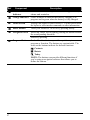
Front Components
1
Ref
Component
Description
n
Notification
Indicator
Flashes in red to inform you of scheduled appointments,
alarms and reminders.
o
Charge Indicator
Glows in amber to indicate that battery charging is in
progress and in green when the battery is fully charged.
p
Touch Screen
Displays the output of your Pocket PC. Tap the screen with
the stylus to select menu commands or enter information.
q
r
Power Button
Turns your Pocket PC on or off by pressing briefly.
Navigation Stick
Moves up, down, left or right by pushing the button toward
the corresponding direction.
Selects by pressing.
s
Program Buttons
Each of the three buttons provides a quick way to use a
program or function. The buttons are customizable. The
icons on the buttons indicate the default functions:
Contacts
Rotate
Today
NOTE: The buttons can provide different functions if
you’re using a navigation software that allows you to
define the buttons.
2
Back Components
Ref
Component
Description
n
Car Antenna
Connector
This connector (under rubber dust cover) allows use of an
optional external antenna with magnetic mount, which
may be positioned on top of the car for better signal
reception in areas with poor reception.
o
Stylus
Tap on the touch screen to make selections and enter
information. Pull the stylus out of its slot to use and store it
in the slot when not in use.
p
Speaker
Sends out music, sounds and voice.
3
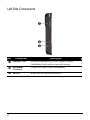
Left-Side Components
Ref
Component
Description
n
SD/MMC Slot
Accepts an optional SD (Secure Digital) or MMC
(MultiMediaCard) card for removable storage.
o
Headphone
Connector
Connects to a pair of stereo headphones.
p
IR Port
Beams files to other mobile devices.
4
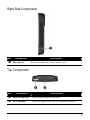
Right-Side Components
Ref
n
Component
Microphone
Description
Receives sound and voice to record voice.
Top Components
Ref
n
o
Component
Description
Hand String Hole
Hand string attaches to this hole.
GPS Antenna
Receives signals from the GPS satellites overhead.
5
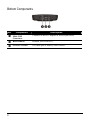
Bottom Components
Ref
Component
Description
n
Mini-USB
Connector
Connects to the AC adapter or ActiveSync cable.
o
p
Reset Button
Restarts your Pocket PC.
ON/OFF Switch
The main power/battery cutoff switch.
6
1.2 Getting Your Device Ready for Use
Performing Initial Startup
Initial startup includes setting the ON/OFF switch and completing the setup
wizard.
1. Pull out the stylus and use it to slide the ON/OFF switch to the ON position.
CAUTION: Always leave the ON/OFF switch in the ON position for normal operation.
2. Your device will automatically turn on. Connect the AC adapter as described
in the next sub-section.
3. Follow the onscreen instructions to complete the setup wizard. You will then
see the Today screen.
7
Connecting to AC Power and Charging the Battery
Fully charge the battery before starting to use your Pocket PC for the first time.
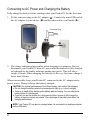
1. Fit the converter plug to the AC adapter (n). Connect the mini-USB end of
the AC adapter to your device (o) and the other end to a wall outlet (p).
Converter Plug
2. The charge indicator glows amber when charging is in progress. Do not
disconnect your Pocket PC from AC power until the battery is fully charged,
as indicated by the amber indicator turning into green. This will take a
couple of hours. When charging the battery for the very first time, charge it
for at least 8 hours.
Whenever possible, keep your Pocket PC connected to the AC adapter and a
power source. Doing so keeps the battery charged.
CAUTION: For optimal performance of the lithium battery, take note of the following:
z Do not charge the battery where the temperature is high (e.g. in direct sunlight).
z There is no need to fully discharge the battery before charging. You can charge the
battery before it is discharged.
z If you will not use the product for a long period of time, be sure to fully charge the
battery at least once every two weeks. Over discharge of the battery can affect the
charging performance.
NOTE: Your Pocket PC can also be charged when it is connected to a desktop computer
via the USB cable.
8
1.3 Using Your Device in a Vehicle
Using the Car Holder
CAUTION:
z When placing the car holder, make sure that the device does not obstruct the driver’s
view, or interfere with the operation of vehicle airbags and safety devices.
z If the car’s windshield is tinted with a reflective coating, an external antenna (optional)
may be needed to route the antenna to the top of the car through a window.
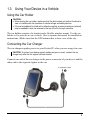
The car holder consists of a bracket and a flexible window mount. Use the car
holder to fix your device in a vehicle. (See a separate document for installation
instructions.) Make sure that the GPS antenna has a clear view of the sky.
Connecting the Car Charger
The car charger supplies power to your Pocket PC when you are using it in a car.
CAUTION: To protect your device against sudden surges in current, connect the car
charger only after the car engine has been started.
Connect one end of the car charger to the power connector of your device and the
other end to the cigarette lighter in the car.
To Cigarette Lighter
9
1.4 Turning Your Pocket PC On and Off
After the initial startup, your Pocket PC enters a suspend state when you turn it
off and resumes when you turn it on.
Turning Off to Suspend
You suspend your Pocket PC by briefly pressing the power button.
By default, your Pocket PC will also automatically suspend after 3 minutes of
inactivity when operating on battery power. (To change these settings, tap
Æ
Settings Æ System Æ Power Æ Advanced.)
Turning On to Resume
You resume your Pocket PC by briefly pressing the power button. You may also
press one of the program buttons to resume.
1.5 Installing Microsoft ActiveSync
You can use Microsoft ActiveSync technology to synchronize information on
your desktop computer and/or a Microsoft Exchange Server with the information
on your Pocket PC. ActiveSync compares the information on your Pocket PC
with the information on the desktop computer and/or the server and updates all
locations, keeping you up-to-date with the most recent information.
ActiveSync is already installed on your Pocket PC. You need to install
ActiveSync on your desktop computer. Follow the procedure below:
CAUTION:
z Before installation, make sure that you have Microsoft Outlook installed on your desktop
computer.
z Do not connect your Pocket PC to your desktop computer before ActiveSync is installed.
z ActiveSync connection problems may occur in some specific cases. They are likely
caused by interoperability with desktop firewall applications or applications that manage
network traffic. For troubleshooting information, visit the Microsoft web site:
www.microsoft.com/windowsmobile/help/activesync.
10
1. Turn on your desktop computer.
2. Insert the Getting Started CD into the CD-ROM drive of your desktop
computer.
3. Click Next to continue.
4. The setup wizard will install Microsoft ActiveSync. Follow the onscreen
instructions to install ActiveSync.
5. When prompted, connect the mini-USB end of the ActiveSync cable to the
bottom of your Pocket PC and the other end to a USB port on your desktop
computer.
6. Follow the onscreen instructions to establish a synchronization relationship
and synchronize your Pocket PC with your desktop computer.
After your first synchronization, the data you have stored on your desktop
computer such as Calendar, Contacts and Tasks is copied to your Pocket PC.
You are now ready to take it along with you when you go.
11
1.6 Expanding Your Pocket PC
Using a SD/MMC Card
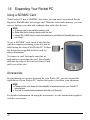
Your Pocket PC has a SD/MMC slot where you can insert an optional Secure
Digital or MultiMediaCard storage card. With the removable memory, you can
store or backup your data and exchange data with other devices.
NOTE:
z A storage card is also called a memory card.
z Make sure that no foreign objects enter the slot.
z Keep a SD or MMC card in a well-protected box to avoid dust and humidity when you are
not using it.
To use a SD/MMC card, insert it into the slot,
with the connector pointing to the slot and its
label facing the front of the Pocket PC. Follow
the instructions supplied with the card for
more information.
To remove a card, first make sure that no
application is accessing the card, then slightly
push the top edge of the card to release it and
pull it out of the slot.
Accessories
By purchasing accessories designed for your Pocket PC, you can expand the
capabilities of your Pocket PC, replace lost parts or facilitate your operation.
NOTE:
z Please contact your dealer for the availability of accessories from your Pocket PC
manufacturer.
z The use of unauthorized accessories will void your Warranty.
For detailed information on using the accessories, see the instructions supplied
with the accessories.
12
2 Basic Skills
This chapter familiarizes you with the basic operations of your Pocket PC such
as using the stylus, navigation stick, Today screen, menus, and programs. You
will also know how to enter information and lock your Pocket PC.
2.1 Using the Stylus
Use the stylus to navigate and select objects on the screen.
Pull the stylus out of the slot and extend it for ease of use. Store it in the slot
when not in use.
z
Tap
Touch the screen once with the stylus to
open items and select options.
z
Drag
Hold the stylus on the screen and drag
across the screen to select text and images.
Drag in a list to select multiple items.
z
Tap and hold
Tap and hold the stylus on an item to see a
list of actions available for that item. On the
shortcut menu that appears, tap the action
you want to perform.
13
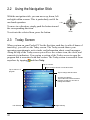
2.2 Using the Navigation Stick
Up
With the navigation stick, you can move up, down, left
and right within a menu. This is particularly useful for
one-hand operation.
Right
Left
To move in a direction, simply push the button toward
the corresponding direction.
Down
To activate the selected item, press the button.
2.3 Today Screen
When you turn on your Pocket PC for the first time each day (or after 4 hours of
inactivity), you will see the Today screen. The Today screen shows your
upcoming appointments, active tasks, and information about e-mail messages.
Along the top of the Today screen you will see the volume icon, the clock, and
connectivity indicators. You can tap a section of the Today screen to open the
program that is associated with that section. The Today screen is accessible from
anywhere by tapping
and then Today.
Tap to connect.
Tap to change volume or mute all sounds.
Tap to switch to a
program.
Tap to change date and time.
Your day at a glance.
Tap an item to access associated
program so that you can view or
change information.
Left Soft Key
14
Right Soft Key
Landscape View
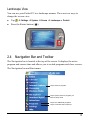
You can use your Pocket PC in a landscape manner. There are two ways to
change the screen view:
Æ Settings Æ System Æ Screen Æ Landscape or Portrait.
z
Tap
z
Press the Rotate button (
).
2.4 Navigation Bar and Toolbar
The Navigation bar is located at the top of the screen. It displays the active
program and current time and allows you to switch programs and close screens.
The Navigation bar and Start menu:
Tap to select a program.
Tap to quickly select a program you
have recently used.
Tap to see additional programs.
Tap to customize the Pocket PC.
15
Use the toolbar at the bottom of the screen to perform tasks in programs. The
toolbar includes a left soft key, a right soft key, and the Input panel button in
between. The right soft key is usually Menu while the left soft key varies with
programs.
An example of the toolbar:
Left Soft Key
Right Soft Key
Input panel
button
2.5 Running Programs
You can switch from one program to another without closing any program.
at the left-top corner of the screen and select from
z
To run a program, tap
the Start menu.
z
To access additional programs, tap
z
You can press a program button on the front of your Pocket PC. The icons on
the buttons identify the default programs they are associated with.
Æ Programs and tap the program icon.
2.6 Shortcut Menus
With shortcut menus, you can quickly choose an action for an item. For example,
you can use the shortcut menu in the contact list to quickly delete a contact, make
a copy of a contact or send an email message to a contact. The actions in the
shortcut menus vary from program to program. To access a shortcut menu, tap
and hold the stylus on the name of the item that you want to perform the action
on. When the menu appears, lift the stylus and tap the action you want to
perform. Or tap anywhere outside the menu to close the menu without
performing an action.
16
Tap and hold to display the
shortcut menu.
Lift the stylus and tap the action
you want.
Tap outside the menu to close it
without performing an action.
2.7 Notifications
Your Pocket PC reminds you in a variety of ways when you have something to
do. For example, if you have set up an appointment in Calendar, a task with a due
date in Tasks or an alarm in Clock, you will be notified in any of the following
ways:
z
A message appears on the screen.
z
A sound, which you can specify, is played.
z
The notification indicator flashes in red.
To choose reminder types and sounds for your Pocket PC, tap
Æ Settings Æ
Personal Æ Sounds & Notifications.
2.8 Entering Information
You have several options for entering new information:
z
Use the Input panel to enter typed text, either by using the soft keyboard or
other input methods.
z
Write directly on the screen.
z
Draw pictures on the screen.
z
Speak into the microphone to record a message.
17
Entering Text Using the Input Panel
Use the Input panel to enter information in any program on your Pocket PC. You
can either type using the soft keyboard or write using the soft keyboard, Block
Recognizer, Letter Recognizer or Transcriber. In any case, the characters appear
as typed text on the screen.
To show or hide the Input panel, tap the Input panel button. Tap the arrow next to
the Input panel button to see your choices.
Select an input method.
Input panel button.
Tap to see your choices.
When you use the Input panel, your Pocket PC anticipates the word you are
typing or writing and displays it above the Input panel. When you tap the
displayed word, it is inserted into your text at the insertion point. The more you
use your Pocket PC, the more words it learns to anticipate.
Tap here if this is
the right word.
18
NOTE: To change word suggestion options, such as the number of words suggested at one
Æ Settings Æ Personal Æ Input Æ Word Completion.
time, tap
Block Recognizer
With Block Recognizer, you can use the stylus to input characters using strokes
that are similar to the Palm™ Graffiti® method.
To type with Block Recognizer:
1. Tap the arrow next to the Input panel button and then tap Block Recognizer.
2. Write a letter in the box.
When you write a letter, it is converted to typed text that appears on the screen.
For specific instructions on using Block Recognizer, open Block Recognizer and
then tap the question mark next to the writing area.
Letter Recognizer
With Letter Recognizer, you can write letters using the stylus just as you would
use a pen on paper.
To type with Letter Recognizer:
1. Tap the arrow next to the Input panel button and then tap Letter Recognizer.
2. Write a letter in the box.
When you write a letter, it is converted to typed text that appears on the screen.
For specific instructions on using Letter Recognizer, open Letter Recognizer and
then tap the question mark next to the writing area.
Transcriber
With Transcriber you can write anywhere on the screen using the stylus just as
you would on paper. Unlike Letter Recognizer and Block Recognizer, you can
write a sentence or more of information; then, you pause and let Transcriber
change the written characters to typed characters.
To type with Transcriber:
1. Tap the arrow next to the Input panel button then tap Transcriber.
2. Write anywhere on the screen.
19
For specific instructions on using Transcriber, open Transcriber and then tap the
question mark in the lower-right corner of the screen.
Writing on the Screen
In any program that accepts writing, such as the Notes program, you can use
your stylus to write directly on the screen. Write the way you do on paper. You
can edit and format what you have written and convert the information to text
later.
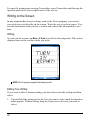
Writing
To write on the screen, tap Menu Æ Draw to switch to drawing mode. This action
displays lines on the screen to help you write.
NOTE: Not all program support the drawing mode.
Editing Your Writing
If you want to edit or format writing, you must first select the writing and then
edit it.
1. Tap and hold the stylus next to the text you want to select until the insertion
point appears. Without lifting, drag the stylus across the text you want to
select.
20
2. Tap and hold the selected words and then tap an editing command (cut, copy
or paste) on the shortcut menu or tap the command on the Menu Æ Edit menu.
If you accidentally write on the screen, tap Menu Æ Undo Ink and try again.
Converting Your Writing to Text
1. If you want to convert only certain words, select them before going to the
next step.
2. To convert writing to text, tap Menu Æ Tools Æ Recognize or tap and hold the
selected words and then tap Recognize on the shortcut menu. Your writing is
turned into text.
If a word is not recognized, it is left as writing.
Select the text you want to
convert and tap Recognize
on the shortcut menu.
The writing is turned into
text.
If the conversion is incorrect, you can select different words from a list of
alternates or return to the original writing.
1. Tap and hold the incorrect word (tap one word at a time).
2. On the shortcut menu, tap Alternates. A menu with a list of alternate words
appears.
3. Tap the word you want to use or tap the writing at the top of the menu to
return to the original writing.
21
Tap to return to your original
writing.
Or, tap the word you want to use.
Some tips for getting good recognition are listed below:
z
Write neatly.
z
Write on the lines and draw descenders below the line. Write the cross of the
“t” and apostrophes below the top line so that they are not confused with the
word above. Write periods and commas above the line.
z
For better recognition, use Menu Æ Zoom to increase the zoom level to 300%.
z
Write the letters of a word close together and leave big gaps between words.
z
Hyphenated words, foreign words that use special characters such as accents
some punctuation cannot be converted.
z
If you add writing to a word to change it (such as changing a “3” to an “8”)
after you attempt to recognize the word, the writing you add will not be
included if you attempt to recognize the writing again.
Drawing on the Screen
You can draw on the screen in the same way that you write on the screen. The
difference between writing and drawing on the screen is how you select items
and how they can be edited. For example, selected drawings can be resized,
while writing cannot.
22
Creating a Drawing
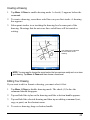
1. Tap Menu Æ Draw to enable drawing mode. A check (√) appears before the
command.
2. To create a drawing, cross three ruled lines on your first stroke. A drawing
box appears.
3. Subsequent strokes in or touching the drawing box become part of the
drawing. Drawings that do not cross three ruled lines will be treated as
writing.
The drawing box indicates
the boundaries of the
drawing.
NOTE: You may want to change the zoom level so that you can more easily work on or view
your drawing. Tap Menu Æ Zoom and then choose a zoom level.
Editing Your Drawing
If you want to edit or format a drawing, you must select it first.
1. Tap Menu Æ Draw to disable drawing mode. The check (√) before the
command should disappear.
2. Tap and hold the stylus on the drawing until the selection handle appears.
3. Tap and hold the selected drawing and then tap an editing command (cut,
copy or paste) on the shortcut menu.
4. To resize a drawing, drag a selection handle.
23
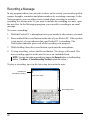
Recording a Message
In any program where you can write or draw on the screen, you can also quickly
capture thoughts, reminders and phone numbers by recording a message. In the
Notes program, you can either create a stand-alone recording or include a
recording in a written note. If you want to include the recording in a note, open
the note first. In the Messaging program, you can add a recording to an email
message.
To create a recording:
1. Hold the Pocket PC’s microphone near your mouth or other source of sound.
2. Press and hold the record button on the side of your Pocket PC. If the speaker
is not muted, a beep indicates that your Pocket PC is recording. The
Notification indicator glows red while recording is in progress.
3. While holding down the record button, speak into the microphone.
4. To stop recording, release the Record button. Two beeps will sound. The
new recording appears in the note list or as an embedded icon.
NOTE: You can also make a recording by tapping the Record button on the Recording
toolbar. (Tap Menu Æ View Recording Toolbar to show the toolbar.)
To play a recording, tap it in the list or tap its icon in the note.
Indicates an
embedded recording.
Recording toolbar
24
Recording Formats
Your Pocket PC supports several formats for voice notes. The formats vary in
both the quality of the recording and the size of the sound file. When selecting a
recording format, you should consider the quality you need as well as how much
storage memory the recording will use on your Pocket PC.
Not all recording formats are compatible with other software or computers. If
you will share your recordings with others or transfer a recording to your desktop
computer, be sure to choose a recording format that is supported by the software
used to play recordings on the other computer.
The PCM format offers the highest quality recording and is compatible with all
Pocket PC models, other Windows-powered mobile devices and desktop
computers that use Windows operating systems. The GSM 6.10 format is
compatible with all Pocket PC models and other Windows-powered mobile
devices, but may not work with desktop computers.
To select a recording format:
1. Tap
Æ Settings Æ Input.
2. On the Options tab in the Input control panel, select a voice recording format
from the drop-down list.
The list of recording formats on your Pocket PC indicates the sample rate,
whether the format is stereo or mono and how much storage memory is required
per second of recording. You may need to experiment with different sample rates
and formats to determine which format best suits your voice.
Using My Text
When using Messaging or MSN Messenger, use My Text to quickly insert preset
or frequently used messages into the text entry area. To insert a message, tap
Menu Æ My Text and then tap a message.
25
Tap to select a
prewritten message.
NOTE: After inserting a My Text message, you can add text to it before you send the
message.
To edit a My Text message, tap Menu Æ My Text Æ Edit My Text Messages. Select
the message you wish to edit and make desired changes.
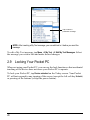
2.9 Locking Your Pocket PC
When not using your Pocket PC, you can use the lock function so that accidental
touching of the device does not cause your Pocket PC to operate.
To lock your Pocket PC, tap Device unlocked on the Today screen. Your Pocket
PC will not respond to any tapping of the screen (except the left soft key Unlock)
or pressing of the buttons (except the power button).
26
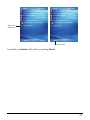
Tap to lock
the device.
Tap to unlock
To unlock, tap Unlock (left soft key) and tap Unlock.
27
3 Managing Your Pocket PC
This chapter tells you how to effectively manage power, memory, settings, data
and programs of your Pocket PC.
3.1 Managing Power
A fully charged battery should provide power for up to 8 hours of use. The
operating time of a fully charged battery depends on how you are using the
Pocket PC. Some functions, such as using multimedia or operating a SD/MMC
card, may consume the battery power considerably.
Low Battery Signals and Actions
CAUTION:
z When the battery is very low, your device automatically sets the volume down as a
protection. Under such circumstances, you will not be able to turn up the volume unless
the battery is charged to a certain level of power.
z When you recharge the battery upon a warning of low power, you should charge for at
least 30 minutes. If you unplug the AC adapter soon, you may not have sufficient battery
power for your operation.
You can monitor the battery power by tapping
Æ Settings Æ System Æ Power.
The remaining power is displayed on a status bar in the Power control panel.
When the battery is low, your Pocket PC will pop up a warning message. You
should save your data and recharge the battery immediately upon a warning of
low power; otherwise your Pocket PC will turn off automatically. You need to
connect the Pocket PC to external AC power for charging before you can use it
again.
29
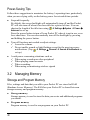
Power-Saving Tips
Follow these suggestions to maximize the battery’s operating time, particularly
when you are relying solely on the battery power for extended time periods.
z
Suspend frequently.
By default, the screen backlight will automatically turn off and the Pocket
PC will also turn off when it has been idle for a period of time. You can
shorten the length of the idle time using
Æ Settings Æ System Æ Power Æ
Advanced to set up.
Press the power button to turn off your Pocket PC when it is not in use, even
for a short time. You can also manually turn off the backlight by pressing
and holding the power button.
z
Turn off functions not needed or adjust settings.
9 Lower the volume.
9 Do not enable sounds or light flashing except for the most necessary
notifications. (Tap
Æ Settings Æ Personal Æ Sounds & Notifications to
set up.)
z
Avoid power-consuming situations such as:
9 When using a modem or other peripheral
9 When playing sound or music
9 When recording.
9 When using or monitoring wireless signals
3.2 Managing Memory
Storage and Program Memory
Files, settings and data that you add to your Pocket PC are stored in RAM
(Random Access Memory). The RAM on your Pocket PC is shared between
storage memory and program memory.
z
Storage memory
Storage memory is used to store the data you create and additional programs
you install.
z
Program memory
Program memory is used to run programs on your Pocket PC.
30
Your Pocket PC automatically manages the allocation between storage and
program memory. However, in some situations, such as when the memory is
running out, your Pocket PC may not be able to automatically adjust the
allocation. (For information on solving memory problems, see section 7.4.)
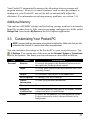
Additional Memory
You can buy a SD/MMC storage card for backup, storage, archives or to transfer
large files to other devices. Files stored on a storage card appear in a folder called
Storage Card, listed under My Device in the File Explorer application.
3.3 Customizing Your Pocket PC
NOTE: Incorrect settings may cause your system to malfunction. Make sure that you fully
understand the function of a certain item before any adjustment.
You can customize the settings of the Pocket PC to your own preferences. Tap
Æ Settings. You can tap any of the icons on the Personal, System or Connections
tabs for the options. The items you can customize are described as follows:
Tab
Personal
Items
Buttons
Descriptions
To assigns programs to the hardware buttons and set
the repeat rate of the up/down control.
Input
To set up items related to the input methods and voice
recording format.
Menus
To customize what appear on the Start menu.
MSN Options
To manage your MSN settings.
Owner
Information
To enter your personal information.
Password
To set a password for security.
Sounds &
Notifications
To set the conditions and types of the sounds, system
volume and ways of notifications.
Today
To select the information you want displayed on the
Today screen and to select a desired theme for the
background.
31
Tab
System
Items
About
Descriptions
To show the hardware information of the Pocket PC and
to define the device name that your Pocket PC uses for
identifying itself to other computers.
Backlight
To adjust the brightness level of the display and to set
the automatic turnoff for power saving purposes.
Certificates
To establish your identify or the identify of other
computers. Certificates help establish your identity
when you are logging onto a secured network, such as a
corporate network. Certificates also help establish the
identity of other computers, such as servers, with which
you connect. This helps prevent unauthorized users
from accessing your Pocket PC and information.
Clock &
Alarms
To change the time and date and to set alarms.
Error
Reporting
To enable or disable error reporting. Error Reporting
sends information needed by technical support groups to
diagnose a program error for a device running Windows
Mobile software.
SysInfo
See Section 5.8 for more information.
GPS
To configure the GPS hardware settings and manage
GPS.
Memory
To view the memory on the storage card (if installed) and
to manually stop a program if it becomes unstable or
program memory is low.
Power
To show the remaining battery power and to set the time
for the Pocket PC to turn off automatically.
Regional
Settings
To specify the region of your location and the formats of
the number, currency, time and date.
Remove
Programs
To remove programs you added to the RAM of your
Pocket PC.
Screen
To set the orientation of the screen to portrait or
landscape.
To adjust the touch screen for accurate screen taps.
To enable ClearType feature for easier reading of text in
programs that support ClearType.
To adjust the text size to see more content or increase
the readability in many programs.
32
Tab
Items
Connections Beam
Descriptions
To send and receive information and files between IR
ports.
Connections To set up or change connection information. (See
Section 6.1 for more information.)
Network
Cards
To configure the network card, if installed. (See Section
6.1 for more information.)
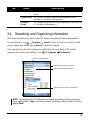
3.4 Searching and Organizing Information
The Search feature on your Pocket PC helps you quickly locate information.
To search a file, tap
Æ Programs Æ Search. Enter the text you want to find,
select a data type and then tap Search to start the search.
You can also use the File Explorer to find files on your Pocket PC and to
organize these files into folders. Tap
Æ Programs Æ File Explorer.
Tap to change folders.
Select the sort order for the list.
Tap the folder name to open it.
Tap and hold to create a new folder.
NOTE: You can move files in File Explorer by tapping and holding the item you want to
move, tapping Cut or Copy on the shortcut menu, browsing to the new location and then
tapping Paste.
33
3.5 Adding or Removing Programs
You can install any program created for your Pocket PC as long as your Pocket
PC has enough memory. The most popular place to find software for your Pocket
PC is on the Pocket PC Web site (http://www.pocketpc.com).
Adding Programs
To Add Programs Using ActiveSync
You will need to install the appropriate software for your Pocket PC on your
desktop computer before installing it on your Pocket PC.
1. Determine your Pocket PC and processor type so that you know which
version of the software to install. Tap
Æ Settings Æ System Æ About Æ
Version and make a note of the information in Processor.
2. Download the program to your desktop computer or, if you have a CD or disk
containing the program, insert the CD or disk into your desktop computer. You
might see a single *.xip, *.exe *.zip file, a Setup.exe file or several versions of
files for different device types and processors. Be sure to select the program
designed for the Pocket PC and your Pocket PC processor type.
3. Read any installation instructions, Read Me files or documentation that
comes with the program. Many programs provide special installation
instructions.
4. Connect your Pocket PC and desktop computer.
5. Double-click on the *.exe file.
34
z
If the file is an installer, the installation wizard begins. Follow the
directions on the screen. Once the software has been installed on your
computer, the installer automatically transfers the software to your
Pocket PC.
z
If the file is not an installer, you will see an error message stating that the
program is valid but it is designed for a different type of computer. You
will need to move this file to your Pocket PC. If you cannot find any
installation instructions for the program in the Read Me file or
documentation, use ActiveSync Explore to copy the program file to the
Program Files folder on your Pocket PC. For more information on
copying files using ActiveSync, see ActiveSync Help.
NOTE: You can also use Pocket Internet Explorer to download some programs from the
Internet directly to your Pocket PC if your Pocket PC is connected to Internet.
Once installation is complete, tap
switch to it.
Æ Programs and tap the program icon to
To Add a Program to the Start Menu
Use one of the following methods to add a program to the Start menu.
z
Tap
Æ Settings Æ Menu and tap the check box for the program. If you do
not see the program listed, use any of the following two methods.
z
If you are using File Explorer on the Pocket PC:
Tap
Æ Program Æ File Explorer and locate the program (tap the folder list,
labelled My Documents by default and tap My Device to see a list of all folders
on the Pocket PC). Tap and hold the program and tap Cut on the shortcut
menu. Open the Start Menu folder located in the Windows folder, tap and
hold a blank area of the window and tap Paste on the shortcut menu. The
program appears on the Start menu.
z
If you are using ActiveSync on the desktop computer:
Use the Explorer in ActiveSync to explore your Pocket PC files and locate
the program. Right-click on the program and then click on Create Shortcut.
Move the shortcut to the Start Menu folder in the Windows folder. The
shortcut appears on the Start menu.
Removing Programs
To remove a program from your Pocket PC:
1. Tap
Æ Settings Æ System Æ Remove Programs.
2. Select the program in the list then tap Remove.
If the program does not appear in the list of installed programs, use File Explorer
on your Pocket PC to locate the program, tap and hold the program and then tap
Delete on the shortcut menu.
35
4 Microsoft Pocket Outlook
This chapter tells you how to use Microsoft Pocket Outlook that includes
Calendar, Contacts, Tasks, Notes, and Messaging. You can use these programs
individually or together. For example, e-mail addresses stored in Contacts can be
used to address e-mail messages in Messaging.
4.1 Calendar: Scheduling Appointments and
Meetings
Use Calendar to schedule appointments, including meetings and other events. You
can check your appointments in one of several views (Agenda, Day, Week, Month
and Year) and set Calendar to remind you of appointments with a sound or other
method. Appointments for the day can be displayed on the Today screen.
Tap
Æ Calendar to switch to the program.
Tap to go to today.
Tap to display or edit the
appointment details.
Tap to switch to another view.
37
Creating an Appointment
1. In Day or Week view, tap the desired date and time for the appointment.
2. Tap Menu Æ New Appointment.
Tap to return to the calendar (the
appointment is saved automatically).
Tap to choose from predefined text.
Tap to choose from previously entered
locations.
Tap to select a time.
Tap to select a date.
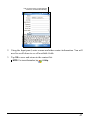
3. Using the Input panel, tap first to select the field, and then enter a description
and a location.
4. If needed, tap the date and time to change them.
5. Enter other desired information. You will need to hide the Input panel to see
all available fields.
6. Tap OK to save and return to Calendar.
NOTE: For more information, tap
38
Æ Help.
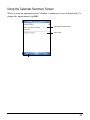
Using the Calendar Summary Screen
When you tap an appointment in Calendar, a summary screen is displayed. To
change the appointment, tap Edit.
View appointment details.
View notes.
Tap to change appointment.
39
4.2 Contacts: Tracking Friends and Colleagues
Contacts maintains a list of your friends and colleagues so that you can easily
find the information you are looking for, whether you are at home or on the road.
Tap
Æ Contacts to switch to the program.
Tap and enter part of a name or
number to quickly find a contact
in the list.
Tap an alphabet group
to scroll the contact list.
Tap to display or edit the contact
details.
Tap and hold to display the
shortcut menu.
Tap to create a new contact.
Creating a Contact
1. In Contacts, tap New.
40
Tap to return to the contact list (the
contact is saved automatically).
2. Using the Input panel, enter a name and other contact information. You will
need to scroll down to see all available fields.
3. Tap OK to save and return to the contact list.
NOTE: For more information, tap
Æ Help.
41
Using the Contacts Summary Screen
When you tap a contact in the contact list, a summary screen is displayed. To
change the contact information, tap Edit.
Tap to view notes.
Tap to change contact information.
42
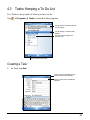
4.3 Tasks: Keeping a To Do List
Use Tasks to keep track of what you have to do.
Tap
Æ Programs Æ Tasks to switch to the program.
Tap to quickly create a task with
only a subject
Tap to display or edit the task
details.
Tap and hold to display the
shortcut men.
Tap to create a new task.
Creating a Task
1. In Task, tap New.
Tap to return to the task list (the
task is saved automatically).
Tap to choose from predefined
subjects.
43
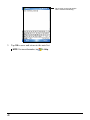
2. Using the Input panel, enter a description.
3. You can enter a start date and due date or enter other information by first
tapping the field. If the Input panel is open, you will need to hide it to see all
available fields.
4. Tap OK to save and return to the task list.
NOTE: For more information, tap
Æ Help.
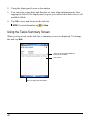
Using the Tasks Summary Screen
When you tap a task in the task list, a summary screen is displayed. To change
the task, tap Edit.
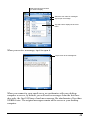
Tap to show and hide additional
summary information.
View notes.
Tap to change task information.
44
4.4 Notes: Capturing Thoughts and Ideas
Quickly capture thoughts, reminders, ideas, drawings and phone numbers with
Notes. You can create a written note or a recording. You can also include a
recording in a note. If a note is open when you create the recording, it will be
included in the note as an icon. If the note list is displayed, it will be created as a
stand-alone recording.
Tap
Æ Programs Æ Notes to switch to the program.
Tap to change the sort order of
the list.
Tap to open a note or play a
recording.
Tap and hold to display the
shortcut menu
Tap to create a new note.
Creating a Note
1. In Notes, tap New.
2. Create your note by writing, drawing, typing, or recording. For more
information about using the Input panel, writing, and drawing on the screen
and creating recordings, see section 2.8.
45
Tap to return to the note list (the
note is saved automatically)
3. Tap OK to save and return to the note list.
NOTE: For more information, tap
46
Æ Help.
4.5 Messaging: Sending and Receiving E-mail
Messages
You can use Messaging to send and receive email messages in two ways:
z
By synchronizing email messages with Microsoft Exchange or Microsoft
Outlook on your desktop computer.
z
By connecting directly to an e-mail server through an ISP (Internet Service
Provider) or a network. This method requires an optional modem or network
card.
Tap
Æ Messaging to switch to the program.
Synchronizing E-mail Messages
E-mail messages can be synchronized as part of the general synchronization
process. To do this, you need to enable Inbox synchronization in ActiveSync For
information on enabling Inbox synchronization, see ActiveSync Help on the
desktop computer.
During synchronization, the following occurs:
z
Messages are copied from the mail folders of Exchange or Outlook on your
desktop computer to the ActiveSync folder in Inbox on your Pocket PC. By
default, you receive messages from the past three days only, the first 100
lines of each message file attachments of less than 100 KB in size.
z
Email messages in the Outbox folder on your Pocket PC are transferred to
Exchange or Outlook and then sent from those programs.
z
The messages on the two computers are linked. When you delete a message
on your Pocket PC, it is deleted from your desktop computer the next time
you synchronize.
z
Email messages in subfolders in other e-mail folders in Outlook are
synchronized only if they have been selected for synchronization in
ActiveSync.
47
Connecting Directly to an E-mail Server
You can send and receive email messages by connecting to a POP3 or IMAP4
e-mail server if you can connect to your ISP or local area network. (For
information on connection, see Section 6.1.)
Setting up an Email Service
You can use multiple email services to receive your messages. For each email
service you intend to use, first set up and name the email service. If you use the
same service to connect to different mailboxes, set up and name each mailbox
connection.
In Messaging, tap Menu Æ Tools Æ New Account. Follow the directions in the New
Service Wizard. For an explanation of a screen, tap at the upper right corner
of the screen.
When you connect to the email server, new messages are downloaded to the
Inbox folder on your Pocket PC, messages in the Pocket PC Outbox folder are
sent messages that have been deleted on the email server are removed from the
Inbox folder on your Pocket PC.
Messages that you receive directly from an email server are linked to your email
server rather than your desktop computer. When you delete a message on your
Pocket PC, it is also deleted from the email server the next time you connect
based on the settings you selected in ActiveSync.
You can work online or offline. When working online, you read and respond to
messages while connected to the email server. Messages are sent as soon as you
tap Send, which saves space on your Pocket PC.
When working offline, once you have downloaded new message headers or
partial messages, you can disconnect from the email server and then decide
which messages to download completely. The next time you connect, Inbox
downloads the complete messages you have marked for retrieval and sends the
messages you have composed.
Using the Message List
Messages you receive are displayed in the message list. By default, the most
recently received messages are displayed first in the list.
48
Select the service and folder
you want to display.
Select the sort order for messages.
Tap to open a message.
Tap and hold to display the shortcut
menu.
When you receive a message, tap it to open it.
Tap to return to the message list.
When you connect to your email server or synchronize with your desktop
computer or server, by default, you will receive messages from the last three
days only, the first 100 lines of each new message file attachments of less than
100KB in size. The original messages remain on the server or your desktop
computer.
49
You can mark the messages that you want to retrieve in full during your next
synchronization or email server connection. In the message list, tap and hold the
message you want to retrieve. On the shortcut menu, tap Mark for Download. The
icons in the Inbox message list give you visual indications of message status.
You specify your downloading preferences when you set up the service or select
your synchronization options. You can change them at any time.
z
Change options for Inbox synchronization using ActiveSync options. For
more information, see ActiveSync Help.
z
Change options for direct email server connections in Messaging on your
Pocket PC. Tap Menu Æ Options and tap the account you want to change. Tap
and hold the account and tap Delete to remove an account.
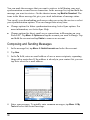
Composing and Sending Messages
1. In the message list, tap Menu Æ Switch Accounts and select the account.
2. Tap New.
3. In the To field, enter an email address of one or more recipients, separating
them with a semicolon. If the address is already in your contact list, you can
tap To to select the e-mail address.
4. Enter your message. To quickly enter common messages, tap Menu Æ My
Text and select the desired message.
50
5. To check spelling, tap Menu Æ Spell Check.
6. If you want to attach a file to the message, tap Menu Æ Insert and select the
desired file.
NOTE: OLE objects cannot be attached to Inbox messages.
7. Tap Send when you have finished the message. If you are working offline,
the message is moved to the Outbox folder and is sent the next time you
connect.
The message is placed in the Outbox folder on your Pocket PC and will be
delivered in one of two ways:
z
The message is transferred to the Outbox folder in Exchange or Outlook on
your desktop computer and sent the next time you synchronize.
z
The message is transferred to your email server the next time you connect.
Managing Email Messages and Folders
Each e-mail service account has its own folder hierarchy with five default
folders: Inbox, Outbox, Deleted Items, Drafts and Sent Items. The messages you
receive and send through the mail service are stored in these folders. You can
also create additional folders within each hierarchy.
The Deleted Items folder contains messages that have been deleted on your
Pocket PC. The behaviour of the Deleted and Sent Items folders depends on the
options you have chosen.
Folder Behavior
The behavior of the folders you create depends on whether you are using
ActiveSync, POP3 or IMAP4.
z
If you use ActiveSync, email messages in the Inbox folder in Outlook are
automatically synchronized with your Pocket PC. You can select to
synchronize additional folders by designating them for ActiveSync. The
folders you create and the messages you move are mirrored on the server.
For example, if you move two messages from the Inbox folder to a folder
named Family and you have designated Family for synchronization, the
server creates a copy of the Family folder and copies the messages into that
folder. You can then read the messages while away from your desktop
computer.
51
z
If you use POP3 and you move email messages to a folder you created, the
link is broken between the messages on the Pocket PC and their copies on
the mail server. The next time you connect, the mail server sees that the
messages are missing from the Pocket PC Inbox and deletes them from the
server. This prevents you from having duplicate copies of a message, but it
also means that you no longer have access to messages that you move to
folders created from anywhere except the Pocket PC.
z
If you use IMAP4, the folders you create and the email messages you move
are mirrored on the server. Therefore, messages are available to you anytime
you connect to your mail server, whether it is from your Pocket PC or
desktop computer. This synchronization of folders occurs whenever you
connect to your mail server, create new folders or rename/delete folders
when connected.
For all services except ActiveSync, you can access folder options by tapping
Menu Æ Tools Æ Manage Folders in the message list.
52
5 More Programs
In addition to Microsoft Pocket Outlook, there are other programs built into your
Pocket PC. This chapter tells you how to use these programs.
5.1 Microsoft ActiveSync
NOTE: ActiveSync is already installed on your Pocket PC. You need to install ActiveSync
on your desktop computer. (For information on installing ActiveSync, see section 1.4.)
When you have established the connection between your Pocket PC and your
desktop computer, you can synchronize the information between the two with
ActiveSync. Synchronization compares the data on the two sides and updates
both computers with the most recent information. For example, you can:
z
Keep your Pocket Outlook Contacts, Calendar and Tasks databases
up-to-date by synchronizing your Pocket PC with Microsoft Outlook data on
your desktop computer.
z
Synchronize email messages in your Pocket PC Inbox with email messages
in Microsoft Outlook on your desktop computer.
z
Synchronize Microsoft Word and Microsoft Excel files between your Pocket
PC and desktop computer. Your files are automatically converted to the
correct format.
With ActiveSync, you can also:
z
Back up and restore your Pocket PC data.
z
Copy (rather than synchronize) files between your Pocket PC and desktop
computer.
z
Add and remove programs on your Pocket PC.
z
Pass through your desktop computer to a network or the Internet.
53
Synchronizing Data
Once you have created a synchronization relationship and completed the first
synchronization, you can initiate synchronization from your Pocket PC.
1. Connect your Pocket PC to your desktop computer.
2. On your Pocket PC, tap
Æ Programs Æ ActiveSync.
3. Tap Sync to begin synchronization.
By default, ActiveSync does not automatically synchronize all types of
information. Use ActiveSync options to turn synchronization on and off for
specific information types. You can:
z
Control when synchronization occurs by selecting a synchronization mode.
For example, you can synchronize continually while the Pocket PC is
connected or only when you choose the synchronize command.
z
Select which information types are synchronized and control how much data
is synchronized. For example, you can choose how many weeks of past
appointments you want synchronized.
For information on setting ActiveSync options and using ActiveSync on your
desktop computer, see ActiveSync Help on the desktop computer. For
information on using ActiveSync on your Pocket PC, see ActiveSync Help on
the Pocket PC.
54
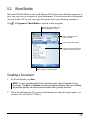
5.2 Word Mobile
Microsoft Word Mobile works with Microsoft Word on your desktop computer to
give you easy access to copies of your documents. You can create new documents
on your Pocket PC or you can copy documents from your desktop computer.
Tap
Æ ProgramsÆ Word Mobile to switch to the program.
Select the type of folder you
want displayed in the list.
Tap to change the sort
order of the list.
Tap to open a document.
Tap and hold an item to see
a shortcut menu of actions.
Tap to create a new document.
Creating a Document
1. In Word Mobile, tap New.
NOTE: To open a template rather than a blank document, select a template for new
documents. Tap Menu Æ Options and select the desired template. When you tap New,
the template appears with appropriate text and formatting already provided.
2. Enter the information. (For more information on using the input panel, see
section 2.8 or Pocket PC Help.)
55
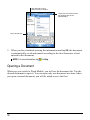
Tap and hold to see a
shortcut menu of actions.
Tap to return to the document
list (changes are saved
automatically).
Tap to format text.
3. When you have finished entering the information and tap OK, the document
is automatically saved and named according to the first characters of text
entered in the document.
NOTE: For more information, tap
Æ Help.
Opening a Document
Whenever you switch to Word Mobile, you will see the document list. Tap the
desired document to open it. You can open only one document at a time; when
you open a second document, you will be asked to save the first.
56
5.3 Excel Mobile
Microsoft Excel Mobile works with Microsoft Excel on your desktop computer
to give you easy access to copies of your workbooks. You can create new
workbooks on your Pocket PC or you can copy workbooks from your desktop
computer to your Pocket PC. Excel Mobile provides fundamental spreadsheet
tools, such as formulas, functions, sorting and filtering, which enable you to
create simple workbooks, such as expense reports and mileage logs.
Tap
Æ Programs Æ Excel Mobile to switch to the program.
Creating a Workbook
NOTE: To open a template rather than a blank workbook, select a template for new
workbooks. Tap Menu Æ Options and select the desired template. When you tap New,
the template appears with appropriate text and formatting already provided.
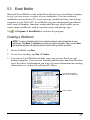
1. In Excel Mobile, tap New.
2. To use Excel toolbar, tap View Æ Toolbar.
3. You can use Excel Mobile much the same way you use Excel on your
desktop computer. You can enter formulas and functions and then filter data
to see the subset of information you want. (For more information on entering
information, see section 2.8 or Pocket PC Help.)
Cell contents appear
here as you enter them.
Excel Toolbar
57
4. When you have finished entering the information and tap OK, the workbook
is automatically saved and named according to the first characters of text
entered in the workbook.
NOTE: For more information, tap
Æ Help.
Opening a Workbook
Whenever you switch to Excel Mobile, you will see the workbook list. Tap the
desired workbook to open it. You can open only one workbook at a time; when
you open a second workbook, you will be asked to save the first.
58
5.4 PowerPoint Mobile
With PowerPoint Mobile, you can open and view slide show presentations
created on your desktop computer. Slide shows created in *.ppt and *.pps format
with PowerPoint ’97 and later can be viewed on your Pocket PC.
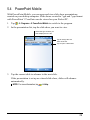
1. Tap
Æ Programs Æ PowerPoint Mobile to switch to the program.
2. In the presentation list, tap the slide show you want to view.
Select the type of folder you
want displayed in the list.
Tap to change the sort
order of the list.
Tap to open a slide show.
3. Tap the current slide to advance to the next slide.
If the presentation is set up as a timed slide show, slides will advance
automatically.
NOTE: For more information, tap
Æ Help.
59
5.5 Pocket MSN
Pocket MSN provides practically instant access to your up-to-date MSN Hotmail
Inbox, your MSN Messenger Contacts list, and options for customizing your
Pocket MSN experience.
With Pocket MSN, you get:
z
MSN Hotmail
Read, write and send e-mail. Delete e-mail and manage your Hotmail
folders.
z
MSN Messenger
See who’s online. Send and receive instant messages. Subscribe to status
updates for selected contacts so you’re notified when they’re online.
z
Options and settings you can use to create a custom Pocket MSN experience.
Tap
Æ Programs Æ Pocket MSN to switch to the program.
NOTE: For more information, tap
60
Æ Help.
5.6 Windows Media Player for Pocket PC
Use Microsoft Windows Media Player for Pocket PC to play digital audio and
video files that are stored on your Pocket PC or on a network, such as on a Web
site.
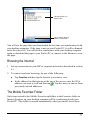
Tap
Æ Windows Media to switch to the program.
Library Screen
Playback Screen
You can play files in either Windows Media or MP3 format (this include files
with the extension.asf,.wma,.wmv and.mp3). To find content in Windows Media
Format, see the WindowsMedia.com Web site
(http://www.windowsmedia.com).
Use Microsoft Windows Media Player on your desktop computer to copy digital
audio and video files to your Pocket PC.
NOTE: For more information, tap
Æ Help.
61
5.7 Pictures & Videos
Use Pictures & Videos to view and edit pictures as well as launch video clips
stored on your Pocket PC or on a storage card. You can also send pictures and
video clips to others, or set a picture as the background on the Today screen. You
can see your pictures individual, as thumbnails, or as part of a slide show. You
can edit your pictures by cropping, rotating, and adjusting the brightness and
contrast.
Tap
Æ Programs Æ Pictures and Videos to switch to the program.
Select the type of folder you
want displayed in the list.
Tap to change the sort
order of the list.
Tap to view a picture in full
screen.
NOTE: For more information, tap
62
Æ Help.
5.8 Additional Programs
In addition to Microsoft software, your Pocket PC manufacturer may provide
additional programs to enhance your Pocket PC or facilitate your operation.
NOTE: Depending on the continuing developments of the product, the software supplied
with your Pocket PC may be changed or updated. If there is any difference between the
information in this manual and your product, the operation should be based on the product
you have.
SysInfo
SysInfo provides the following functions:
z
Restore your device to the factory default state.
z
Automatically lock your device when it turns off.
Tap
Æ Settings Æ System Æ SysInfo. The tool consists of these tabs: System,
Clean Boot, and AutoLock. They are described as below.
System
This screen displays the system information.
Clean Boot
Use this function if you want to restore your Pocket PC to the factory default
state. Restoring factory default state means all data you have entered in RAM,
including all files, system settings, and additional programs you have installed,
will be erased.
If Mio Map is pre-installed in your device, you have the option of keeping the
software. To perform a “Clean Boot,” tap Start and follow the onscreen
instructions.
AutoLock
You may not want any accidental touching of the buttons to turn on your device.
This can happen when, for example, you put your device in a bag and something
else in the bag presses against your device.
This AutoLock feature allows your device to be automatically locked whenever
it turns off. Even if your device is accidentally turned on, a message will prompt
63
you to unlock it within 5 seconds. As long as there is no response from you
within 5 seconds, the device turns off again. This helps saving battery power.
(See Section 2.9 to know how to unlock.)
eConverter
eConverter provides three modes: Calculator, Currency, and Metrology. You
can use these modes to perform basic arithmetic and convert currency and
measure.
Tap
Æ Programs Æ eConverter to switch to the program.
You will see the calculator screen. To switch to another mode, tap one of the
buttons at the top right corner of the screen.
Using Calculator Mode
Calculator mode allows you to perform any of the
standard operations for which you would normally
use a handheld calculator.
Using Currency Mode
Tap the
button on the calculator screen to
switch to Currency mode.
Tap the down arrow next to the input field to display
a list of currencies and select the currency to convert
from. Tap the down arrow next to the output field to
display a list of currencies and select the currency to
convert to.
Enter the currency value in the input field by tapping
the number buttons on the numeric keypad. The
converted currency immediately appears in the
output field.
64
Before performing the currency conversion, you can
edit the exchange rate to the most up-to-date one. Tap
the Edit button on the currency screen. Enter the
exchange rate and tap the √ button to save and go
back to the currency screen.
Using Metrology Mode
Tap the
button on the calculator screen to
switch to Metrology mode.
Tap the measure button on the metrology screen to
display a scroll list of measures and select the desired
measure from the list.
Tap the down arrow next to the input field to display
a list of units and select the unit to convert from. Tap
the down arrow next to the output field to display a
list of units and select the unit to convert to.
Enter the value in the input field by tapping the
number buttons on the numeric keypad. The
converted value immediately appears in the output
field.
65
6 Getting Connected
To take full advantage of your Pocket PC, you will want to get connected. This
chapter tells you how you can get your Pocket PC connected through a variety of
ways including modem, and network card. It also describes Internet Explorer for
Web browsing.
6.1 Connection Settings
Your Pocket PC has two groups of connection settings: “My ISP” and “My
Work Network.” My ISP settings are used to connect to the Internet, and My
Work Network settings can be used to connect to any private network, such as a
corporate network you use at work.
Connections can be made using a modem, wireless network, or network
(Ethernet) card.
After the connections, you can browse the Internet or intranet, send and receive
e-mail and instant messages, and synchronize information using ActiveSync.
Modem Connection
With a modem, you can dial in to your ISP or corporate network. Before creating
the connection, you need to:
z
Have a modem (SD IO or Bluetooth). (For installation information, see the
documentation supplied with the product.)
z
Obtain the following information from your ISP or network administrator:
server phone number, user name, password, domain name and TCP/IP
settings.
67
Creating a Modem Connection
1. Tap
Æ Settings Æ Connections Æ Connections.
2. In My ISP or My Work Network, tap Add a new modem connection. To view
additional settings, tap .
NOTE: To change modem connection settings, in either My ISP or My Work Network, tap
Manage existing connections. Select the desired modem connection, tap Settings and
follow the instructions on the screen.
Starting and Ending a Modem Connection
To start the connection, install the modem and connect the modem cable. Then,
use the desired program. For example, switch to Pocket Internet Explorer and
browse to a Web page. Your Pocket PC will automatically connect.
To end the connection, tap the icon
Disconnect.
on the Navigation bar and then tap
Network (Ethernet) Card Connection
Use a network (Ethernet) card to connect directly to a network. You do not need
to create a new connection on your Pocket PC. Insert a network card and you can
create a connection.
Before creating the connection, you need to:
z
Have a network card (SD IO). (For installation information, see the
documentation supplied with the product.)
z
Obtain the following information from your network administrator: user
name, password and domain name.
Creating a Network Card Connection
1. Insert the network card into your Pocket PC.
2. The first time you insert the card, Network Settings appears automatically so
that you can configure the network card. If it does not appear or to change
Æ Settings Æ Connections Æ Network Cards.
settings later, tap
3. If you need to enter specific server information, on the Network Adapters tab,
tap the appropriate adapter and then Name Servers. Most networks use DHCP,
68
so you should not have to change these settings unless your network
administrator instructs you to do so.
4. If necessary, connect the network card to the network by using a network
cable.
NOTE: You may need proxy server and VPN connection settings. For more information,
see Pocket PC online help and your network administrator.
Starting and Ending a Network Card Connection
To start the connection, install the network card and connect the network cable.
Then, use the desired program. For example, switch to Pocket Internet Explorer
and browse to a Web page. Your Pocket PC will automatically connect.
To end the connection, remove the card from your Pocket PC.
69
6.2 Using Internet Explorer Mobile
Use Internet Explorer Mobile to view Web pages in either of these ways:
z
Connect to an ISP or network and browse the Web. To do this, you will need
to create the connection first, as described in section 6.1.
z
During synchronization with your desktop computer, download your
favorite links and mobile favorites that are stored in the Mobile Favorites
subfolder in Internet Explorer on the desktop computer.
While you are connected to an ISP or network, you can also download files and
programs from the Internet or an intranet.
Tap
Æ Internet Explorer to switch to the program. The Internet Explorer
Mobile home page appears:
Viewing Mobile Favorites and Channels
1. In Internet Explorer, tap Favorites.
2. In the list, tap the page you want to view.
70
Tap the favorite you
want to view.
Tap to add or delete a
folder or favorite link.
You will see the page that was downloaded the last time you synchronized with
your desktop computer. If the page is not on your Pocket PC, it will be dimmed
in the Favorites list. You will need to synchronize with your desktop computer
again to download the page to your Pocket PC or connect to the Internet to view
the page.
Browsing the Internet
1. Set up a connection to your ISP or corporate network as described in section
6.1.
2. To connect and start browsing, do one of the following:
z
Tap Favorites and then tap the favorite you want to view.
z
In the address bar that appears at the top of the screen, enter the Web
address you want to visit and then tap . Tap the arrow to choose from
previously entered addresses.
The Mobile Favorites Folder
Only items stored in the Mobile Favorites subfolder in the Favorites folder in
Internet Explorer on your desktop computer will be synchronized with your
Pocket PC. This folder is created automatically when you install ActiveSync.
71
Favorite Links
During synchronization, the list of favorite links in the Mobile Favorites folder
on your desktop computer is synchronized with Pocket Internet Explorer on your
Pocket PC. Both computers are updated with changes made to either list each
time you synchronize. Unless you mark the favorite link as a mobile favorite,
only the link (and not the page) will be downloaded to your Pocket PC, and you
must connect to your ISP or network to view the content. For more information
on synchronization, see ActiveSync Help on your desktop computer.
Mobile Favorites
If you are using Microsoft Internet Explorer 5 or later on your desktop computer,
you can download mobile favorites to your Pocket PC. When you synchronize
your desktop computer and Pocket PC, the content of your mobile favorites is
downloaded to your Pocket PC so that you can view pages while you are not
connected to your ISP or your network.
Use the Internet Explorer plug-in installed with ActiveSync to create mobile
favorites quickly.
To create a mobile favorite:
1. In Internet Explorer on your desktop computer, click Tools, and then click
Create Mobile Favorite.
z
To change the link name, enter a new name in the Name box.
z
To change how often the mobile favorite is updated, select a desired
update schedule under Update.
2. Click OK. Internet Explorer downloads the latest version of the page to your
desktop computer.
3. If you want to download the pages that are linked to the mobile favorite you
just created, right-click the mobile favorite and then click Properties. On the
Download tab, specify the number of links deep you want to download. To
conserve memory on your Pocket PC, download only one level of links.
4. Synchronize your Pocket PC and desktop computer. Mobile favorites that
are stored in the Mobile Favorites folder in Internet Explorer are
downloaded to your Pocket PC.
72
NOTE: If you do not specify an update schedule, you must manually download content to
keep the information updated on your desktop computer and Pocket PC. Before
synchronizing, in Internet Explorer on your desktop computer, click Synchronize on the
Tools menu. You will see the last time content was downloaded to the desktop computer,
and you can manually download content if needed.
CAUTION: You can add a button to the Internet Explorer toolbar for creating mobile
favorites. In Internet Explorer on your desktop computer, on the View menu, click
Toolbars, and then click Customize.
Conserving Memory
Mobile favorites take up storage memory on your Pocket PC. Follow these tips
to minimize the amount of memory used:
z
Use ActiveSync settings to turn off photos and sounds for the Mobile
Favorites information type or to stop some mobile favorites from being
downloaded to your Pocket PC. For more information, see ActiveSync Help.
z
Limit the number of downloaded linked pages. In Internet Explorer on the
desktop computer, right-click the mobile favorite you want to change, and
then click Properties. On the Download tab, specify 0 or 1 for the number of
linked pages you want to download.
73
7
Troubleshooting and
Troubleshooting
and Maintenance
Maintenance
This chapter gives solutions to common Pocket PC problems you may
encounter. It also provides guidelines on taking care of your Pocket PC.
NOTE: If you encounter a problem you cannot solve, contact your dealer for assistance.
7.1 Resetting Your Pocket PC
CAUTION: Resetting will cause unsaved data to be lost.
Resetting your Pocket PC is similar to restarting your desktop computer. It
restarts the operating system, but you will lose any unsaved data.
Occasionally, you may need to reset your Pocket PC; for example, you should
reset:
z
After you restore data from your desktop computer.
z
When your Pocket PC stops responding; in other words, it appears to be
“frozen” or “locked up.”
Use the stylus to press the reset button on your Pocket PC.
75
7.2 Restoring Last State
Follow this procedure to restore your Pocket PC to the last state when your
Pocket PC does not respond after being reset.
1. Disconnect all cables, including the AC adapter, from your Pocket PC.
2. Slide the ON/OFF switch to the OFF position.
3. Wait for 1 minute and then slide the switch back to the ON position.
4. Your Pocket PC turns on.
NOTE: You need to restore your Pocket PC to factory default state if you have set up a
password but forget it. (See “SysInfo” in Section 5.8.)
76
7.3 Power Problems
Power does not turn on when using battery power
z
The remaining battery power may be too low to run your Pocket PC.
Connect the AC adapter to your Pocket PC and to external AC power. Then,
turn on your Pocket PC.
Battery runs out of power quickly
z
You might be using your Pocket PC in ways that drain power quickly. (See
“Power-Saving Tips” in section 3.1 for more information.)
7.4 Memory Problems
If a warning message of not enough memory appears due to the memory
allocation problem, try the following to free memory on your Pocket PC.
CAUTION: Be discreet when you delete files. Deleting files of which the function is
unknown can cause programs or features to malfunction. It is appropriate to make a backup
before deleting files.
z
Delete files you no longer need. Tap
Æ Programs Æ File Explorer. Tap and
hold the file you wish to delete and then tap Delete on the shortcut menu. To
find your largest files, tap
Æ Programs Æ Search. In the Type list, tap
Larger than 64KB Æ Go.
z
Æ Settings Æ System Æ
Remove programs you no longer need. Tap
Remove Programs. Tap the program you want to remove and then tap Remove.
z
In Internet Explorer options, delete all files and clear history. In Internet
Explorer, tap Menu Æ Tools Æ Options Æ Memory. Tap Delete Files and Clear
History.
z
Stop programs you are not currently using. In most cases, programs
automatically stop to free needed memory. However, in some situations, such
as when confirmation dialog boxes are waiting for a user response, the
program may not be able to automatically stop. To check the state of your
active programs, tap Æ Settings Æ System Æ Memory Æ Running Programs.
Tap the program you want to view and then tap Activate. Close any open
windows or messages and return the program to list view. If this does not
work, you can stop the program manually. First, make sure that your work is
77
saved by closing open items and returning the program to list view. Then, stop
the program by tapping Stop or Stop All on the Running Programs tab.
z
Reset your Pocket PC as described in section 7.1.
If you have a storage card, move data to the storage card as described
below.
z
Tap
Æ Programs Æ File Explorer. Tap and hold the file you want to move
and tap Cut. Browse to My Documents folder in the storage card folder, tap Edit
Æ Paste. Files stored in folders other than My Documents or stored in
subfolders within subfolders in My Documents may not show up in the list
view of some programs. When using Notes, Word Mobile Pocket or Excel,
you can also move files by opening the item and tapping Menu Æ File Æ
Rename/Move.
z
Move email attachments. In Messaging, tap Menu Æ Tools Æ Options Æ
Storage and select Store attachments on storage card. All attachments are moved
to the storage card and new attachments are automatically stored on the
storage card.
z
Set programs such as Notes, Word Mobile and Excel Mobile to
automatically save new items on the storage card. In the program, tap Menu
Æ Options. In Save to, select Storage Card.
7.5 Screen Problems
Screen is off
If the screen does not respond even after you press the power button, try the
following in order until the problem is solved:
z
Connect the AC adapter to your Pocket PC and to external AC power.
z
Reset your Pocket PC as described in section 7.1.
Screen responds slowly
z
78
Make sure that your Pocket PC is not running out of battery power or
running many active programs. If the problem still exists, reset your Pocket
PC as described in section 7.1.
Screen freezes
z
Reset your Pocket PC as described in section 7.1.
Screen is hard to read
z
Make sure that the backlight of the display is on.
z
Move to a location with enough light.
z
If you’re having a hard time reading a document on the screen, try adjusting
the zoom percentage or text size.
9 Tap
Æ Settings Æ System Æ Screen Æ Text Size and select the text
size.
9 In Notes, tap Menu Æ Zoom and select a zoom percentage.
9 In Word Mobile and Excel Mobile, tap View Æ Zoom and select a zoom
percentage.
9 In Pocket Internet Explorer, tap Menu Æ Zoom and select a size.
Inaccurate response to stylus taps
z
Realign the touch screen. Tap
Æ Settings Æ System Æ Screen Æ Align
Screen. If you cannot correctly tap your selection, turn off the Pocket PC.
Press in the scroll dial and, while keeping it pressed, press the power button
to turn on the Pocket PC. You can then start to align the touch screen.
7.6 Connection Problems
ActiveSync Connection Problems
z
ActiveSync connection problems may occur in some specific cases. They
are likely caused by interoperability with desktop firewall applications or
applications that manage network traffic. For troubleshooting information,
visit the Microsoft web site:
www.microsoft.com/windowsmobile/help/activesync.
z
Make sure that you have installed the correct version of ActiveSync on your
desktop computer. Install the version ActiveSync included with your Pocket
PC.
79
z
Make sure that your Pocket PC and your desktop computer are both turned
on before establishing the connection.
z
Make sure that the cable is securely plugged into the USB port on your
desktop computer. Connect the USB cable directly to your desktop
computer—do not run the cable through a USB hub.
z
Make sure that the USB connection is enabled in ActiveSync on your
desktop computer. If the USB connection is already enabled, disable the
USB connection, close the Connection Settings window and then reopen and
re-enable the USB connection.
z
Reset your Pocket PC before connecting the cable. (See section 7.1.) Always
disconnect your Pocket PC before you restart your desktop computer.
z
Connect only one Pocket PC or personal digital assistant to your desktop
computer at a time.
Modem Connection Problems
Unable to dial out
z
Do not install your Pocket PC in the cradle. You cannot dial out if your
Pocket PC has an active connection with your desktop computer.
z
Make sure that the telephone line is connected correctly.
z
Make sure that the telephone line is analog. Do not connect a modem to a
digital telephone line unless it is specifically designed for use with a digital
line.
Able to dial out but unable to make a proper connection
z
Make sure that the network you are trying to connect supports the
Point-to-Point Protocol (PPP). Your ISP or network administrator can verify
this.
z
Make sure that your dialing location is correct.
z
Make sure that the phone number you are trying to reach is correct.
80
Modem connection is unreliable
z
Make sure that the modem is installed properly.
z
Make sure that the telephone line is connected correctly.
Network Connection Problems
z
Make sure that the network card is compatible with your Pocket PC.
z
Make sure that you have installed the proper drivers for your Pocket PC.
z
In the properties for your network card, make sure that you have correctly
configured the IP settings, and the addresses of your DNS servers and/or
WINS servers. Your network administrator can verify this.
z
Make sure that you have added necessary server information.
z
If Network Connection is not listed as a connection method in the ActiveSync
dialog box when starting synchronization, wait a few minutes and try again.
Also, if synchronization does not start right away, the network is probably
busy, and it may take a minute for your Pocket PC to connect to the network.
z
Verify with your network administrator that your user name and password
are correct.
z
Verify with your network administrator that the network you are trying to
connect to is available, to try to connect to it from another computer.
z
You may need to change the device name if you are trying to connect to a
network and cannot because another device with the same name is already
connected. To change the device name, tap
Æ Settings Æ System Æ About
Æ Device ID.
81
7.7 Taking Care of Your Pocket PC
Taking good care of your Pocket PC will ensure trouble-free operation and
reduce the risk of damage to your Pocket PC.
General Guidelines
z
Keep your Pocket PC away from excessive moisture and extreme
temperatures.
z
Avoid exposing your Pocket PC to direct sunlight or strong ultraviolet light
for extended periods of time.
z
Do not place anything on top of your Pocket PC or drop objects on top of
your Pocket PC.
z
Do not drop your Pocket PC or subject it to severe shock.
z
Store your Pocket PC in a protective cover when not in use.
z
Do not subject your Pocket PC to sudden and severe temperature changes.
This could cause moisture condensation inside the unit that could damage
your Pocket PC. In the event of moisture condensation, allow you Pocket PC
to dry out completely.
z
Take care not to sit on your Pocket PC when it is located in the back pocket
of trousers, etc.
z
The screen surface is easily scratched. Use only the stylus to tap on the
screen. Avoid touching it with your fingers, pens, pencils or any other sharp
objects.
z
Never clean your Pocket PC with its power on. Use a soft, lint-free cloth
moistened with water to wipe the screen and the exterior of your Pocket PC.
z
Do not use paper towels to clean the screen.
z
Never attempt to disassemble, repair or make any modifications to your
Pocket PC. Disassembly, modification or any attempt at repair could cause
damage to your Pocket PC and even bodily injury or property damage.
z
Do not store or carry flammable liquids, gases or explosive materials in the
same compartment as your Pocket PC, its parts or accessories.
82
Travel Guidelines
z
Before traveling with your Pocket PC, back up your data. As an added
precaution, bring along a backup copy.
z
Turn off your Pocket PC and disconnect all external devices.
z
Make sure that the battery is fully charged.
z
Take the AC adapter with you. Use the AC adapter as the power source and
as a battery-recharger.
z
Keep your Pocket PC inside its protective cover when you are not using it on
the road.
z
Hand-carry your Pocket PC in a protective cover. Do not check it in as
luggage.
z
If you plan to travel abroad with your Pocket PC, consult your dealer for the
appropriate AC adapter for use in your country of destination.
z
If you plan to make modem connections abroad, make sure that you have the
correct modem and cable for your country of destination.
83
A Regulatory Information
NOTE: Marking labels located on the exterior of your device indicate the regulations that
your model complies with. Please check the marking labels on your device and refer to the
corresponding statements in this chapter. Some notices apply to specific models only.
A.1 Regulations Statements
European Notice
Products with the CE marking comply with Radio & Telecommunication
Terminal Equipment Directive (R&TTE) (1999/5/EEC), the Electromagnetic
Compatibility Directive (89/336/EEC) and the Low Voltage Directive
(73/23/EEC) – as amended by Directive 93/68/ECC - issued by the Commission
of the European Community.
Compliance with these directives implies conformity to the following European
Standards:
EN301489-1: Electronic compatibility and Radio spectrum Matters (ERM),
ElectroMagnetic Compatibility (EMC) standard for radio equipment and
services; Part 1: Common technical requirements
EN301489-17: Electronic compatibility and Radio spectrum Matters (ERM),
ElectroMagnetic Compatibility (EMC) standard for radio equipment and
services; Part 17: Specific conditions for 2,4 GHz wideband transmission
systems and 5 GHz high performance RLAN equipment
EN55022: Radio disturbance characteristics
EN55024: Immunity characteristics
EN6100-3-2: Limits for harmonic current emissions
EN6100-3-3: Limitation of voltage fluctuation and flicker in low-voltage
supply system
EN60950 / IEC 60950: Product Safety
85
The manufacturer cannot be held responsible for modifications made by the User
and the consequences thereof, which may alter the conformity of the product
with the CE Marking.
A.2 Safety Precautions
About Charging
z
Use only the AC adapter (PSC05R-050 PH) supplied with your Pocket PC.
Use of another type of AC adapter will result in malfunction and/or danger.
z
Use only the car charger supplied with your Pocket PC. Use of another type
of car charger will result in malfunction and/or danger.
z
This product is intended to be supplied by a LISTED Power Unit marked
with “LPS”, “Limited Power Source” and output rated + 5 V dc / 1.0 A”.
z
Use a specified USB cradle approved by the manufacturer.
z
Use a specified battery in the equipment.
About the AC Adapter
z
Do not use the adapter in a high moisture environment. Never touch the
adapter when your hands or feet are wet.
z
Allow adequate ventilation around the adapter when using it to operate the
device or charge the battery. Do not cover the AC adapter with paper or other
objects that will reduce cooling. Do not use the AC adapter while it is inside
a carrying case.
z
Connect the adapter to a proper power source. The voltage and grounding
requirements are found on the product case and/or packaging.
z
Do not use the adapter if the cord becomes damaged.
z
Do not attempt to service the unit. There are no serviceable parts inside.
Replace the unit if it is damaged or exposed to excess moisture.
86
About the Battery
z
Use a specified charger approved by the manufacturer.
z
Do not mutilate, puncture, or dispose of battery in fire. The battery can burst
or explode, releasing hazardous chemicals.
z
Important instructions
9 Caution: Risk of explosion if battery is replaced by an incorrect type.
Dispose of used batteries according to the instructions.
9 Replace only with the same or equivalent type recommended by the
manufacturer.
9 The battery must be recycled or disposed of properly.
9 Use the battery only in the specified equipment.
87
Index
Settings, 31
A
AC adapter
Cautions, 86
Connecting, 8
Accessory, 12
ActiveSync, 53
Installing on desktop computer, 10
Synchronizing data, 54
Synchronizing e-mail messages, 47
Synchronizing mobile favorites, 71
ActiveSync cable, 11
Alarm, 32
Appointment
Changing, 39
Creating, 38
Summary screen, 39
B
Backlight setting, 32
Battery
Cautions, 87
Charging, 8
Checking remaining battery power,
29
Power low, 29
Beam, 33
Block Recognizer, 19
Buttons
C
Calculator, 64
Calendar, 37
Creating an appointment, 38
Summary screen, 39
Car charger, 9
Car holder, 9
Certificate, 32
Charging the battery, 8
Indicator, 2
Cleaning, 82
ClearType, 32
Clock, 32
Connections, 33, 67
Troubleshooting, 79
Contacts, 40
Changing, 42
Creating, 40
Summary screen, 42
Converting writing to text, 21
D
Date, 32
Drag, stylus, 13
Drawing on the screen, 22
89
E
eConverter, 64
E-mail service setting up, 48
Entering information, 17
Error reporting, 32
Ethernet, 68
Excel Mobile, 57
F
Features, 1
File Explorer, 33
G
Getting Started CD, 11
GPS
Antenna, 5
Car antenna, 3
Settings, 32
GSM file format, 25
H
Hardware information, 32
Headphone connector, 4
I
IMAP4 e-mail server, 48
Folder behavior, 52
Inbox, 47
Composing a message, 50
Connecting to e-mail servers, 48
Managing messages and folders, 51
Sending a message, 51
Setting up email service, 48
Synchronizing e-mail messages, 47
Using message list, 48
Indicator
Charging, 2
90
Notification, 2
Infrared, 4
Input, 17
Settings, 31
Input panel, 18
Internet
Browsing, 71
Internet Explorer Mobile, 70
IR port, 4
L
Landscape view, 15
Letter Recognizer, 19
Lock, 26
M
Memory
Additional, 31
Clearing, 76
Program, 30
RAM, 30
Settings, 32
Storage, 30
Storage card, 31
Troubleshooting, 77
Memory card, 12, See Storage card
Menu
Settings, 31
Start menu, 15
Messaging. See Inbox
Microphone, 5
Microsoft Mobile Devices Web site, vi
Microsoft Pocket Outlook, 37
Mini-USB connector, 6
MMC card, 12
MMC slot, 4
Mobile favorites
Creating, 72
Reducing storage memory for, 73
Specifying level of links, 72
Synchronizing, 71
Updating schedule, 72
Viewing, 70
Modem connection, 67
MP3, 61
MSN. See Pocket MSN
MultiMediaCard, 4, 12
My ISP, 67
My Text, 25
My Work Network, 67
N
Navigation bar, 15
Navigation stick, 2
Using, 14
Network card connection, 68
Network cards settings, 33
Notes, 45
Creating, 45
Notification, 17
Indicator, 2
Settings, 31
O
ON/OFF switch, 7
Owner information, 31
P
Pass through, 53
Password, 31
PCM file format, 25
Pictures & Videos, 62
Pocket Internet Explorer
Clearing history, 77
Delete all files, 77
Pocket MSN, 60
Options, 31
POP3 e-mail server, 48
Folder behavior, 52
Power, 29
Checking remaining battery power,
29
Connecting, 8
Low battery, 29
Saving, 30
Settings, 32
Troubleshooting, 77
Power button, 2, 10, 30
PowerPoint Mobile, 59
Program buttons, 2
Program memory, 30
Programs
Adding, 34
Adding to Start menu, 35
Removing, 35
Stopping, 78
Switching, 16
R
RAM, 30
Record button
Using, 24
Recording, 24
File formats, 25
Playing back, 24
Recording toolbar, 24
Regional settings, 32
Regulatory information, 85
Removing programs, 32
Reset button, 6, 75
Resetting, 75
Restarting, 75
Restoring factory defaults, 76
Resume, 10
Running programs, 16
S
Screen
Adjusting zoom percentage, 79
Aligning, 32
Backlight setting, 32
91
Landscape view, 15
Landscape/Portrait view, 32
Realigning, 79
Troubleshooting, 78
SD card, 12
SD slot, 4
Search, 33
Secure Digital, 4, 12
Shortcut menu, 16
Soft keyboard, 18
Sound
Settings, 31
Speaker, 3
Start menu, 15
Storage card
Moving files to, 78
Storage memory, 30
Stylus, 3
Using, 13
Suspend, 10, 30
Summary screen, 44
Time, 32
Today screen, 14
Settings, 31
To-do list. See Tasks
Touch screen. See Screen
Transcriber, 19
Traveling, 83
Troubleshooting, 75
Cable connection, 79
Cradle connection, 79
Memory, 77
Modem connection, 80
Network connection, 81
Power, 77
Screen, 78
Turning off, 10
Turning on, 10
T
Voice notes. See Recording
Volume control, 31
Taking care, 82
Tap and hold, stylus, 13
Tap, stylus, 13
Tasks, 43
Changing, 44
Creating, 43
Due date, 44
Start date, 44
92
V
W
Windows Media Player, 61
Word Mobile, 55
Writing on the screen, 20