1
Diagnostics
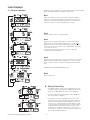
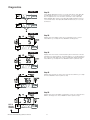
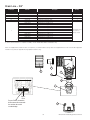
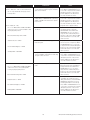
Step 1D
Step 1D
Press ▲ and ▼ simultaneously for 5 seconds and release. Then press ▲
and ▼ simultaneously for 3 seconds and release. If screen in Step 2D
does not appear the lock on the valve is activated. To unlock press ▼,
NEXT, REGEN, ▲ in sequence, then press ▲ and ▼ simultaneously for 5
seconds and release. Then press ▲ and ▼ simultaneously for 3 seconds
and release.
Step 2D
Step 2D
Display shows the number of days since a regeneration last occurred.
Press NEXT to go to Step 3D. Press REGEN to exit Diagnostics.
Step 3D
Step 3D
Display shows the volume of water treated in gallons treated since the last
regeneration. If Volume (gallons), 28/Volume (gallons), or 7/Volume (gallons)
was selected in Step 4CS and no meter is installed this display will read 0.
Press NEXT to go to Step 4D. Press REGEN to return to previous step.
Step 4D
Step 4D
Display shows the days in service since start up. Press NEXT to go to Step
5D. Press REGEN to return to previous step.
Step 5D
Step 5D
Display shows the total number of regeneration cycles since start up. Press
NEXT to exit Diagnostics. Press REGEN to return to previous step.
EXIT TO
DISPLAY
SCREENS
W100T Twin Alternating Series Softeners
17