1
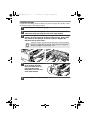
ED IN CHINA
005D
KS1
INSE1477QSZZ
AL-1642CS_Manual.book
1 ページ
2005年3月3日 木曜日 午後5時34分
MODEL
AL-1642CS
DIGITAL LASER COPIER
DIGITAL MULTIFUNCTIONAL
SYSTEM
OPERATION MANUAL
Page
AL-1642CS
INTRODUCTION
4
SETTING UP THE UNIT
7
LOADING PAPER
14
INSTALLING THE
SOFTWARE
MAKING COPIES
SPECIAL FUNCTIONS
19
46
MAINTENANCE
57
TROUBLESHOOTING
THE UNIT
APPENDIX
61
52
68
AL-1642CS_Manual.book
1 ページ
2005年3月3日 木曜日 午後5時34分
FOR YOUR PROTECTION...
To aid in reporting this unit in case of loss or theft, please record below the model number
and serial number located on the back of the unit. We also suggest you record all the
information listed and retain for future reference.
MODEL NUMBER
SERIAL NUMBER
DATE OF PURCHASE
Dealer
Address
City
State
Zip
Telephone
Service Station
Address
City
State
Zip
Telephone
To obtain service, or to obtain product literature, accessories, or
supplies,
please call
or
1-(630)378-3590 in the USA
905-568-7140 in Canada.
For customer assistance, please visit http://www.sharpusa.com/
(for USA) or http://www.sharp.ca/ (for Canada) on the World Wide Web
or call 1-(630)378-3590 (for USA).
Do not make copies of anything which is prohibited from copying by law. The
following items are normally prohibited from copying by national law. Other
items may be prohibited by local law.
Money
Stamps
Bonds
Stocks
Bank drafts
Checks
Passports
Driver's licenses
AL-1642CS_Manual.book
1 ページ
2005年3月3日 木曜日 午後5時34分
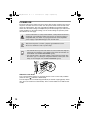
CAUTIONS
Caution label on the unit
The label (
,
) in the fusing area of the unit indicates the following:
: Caution, risk of danger
: Caution, hot surface
Cautions on using
Follow the cautions below when using this unit.
Warning:
• The fusing area is hot. Exercise care in this area when removing misfed paper.
• Do not look directly at the light source. Doing so may damage your eyes.
Caution:
• Place the unit on a firm, level surface.
• Do not install the unit in a humid or dusty location.
• When the unit is not used for a long time, for example for consecutive holidays,
turn the power switch off and remove the power cord from the outlet.
• When moving the unit, be sure to turn the power switch off and remove the power
cord from the outlet.
• Do not switch the unit rapidly on and off. After turning the unit off, wait 10 to 15
seconds before turning it back on.
• Do not cover the unit with a dust cover, cloth or plastic film while the power is on.
Doing so may prevent heat radiation, damaging the unit.
• Use of controls or adjustments or performance of procedures other than those
specified herein may result in hazardous radiation exposure.
• The socket-outlet shall be installed near the unit and shall be easily accessible.
Important points when selecting an installation site
Do not install your unit in areas that are:
• damp, humid, or very dusty
• exposed to direct sunlight
• poorly ventilated
• subject to extreme temperature or humidity changes, e.g., near an air conditioner or heater.
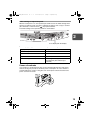
Be sure to allow the required space around the
8" (20 cm)
machine for servicing and proper ventilation.
4"
(10 cm)
4"
(10 cm)
Cautions on handling
Be careful in handling the unit as follows to maintain the performance of this unit.
Do not drop the unit, subject it to shock or strike it against any object.
Do not expose the drum cartridge to direct sunlight.
• Doing so will damage the surface (green portion) of the drum cartridge, causing smudges on copies.
Store spare supplies such as drum cartridges and TD cartridges in a dark
place without removing from the package before use.
• If they are exposed to direct sunlight, smudges on copies may result.
Do not touch the surface (green portion) of the drum cartridge.
• Doing so will damage the surface of the cartridge, causing smudges on copies.
1
AL-1642CS_Manual.book
2 ページ
2005年3月3日 木曜日 午後5時34分
Supply and Consumables
The supply of spare parts for a repair of the appliance is guaranteed for at least 7
years following the termination of production. Spare parts are those parts of the
apparatus which may break down within the scope of the ordinary use of the
product - whereas those parts which normally exceed the life of the product are
not to be considered as spare parts. Consumables too, are available for 7 years
following the termination of production.
Trademark acknowledgements
• Sharpdesk is a trademark of Sharp Corporation.
• Microsoft®, Windows®, Windows® 95, Windows® 98, Windows® Me, Windows NT®
4.0, Windows® 2000, Windows® XP and Internet Explorer® are registered trademarks
or trademarks of Microsoft Corporation in the U.S.A. and other countries.
• IBM, PC/AT, and PowerPC are trademarks of International Business Machines
Corporation.
• Acrobat® Reader Copyright © 1987-2002 Adobe Systems Incorporated. All rights reserved.
Adobe, the Adobe logo, Acrobat, and the Acrobat logo are trademarks of Adobe Systems
Incorporated.
• All other trademarks and copyrights are the property of their respective owners.
For users in the USA
As an ENERGY STAR® Partner, SHARP has determined that
this product meets the ENERGY STAR® guidelines for energy
efficiency.
Safety precautions:
This Digital Copier is rated Class 1 and complies with 21 CFR 1040.10 and
1040.11 of the CDRH standards. This means that the unit does not produce
hazardous laser radiation. For your safety, observe the precautions below.
• Do not remove the cabinet, operation panel or any other covers.
• The unit’s exterior covers contain several safety interlock switches. Do not
bypass any safety interlock by inserting wedges or other items into switch slots.
A small amount of ozone is produced within the unit during operation. The
emission level is insufficient to cause any health hazard.
Note:
The present recommended long term exposure limit for ozone is 0.1 ppm
(0.2 mg/m3) calculated as an 8hr. time-weighted average concentration.
However, since the small amount that is emitted may have an objectionable odor,
it is advisable to place the unit in a ventilated area.
2
AL-1642CS_Manual.book
3 ページ
2005年3月3日 木曜日 午後5時34分
CONTENTS
1 INTRODUCTION
USING THE MANUALS................. 4
PART NAMES ............................... 5
OPERATION PANEL..................... 6
2 SETTING UP THE UNIT
SETUP PROCEDURE................... 7
CHECKING PACKED
COMPONENTS AND
ACCESSORIES............................. 8
PREPARING THE UNIT FOR
INSTALLATION ............................. 8
INSTALLING THE
TD CARTRIDGE.......................... 10
POWER ON................................. 12
3 LOADING PAPER
PAPER......................................... 14
LOADING THE PAPER TRAY
1 and 2......................................... 15
BYPASS FEED
(including special paper).............. 17
4 INSTALLING THE SOFTWARE
SOFTWARE FOR THE SHARP
PERSONAL MFP SERIES .......... 19
HARDWARE AND SOFTWARE
REQUIREMENTS........................ 20
BEFORE INSTALLATION ........... 20
INSTALLING THE SOFTWARE .. 21
INDICATORS ON THE
OPERATION PANEL................... 31
USING THE PRINTER MODE..... 32
USING THE SCANNER MODE... 34
HOW TO USE THE ONLINE
MANUAL...................................... 43
USING OTHER INSTALLED
DRIVERS..................................... 44
CONNECTING THE INTERFACE
CABLE ......................................... 45
5 MAKING COPIES
COPY FLOW ...............................46
ORIGINAL PLACEMENT.............47
SET THE COPY QUANTITY .......49
EXPOSURE ADJUSTMENT/
PHOTO COPYING.......................49
REDUCTION/ENLARGEMENT/
ZOOM ..........................................51
SELECTING THE TRAY..............51
6 SPECIAL FUNCTIONS
TWO SIDED COPYING ...............52
DESCRIPTION OF OTHER
SPECIAL FUNCTIONS ................54
TONER SAVE MODE ..................54
USER PROGRAMS .....................55
DISPLAYING TOTAL NUMBER
OF COPIES .................................56
1
2
3
4
7 MAINTENANCE
TD CARTRIDGE
REPLACEMENT ..........................57
DRUM CARTRIDGE
REPLACEMENT ..........................58
CLEANING THE UNIT .................59
8 TROUBLESHOOTING THE UNIT
TROUBLESHOOTING .................61
STATUS INDICATORS................62
MISFEED REMOVAL ..................63
9 APPENDIX
SPECIFICATIONS .......................68
ABOUT SUPPLIES AND
OPTIONS.....................................70
MOVING AND STORING
THE UNIT ....................................71
5
6
7
8
SOFTWARE LICENSE ................72
MATERIAL SAFETY
DATA SHEET ................................. 76
9
INDEX ..........................................92
3
AL-1642CS_Manual.book
4 ページ
1
2005年3月3日 木曜日 午後5時34分
INTRODUCTION
This chapter provides basic information for using the unit.
USING THE MANUALS
In addition to this printed manual an online manual is also provided. To get full use of all
features and functions of this product, be sure to familiarize yourself with both manuals.
This printed manual provides all installation and setup instructions as well as instructions
in the use of all copier functions. The online manual contains the following information.
Online manual
Provides you with information on how to specify preferences and troubleshooting. Check
the online manual when you use this unit after all the initial setup is completed.
How to use the online manual
Explains how to use the online manual.
Print
Provides information on how to print a document.
Scan
Explains how to scan using the scanner driver and how to adjust the settings for
the Button Manager.
Troubleshooting
Provides instructions on how to solve driver or software problems.
Conventions used in this manual and online manual
• Illustrations of driver screens and other computer screens show the screens that
appear in Windows XP Home Edition. Some of the names that appear in these
illustrations may differ slightly from the screens that appear in other operating systems.
• This operation manual refers to the Single Pass Feeder as the "SPF".
• In this manual, the following icons are used to provide the user with information
pertinent to the use of the unit.
Warns the user that injury may result if the contents of the warning
are not properly followed.
Cautions the user that damage to the unit or one of its components
may result if the contents of the caution are not properly followed.
Notes provide information relevant to the unit regarding
specifications, functions, performance, operation and such, that
may be useful to the user.
Indicates a letter displayed in the display.
4
AL-1642CS_Manual.book
5 ページ
2005年3月3日 木曜日 午後5時34分
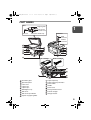
PART NAMES
SPF
Original guide
1
Document
feeder cover
Exit area
Document feeder tray
Interface
USB
connector
Parallel
connector
1
2
7
8
9
3
10
11
12
13
14
4
5
6
TD cartridge
Drum cartridge
7
15
16
3
17
1
2
3
4
5
6
7
8
9
Document glass
Operation panel
Front cover
Paper tray 1
Paper tray 2
Multi-bypass tray
Side cover
Side cover open button
Bypass tray paper guides
10
11
12
13
14
15
16
17
Paper output tray
Paper output tray extension
Power switch
Handle
Power cord
Fusing unit release lever
Transfer charger
Charger cleaner
5
AL-1642CS_Manual.book
6 ページ
2005年3月3日 木曜日 午後5時34分
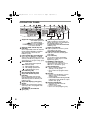
OPERATION PANEL
1
2
3
4
5
6
7
8
9
10
6
Original to copy key and indicators
Two-sided copies from
one-sided originals.
Turn on Long Edge or
Turn on Short Edge
can be selected.
Exposure mode selector key and
indicators
Use to sequentially select the exposure
modes: AUTO, MANUAL or PHOTO.
Selected mode is shown by a lit
indicator. (p.49)
Light and dark keys and indicators
Use to adjust the MANUAL or PHOTO
exposure level. Selected exposure level is
shown by a lit indicator. (p.49) Use to start
and terminate user program setting. (p.55)
Alarm indicators
Drum replacement required
indicator (p.58)
Misfeed indicator (p.63)
TD cartridge replacement
required indicator (p.57)
SPF indicator (p.48)
SPF misfeed indicator (p.67)
Copy ratio selector key and
indicators
Use to sequentially select preset
reduction/enlargement copy ratios.
Selected copy ratio is shown by a lit
indicator. (p.51)
Copy ratio display (%) key (p.51)
Display
Displays the specified copy quantity,
zoom copy ratio, user program code,
and error code.
SCANNER key and indicator
(p.31, p.39)
11
12
13
14
15
16
17
18
ONLINE key and indicator
Lights up when the unit is used as a
printer and scanner. For description of
the ONLINE indicator, see
"INDICATORS ON THE OPERATION
PANEL" (p.31).
Power save indicator
Lights up when the unit is in a power
save mode. (p.54, p.55)
Paper feed location indicators
Light up to show the selected paper
feed station.
Tray select key
Use to select a paper feed station
(paper tray 1, paper tray 2 or multibypass tray). (p.51)
ZOOM keys and indicator
Use to select any reduction or
enlargement copy ratio from 25% to
400% in 1% increments. (p.51)
Copy quantity keys
• Use to select the desired copy
quantity (1 to 99). (p.49)
• Use to make user program entries.
(p.55)
Clear key
• Press to clear the display, or press
during a copy run to terminate
copying. (p.49)
• Press and hold down during standby
to display the total number of copies
made to date. (p.56)
Start key and indicator
• Copying is possible when the
indicator is on.
• Press to start copying
• Use to set a user program. (p.55)
AL-1642CS_Manual.book
2
7 ページ
2005年3月3日 木曜日 午後5時34分
SETTING UP THE UNIT
Follow the installation procedure below to use the unit properly.
If the unit does not function properly during setup or use, or if a function
cannot be used, see "TROUBLESHOOTING THE UNIT" (p.61).
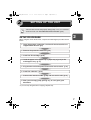
SETUP PROCEDURE
2
When using the unit for the first time, setup the unit following the procedure shown
below.
1 Open the package, and make sure that all the accessories are
supplied with the unit. (p.8)
2 Remove the protective materials. (p.9)
3 Install the TD cartridge. (p.10)
4 Load the paper in the paper tray 1, paper tray 2 (p.15) or the
multi-bypass tray . (p.17)
5 Plug the other end of the power cord into the nearest outlet. (p.12)
6 Install the software.* (p.19)
7 Connect the interface cable* (p.45) and turn on the unit. (p.12)
8 Now, you can copy (p.46), print (p.33), or scan (p.34) your
document.
* If you are only using the unit for copying, skip this step.
7
AL-1642CS_Manual.book
8 ページ
2005年3月3日 木曜日 午後5時34分
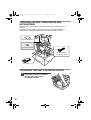
CHECKING PACKED COMPONENTS AND
ACCESSORIES
Open the carton and check if the following components and accessories are
included.
If anything is not included or is damaged, contact our Technical Assistance
Department at 1-(630)378-3590 in the USA or 905-568-7140 in Canada.
Operation manual
Software CD-ROM
Drum cartridge
(installed in unit)
TD cartridge
PREPARING THE UNIT FOR INSTALLATION
1
8
Be sure to hold the handles on
both sides of the unit to unpack
the unit and carry it to the
installation location.
AL-1642CS_Manual.book
2
9 ページ
2005年3月3日 木曜日 午後5時34分
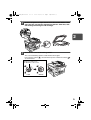
Remove all pieces of tape shown in the illustration below. Then
open the SPF and remove protective materials. After that, take
out the bag containing the TD cartridge.
2
3
Release the scan head locking switch.
The scan head locking switch is under the document glass.
If the switch is locked ( ), the unit will not operate. Unlock the switch (
as shown below.
)
Grasp here and turn in
the direction of the arrow.
Lock
Unlock
9
AL-1642CS_Manual.book
10 ページ 2005年3月3日 木曜日 午後5時34分
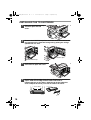
INSTALLING THE TD CARTRIDGE
1
Open the multi-bypass tray,
and then open the side
cover.
2
Remove the CAUTION tape from the front cover and remove the
two protective pins from the fusing unit by pulling the strings
upward one at a time.
Protective pins
CAUTION tape
3
Push gently on both sides of the
front cover to open the cover.
4
Remove the TD cartridge from the bag. Remove the protective
paper. Hold the cartridge on both sides and shake it
horizontally four or five times. Hold the tab of the protective
cover and pull the tab to your side to remove the cover.
4 or 5 times
10
AL-1642CS_Manual.book
11 ページ 2005年3月3日 木曜日 午後5時34分
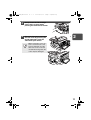
5
Gently insert the TD cartridge
until it locks in place while
pushing the lock release button.
6
Close the front cover and then
the side cover by pressing the
round projections near the
side cover open button.
2
When closing the covers, be
sure to close the front cover
securely and then close the
side cover. If the covers are
closed in the wrong order, the
covers may be damaged.
11
AL-1642CS_Manual.book
12 ページ 2005年3月3日 木曜日 午後5時34分
POWER ON
Ensure that the power switch of the unit is in the OFF position. Plug the other end of
the power cord into the nearest outlet. Turn the power switch on the left side of the
unit to the "ON" position. The start ( ) indicator will light up and other indicators
which show the initial settings of the operation panel will also light up to indicate the
ready condition. For the initial settings, see the "Initial settings of operation panel"
described on the next page.
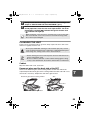
If you use the unit in a country other than the country where the unit was
purchased, you will need to make sure that your local power supply is
compatible with your model. If you plug the unit into an incompatible
power supply, irreparable damage to the unit will result.
Only insert the power cord into a properly grounded wall socket.
Do not use extension cords or power strips.
• The unit will enter a power save mode once the set time has elapsed
without any unit operation. The settings of the power save modes can
be modified. See "USER PROGRAMS" (p.55).
• The unit will return to the initial settings a preset amount of time after
the end of copy or scanner job. The preset amount of time (auto clear
time) can be changed. See "USER PROGRAMS" (p.55).
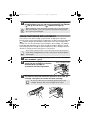
About the scan head
The scan head lamp remains on constantly when the unit is in the ready condition
(when the start ( ) indicator is illuminated).
The unit adjusts the scan head lamp periodically to maintain copying quality. At this
time, the scan head moves automatically. This is normal and does not indicate unit
trouble.
12
AL-1642CS_Manual.book
13 ページ 2005年3月3日 木曜日 午後5時34分
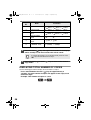
Initial settings of operation panel
When the unit power is on, the operation panel will revert to the initial settings when
the time set with the "Auto clear time" setting (p.55) elapses after a copy or scanner
job is finished, or when the clear (
) key is pressed twice.
The initial settings of the operation panel are shown below.
2
"0" is displayed in the display.
When copying is begun in this state, the settings in the following table are used.
Copy quantity
1 copy
Exposure adjustment
AUTO
Zoom
100%
Tray
Paper tray 1
Two-sided copy
The "Original to copy" indicator does
not illuminate.(One-sided copy is
selected.)
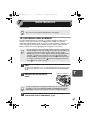
Power off methods
If not used for a certain period of time, the unit will automatically enter auto power
shut-off mode (p.54) in order to minimize power consumption. In cases where the
machine will not be used for a long time, turn off the power switch and remove the
power cord from the outlet.
13
AL-1642CS_Manual.book
3
14 ページ 2005年3月3日 木曜日 午後5時34分
LOADING PAPER
Follow the steps below to load paper into the tray.
PAPER
For best results, use only paper recommended by SHARP.
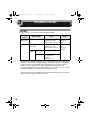
Type of paper
feeding
Type of media
Size
Weight
Paper tray 1
Paper tray 2
Standard paper
Letter (8-1/2" x 11")
Legal (8-1/2" x 14")
Invoice (5-1/2" x 8-1/2")
15 lbs. to 21 lbs.
(56g/m2 to
80g/m2)
Multi-bypass
tray
Standard paper and
thick paper
Letter (8-1/2" x 11")
Legal (8-1/2" x 14")
Invoice (5-1/2" x 8-1/2")
14 lbs. to 34.5
lbs.**
(52g/m2 to
128g/m2)
Special Transparency Letter (8-1/2" x 11")
media film
Envelope*
Commercial 10
(4-1/8" x 9-1/2")
Monarch
(3-7/8" x 7-1/2")
* Do not use non-standard envelopes, and envelopes that have metal clasps, plastic
snappers, string closures, windows, linings, self-adhesive, patches or synthetic
materials. Do not use envelopes that are filled with air or envelopes that have
labels or stamps attached. These will cause physical damage to the unit.
** For paper weighing from 28 to 34.5 lbs. (105g/m2 to 128g/m2), 8-1/2" x 11" is the
maximum size that can be fed through the multi-bypass tray.
• Special papers such as transparency film, labels and envelopes must be fed one
sheet at a time through the multi-bypass tray.
14
AL-1642CS_Manual.book
15 ページ 2005年3月3日 木曜日 午後5時34分
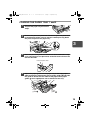
LOADING THE PAPER TRAY 1 and 2
1
Raise the handle of the paper tray
and pull the paper tray out until it
stops.
2
Remove the pressure plate lock. Rotate the pressure plate lock
in the direction of the arrow to remove it while pressing down
the pressure plate of the paper tray.
3
3
Store the pressure plate lock which has been removed in step
2. To store the pressure plate lock, rotate the lock to fix it on the
relevant location.
Pressure plate lock
4
Adjust the paper guides on the paper tray to the copy paper
width and length. Squeeze the lever of paper guide A and slide
the guide to match with the width of the paper. Move paper
guide B to the appropriate slot as marked on the tray.
Paper
guide B
Paper
guide A
15
AL-1642CS_Manual.book
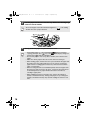
5
16 ページ 2005年3月3日 木曜日 午後5時34分
Fan the paper and insert it into the tray. Make sure the edges go
under the corner hooks.
Do not load paper above the maximum height line (
the line will cause a paper misfeed.
6
). Exceeding
Gently push the paper tray back into the unit.
• After loading paper, to cancel the blinking
without restarting
copying, press the clear (
) key. The
in the display will go out
and the start (
) indicator will light up.
• Be sure that paper is free of rips, dust, wrinkles, and curled or bent
edges.
• Make sure all the paper in the stack is the same size and type.
• When loading paper, ensure there is no space between the paper and
the guide, and check if the guide is not set too narrow causing the
paper to bend. Loading paper in these ways will result in document
skew or a paper jam.
• When not using the unit for an extended period, remove all paper from
the paper tray and store it in a dry place. If paper is left in the unit for
an extended period, the paper will absorb moisture from the air,
resulting in paper jams.
• When adding new paper to the paper tray, remove the old paper
already contained in the tray. Placing new paper on top of the paper
already contained in the tray may result in feeding two sheets at one
time.
16
AL-1642CS_Manual.book
17 ページ 2005年3月3日 木曜日 午後5時34分
BYPASS FEED (including special paper)
The multi-bypass tray can be used to feed standard paper, transparency film, labels,
envelopes, and other special purpose paper. Paper measuring from 3-1/2" x 5-1/2"
to 8-1/2" x 14" and in the weight range of 14 lbs. to 34.5 lbs. (52g/m2 to 128g/m2) can
be used in this tray. (For paper weighing from 28 lbs. to 34.5 lbs. (105g/m2 to
128g/m2), 8-1/2" x 11" is the maximum size.)
• The multi-bypass tray can hold maximum of 50 sheets of paper.
(Capacity will vary depending on the type of paper loaded.)
• The original image must be smaller than the paper or media for
copying. If the original image is bigger than the paper or media, this
may cause smudges on the edges of the copies.
The multi-bypass tray
1
Open the multi-bypass tray and extend the tray.
3
To close the multibypass tray,
perform step 1
and then step 2
in the illustration
and push the
round projections
at the right of the
tray until they
click.
17
AL-1642CS_Manual.book
2
18 ページ 2005年3月3日 木曜日 午後5時34分
Set the paper guides to the paper width. Insert the paper (print
face down) all the way into the multi-bypass tray.
Print face
• Paper must be fed narrow side into the feed slot.
• Special papers such as transparency film, labels, and envelopes
must be fed one sheet at a time through the multi-bypass tray.
• When copying onto transparency film, remove each copy
promptly. Do not let copies stack up.
3
Press the tray select (
) key to select the multi-bypass tray.
Note for loading envelopes
• Envelopes must be fed narrow side into the feed slot at a time.
• Do not use non-standard envelopes, and envelopes that have metal clasps, plastic snappers,
string closures, windows, linings, self-adhesive, patches or synthetic materials. Do not use
envelopes that are filled with air or envelopes that have labels or stamps attached.
• Envelopes of which the surface is not flat because of embossing may cause the
copies/prints to become smudged.
• Under high humidity and temperature conditions the glue flaps on some envelopes
may become sticky and be sealed when copied/printed.
• Use only envelopes which are flat and crisply folded. Curled or poorly formed
envelopes may be poorly printed or may cause misfeeds.
• Be sure to select either Com10, DL, C5 or Monarch on the paper size setting of the
printer driver. (For detailed information on printer driver, refer to the online manual.)
• It is recommended that you perform a test print before performing the actual copy/
print job.
18
AL-1642CS_Manual.book
4
19 ページ 2005年3月3日 木曜日 午後5時34分
INSTALLING THE SOFTWARE
This chapter explains how to install the software that allows the machine to be used
as a printer and scanner, and the procedures for using the printer and scanner
functions. The following term is used in this chapter.
CD-ROM
Means the supplied CD-ROM with the SHARP Personal MFP series software.
SOFTWARE FOR THE SHARP PERSONAL MFP
SERIES
The supplied CD-ROM includes software for this unit.
MFP driver
Scanner driver
Permits you to operate scanning function of this unit with TWAIN-compliant and
WIA-compliant application.
Printer driver
Enables you to use the printer function of this unit with your computer.
Print Status Window
4
The print state and information on current printing are displayed on the status
monitor window.
Sharpdesk
An integrated software environment that makes it easy to manage document and
image files and launch applications.
Button Manager
Button Manager enabling the SCANNER (
) key located on the unit.
The scanning feature is only available with Windows 98/Me/2000/XP
using a USB connection. For users running Windows 95/NT4.0 or using
a parallel connection, only printing is available.
19
AL-1642CS_Manual.book
20 ページ 2005年3月3日 木曜日 午後5時34分
HARDWARE AND SOFTWARE REQUIREMENTS
Check the following hardware and software requirements in order to install the software.
Computer type
IBM PC/AT or compatible computer equipped with a
USB 1.1*1 or bi-directional parallel interface (IEEE 1284)
Operating system*2 Windows 95, Windows 98, Windows Me, Windows NT
Workstation 4.0 (ServicePack 5 or later)*3, Windows 2000
Professional*3, Windows XP Professional*3, Windows XP
Home Edition*3
Display
800 x 600 dots (SVGA) display with 256 colors (or better)
Hard disk free space 150 MB or more
Other requirement An environment on which any of the operating systems listed
for hardware
above can fully operate
*1 Compatible with Windows 98, Windows Me, Windows 2000 Professional, Windows XP
Professional or Windows XP Home Edition preinstalled model with USB interface
equipped as standard.
*2 Printing is unavailable in MS-DOS mode.
*3 The administrator's authorization is required to install this software using this installer.
BEFORE INSTALLATION
The following table shows the drivers and software that can be installed for each
version of Windows and interface connection method.
MFP Driver
Printer driver/
Scanner driver
Print Status
Window
Users of Windows
98/Me/2000/XP who
will use the USB
interface connection
Users of Windows
98/Me/2000/XP who
will use the parallel
interface connection
Windows 95/NT 4.0
users
Button
Manager
Sharpdesk
Available
Available
Available
Not Available
Not
Available
Available*2
Available*1
*1 When the unit is connected through the parallel port, the Print Status Window can only
be used when the parallel port is set to ECP mode. To set the parallel port mode, refer
to your computer manual or ask the manufacturer of your computer.
*2 Sharpdesk can be installed when using a parallel interface connection, however, the
unit’s scanner function cannot be used.
Is there another GDI printer driver or a Windows Printing System printer
driver already installed? If installed, change the printer port setting. For
the change of the printer port setting, see "USING OTHER INSTALLED
DRIVERS" (p.44).
20
AL-1642CS_Manual.book
21 ページ 2005年3月3日 木曜日 午後5時34分
Flow of installation
Refer to the following table and then begin installation.
Operating
system
Windows XP
Windows 98
Interface
Reference pages for how to install
USB/
Parallel
USB
Installing onto Windows XP (USB/parallel interface)
(p.21)
Installing onto Windows 98/Me/2000 (USB interface) (p.25)
Installing onto Windows 95/98/Me/NT4.0/2000
(Parallel interface) (p.28)
Installing onto Windows 98/Me/2000 (USB interface) (p.25)
Installing onto Windows 95/98/Me/NT4.0/2000
(Parallel interface) (p.28)
Installing onto Windows 98/Me/2000 (USB interface) (p.25)
Installing onto Windows 95/98/Me/NT4.0/2000
(Parallel interface) (p.28)
Installing onto Windows 95/98/Me/NT4.0/2000
(Parallel interface) (p.28)
Parallel
USB
Windows Me
Parallel
USB
Windows 2000
Windows 95/
NT 4.0
Parallel
Parallel
4
INSTALLING THE SOFTWARE
The following term is used in this section.
MFP
Means the unit as a printer and scanner.
• For this description, it is assumed that the mouse is configured for
right hand operation.
• To print or scan, the MFP must be in the online state.
• The scanner feature only works when using a USB interface cable.
• If any error message appears, solve the problem following the
instructions on the screen. After your problem is solved, the installing
procedure will be continued. Depending on your problem, you may
have to exit the installer. In this case, click the "Cancel" button to exit
the installer. After solving your problem, reinstall the software from the
beginning.
Installing onto Windows XP (USB/parallel interface)
Before starting the installation, make sure the USB or parallel interface cable is not
connected to the MFP.
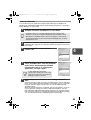
1
Insert the supplied CD-ROM into your CD-ROM drive.
2
Click the "start" button, click "My Computer" (
double-click the CD-ROM ( ) icon.
), and then
When any of "Found New Hardware Wizard" messages appear during
the software installation, be sure to click the "Cancel" button.
21
AL-1642CS_Manual.book
3
22 ページ 2005年3月3日 木曜日 午後5時34分
Double-click the "setup" (
) icon.
If the language selection screen appears after you double click the
"setup" icon, select the language you wish to use and click the "Next"
button. (Normally, the correct language is selected automatically.)
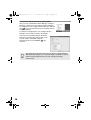
4
Select the software packages to be
installed, and then click the "Next"
button.
The software packages with checkmark ( )
on the list on the screen will be installed.
Click the "Display README" button to show
the information on the selected package.
• If you are using the parallel interface connection, do not select the
Button Manager checkbox because this feature is not supported with
the parallel interface.
• If the following screen appears, click the "OK" button. Review the
contents in "BEFORE INSTALLATION" (p.20), and then select only
the appropriate software packages to be installed.
5
Review the software packages to be
installed on the screen, and then click
the "Start" button.
The software packages to be installed will be
displayed on the screen. If inappropriate
packages are displayed, click the "Back" button
to select appropriate packages again.
6
Copying files for MFP driver installation (This step will start if it
was selected in step 4).
1
2
22
After confirming the message in the "Welcome" window, click the
"Next" button.
A dialog box appears asking you to verify that the USB or parallel
interface cable is not connected to the MFP. Make sure that the
interface cable is not connected and click the "Next" button.
AL-1642CS_Manual.book
3
4
7
2
3
4
5
After confirming the message in the "Welcome" window, click the
"Next" button.
Read the message in the "Please read the following information."
window, and then click the "Next" button.
When a message appears that lets you specify the location for the
software to be installed, click the "Next" button.
If the program displays "Do you want the Button Manager added to
Windows Startup?", check "Yes" and click the "OK" button.
The setup program will start to copy the files.
Click the "Finish" button when the message informs you that
setup is successful.
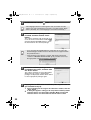
The Sharpdesk installer will start.
4
Begin installation of the Sharpdesk (This step will start if it was
selected in step 4).
1
2
3
4
5
9
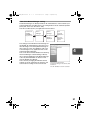
Click the "Next" button in the dialog box to
install the MFP driver or Cancel to quit the
installation.
The setup program will start to copy the files.
If the following screen appears while the files are
being copied (the message may appear more
than once), click "Continue Anyway".
When the "The MFP driver installation is complete." dialog box
appears, click the "OK" button.
The Button Manager installer will start.
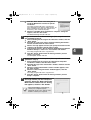
Begin installation of the Button Manager (This step will start if it
was selected in step 4).
1
8
23 ページ 2005年3月3日 木曜日 午後5時34分
After confirming the message in the "Welcome to Sharpdesk
installation" window, click the "Next" button.
Read the message in the "Information" window, and then click the
"Next" button.
When the "Choose Destination Location" window appears, click
the "Next" button.
When the "Select Program Folder" window appears, click the
"Next" button.
The setup program will start to copy the files.
Click the "Finish" button when the message informs you that
Setup is complete.
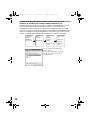
Click the "Close" button when the
message informs you that "Setup has
finished". When the "Now connect the
MFP interface cable to the PC" dialog
box appears, click the "OK" button.
After the installation, a message to
restart your computer may be
displayed. In this case, click the "Yes"
button to restart your computer.
23
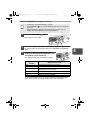
AL-1642CS_Manual.book
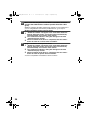
10
24 ページ 2005年3月3日 木曜日 午後5時34分
Make sure that the power of the MFP is turned on, and then
connect the USB interface cable or parallel interface cable.
(p.45)
Windows will detect the MFP and the Plug and Play screen will appear. If
you are using Windows XP with the parallel interface, go to step 12.
11
Begin installation of the scanner driver.
1
2
3
12
"SHARP AL-1642CS" will appear in the "Found New Hardware
Wizard" dialog box. Select "Install the software automatically
(Recommended)" and click the "Next" button.
The "Hardware Installation" dialog box will appear. Click the
"Continue Anyway" button.
When installation of the driver is completed, click the "Finish"
button to finish the scanner driver installation.
Begin installation of the printer driver.
"SHARP AL-1642CS" will appear in the "Found New Hardware
Wizard" dialog box. Select "Install the software automatically
(Recommended)" and click the "Next" button.
2 The "Hardware Installation" dialog box will appear. Click the
"Continue Anyway" button.
3 When installation of the driver is completed, click the "Finish"
button to finish the printer driver installation.
You have completed the installation of all the software.
1
24
AL-1642CS_Manual.book
25 ページ 2005年3月3日 木曜日 午後5時34分
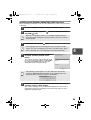
Installing onto Windows 98/Me/2000 (USB interface)
Before starting the installation, make sure the USB interface cable is not connected
to the MFP.
1
Insert the supplied CD-ROM into your CD-ROM drive.
2
Double-click "My Computer" (
CD-ROM ( ) icon.
), and then double-click the
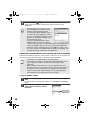
When any of "Hardware Found", or "Found New Hardware Wizard"
messages appear during the software installation, be sure to click the
"Cancel" button.
3
Double-click the "setup" (
) icon.
If the language selection screen appears after you double click the
"setup" icon, select the language you wish to use and click the "Next"
button. (Normally, the correct language is selected automatically.)
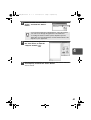
4
4
Select the software packages to be
installed, and then click the "Next"
button.
The software packages with checkmark ( )
on the list on the screen will be installed. Click
the "Display README" button to show the
information on the selected package.
If the following screen appears, click the "OK" button. Review the
contents in "BEFORE INSTALLATION" (p.20), and then select the
appropriate driver software packages to be installed.
5
Review the software packages to be installed on the screen,
and then click the "Start" button.
The software packages to be installed will be displayed on the screen. If
inappropriate packages are displayed, click the "Back" button to select
appropriate packages again.
25
AL-1642CS_Manual.book
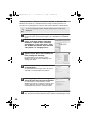
6
Copying files for MFP driver installation.
1
2
3
4
5
7
After confirming the message in the "Welcome" window, click the
"Next" button.
A dialog box appears asking you to verify that the interface cable
is not connected to the MFP. Make sure that the interface cable is
not connected and click the "Next" button.
Click the "Next" button in the dialog box
showing the files to be copied for installation
of the MFP driver.
The setup program will start to copy the files.
In Windows 2000, if the following screen appears
while the files are being copied (the message
may appear more than once), click "Yes" in
Windows 2000.
The following screen appears when all of the
files for the USB interface connection have
been copied. If you are not using a parallel
interface cable for connection to the MFP,
please click the "No" button.
When the "The MFP driver installation is
complete." dialog box appears, click the "OK" button.
The Button Manager installer will start.
Begin installation of the Button Manager (This step will start if it
was selected in step 4).
1
2
3
4
5
26
26 ページ 2005年3月3日 木曜日 午後5時34分
After confirming the message in the "Welcome" window, click the
"Next" button.
Read the message in the "Please read the following information."
window, and then click the "Next" button.
When a message appears that lets you specify the location for the
software to be installed, click the "Next" button.
If the program displays "Do you want the Button Manager added to
Windows Startup?", check "Yes" and click the "OK" button.
The setup program will start to copy the files.
Click the "Finish" button when the message to inform you of the
completion of the installation appears.
The Sharpdesk installer will start.
AL-1642CS_Manual.book
8
Begin installation of the Sharpdesk (This step will start if it was
selected in step 4).
4
After confirming the message in the "Welcome to Sharpdesk
installation" window, click the "Next" button.
Read the message in the "Information" window, and then click the
"Next" button.
When the "Choose Destination Location" window appears, click
the "Next" button.
When the "Select Program Folder" window appears, click the
"Next" button.
The setup program will start to copy the files.
If the dialog box asking "If you have TIF files
saved using Photoshop or Imaging for
Windows you should hit Skip" appears,
answer the question to continue the
Sharpdesk installation.
5
Click the "Finish" button when the message
to inform you of the completion of the installation appears.
1
2
3
9
27 ページ 2005年3月3日 木曜日 午後5時34分
Click the "Close" button when the
message to inform you of the
completion of the installation appears.
When the "Now connect the MFP
interface cable to the PC." dialog box
or "After Windows system restarts..."
dialog box appears, click the "OK"
button.
4
After the installation, a message to
restart your computer may be
displayed. In this case, click the "Yes"
button to restart your computer.
10
Make sure that the power of the MFP is turned on, and then
connect the USB interface cable. (p.45)
Windows will detect the MFP and the Plug and Play screen will appear.
11
Follow the instructions in the Plug and Play screen that
appears in your version of Windows to begin the installation.
You have completed the installation of the software.
27
AL-1642CS_Manual.book
28 ページ 2005年3月3日 木曜日 午後5時34分
Installing onto Windows 95/98/Me/NT4.0/2000
(Parallel interface)
Before starting the installation, make sure the USB or parallel interface cable is not
connected to the MFP.
1
Insert the supplied CD-ROM into your CD-ROM drive.
2
Double-click "My Computer" (
CD-ROM ( ) icon.
), and then double-click the
When any of "Hardware Found", or "Found New Hardware Wizard"
messages appear during the software installation, be sure to click the
"Cancel" button.
3
Double-click the "setup" (
) icon.
If the language selection screen appears after you double click the
"setup" icon, select the language you wish to use and click the "Next"
button. (Normally, the correct language is selected automatically.)
4
Select the software packages to be
installed, and then click the "Next"
button.
The software packages with checkmark ( )
on the list on the screen will be installed.
Click the "Display README" button to show
the information on the selected package.
In Windows 95/NT 4.0, "Button
Manager" does not appear. In
Windows 98/Me/2000, do not select
the "Button Manager" checkbox.
because this is not supported when
using the parallel interface.
5
The next screen appears. Make sure that the parallel interface
cable is not connected, and click "OK".
Windows 95/NT 4.0
6
Windows 98/Me/2000
Check the contents of the package on the screen, and then
click the "Start" button.
The software packages to be installed will be displayed on the screen. If
inappropriate packages are displayed, click the "Back" button to select only
appropriate software packages.
28
AL-1642CS_Manual.book
7
29 ページ 2005年3月3日 木曜日 午後5時34分
Copying files for MFP driver installation and parallel interface
setup (This step will start if it was selected in step 4).
1
2
3
4
After confirming the message in the "Welcome" window, click the
"Next" button.
A dialog box appears asking you to verify that the USB or parallel
interface cable is not connected to the MFP. Make sure that the
interface cable is not connected and click the "Next" button.
Click the "Next" button in the dialog box to
install the MFP driver or Cancel to quit the
installation.
The setup program will start to copy the files.
In Windows 2000, if the following screen appears
while the files are being copied (the message
may appear more than once), click "Yes" in
Windows 2000.
The following screen appears. Click the "Yes" button, and then the
Model screen will appear. Select the model number that is the
same as the model name of your MFP and click the "Next" button.
Be sure to select the displayed model number that is the same as the
MFP's model name. If they are not the same, the driver will not be
installed correctly.
5
Establish the printer settings and click the
"Next" button.
Select "LPT1" for the port to be used. If "LPT1"
does not appear, it is likely that another printer or
peripheral device is using "LPT1". Check your
other printers and peripheral devices, and change
the port setting as needed so no device is using
"LPT1". If you wish the MFP to be your default
printer, select "Yes". If not, select "No".
6
When the "Setup has completed gathering all necessary installation
information" dialog box appears, click the "Yes" button.
The parallel interface driver is installed.
When the "The MFP driver installation is complete." dialog box
appears, click the "OK" button.
The Sharpdesk installer will start.
7
4
29
AL-1642CS_Manual.book
8
Begin installation of the Sharpdesk (This step will start if it was
selected in step 4).
4
After confirming the message in the "Welcome to Sharpdesk
installation" window, click the "Next" button.
Read the message in the "Information" window, and then click the
"Next" button.
When the "Choose Destination Location" window appears, click
the "Next" button.
When the "Select Program Folder" window appears, click the
"Next" button.
The setup program will start to copy the files.
If the dialog box asking "If you have TIF files
saved using Photoshop or Imaging for
Windows you should hit Skip" appears,
answer the question to continue the
Sharpdesk installation.
5
Click the "Finish" button when the message
to inform you of the completion of the installation appears.
1
2
3
9
30 ページ 2005年3月3日 木曜日 午後5時34分
Click the "Close" button when the
message to inform you of the
completion of the installation appears.
When the "Now connect the MFP
interface cable to the PC." dialog box
or "After Windows system restarts..."
dialog box appears, click the "OK"
button.
After the installation, a message to
restart your computer may be
displayed. In this case, click the "Yes"
button to restart your computer.
10
Make sure that the power of the MFP is turned on, and then
connect the parallel interface cable. (p.45)
You have completed the installation of all the software.
30
AL-1642CS_Manual.book
31 ページ 2005年3月3日 木曜日 午後5時34分
INDICATORS ON THE OPERATION PANEL
The ONLINE indicator and the start (
scanner.
) indicator indicate the state of the printer or
SCANNER indicator
ONLINE indicator
Start indicator
Power save indicator
Start indicator
On:
Indicates the unit is ready for copying or scanning is being performed.
Blinking: The indicator blinks in the following situations:
• When a print job is interrupted.
• When reserving a copy job.
• When toner is being replenished during a copy or print job.
Off:
The indicator is off in the following situations:
• During copying or scanning.
• The unit is in the auto power shut-off mode.
• When a misfeed or error has occurred.
4
ONLINE indicator
The ONLINE key is pressed and on line and off line are changed.
On:
Indicates the unit is ready for printing or scanning is being performed.
(On line)
Blinking: Printing or data is being received from a computer.
Off:
Copying is being performed. (Off line)
Power save indicator
On:
Indicates the unit is in a power save mode.
Blinking: Indicates that the unit is initializing (when the side cover is opened and
closed or the power turned off and on).
SCANNER indicator
On:
The SCANNER (
) key has been pressed and the unit is in scanner
mode.
Blinking: A scan job is being executed from the computer, or scan data is stored
in the unit's memory.
Off:
The unit is in the copy mode.
31
AL-1642CS_Manual.book
32 ページ 2005年3月3日 木曜日 午後5時34分
USING THE PRINTER MODE
For problems with the printer function, see the online manual or the help
file for the driver.
Opening the printer driver from the start menu
Open the printer driver setup screen by the method shown below.
1
Click the "start" button.
2
Click "Control Panel", select "Printers and Other Hardware",
and then click "Printers and Faxes".
On Windows 95/98/Me/NT4.0/2000, select "Settings" and click "Printers".
3
Click the "SHARP AL-1642CS" printer driver icon and from the
"File" menu select "Properties".
On windows NT 4.0, select "Document Defaults" to open the printer driver
setup screen.
4
Click "Printing Preferences" button in the "General" tab.
On Windows 95/98/Me, click the "Setup" tab.
The printer driver setup screen will appear.
Refer to the Windows manual or help file for more information
on the "General" tab, "Details" tab, "Color Management" tab and
"Sharing" tab.
32
AL-1642CS_Manual.book
33 ページ 2005年3月3日 木曜日 午後5時34分
How to print
1
Make sure that the paper of the desired size and type is loaded
in the tray.
The procedure for loading paper is the same as for loading copy paper. See
"LOADING PAPER" (p.14).
2
Open the document you intend to print, and select "Print" from
the application's "File" menu.
3
Make sure that "SHARP AL-1642CS" is selected as the current
printer. If you intend to change any print setting, click the
"Preferences" button to open the setting dialog.
On Windows 95/98/Me/NT 4.0, click the "Properties" button.
On Windows 2000, the "Properties" button does not appear. Set your
preferences by switching the tab in the "Print" dialog box.
4
Specify the print settings including the number of copies,
media type, and print quality, and then click the "Print" button
to start printing.
On Windows 95/98/Me/NT 4.0, click the "OK" button to start printing.
For details on print settings, see the online manual or the help file for the
printer driver.
4
• If copying is being performed when printing is started, copying will
continue. After copying is complete, printing will be executed when the
clear (
) key is pressed twice, the ONLINE key is pressed to switch
the unit to the online state or approximately 60 seconds (auto clear
time)* elapse.
* The auto clear time varies with a user program setting. See "USER
PROGRAMS" (p.55).
• Preheat mode and auto power shut-off mode will be canceled when
printing is started.
• If the paper size specified from the software application is larger than
the paper size in the printer, part of the image that is not transferred to
the paper may remain on the surface of the drum. In this case, the
backside of the paper may become dirty. If this occurs, change to the
correct size paper and print two or three pages to clean the image.
• If you start a print job while a scan job is in progress, the print data will
be stored in the unit's memory. When the scan job is completed,
printing will begin.
33
AL-1642CS_Manual.book
34 ページ 2005年3月3日 木曜日 午後5時34分
USING THE SCANNER MODE
The scanner driver for this unit includes an STI (Still image) driver and WIA
(Windows Image Acquisition) driver. You can install software that supports the STI
driver and WIA driver to enable scanning using the operation panel of the unit.
For problems with the scanner function, see the online manual or the
help file for the driver.
Using the Button Manager
Setting up the Button Manager
The Button Manager accessory software supports the STI driver and WIA driver. Setup
that is required in Windows to use the Button Manager is explained in the following.
Windows XP
34
1
Click the "start" button, select "Control Panel" and click
"Printers and Other Hardware", and then click "Scanners and
Cameras" in the start menu. Right click the "SHARP AL1642CS" icon and click "Properties" in the menu that appears.
2
In the "Properties" screen, click the
"Events" tab.
3
Click the "Select an event" button and
select "ScanMenu SC1" from the pull-down
menu. Select "Button Manager (SHARP
Personal MFP series)" in "Start this
program" and click "Apply".
4
Repeat Step3 to set "ScanMenu SC2" through "ScanMenu SC6".
Click the "Select an event" button and select "ScanMenu SC2" from the pulldown menu. Select "Button Manager (SHARP Personal MFP series)" in
"Start this program" and click "Apply". Do the same for each ScanMenu
through "ScanMenu SC6".
When the settings have been completed, click the "OK" button to close the
screen. When the settings have been completed in Windows, start the
Button Manager. Adjust detailed settings and then scan an image from the
unit. For the procedures for starting Button Manager and adjusting settings,
see "Scan Button Destination Setting Dialog Box" (p.36).
AL-1642CS_Manual.book
35 ページ 2005年3月3日 木曜日 午後5時34分
Windows 98/Me/2000
To scan directly into an application using the Button Manager on Windows 98,
Windows Me and Windows 2000. Set the Event Manager properties to send only to
Button Manager as shown below.
1
Click the "Start" button, select "Control Panel" from "Settings",
and open "Scanners and Cameras" in start menu.
In Windows Me, it occasionally happens that the "Scanners and
Cameras" icon does not appear immediately after installation of the
MFP driver is completed. If the icon does not appear, click "View all
Control Panel options" in the Control Panel and display the "Scanner
and Cameras" icon.
2
Select "AL-1642CS", and click the "Properties" button.
3
In the "Properties" screen, click the
"Events" tab.
4
Click the "Scanner events" button and
select "ScanMenu SC1" from the pull-down
menu. Select "Button Manager (SHARP
Personal MFP series)" in "Send to this
application" and click "Apply".
In Windows Me, right click "AL-1642CS" and click "Properties" in the menu
that appears.
4
If other application are shown,
deselect the checkboxes for the other
applications and leave only the Button
Manager checkbox selected.
5
Repeat Step4 to set "ScanMenu SC2" through "ScanMenu
SC6".
Click the "Scanner events" and select "ScanMenu SC2" from the pull-down
menu. Select "Button Manager (SHARP Personal MFP series)" in "Start this
program" and click "Apply". Do the same for each ScanMenu through
"ScanMenu SC6".
When the settings have been completed, click the "OK" button to close the
screen. When the settings have been completed in Windows, start the
Button Manager. Adjust detailed settings and then scan an image from the
unit. For the procedures for starting Button Manager and adjusting settings,
see "Scan Button Destination Setting Dialog Box" (Next page).
35
AL-1642CS_Manual.book
36 ページ 2005年3月3日 木曜日 午後5時34分
Scan Button Destination Setting Dialog Box
After you have completed the Button Manager settings in
Windows, configure the scan settings in Button Manager.
To configure the scan settings in Button Manager, right click
the (
) icon in the Taskbar and select "Setting" from the
menu that appears.
For details on configuring the scan settings in Button
Manager, see the online manual or the help file.
This is the corresponding setting in the Button
Manager to automatically send image(s) in full
color at 75 dpi to Sharpdesk using the
operation panel "SC1" SCANNER (
) key
selection.
This dialog shows the SC1 event set to go directly to Button Manager.
With the Button Manager set to send the image to Sharpdesk. (factory
default setting) Sharpdesk will open after acquiring the image
automatically.
36
AL-1642CS_Manual.book
37 ページ 2005年3月3日 木曜日 午後5時34分
Flow of the Button Manager setting
The Button Manager can directly handle an AL-1642CS device event and start your
selected application according to the scan setting made on the AL-1642CS operation
panel (SC1, SC2, SC3, SC4, SC5, SC6).
This will scan directly into your application from the device.
Scanner AL1642CS
SCANNER
key pressed.
Event
Manager
Button
Manager
Windows OS
No Selection
dialog is
displayed.
The settings for the Windows Event Manager for
the SHARP AL-1642CS device allow the user to
take advantage of the Sharp Button Manager to
take control of events from Windows and send
scanned images to any application that can be
selected in Button Manager.
This can be done with the Windows OS showing
the Event Manager selection dialog or directly
into a selected application if the Button Manager
is the only allowed handler for device events
from the SHARP AL-1642CS.
This is done by changing the Windows device
settings for the AL-1642CS in the Scanner and
Camera device settings in the Control Panel.
User
selected
application
The user
application
opens.
4
This is the Control Panel
Properties dialog for "Scanners and
Cameras".
The AL-1642CS is shown selected.
37
AL-1642CS_Manual.book
38 ページ 2005年3月3日 木曜日 午後5時34分
All About The Windows Event Manager and scanner events in
Windows 98, Windows Me, Windows 2000 and Windows XP.
Windows Platforms provide a mechanism for software to handle external events for
a scanner device like the SHARP AL-1642CS products. This mechanism is
controlled by the device manager on a device basis. Applications that can handle
events from a scanner/camera device register with the Windows Event Manager and
shown as available in the registered applications. The path an event takes to get to
the user's selected application depends upon the event settings for the device.
Scanner AL1642CS
SCANNER
key pressed.
Event
Manager
Windows OS
Event
Manager
selection
dialog
Displayed on
screen
User selects
an
application.
The user
application
opens.
This is the Windows Event Manager
Selection Dialog.
Shown are two applications registered
to handle the scanner event from the
AL-1642CS device.
38
AL-1642CS_Manual.book
39 ページ 2005年3月3日 木曜日 午後5時34分
Using the SCANNER key to begin scanning
• Scanning is not possible during a copy job.
• If the SCANNER (
) key is pressed during a print job, the scan job will
be stored.
• When scanning an original that has been placed in the SPF, only one
original can be placed unless you are using Sharpdesk.
1
Press the SCANNER (
) key.
The unit enters scan mode.
2
Place the original you wish to scan on the document glass/SPF.
3
Press the right copy quantity key to
display the number of the application that
you wish to use for scanning.
For the procedure for placing the original, see "ORIGINAL PLACEMENT"
(p.47).
4
The application numbers are initially as follows.
Application
number
SC1
SC2
SC3
SC4
SC5
SC6
Application launched
Sharpdesk (Full color) (if installed)
Sharpdesk (Monochrome) (if installed)
E-mail (your standard e-mail program in the
Windows OS you are using)
Fax (if a fax program is installed)
OCR (if an OCR program is installed)
Microsoft Word (if installed)
To check the settings, see "Scan Button Destination Setting Dialog Box"
(p.36) and then open the settings window of the Button Manager.
39
AL-1642CS_Manual.book
4
40 ページ 2005年3月3日 木曜日 午後5時34分
Press the start (
) key.
Scanning will start and the scanned data will be transferred to the
application.
• If the following screen appears, select
Button Manager and click "OK". Button
Manager starts and the application
associated with Button Manager starts. If
you want only Button Manager to start in
this case, set up Button Manager for use in
Windows as explained in "Setting up the
Button Manager" (p.34).
• If step 4 is performed with the "Show
TWAIN setting screen when scanning"
checkbox selected in the Scan Button Destination Setting Dialog Box
(p.36), the TWAIN settings screen (p.41) will automatically appear.
Check the settings, and then press the start (
) key again or click
the "Scan" button in the TWAIN setting screen to start scanning. The
scanned data will be transferred to the application.
Opening the scanner driver and scanning from your computer
Follow the steps below to open the scanner driver setup screen. As an example, this
instruction is given using Sharpdesk as an image capture application.
• Scanning is not possible during a copy and print job.
• The method for starting the scanner driver differs depending on the
type of application. Refer to the manual or the help file of your
application.
• When using the scanner driver to scan an original that has been
placed in the SPF. If you perform "preview" (see the online manual or
the help file for the scanner driver), the original in the SPF will be
output to the exit area after previewing. To scan the original after
previewing, place the original in the SPF once again.
Using the SHARP TWAIN
1
Place the original(s) you wish to scan on the document glass/
SPF.
For the procedure for placing the original, see "ORIGINAL PLACEMENT"
(p.47).
2
After starting Sharpdesk, click the
"File" menu and select "Select
Scanner".
Click here
40
AL-1642CS_Manual.book
3
41 ページ 2005年3月3日 木曜日 午後5時34分
Select "SHARP Personal MFP
series", and click the "Select"
button.
Click here
If you use more than one scanning device, select the scanner
you want to use through the application. The method for
accessing the "Select Scanner" option, depends upon the
application. For more information, see the online manual or the
help file of your application.
4
Select "Acquire Image" from
the "File" menu, or click the
"Acquire" button (
).
4
5
Set the configuration for scanning (refer to the online manual
and help file), and click the "Scan" button.
Scan is started.
41
AL-1642CS_Manual.book
42 ページ 2005年3月3日 木曜日 午後5時34分
Scanning with the "Scanner and Camera Wizard" in Windows XP
Windows XP includes as a standard feature an image scanning function. The
procedure for scanning with the "Scanner and Camera Wizard" is explained here.
To cancel scanning, click the "Cancel" button in the screen that is
displayed.
1
Place the original you wish to scan on the document glass/SPF.
2
Click the "start" button, select "Control
Panel", and click "Printers and Other
Hardware", and then click "Scanners
and Cameras" in the start menu. Click
the "SHARP AL-1642CS" icon and click
"Get picture" in "Imaging Tasks".
3
The "Scanner and Camera Wizard"
appears. Click "Next" and establish the
basic settings for scanning.
For the procedure for placing the original, see "ORIGINAL PLACEMENT"
(p.47).
For information on the settings, see the
Windows XP help file. After completing each
setting, click "Next".
4
Select a name, format, and folder for the
scanned image.
For information on the image name, file format,
and folder, see the Windows XP help file.
5
Scanning begins. When scanning ends,
select the next task you wish to perform.
For information on each selection, see the
Windows XP help file. To quit the "Scanner and
Camera Wizard", select "Nothing. I’m finished
working with these pictures." and click "Next".
6
42
Click "Finish" in the screen that appears.
The "Scanner and Camera Wizard" closes and the scanned image is saved.
AL-1642CS_Manual.book
43 ページ 2005年3月3日 木曜日 午後5時34分
HOW TO USE THE ONLINE MANUAL
The online manual provides detailed instructions for operating the unit as the printer
or scanner and a list of methods for dealing with printing or scanner problems.
To access the online manual, your computer must have Acrobat Reader 5.0 or a
later version. If it is not installed, refer to "Installing Acrobat Reader" (below).
1
Turn on your computer.
2
Insert the supplied CD-ROM into your CD-ROM drive.
3
Click the "start" button, click "My Computer" (
double-click the CD-ROM ( ) icon.
), and then
On Windows 95/98/Me/NT 4.0/2000, double-click "My Computer" (
then double-click the CD-ROM ( ) icon.
4
), and
Double-click the "Manual" folder, double-click the "EnglishA"
folder, and then double-click the "AL_1642CS.pdf" icon.
The following window will appear.
5
Click
4
to read the online manual.
To close the online manual, click the (
the window.
) button located at the top-right of
• The online manual can be printed out using Acrobat Reader. SHARP
recommends printing out the sections which you refer to frequently.
• Refer to "Help" of Acrobat Reader for more details on the operation
and function of Acrobat Reader.
Installing Acrobat Reader
1
Turn on your computer.
2
Insert the CD-ROM into the CD-ROM drive.
3
Click the "start" button, click "My Computer" (
double-click the CD-ROM ( ) icon.
), and then
On Windows95/98/Me/NT4.0/2000, double-click "My Computer" (
then double-click the CD-ROM ( ) icon.
4
), and
Double-click the "Acrobat" folder, and then double-click the
"ar500enu.exe" icon.
Follow the on-screen instructions to install Acrobat Reader.
43
AL-1642CS_Manual.book
44 ページ 2005年3月3日 木曜日 午後5時34分
USING OTHER INSTALLED DRIVERS
If you use another GDI printer or a Windows Printing System printer, interference
between printers may occur and printing may not be performed properly. To use
another GDI printer or a Windows Printing System printer, you must change the port
setting of the printer driver using the following procedure.
If another printer does not operate properly when the SHARP Personal
MFP series printer driver is set to "FILE" as described below, uninstall
the SHARP Personal MFP series printer driver. To uninstall the printer
driver, see the online manual.
1
Click the "start" button.
2
Click "Control Panel", click "Printer and Other Hardware" and
then click "Printer and Faxes".
On Windows 95/98/Me/NT4.0/2000, select "Settings" and then click
"Printers".
3
Right-click the "SHARP AL-1642CS" icon in
the printer dialog box and then click
"Properties".
4
Click the "Ports" tab ("Details" tab - on Windows 95/98/Me) in
the "Properties" dialog box, select "FILE:" in the "Print to the
following port" list box, and click the "OK".
5
Right-click the icon of the printer to be used and click
"Properties".
6
Click the "Ports" tab ("Details" tab - on Windows 95/98/Me) in
the "Properties" window, select "LPT1" (or the currently used
port), and click the "OK" button.
To use the SHARP Personal MFP series again, perform the same
procedure but select the port to be used (for example, LPT1) in step 4.
44
AL-1642CS_Manual.book
45 ページ 2005年3月3日 木曜日 午後5時34分
CONNECTING THE INTERFACE CABLE
This unit includes both USB and parallel interface connectors.
Interface cables for connecting the unit to your computer are not included with this
unit. Please purchase the appropriate cable for your computer.
• If you intend to use the unit as a scanner, it must be connected
to your computer with a USB interface cable. The scanner
function cannot be used if the unit is connected with a parallel
cable.
• USB is available with a PC/AT compatible computer that was
originally equipped with USB and had Windows 98, Windows Me,
Windows 2000 Professional, Windows XP Professional or Windows
XP Home Edition preinstalled.
• Do not connect the interface cable before installing the MFP driver.
The interface cable should be connected during installation of the
MFP driver. (p.21)
Connecting the USB interface cable
1
Obtain a shielded USB interface cable.
2
Insert the cable into the USB interface
connector located on the rear of the
unit.
3
Insert the other end of the cable into the interface connector of
your computer, or the USB hub connected to your computer.
4
Connecting the parallel interface cable
1
Obtain an IEEE1284 shielded parallel interface cable.
2
Ensure that your computer and unit are turned off.
3
Insert the cable into the parallel
interface connector located on the
rear of the unit, and fasten with
clasps.
4
Insert the other end of the cable into
the interface connector of your computer.
45
AL-1642CS_Manual.book
46 ページ 2005年3月3日 木曜日 午後5時34分
5
MAKING COPIES
This chapter explains basic and other copying functions.
The unit is equipped with a one-page memory buffer. This memory allows the unit to
scan an original once only and make up to 99 copies. This feature improves
workflow, reduces operation noise from the copier, and provides higher reliability by
reducing wear and tear on the scanning mechanism.
COPY FLOW
1 Make sure that paper has been loaded in the paper tray 1,
paper tray 2 (p.15) or multi-bypass tray (p.17), and check the
paper size (p.14).
If paper is not loaded, see page 15.
2 Place the original.
If you are using the document glass, see "Using the document glass" (p.47).
If you are using the SPF, see "Using the SPF" (p.48).
When copying onto paper larger than 8-1/2" x 11" size, pull out the paper
output tray extension.
3 Select the copy settings.
If you wish to copy using the initial settings (p.13), proceed to the next step.
To set the number of copies, see page 49.
To adjust the resolution and contrast settings, see page 49.
To enlarge or reduce the copy, see page 51.
To change the tray used, see page 51.
To print on both sides of the paper, see page 52.
4 Start copying.
Press the start (
46
) key.
AL-1642CS_Manual.book
47 ページ 2005年3月3日 木曜日 午後5時34分
• If you start a print job while a copy job is in progress, the print job will
begin when the copy job is completed.
• The scanning function cannot be used while a copy job is in progress.
About interrupt copying
If you press the start (
) key to begin a copy job while a print job using the paper
tray 1, paper tray 2 or multi-bypass tray is in progress, the copy job will begin
automatically after the print data in the unit's memory is printed (interrupt copying).
When this is done, the print data remaining in the computer is not sent to the unit.
When the copy job ends, press the clear (
) key twice, or press the ON LINE key
once to change the unit to the online state (p.31), or wait until the set auto clear time
(p.55) elapses. The remaining print data will be sent to the unit and printing will
resume.
ORIGINAL PLACEMENT
Using the document glass
• The document glass can read up to 8-1/2" x 14" original.
• Image loss 5/32" (4mm) can occur at the leading and trailing edges of
the copies. Also image loss 11/64" (4.5mm) in total can occur along
the other edges of the copies.
• When copying a book or an original which has been folded or a
crumpled original, press down the SPF lightly. If the SPF is not
securely closed, the copies may be striped or blurred.
1
Open the SPF, and place the original.
2
Place an original face down on the document glass. Align it
with the original scale and the centering ( ) mark. Gently close
the SPF.
5
Original scale
mark
47
AL-1642CS_Manual.book
48 ページ 2005年3月3日 木曜日 午後5時34分
Using the SPF
The SPF is designed to hold up to 30 originals measuring from 5-1/2" x 8-1/2" to
8-1/2" x 14" and weighting from 14 lbs. to 23.9 lbs. (52g/m2 to 90g/m2).
• Before feeding originals in the document feeder tray, be sure to
remove any staples or paper clips from them.
• Before placing curled or wavy originals into the document feeder tray,
be sure to flatten them. If not, original misfeeds may result.
• The SPF (
) indicator on the operation panel will light up. If this
indicator does not light up, the originals are not properly set or the
SPF is not properly closed.
• Badly damaged originals may misfeed in the SPF. It is recommended
that such originals be copied from the document glass.
• Special originals such as transparency film should not be fed through
the SPF, but should be placed directly on the document glass.
• Image loss (max. 5/32" (4mm)) can occur at the leading and trailing
edges of the copies. Also image loss (max. 11/64" (4.5mm) in total)
can occur along the other edges of the copies. It can be 15/64" (6mm)
(max.) at the trailing edge of the second copy of two-sided copying.
• To stop continuous copying using the SPF, press the clear (
) key.
• Copying using one-sided to one-sided mode:
Ensure that no indicator is lit among the original to copy indicators.
1
Make sure that no original is left on the document glass.
2
Adjust the original guides to the size
of originals.
3
Set the originals face up in the
document feeder tray.
Original face up
Stream feeding mode
The stream feeding mode allows easy operation of continuous copying from the
SPF. If the stream feeding mode has been enabled using user program No.4, the
SPF (
) indicator will blink approximately 5 seconds after the last original has
been fed by the SPF. While this indicator is blinking, any new originals placed in the
document feeder tray will be fed and copied automatically. If the stream feeding
mode has been disabled, the start (
) key must be pressed each time the
originals are set even immediately after completion of a copy run from the SPF. The
default setting of the stream feeding mode is "ON". See "USER PROGRAMS" (p.55).
48
AL-1642CS_Manual.book
49 ページ 2005年3月3日 木曜日 午後5時34分
SET THE COPY QUANTITY
Set the number of copies using the two copy quantity (
from the document glass or copying from SPF.
,
) keys when copying
• Press the clear (
) key to clear an entry if a mistake is made.
• A single copy can be made with the initial setting, i.e., when "0" is
displayed.
• Press the right copy quantity key to set the unit digit
from 0 to 9. This key will not change the tens digit.
• Press the left copy quantity key to set the tens digit
from 1 to 9.
Tens digit
Unit digit
EXPOSURE ADJUSTMENT/PHOTO COPYING
Exposure adjustment
Copy density adjustment is not required for most originals in the automatic exposure
mode. To adjust the copy density manually or to copy photographs, the exposure
level can be adjusted in five steps manually.
The copy resolution used for AUTO and MANUAL (
changed. (p.55)
1
Press the exposure mode selector key to
select the MANUAL (
) mode or
PHOTO (
) mode.
2
Use the light (
) and dark (
) keys to
adjust the exposure level. If exposure level
2 is selected, the two left-handmost
indicators for that level will light up
simultaneously. Also, if level 4 is selected,
the two right-handmost indicators for that
level will light up simultaneously.
) mode can be
5
49
AL-1642CS_Manual.book
50 ページ 2005年3月3日 木曜日 午後5時34分
Automatic exposure adjustment
This automatic exposure level will remain in effect until you change it
again by this procedure.
The automatic exposure level can be adjusted to suit your copying needs. This level is
set for copying from the document glass and copying from the SPF respectively.
50
1
When adjusting the automatic exposure level for copying from
the SPF, place an original in the document feeder tray and
make sure that the SPF (
) indicator lights up. When
adjusting the level for copying from the document glass, make
sure that no original is left in the document feeder tray.
2
Press the exposure mode selector key to
select the PHOTO (
) mode.
3
Press and hold down the exposure mode
selector key for approximately 5 seconds.
The PHOTO (
) indicator will go out and
the AUTO indicator will begin to blink. One
or two light and dark indicators
corresponding to the automatic exposure
level which has been selected will light up.
4
Press the light (
) or dark (
) key to
lighten or darken the automatic exposure
level as desired. If exposure level 2 is
selected, the two left-handmost indicators
for that level will light up simultaneously.
Also, if level 4 is selected, the two righthandmost indicators for that level will
light up simultaneously.
5
Press the exposure selector key. The AUTO indicator will stop
blinking and light up steadily.
AL-1642CS_Manual.book
51 ページ 2005年3月3日 木曜日 午後5時34分
REDUCTION/ENLARGEMENT/ZOOM
Three preset reduction ratios and two enlargement ratios can be selected. The zoom
function enables copy ratio selection from 25% to 400% in 1% increments.
1
Set the original and check the paper size.
2
Use the copy ratio selector key and/or ZOOM (
select the desired copy ratio.
,
) keys to
• To verify a zoom setting without changing the zoom ratio,
press and hold down the copy ratio display (%) key. When the
key is released, the display will return to the copy quantity
display.
• To reset the ratio to 100%, press the copy ratio selector key
repeatedly until the 100% indicator lights up.
3
Set the reduction/enlargement ratio.
To decrease or increase the zoom ratio rapidly, press and hold
down the ZOOM (
) or (
) key. However the value will
stop at the preset reduction or enlargement ratios. To move
beyond these ratios, release the key and then press and hold it
down again.
To select a preset copy ratio:
Preset reduction and enlargement ratios are:
25%, 64%, 78%, 129%, and 400%.
5
To select a zoom ratio:
When a ZOOM (
or
) key is pressed, the
ZOOM indicator will light up and the zoom ratio will
be displayed in the display.
SELECTING THE TRAY
Press the tray select (
) key.
Each time you press the tray select (
) key, the location
indicated by the paper feed location indicator changes in
the following order: paper tray 1, paper tray 2, multi-bypass
tray.
51
AL-1642CS_Manual.book
52 ページ 2005年3月3日 木曜日 午後5時34分
6
SPECIAL FUNCTIONS
This chapter describes the special functions of this unit. Use these functions as
needed.
TWO SIDED COPYING
When copying from one-sided originals to two-sided copies, copying orientation can
be selected between Turn on Long Edge and Turn on Short Edge.
• When making two-sided copies from the document glass, the paper
size must be letter. Non-standard size paper cannot be used.
• When making two-sided copies, the multi-bypass tray cannot be used.
A A
A
A
Turn on Long Edge
52
A
A
A
A
Turn on Short Edge
AL-1642CS_Manual.book
53 ページ 2005年3月3日 木曜日 午後5時34分
Making two-sided copies
1
Place the original(s) on the document glass or in the SPF. (see
"ORIGINAL PLACEMENT" (p.47).
2
Select two-sided copy mode.
When copying in a one-sided to two-sided mode:
Use the original to copy key to select the desired one-sided to two-sided
copying mode (Turn on Long Edge or Turn on Short Edge). See the
illustrations on page 52.
3
Select the copy settings. See "SET THE COPY QUANTITY"
(p.49), "EXPOSURE ADJUSTMENT/PHOTO COPYING" (p.49),
and "REDUCTION/ENLARGEMENT/ZOOM" (p.51).
Using the document glass
1
2
Press the start ( ) key.
The original is scanned into the unit's memory and the number of the
copy quantity blinks in the display.
Place the original that you wish to copy onto the rear side of the
paper, and press the start ( ) key again.
Copying begins.
Using the SPF
Press the start (
) key. Copying begins in the selected two-sided copy mode.
6
53
AL-1642CS_Manual.book
54 ページ 2005年3月3日 木曜日 午後5時34分
DESCRIPTION OF OTHER SPECIAL FUNCTIONS
Toner save mode (page 54)
Reduces toner consumption by approximately 10%.
Power save modes (page 55)
The unit has two power save modes of operation: preheat mode and auto power
shut-off mode.
Preheat mode
When the unit enters the preheat mode, the power save ( ) indicator will light up
and other indicators will remain on or off as before. In this condition, the fuser in
the unit is maintained at a lower heat level, thereby saving power. To copy from
the preheat mode, make desired copier selections and press the start ( ) key
using the normal copying procedure.
Auto power shut-off mode
When the unit enters the auto power shut-off mode, the power save ( ) indicator
will light up and other indicators except the ONLINE indicator will go out. The auto
power shut-off mode saves more power than the preheat mode but requires a
longer time before starting copying. To copy from the auto power shut-off mode,
press the start ( ) key. Then make desired copier selections and press the start
( ) key using the normal copying procedure.
Auto clear (page 55)
The unit returns to the initial settings a preset amount of time after the end of copy, or
scanner job. This preset amount of time (auto clear time) can be changed.
Stream feeding mode (page 55)
For description of the stream feeding mode, see "Stream feeding mode" (p.48).
Resolution of AUTO & MANUAL mode (page 55)
You can set the copy resolution used for AUTO and MANUAL (
mode.
TONER SAVE MODE
1
54
Press the exposure mode selector key
to select the MANUAL (
) mode.
) exposure
AL-1642CS_Manual.book
55 ページ 2005年3月3日 木曜日 午後5時34分
2
Press and hold down the exposure mode
selector key for approximately 5 seconds.
The MANUAL (
) indicator will go out
and the PHOTO (
) indicator will begin
to blink. The light and dark indicator
marked "5" will light up, indicating the
standard toner mode is active.
3
To enter the toner save mode, press the
light (
) key. The light and dark
indicator marked "1" will light up,
indicating the toner save mode is
selected.
4
Press the exposure mode selector key. The PHOTO (
)
indicator will stop blinking and light up steadily. The light and
dark indicator marked "3" will light up. The toner save mode is
now active.
To return to the standard mode, repeat the procedure but use the dark
(
) key to select exposure level "5" in step 3.
USER PROGRAMS
The user programs allow the parameters of certain functions to be set, changed, or
canceled as desired.
Setting the power save modes, auto clear time, stream
feeding mode and resolution of AUTO & MANUAL mode
1
Press and hold down the light (
) and dark (
) keys
simultaneously for more than 5 seconds until all the alarm
indicators (
,
, ) blink and "
" appears in the display.
2
Use the left copy quantity (
) key to select a user program
number (1: auto clear time, 2: preheat mode, 3: auto power
shut-off timer, 4: stream feeding mode, 5: auto power shut-off
mode 6: resolution of AUTO & MANUAL mode). The selected
number will blink in the left side of the display.
3
Press the start (
) key. The entered program number will be
steadily lit and the currently selected parameter number for the
program will blink on the right side of the display.
4
Select the desired parameter using the right copy quantity (
)
key. The entered parameter number will blink on the right of the
display.
6
55
AL-1642CS_Manual.book
Program
No.
56 ページ 2005年3月3日 木曜日 午後5時34分
Mode
Parameters
1
Auto clear time
0
*3
OFF, 1
10sec., 2
30sec.,
60sec., 4
90sec., 5
120sec.
2
Preheat mode
*0
3
Auto power shut- off
timer
0
3
2min., *1
30min., 4
4
Stream feeding
mode
0
OFF, *1
ON
5
Auto power shut- off
mode
0
OFF, *1
ON
6
Resolution of AUTO
& MANUAL mode
*0
30sec., 1
300dpi, 1
60sec., 2
90sec.
5min., 2
15min.,
60 min., 5
120min.
600dpi
* Factory default settings are indicated with an asterisk (*).
5
Press the start (
) key. The right-hand number in the display
will be steadily lit and the entered value will be stored.
To change the setting or to set another mode, press the clear
(
) key. The unit will return to step 2.
6
Press the light (
copy mode.
) or dark (
) key to return to the normal
DISPLAYING TOTAL NUMBER OF COPIES
Use the following procedure to display the total number of copies.
Press and hold down the clear (
) key for approximately 5
seconds. The total number of copies will appear in two steps, each
with three digits.
Example: Total number of copies is 1,234.
56
AL-1642CS_Manual.book
7
57 ページ 2005年3月3日 木曜日 午後5時34分
MAINTENANCE
This chapter describes how to replace the TD cartridge and drum cartridge and how
to clean the unit.
Be sure to use only genuine SHARP parts and supplies.
TD CARTRIDGE REPLACEMENT
The TD cartridge replacement required ( ) indicator will light up when toner is
needed. For more information on purchasing the TD cartridge, see "ABOUT
SUPPLIES AND OPTIONS" (p.70). If copying is continued while the indicator is lit,
copies will gradually become lighter until the unit stops and the indicator begins
blinking. Replace the old TD cartridge by following the procedure below.
• After the unit stops, it may be possible to make a few more copies by taking
the TD cartridge out of the unit, shaking it horizontally, then reinstalling it. If
copying is not possible after this operation, replace the TD cartridge.
• During long copy run of a dark original, the TD cartridge replacement
required ( ) indicator may light up, the start (
) indicator blink,
and the unit stop, even though toner is left. The unit will feed toner up
to 2 minutes and then the start (
) indicator will light up. Press the
start (
) key to restart copying.
1
Open the multi-bypass tray, side cover, and front cover, in that
order.
To open the multi-bypass tray, see "The multi-bypass tray" (p.17). To open
the side cover and front cover, see "INSTALLING THE TD CARTRIDGE"
(p.10).
2
Gently pull the TD cartridge out
while pressing the lock release
button.
Lock release button
7
In order to help preserve the global environment, we recycle used TD
cartridges. Please read "COPIER TONER CARTRIDGE RECYCLING
PROGRAM", which is enclosed in the new toner cartridge package.
3
Install a new TD cartridge. To install the new cartridge, see
"INSTALLING THE TD CARTRIDGE" (p.10).
57
AL-1642CS_Manual.book
4
58 ページ 2005年3月3日 木曜日 午後5時34分
Close the front cover and then the side cover by pressing the
round projections near the side cover open button. The indicator
( ) will go out and the start (
) indicator will light up.
When closing the covers, be sure to close the front cover securely and
then close the side cover. If the covers are closed in the wrong order,
the covers may be damaged.
DRUM CARTRIDGE REPLACEMENT
The useful life of the drum cartridge is approximately 18,000 copies*. When the
internal counter reaches approximately 17,000 copies, the drum replacement required
(
) indicator will light up indicating that replacement of the drum cartridge will be
needed soon. For more information on purchasing the drum cartridge, see "ABOUT
SUPPLIES AND OPTIONS" (p.70). When the indicator begins to blink, the unit will
stop operating until the cartridge is replaced. Replace the drum cartridge at this time.
*Based on copying onto letter size paper at 5% toned area.
Do not remove the protective cover on the drum portion (black paper) of
a new drum cartridge before use. The cover protects the drum against
external light.
1
Remove the TD cartridge (see step 1 and 2 in "TD CARTRIDGE
REPLACEMENT" (p.57)).
2
Hold the drum cartridge handle and
gently pull the cartridge out. Dispose
of the old drum cartridge in
accordance with local regulations.
3
Remove the new drum cartridge from
the protective bag and remove the protective cover from the
cartridge. Then gently install the new drum cartridge.
Drum cartridge handle
Do not touch the surface of the drum (green portion) of the
cartridge. Doing so may cause smudges on the copies.
58
AL-1642CS_Manual.book
59 ページ 2005年3月3日 木曜日 午後5時34分
4
Gently install the TD cartridge. To install the TD cartridge, see
step 5 in "INSTALLING THE TD CARTRIDGE" (p.11).
5
Close the front cover and then the side cover by pressing the
round projections near the side cover open button. The drum
replacement required (
) indicator will go out and the start
(
) indicator will light up.
When closing the covers, be sure to close the front cover securely and
then close the side cover. If the covers are closed in the wrong order,
the covers may be damaged.
CLEANING THE UNIT
Proper care is essential in order to get clean, sharp copies. Be sure to take a few
minutes to regularly clean the unit.
Do not spray flammable cleaner gas. Gas from the spray may come in
contact with the internal electrical components or high-temperature parts
of the fusing unit, creating a risk of fire or electrical shock.
• Before cleaning, be sure to turn the power switch off and remove the
power cord from the outlet.
• Do not use thinner, benzene or other volatile cleaning agents. Doing
so may cause deformation, discoloration, deterioration or malfunction.
Cabinet
Wipe the cabinet with a soft, clean cloth.
Document glass and the back side of the SPF
Stains on the document glass, SPF scanning window or SPF roller will also be
copied. Wipe the document glass, SPF scanning window and SPF roller with a soft,
clean cloth. If necessary, dampen the cloth with a glass cleaner.
Document glass/SPF scanning window
7
SPF
SPF roller
SPF scanning window
59
AL-1642CS_Manual.book
60 ページ 2005年3月3日 木曜日 午後5時34分
Transfer charger
If copies start becoming streaky or blotchy, the transfer charger may be dirty. Clean
the charger using the following procedure.
1
Turn the power switch off. (p.13)
2
Ensure that the multi-bypass tray is open and then open the
side cover while pressing the side cover open button.
3
Take the charger cleaner out by holding the tab. Set the charger
cleaner onto the right end of the transfer charger, gently slide
the cleaner to the left end, and then remove it. Repeat this
operation two or three times.
Slide the charger cleaner from the right end to the left end along
the groove of the transfer charger. If the cleaner is stopped on
the way, smudges on copies may occur.
60
4
Return the charger cleaner
to its original position.
Close the side cover by
pressing the round
projections near the side
cover open button.
5
Turn the power switch on. (p.12)
AL-1642CS_Manual.book
8
61 ページ 2005年3月3日 木曜日 午後5時34分
TROUBLESHOOTING THE UNIT
This chapter describes misfeed removal and troubleshooting.
For problems with the printer function or the scanner function, see the online manual
or the Help file for the printer/scanner driver.
TROUBLESHOOTING
If any problem occurs, check the list below before contacting our Technical
Assistance Department.
Problem
Unit does not
operate.
Blank copies
Copies are too
dark or too light.
Dust, dirt,
smudges appear
on copies.
Striped copies
Possible cause
Unit plugged in?
Power switch on?
Side cover closed securely?
Front cover closed?
Is the original placed face
down on the document
glass or face up in the
SPF?
Is original image too dark or
too light?
Is the unit in the automatic
exposure mode?
Is the unit in the photo
exposure mode?
Document glass or SPF
dirty?
Original smudged or
blotchy?
Is transfer charger clean?
Non-standard paper used?
Solution
Page
Plug the unit into a grounded outlet.
12
Turn the power switch on.
12
Gently close the side cover.
11
Gently close the front cover and then
11
close the side cover.
Place the original face down on the
document glass or face up in the
47, 48
SPF.
Adjust the exposure manually.
49
Adjust the automatic exposure level.
50
Cancel the photo exposure mode.
49
Clean regularly.
59
Use a clean original.
–
Clean the transfer charger.
60
Use standard paper. If using special
papers, feed the paper through the
14
multi-bypass tray.
Paper curled or damp?
Store paper flat in the wrapper in a
–
dry location.
Paper misfeeds
Pieces of paper inside unit? Remove all pieces of misfed paper.
63
frequently.
Paper guides in the paper Set the guides properly depending on
15,
18
tray not set properly?
the paper size.
Too much paper in the
Remove excessive paper from the
paper tray 1, paper tray 2 or tray.
15, 17
multi-bypass tray?
Is the paper too heavy?
Use paper within the specified range.
14
Replace with dry paper. If the unit is
Images rub off the Paper damp?
not used for long time, remove the
copy easily.
71
paper from the paper tray and store it
in its wrapper in a dry location.
8
61
AL-1642CS_Manual.book
62 ページ 2005年3月3日 木曜日 午後5時34分
STATUS INDICATORS
When the following indicators light up or blink on the operation panel or the following
alphanumeric codes appear in the display, solve the problem immediately referring
to both the table below and the relevant page.
Be sure to use only genuine SHARP parts and supplies.
Indication
Cause and remedy
Steadily Replacement of drum cartridge will be needed
soon. Prepare a new cartridge.
Drum replacement lit
required indicator
cartridge must be replaced. Replace it with
Blinking Drum
a new one.
Steadily Replacement of TD cartridge will be needed
TD cartridge
lit
soon. Prepare a new cartridge.
replacement
TD
cartridge must be replaced. Replace it with a
required indicator Blinking
new one.
A misfeed has occurred. Remove the misfed
Misfeed indicator
Blinking paper referring to the description of "MISFEED
REMOVAL".
An original misfeed has occurred in the SPF.
SPF misfeed
Blinking Remove the misfed originals referring to the
indicator
description of "E: Misfeed in the SPF".
The unit is in the preheat mode. Press any key to
cancel the preheat mode.
Power save indicator is
The unit is in the auto power shut-off mode.
steadily lit.
Press the start ( ) key to cancel the auto power
shut-off mode.
The paper tray indicator is
blinking.
The paper tray is not installed properly. Push the
tray into the unit securely.
Page
70
58
70
57
63
67
54
54
–
"CH" is blinking in the
display.
The TD cartridge is not installed. Check if the
57
cartridge is installed.
Side cover is open. Close the side cover
"CH" is steadily lit in the
securely by pressing the round projections near
–
display.
the side cover open button.
The paper tray 1, paper tray 2 or multi-bypass
15, 17
tray is empty.Load paper.
"P" is blinking in the display.
A misfeed has occurred in the paper tray 1, paper
tray 2 or multi-bypass tray. Remove the misfed paper. 63
62
A letter and a number appear The scan head locking switch is locked. Unlock
alternately.
the scan head locking switch.
9
The unit will not function. Turn the power switch
remove the power cord from the outlet, and
A letter and a number appear off,
contact our Technical Assistance Department at
alternately.
1-(630)378-3590 in the USA or 905-568-7140 in
Canada.
–
AL-1642CS_Manual.book
63 ページ 2005年3月3日 木曜日 午後5時34分
MISFEED REMOVAL
When the misfeed ( ) indicator blinks or
blinks in the display, the unit will
stop because of a misfeed. If a misfeed occurs when using the SPF, a number may
appear in the display after a minus sign. This indicates the number of the originals
that must be returned to the document feeder tray after a misfeed. Return the
required number of originals. Then this number will disappear when copying is
resumed or the clear (
) key is pressed. When the SPF misfeeds an original
sheet, the unit will stop and the SPF misfeed (
) indicator will blink, while the
misfeed ( ) indicator will remain off. For a misfeed of originals in the SPF, see "E:
Misfeed in the SPF" (p.67).
1
Open the multi-bypass tray,
and then open the side
cover.
2
Check the misfeed location. Remove the misfed paper
following the instructions for each location in the illustration
below. If the misfeed ( ) indicator blinks, proceed to "A:
Misfeed in the paper feed area" (p.64).
If the misfed paper is seen from
this side, proceed to "C: Misfeed
in the transport area". (p.66)
If paper is misfed here, proceed to "B:
Misfeed in the fusing area". (p.65)
8
If paper is misfed here, proceed
to "D: Misfeed in the lower
paper feed area". (p.66)
If paper is misfed here, proceed to "A:
Misfeed in the paper feed area". (p.64)
63
AL-1642CS_Manual.book
64 ページ 2005年3月3日 木曜日 午後5時34分
A: Misfeed in the paper feed area
1
Gently remove the misfed paper from the paper feed area as
shown in the illustration. When the misfeed ( ) indicator
blinks, and the misfed paper is not seen from the paper feed
area, pull out the paper tray and remove the misfed paper. If the
paper cannot be removed, proceed to "B: Misfeed in the fusing
area".
The fusing unit is hot. Do not touch the fusing unit when
removing misfed paper. Doing so may cause a burn or other
injury.
• Do not touch the surface (green portion) of the drum cartridge
when removing the misfed paper. Doing so may damage the
drum and cause smudges on copies.
• If the paper has been fed through the multi-bypass tray, do
not remove the misfed paper through the multi-bypass tray.
Toner on the paper may stain the paper transport area,
resulting in smudges on copies.
2
64
Close the side cover by pressing the round projections near
the side cover open button. The misfeed ( ) indicator will go
out and the start (
) indicator will light up.
AL-1642CS_Manual.book
65 ページ 2005年3月3日 木曜日 午後5時34分
B: Misfeed in the fusing area
1
Lower the fusing unit release
lever.
2
Gently remove the misfed paper
from under the fusing unit as
shown in the illustration. If the
paper cannot be removed, proceed
to "C: Misfeed in the transport
area".
Fusing unit release lever
The fusing unit is hot. Do not
touch the fusing unit when
removing misfed paper. Doing
so may cause a burn or other
injury.
• Do not touch the surface (green portion) of the drum cartridge
when removing the misfed paper. Doing so may cause
smudges on copies.
• Do not remove the misfed paper from above the fusing unit.
Unfixed toner on the paper may stain the paper transport
area, resulting in smudges on copies.
3
Raise the fusing unit release lever and then close the side
cover by pressing the round projections near the side cover
open button. The misfeed ( ) indicator will go out and the start
(
) indicator will light up.
8
65
AL-1642CS_Manual.book
66 ページ 2005年3月3日 木曜日 午後5時34分
C: Misfeed in the transport area
1
Lower the fusing unit release lever.
See "B: Misfeed in the fusing area" (p.65).
2
Open the front cover.
To open the front cover, see "INSTALLING THE TD CARTRIDGE" (p.10).
3
4
Rotate the roller rotating
knob in the direction of the
arrow and gently remove
the misfed paper from the
exit area.
Roller rotating knob
Raise the fusing unit release lever, close the front cover and
then close the side cover by pressing the round projections
near the side cover open button. The misfeed ( ) indicator will
go out and the start (
) indicator will light up.
When closing the covers, be sure to close the front cover securely and
then close the side cover. If the covers are closed in the wrong order,
the covers may be damaged.
D: Misfeed in the lower paper feed area
66
1
Open the lower side cover
(under the multi-bypass
tray) and remove the misfed
paper. If the misfeed ( )
indicator blinks and the
misfed paper is not seen
from the area of the lower
side cover, pull out the
lower paper tray and remove
the misfed paper. Then
close the lower paper tray.
2
Close the lower side cover.
3
Close the side cover by pressing the round projections near
the side cover open button. The misfeed ( ) indicator will go
out and the start (
) indicator will light up.
AL-1642CS_Manual.book
67 ページ 2005年3月3日 木曜日 午後5時34分
E: Misfeed in the SPF
An original misfeed may occur at one of three locations: if the misfed original is seen
from the document feeder tray, (A) in the document feeder tray; if the misfed original
is not seen from the document feeder tray, (B) in the exit area or (C) under the
document feeder cover. Remove the misfed original following the instructions for
each location.
(A) Open the document feeder cover and pull the original gently to the left and
out from the document feeder tray. Close the document feeder cover. Open
and close the SPF to clear the SPF misfeed (
) indicator. If the misfed
original cannot be easily removed, proceed to (C).
Document feeder cover
(B) Open the SPF and rotate the roller to remove the misfed original from the
exit area. If the misfed original cannot be easily removed, proceed to (C).
Roller
(C) If the original does not move easily into the exit area, remove it in the
direction of the arrow while rotating the knob.
8
A number may appear in the display after a minus sign, indicating the
number of the originals that must be returned to the document feeder
tray. Open and close the SPF to clear the SPF misfeed (
) indicator,
and then return the required number of originals. Then press the start
(
) key to resume copying.
67
AL-1642CS_Manual.book
68 ページ 2005年3月3日 木曜日 午後5時34分
9
APPENDIX
SPECIFICATIONS
Model
AL-1642CS
Type
Digital multifunctional system, desk-top type
Copy/printer system
Dry, electrostatic transfer
Originals
Sheets, bound documents
Printer function
Available - Cable required (USB or Parallel)
Scanner function
Available - Cable required (USB only)
Paper tray 1 and 2
250 sheets x 2
Single bypass, Multi-bypass tray
Multi-bypass tray (50 sheets)
Paper output tray
100 sheets
SPF
SPF
Original sizes
Original feed
Max. 8-1/2" x 14"
Document glass
1 sheet
SPF
Up to 30 sheets
Copy/printing size
3-1/2" x 5-1/2" to 8-1/2" x 14" *1
Image loss
Max. 5/32" (4mm) *2
Max. 11/64" (4.5mm) *3
Copy speed
16 pages/min. (8-1/2" X 11")
Print speed *4
12 pages/min. (8-1/2" X 11")
Continuous copying
Max. 99 pages subtractive counter
First-copy time *5
(Approximately)
9.6 seconds
(paper:A4, exposure mode: AUTO, copy ratio:100% )
Copy ratio
Variable: 25% to 400% in 1% increments (total 376 steps)
Fixed: 25%, 64%, 78%, 100%, 129%, 400%
Exposure system
Document glass
Moving optical source, slit exposure (stationary
platen) with automatic exposure
SPF
Moving original
Fusing system
Heat rollers
Development system
Magnetic brush development
Light source
Cold cathode fluorescent lamp
Resolution
Gradation
68
Document glass/
SPF
Copier
600 x 300dpi (Auto/Manual mode)
600 x 600dpi (Photo mode)
Printer
600dpi
Scanner
600 x 1200dpi
Scan
256 levels
Output
2 levels
AL-1642CS_Manual.book
69 ページ 2005年3月3日 木曜日 午後5時34分
Bit depth
1 bit or 8 bit/pixel
Sensor
Color CCD
Scanning speed
Max. 2.88ms/line
Memory
8 MB
Power supply
120V, 60Hz, 9.5A
Power consumption
Max. 1.0kW
Overall dimensions
Width
23.9" (607.6mm)
Depth
19.4" (492.5mm)
Weight (Approximately) *6
Unit dimensions
50.7 lbs. (23kg)
Width
20.4" (518mm)
Depth
19.4" (492.5mm)
Height
18.3" (465.4mm)
Operating conditions
Temperature: 50°F to 86°F (10°C to 30°C)
Humidity: 20% to 85%
Emulation
SHARP GDI
Interface port
USB interface (USB1.1 Standard) /
IEEE1284-compliant bi-directional parallel
interface (Only for printer)
Noise level
Sound Power Level LwA
Copying mode: 6.3B or less
Standby mode: 4.0B or less
Noise emission measurement in accordance with
ISO 7779.
Emission concentration
(measurement according to
RAL-UZ 62: Edition Jan. 2002)
Ozone:0.02 mg/m3 or less
Dust:0.075 mg/m3 or less
Styrene:0.07 mg/m3 or less
*1 Feed paper lengthwise only.
*2 Leading and trailing edges.
*3 Along the other edges in totals.
*4 Print speed during printing of the second sheet and following sheets when using 8-1/2" x 11" (A4)
plain paper in the tray 1 and performing continuous one-sided printing of the same page.
*5 The copy time in the case when the power is turned on and copying using the document
glass is started immediately after the power save indicator goes off (8-1/2" x 11" (A4), paper
fed from paper tray).
The first-copy time may vary depending on machine operating conditions and ambient
conditions such as temperature.
*6 Not including TD and drum cartridges.
• As a part of our policy of continuous improvement, SHARP reserves
the right to make design and specification changes for product
improvement without prior notice. The performance specification
figures indicated are nominal values of production units. There may be
some deviations from these values in individual units.
9
69
AL-1642CS_Manual.book
70 ページ 2005年3月3日 木曜日 午後5時34分
ABOUT SUPPLIES AND OPTIONS
When ordering supplies, please use the correct part numbers as listed below.
Be sure to use only genuine SHARP parts and supplies.
For best copying results, be sure to use only SHARP Genuine
Supplies which are designed, engineered, and tested to maximize the
life and performance of SHARP copiers. Look for the Genuine
Supplies label on the toner package.
Supply list
Supply
Part number
Usable life
TD cartridge
AL-110TD
Approx. 4,000 sheets *
Drum cartridge
AL-100DR
Approx. 18,000 sheets
* Based on copying onto letter size paper at 5% toned area
(The life of the TD cartridge which has been included in the unit at the factory is
approximately 2,000 sheets.)
Interface cable
Please purchase the appropriate cable for your computer.
Parallel interface cable
IEEE 1284-Shielded type bi-directional parallel interface cable (6 feet Max.)
USB interface cable
Shielded twisted pair cable, high-speed transmission equivalent (6 feet Max.)
70
AL-1642CS_Manual.book
71 ページ 2005年3月3日 木曜日 午後5時34分
MOVING AND STORING THE UNIT
Moving instructions
When moving the unit, follow the procedure below.
When moving this unit, be sure to remove the TD cartridge in advance.
1
Turn the power switch off and remove the power cord from the
outlet.
2
Open the side cover and front cover, in that order. Remove the
TD cartridge and close the front cover and side cover, in that
order.
To open and close the side cover and front cover, and to remove the TD
cartridge, see "TD CARTRIDGE REPLACEMENT" (p.57).
3
Raise the handle of the paper tray and pull the paper tray out
until it stops.
4
Push the center of the pressure plate down until it locks in
place and lock the plate using the pressure plate lock which
has been stored in the front of the paper tray.
5
Push the paper tray back into the unit.
6
Lock the scan head locking switch (p.9).
When shipping the unit, the scan head locking switch must be locked to
prevent shipping damage.
7
Close the multi-bypass tray and the paper output tray
extension, and attach the packing materials and tape which
were removed during installation of the unit. See "PREPARING
THE UNIT FOR INSTALLATION" (p.8).
8
Pack the unit into the carton. See "CHECKING PACKED
COMPONENTS AND ACCESSORIES" (p.8).
Proper storage
Store the supplies in a location that is:
• clean and dry,
• at a stable temperature,
• not exposed to direct sunlight
Store paper in the wrapper and lying flat.
• Paper stored out of the wrapper or in packages standing on end may curl or get
damp, resulting in paper misfeeds.
9
71
AL-1642CS_Manual.book
72 ページ 2005年3月3日 木曜日 午後5時34分
SOFTWARE LICENSE
PLEASE READ THIS LICENSE CAREFULLY BEFORE USING THE SOFTWARE. BY
USING THE SOFTWARE, YOU ARE AGREEING TO BE BOUND BY THE TERMS OF
THIS LICENSE.
1. License.
The application, demonstration, system and other software accompanying this License, whether on disk,
in read only memory, or on any other media (the "Software") and related documentation are licensed to
you by SHARP. You own the disk on which the Software is recorded but SHARP and/or SHARP'S
Licensors retain title to the Software and related documentation. This License allows you to use the
Software on one or more computers connected to a single printer and make one copy of the Software in
machine-readable form for backup purposes only. You must reproduce on such copy the SHARP
copyright notice, the copyright notice of SHARP’S Licensors and any other proprietary legends of
SHARP and/or its Licensors that were on the original copy of the Software. You may also transfer all
your license rights in the software, the backup copy of the Software, the related documentation and a
copy of this License to another party, provided the other party reads and agrees to the terms and
conditions of this License.
2. Restrictions.
The Software contains copyrighted material, trade secrets and other proprietary material which is owned
by SHARP and/or its Licensors and in order to protect them you may not decompile, reverse engineer,
disassemble or otherwise reduce the Software to a human-perceivable form. You may not modify,
network, rent, lease, loan, distribute or create derivative works based upon the Software in whole or in
part. You may not electronically transmit the Software from one computer to another or over a network.
3. Termination.
This license is effective until terminated. You may terminate this License at any time by destroying the
Software and related documentation and all copies thereof. This License will terminate immediately
without notice from SHARP and/or SHARP’S Licensors if you fail to comply with any provision of this
License. Upon termination you must destroy the Software and related documentation and all copies
thereof.
4. Export Law Assurances.
You agree and certify that neither the Software nor any other technical data received from SHARP, nor
the direct product thereof, will be exported outside the United States except as authorized and as
permitted by the laws and regulations of the United States. If the Software has been rightfully obtained by
you outside of the United States, you agree that you will not re-export the Software nor any other
technical data received from SHARP, nor the direct product thereof, except as permitted by the laws and
regulations of the United States and the laws and the regulation of the jurisdiction in which you obtained
the Software.
5. Government End Users.
If you are acquiring the Software on behalf of any unit or agency of the United States Government, the
following provisions apply. The Government agrees:
(i) if the Software is supplied to the Department of Defense (DoD), the Software is classified as
"Commercial Computer Software" and the Government is acquiring only "restricted rights" in the
Software and its documentation as that term is defined in Clause 252.227-7013 (c)(1) of the
DFARS; and
(ii) if the Software is supplied to any unit or agency of the United States Government other than DoD,
the Government's rights in the Software and its documentation will be as defined in Clause 52.22719 (c)(2) of the FAR or, in the case of NASA, in Clause 18-52.227-86 (d) of the NASA
Supplement to the FAR.
72
AL-1642CS_Manual.book
73 ページ 2005年3月3日 木曜日 午後5時34分
6. Limited Warranty on Media.
SHARP warrants the disks on which the Software is recorded to be free from defects in materials and
workmanship under normal use for a period of ninety (90) days from the date of purchase as evidenced
by a copy of the receipt. The entire liability of SHARP and/or its Licensors and your exclusive remedy
will be replacement of the disk which fails to meet the limited warranty provided by this Clause 6. A disk
will be replaced when it is returned to SHARP or a SHARP authorized representative with a copy of the
receipt. SHARP will have no responsibility to replace a disk damaged by accident, abuse or
misapplication.
ANY IMPLIED WARRANTIES ON THE DISKS, INCLUDING THE IMPLIED WARRANTIES OF
MERCHANTABILITY AND FITNESS FOR A PARTICULAR PURPOSE, ARE LIMITED IN
DURATION TO NINETY (90) DAYS FROM THE DATE OF DELIVERY. THIS WARRANTY GIVES
YOU SPECIFIC LEGAL RIGHTS, AND YOU MAY ALSO HAVE OTHER RIGHTS WHICH VARY
FROM JURISDICTION TO JURISDICTION.
7. Disclaimer of Warranty on Software.
You expressly acknowledge and agree that use of the Software is at your sole risk. The software and
related documentation are provided "AS IS" and without warranty of any kind and SHARP and SHARP'S
Licensor(s) (for the purpose of provisions 7 and 8, SHARP and SHARP'S Licensor(s) shall be
collectively referred to as "SHARP") EXPRESSLY DISCLAIM ALL WARRANTIES, EXPRESS OR
IMPLIED, INCLUDING, BUT NOT LIMITED TO, THE IMPLIED WARRANTIES OF
MERCHANTABILITY AND FITNESS FOR A PARTICULAR PURPOSE. SHARP DOES NOT
WARRANT THAT THE FUNCTIONS CONTAINED IN THE SOFTWARE WILL MEET YOUR
REQUIREMENTS, OR THAT THE OPERATION OF THE SOFTWARE WILL BE
UNINTERRUPTED OR ERROR-FREE, OR THAT DEFECTS IN THE SOFTWARE WILL BE
CORRECTED. FURTHERMORE, SHARP DOES NOT WARRANT OR MAKE ANY
REPRESENTATIONS REGARDING THE USE OR THE RESULTS OF THE USE OF THE
SOFTWARE OR RELATED DOCUMENTATION IN TERMS OF THEIR CORRECTNESS,
ACCURACY, RELIABILITY, OR OTHERWISE. NO ORAL OR WRITTEN INFORMATION OR
ADVICE GIVEN BY SHARP OR A SHARP AUTHORIZED REPRESENTATIVE SHALL CREATE A
WARRANTY OR IN ANY WAY INCREASE THE SCOPE OF THIS WARRANTY. SHOULD THE
SOFTWARE PROVE DEFECTIVE, YOU (AND NOT SHARP OR A SHARP AUTHORIZED
REPRESENTATIVE) ASSUME THE ENTIRE COST OF ALL NECESSARY SERVICING, REPAIR
OR CORRECTION, SOME JURISDICTIONS DO NOT ALLOW THE EXCLUSION OF IMPLIED
WARRANTIES, SO THE ABOVE EXCLUSION MAY NOT APPLY TO YOU.
8. Limitation of Liability.
UNDER NO CIRCUMSTANCES INCLUDING NEGLIGENCE, SHALL SHARP BE LIABLE FOR
ANY INCIDENTAL, SPECIAL OR CONSEQUENTIAL DAMAGES THAT RESULT FROM THE
USE OR INABILITY TO USE THE SOFTWARE OR RELATED DOCUMENTATION, EVEN IF
SHARP OR A SHARP AUTHORIZED REPRESENTATIVE HAS BEEN ADVISED OF THE
POSSIBILITY OF SUCH DAMAGES. SOME JURISDICTIONS DO NOT ALLOW THE
LIMITATION OR EXCLUSION OF LIABILITY FOR INCIDENTAL OR CONSEQUENTIAL
DAMAGES SO THE ABOVE LIMITATION OR EXCLUSION MAY NOT APPLY TO YOU.
In no event shall SHARP'S total liability to you for all damages, losses, and causes of action (whether in
contract, tort (including negligence) or otherwise) exceed the amount paid by you for the Software.
9. Controlling Law and Severability.
For a portion of the Software related with Apple Macintosh and Microsoft Windows, this license shall be
governed by and construed in accordance with the laws of the state of California and Washington,
respectively. If for any reason a court of competent jurisdiction finds any provision of this License, or
portion thereof, to be unenforceable, that provision of the License shall be enforced to the maximum
extent permissible so as to effect the intent of the parties, and the remainder of this License shall continue
in full force and effect.
10. Complete Agreement.
This License constitutes the entire agreement between the parties with respect to the use of the Software and
related documentation, and supersedes all prior or contemporaneous understandings or agreements, written
or oral, regarding such subject matter. No amendment to or modification of this License will be binding
unless in writing and signed by a duly authorized representative of SHARP.
73
AL-1642CS_Manual.book
74 ページ 2005年3月3日 木曜日 午後5時34分
IMPORTANT SERVICE INFORMATION (U.S.A. only)
If a Problem Occurs
Most operational questions can be answered by referring to the Operation Manual or Online Manual.
Also, for your convenience, you will find answers to frequently asked questions on our website at
www.sharpusa.com. You can also e-mail your service question to
[email protected]. Should you require further assistance, call Sharp at 1-630378-3590. A Customer Relations Specialist will assist you. Before your call, please be ready to provide
the model number of your Product, Serial Number, Date of Purchase, description of the problem, and a
valid Credit Card Number (should it be required).
How Exchange is Obtained
A replacement unit in exchange for your copier is provided directly by Sharp to any U.S. location. You
will be required to provide consent for acceptance of an exchange unit and provide credit card
authorization for the value of the exchange unit and the outbound shipping cost. At that time, Sharp will
ship to you an exchange for your defective Product. The exchange unit we ship to you will be new or
remanufactured. Upon your receipt of the exchange unit, packing and shipping instructions will be
enclosed for you to return the defective unit. Upon Sharp's receipt of the defective unit, your credit card
hold for the exchange unit will be released.
How Warranty Repair Service is Obtained
If you prefer that we repair your unit instead of replacing it, our Customer Relations Specialists at 1-630378-3590 will explain how to obtain warranty repair service. Please be sure to retain the original
packaging materials in order to facilitate shipment. The shipment of the defective unit will be at your
expense; please be sure it is insured and packaged securely. Upon repair of your unit, Sharp will promptly
return it to you at any U.S. location.
What You Must Do
Your Product is designed to perform with a minimum amount of user maintenance. However, you are
responsible for the required user maintenance described in the Operation Manual. This requires user
maintenance including replacement of the TD cartridge and drum cartridge, cleaning of the unit and
transfer charger, removal of dust and foreign matter, clearing of paper misfeeds, and proper routine and
preventive maintenance.
Service After Expiration of Warranty Coverage
Should you require service repair after warranty coverage has expired, contact Sharp at 1-630-378-3590
for information.
74
AL-1642CS_Manual.book
75 ページ 2005年3月3日 木曜日 午後5時34分
END-USER LIMITED WARRANTY (Valid in U.S.A. only)
SHARP ELECTRONICS CORPORATION warrants to the first end-user purchaser that this Sharp brand
product (the "Product"), when shipped in its original container, will be free from defective workmanship
and materials, and agrees that it will, at its option, either repair the defect or replace the defective Product
or part thereof with a new or remanufactured equivalent at no charge to the purchaser for parts or labor for
the period(s) set forth below.
This warranty does not apply to any appearance items of the Product nor to the additional excluded item(s)
set forth below nor to any Product the exterior of which has been damaged or defaced, which has been
subjected to improper voltage or other misuse, abnormal service or handling, or which has been altered or
modified in design or construction.
In order to enforce the rights under this limited warranty, the purchaser should follow the steps set forth
below and provide proof of purchase to the servicer.
To the extent permitted by applicable state law, the warranties set forth herein are in lieu of, and exclusive
of, all other warranties, express or implied. Specifically, ALL OTHER WARRANTIES OTHER THAN
THOSE SET FORTH ABOVE ARE EXCLUDED. ALL EXPRESS AND IMPLIED WARRANTIES
INCLUDING THE WARRANTIES OF MERCHANTABILITY, FITNESS FOR USE, AND FITNESS
FOR A PARTICULAR PURPOSE ARE SPECIFICALLY EXCLUDED. If, under applicable state law,
implied warranties may not validly be disclaimed or excluded, the duration of such implied warranties is
limited to the period(s) from the date of purchase set forth below.
Neither the sales personnel of the seller nor any other person is authorized to make any warranties other
than those described herein, or to extend the duration of any warranties beyond the time period described
herein on behalf of Sharp.
The warranties described herein shall be the sole and exclusive warranties granted by Sharp and shall be
the sole and exclusive remedy available to the purchaser. Correction of defects, in the manner and for the
period of time described herein, shall constitute complete fulfillment of all liabilities and responsibilities of
Sharp to the purchaser with respect to the Product, and shall constitute full satisfaction of all claims,
whether based on contract, negligence, strict liability or otherwise. In no event shall Sharp be liable, or in
any way responsible, for any damages or defects in the Product which were caused by repairs or attempted
repairs performed by anyone other than an authorized servicer. Nor shall Sharp be liable or in any way
responsible for any incidental or consequential economic or property damage. Some states do not allow
limits on warranties or on remedies for breach in certain transactions; in such states, the limits herein may
not apply.
Model Specific Section
Your Product Model Number & Description:
Warranty Period for this Product:
Additional Item(s) Excluded from
Warranty Coverage (if any):
Where to Obtain Service:
What to do to Obtain Service:
AL-1642CS Digital Multifunctional System
(Be sure to have this information available when you need
service for your Product.)
One (1) year on parts and one (1) year on labor from date of
purchase, except for the toner/developer cartridge and drum
cartridge supplied with the Product, which are warranted for a
period of fifteen (15) days from date of purchase. Disk media
supplied with the Product is warranted for replacement only
and limited to ninety (90) days from date of purchase.
The warranty does not apply to defects or damage resulting
from improper or inadequate maintenance by the purchaser
(see Operation Manual) or the use of non-genuine Sharp
toner/developer and drum cartridges.
Service is available in the United States from Sharp. You may
ship in your Product for repair or replacement. Replacement
units may be remanufactured, rather than new, but your
original limited warranty will continue for the remainder of
your original warranty period or ninety (90) days from the
date we send the replacement unit to you, whichever is
longer.
Call Sharp at 1-630-378-3590 to obtain a Return
Authorization Number and shipping instructions. A
technician will work with you on the phone and if it is
determined that your Product needs service, you will have
your choice of having your unit repaired or replaced to any
U.S. location. Be sure to have Proof of Purchase available.
75
AL-1642CS_Manual.book
76 ページ 2005年3月10日 木曜日 午後5時5分
MATERIAL SAFETY DATA SHEET
Page : 1/4
Date Revised : Jul. 31, 2002
Date Issued : Jun. 1, 1998
MSDS No. F-00831
1.PRODUCT AND COMPANY IDENTIFICATION
Product Name
Supplier Identification
: AL-100TD / DM-150TD / AL-110TD / AL-110DC (Black Toner)
: Sharp Corporation
22-22 Nagaike-cho, Abeno-ku, Osaka, Japan
Local suppliers are listed below. Please contact the nearest supplier for additional information.
Area
(Country)
(Name and Telephone Number)
U.S.A.
Sharp Electronics Corporation
Sharp Plaza, Mahwah, NJ
Telephone number for information
: 1-800-237-4277
North
Emergency telephone number
: 1-800-255-3924
America
Canada
Sharp Electronics of Canada Ltd.
Telephone number for information
: 905-890-2100
Emergency telephone number
: 1-800-255-3924
Australia
Sharp Corporation of Australia PTY. Ltd.
Oceania
No1 Huntingwood Drive Huntingwood Blacktown N.S.W.
Telephone number for information
: 1300-13-50-22
Germany
Sharp Electronics (Europe) GMBH
Sonninstrasse 3, 20097 Hamburg
Telephone number to access MSDS
: 040-2376-2185
For more information
: 040-2376-2613
United
Sharp Electronics (U. K.) Ltd.
Telephone number for information
: 08705-274-277
Kingdom
France
Sharp Electronics France S.A.
Telephone number for information
: 01-49-90-34-00
Austria
Sharp Electronics GMBH
Telephone number for information
: 01-727-19-0
Europe
Italy
Sharp Electronics (Italy) S.P.A.
Telephone number for information
: 02895951
Spain
Sharp Electronics (Espana) S.A.
Telephone number for information
: 93-581-97-00
Netherlands
Sharp Electronics Benelux B.V.
Telephone number for information
: 30-6359500
Sweden
Sharp Electronics Nordic AB
Telephone number for information
: 08-634-36-00
Switzerland
Sharp Electronics(Schweiz)AG
Telephone number for information
: 01-846-6111
U.A.E.
Sharp Middle East FZE
Middle
P.O.Box 17115 Jebel Ali, Dubai
East
Telephone number for information
: 04-815311
2.COMPOSITION / INFORMATION ON INGREDIENTS
Substance[ ]
Ingredient
Styrene-Acrylate
copolymer
StyreneHomopolymer
Carbon black
Iron oxide
Polypropylene
Parafrfine
Metal Complex dye*
Preparation[X]
CAS No.
29497-14-1
Proportion
35-45%
OSHA PEL
Not listed
ACGIH TLV
Not listed
NOHSC-TWA
Not listed
9003-53-6
35-45%
Not listed
Not listed
Not listed
Not listed
1333-86-4
1317-61-9
9010-79-1
8002-74-2
109125-51-1
84179-66-8
5-10%
5-10%
1-5%
1-5%
< 1%
3.5mg/m
Not listed
Not listed
Not listed
3
0.5mg/m
3
3.5mg/m
Not listed
Not listed
Not listed
3
0.5mg/m
3
Not listed
Not listed
Not listed
Not listed
Not listed
3mg/m
Not listed
Not listed
Not listed
Not listed
* EC N0. : 400-110-2, Symbol letter : F, R Phrase : R11
76
MAK-TWA
Not listed
3
AL-1642CS_Manual.book
77 ページ 2005年3月10日 木曜日 午後5時5分
MATERIAL SAFETY DATA SHEET
Page : 2/4
Date Revised : Jul. 31, 2002
Date Issued : Jun. 1, 1998
MSDS No. F-00831
3.HAZARDS IDENTIFICATION
Most Important Hazards and Effects of the Products
Human Health Effects : There are no anticipated carcinogenic effects from exposure based on animal tests
performed using toner. When used as intended according to instructions, studies do not
indicate any symptoms of fibrosis will occur.
Environmental Effects : No data are available.
Specific Hazards
: Dust explosion (like most finely divided organic powders)
Directive 1999/45/EC(Europe) : Not classified as dangerous
4.FIRST-AID MEASURES
Route(s) of Entry : Inhalation?
Yes
Skin?
No
Ingestion?
Possible but very unusual.
Inhalation
: Remove to fresh air. If symptoms occur, consult medical personnel.
Skin Contact : Wash with soap and water for 15 minutes or until particle is removed.
If irritation does occur, consult medical personnel.
Eye Contact : Flush eyes immediately with water for 15 minutes. If irritation does occur, consult medical personnel.
Ingestion
: Rinse with water and drink several glasses of water. If irritation or discomfort does occur, consult
medical personnel.
5.FIRE-FIGHTING MEASURES
Extinguishing Media
: Water, CO2, foam and dry chemicals
Special Fire Fighting Procedures : None
Fire and Explosion Hazards
: Toner material, like most finely divided organic powders, may form an explosive
mixture.
6.ACCIDENTAL RELEASE MEASURES
Personal Precautions
Environmental Precautions
Methods for Cleaning Up
: None
: None
: Wipe off with paper or cloth. Do not use vacuum cleaner when a large amount is
released. It, like most finely divided organic powders, is capable of creating a
dust explosion.
7.HANDLING AND STORAGE
Handling
Technical Measures
: None
Precautions
: None
Safe Handling Advice : Use of a dust mask is recommended when handling a large quantity of toner or during long
term exposure, as with any non-toxic dust. Try not to disperse the particles.
Storage
Technical Measures
: None
Storage Conditions
: Keep container closed and Store in a cool and dry place.
Keep out of the reach of children.
Incompatible Products : None
77
AL-1642CS_Manual.book
78 ページ 2005年3月10日 木曜日 午後5時5分
MATERIAL SAFETY DATA SHEET
Page : 3/4
Date Revised : Jul. 31, 2002
Date Issued : Jun. 1, 1998
MSDS No. F-00831
8.EXPOSURE CONTROLS / PERSONAL PROTECTION
Engineering Measures
Ventilation
Exposure Limit Values
OSHA-PEL(USA)
ACGIH-TLV(USA)
Personal Protective Equipment
Respiratory Protection
Hand Protection
Eye Protection
Skin Protection
Other Protective Equipment
: Not required under intended use.
3
: 15mg/m (Total Dust),
3
: 10mg/m (Total Dust),
3
5mg/m (Respirable Dust)
3
3mg/m (Respirable Dust)
: Not required under intended use.
: Not required under intended use.
: Not required under intended use.
: Not required under intended use.
: Use of a dust mask and goggles are recommended when handling a large
quantity of toner or during long term exposure, as with any non-toxic dust.
9.PHYSICAL AND CHEMICAL PROPERTIES
Appearance
Physical State : Solid
Ph
Boiling / Melting Point
Softening Point(°C)
Flash Point(°C)
lgnition Point(°C )
Explosion Properties
Density(g/cm³)
Solubility in Water
Form : Powder
Color : Black
: Not applicable
: Not applicable
: No data
: Not applicable
: No data
: No data
: 1.1 (bulk density : 0.34)
: Negligible
Odor : odorless
10.STABILITY AND REACTIVITY
Stability
Hazardous Reactions
Conditions to Avoid
Materials to Avoid
Hazardous Decomposition Products
Further Information
: Stable
: Dust explosion, like most finely divided organic powders.
: Electric discharge, throwing into fire.
: Oxidizing Materials
: CO, CO2 and NOX
: None
11.TOXICOLOGICAL INFORMATION
Acute Toxicity
Ingestion(oral)
Dermal
Inhalation
Eye irritation
Skin irritation
Skin sensitizer
Mutagenicity
Carcinogenicity
78
: LD50 > 2000mg/kg (Rats)
: LD50 > 2000mg/kg (Rats)
: No Data
: Not an irritant
: Not an irritant
: No sensitization
: Negative (Ames Test)
: In 1996 the IARC reevaluated carbon black as a Group 2B carcinogen (possible human
carcinogen). This classification is given to chemicals for which there is inadequate human
evidence, but sufficient animal evidence on which to base an opinion of carcinogenicity. The
classification is based upon the development of lung tumors in rats receiving chronic inhalation
exposures to free carbon black at levels that induce particle overload of the lung.
AL-1642CS_Manual.book
79 ページ 2005年3月10日 木曜日 午後5時5分
MATERIAL SAFETY DATA SHEET
Chronic Effect
Page : 4/4
Date Revised : Jul. 31, 2002
Date Issued : Jun. 1, 1998
MSDS No. F-00831
Studies performed in animal models other than rats did not show any association between
carbon black and lung tumors. Moreover, a two-year cancer bioassay using a typical toner
preparation containing carbon black demonstrated no association between toner exposure and
tumor development in rats.
: In a study in rats of chronic inhalation exposure to a typical toner, a mild to moderate degree of
3
lung fibrosis was observed in 92% of the rats in the high concentration (16mg/m ) exposure
group, and a minimal to mild degree of fibrosis was noted in 22% of the animals in the middle
3
3
(4mg/m ) exposure group, but no pulmonary change was reported in the lowest (1mg/m )
exposure group, the most relevant level to potential human exposures.
12.ECOLOGICAL INFORMATION
No data are available.
13.DISPOSAL CONSIDERATIONS
Waste from Residues
: Waste material may be dumped or incinerated under conditions which meet all federal,
state and local environmental regulations.
Contaminated Packaging : Waste may be disposed or incinerated under conditions which meet all federal, state
and local environmental regulations.
14.TRANSPORT INFORMATION
UN Classification
: None
Not classified as hazardous for transport.
15.REGULATORY INFORMATION
US Information
TSCA(Toxic Substances Control Act) :
All chemical substances in this product comply with all applicable rules or order under TSCA.
SARA(Superfund Amendments and Reauthorization Act) Title III
302 Extreme Hazardous Substance : None
311/312 Hazard Classification
: None
EU Information
1999/45/EC and 67/548/EEC
Symbol & Indication
: Not required
R-Phrase
: Not required
76/769/EEC
: All chemical substances in this product comply with all applicable rules or
order under 76/769/EEC.
16.OTHER INFORMATION
NFPA Rating (USA)
: Health=1
Flammability=1
Reactivity=0
WHMIS Legislation (Canada) : This product is not a controlled product.
List of R phrases
: R11 : Highly flammable
References
IARC(1996) : IARC monographs on the Evaluation of the Carcinogenic Risk of Chemicals to Humans, Vol. 65,
Printing Process And Printing Inks, Carbon Black and Some Nitro Compounds, Lyon, pp.149-261
H.Muhle, B.Bellmann, O.Creutzenberg, C.Dasenbrock, H.Ernst, R.Kilpper, J.C.MacKenzie, P.Morrow, U.Mohr,
S.Takenaka, and R.Mermelstein(1991) Pulmonary Response to Toner upon Chronic Inhalation Exposure in Rats.
Fundamental and Applied Toxicology 17, pp.280-299.
The information on this data sheet represents our current data and best opinion as to the proper use in handling of this
product under normal conditions. However, all materials may present unknown hazards and should be used with
caution. Although certain hazards are described herein, we do not guarantee that these are the only hazards which
exist.
79
AL-1642CS_Manual.book
80 ページ 2005年3月10日 木曜日 午後5時5分
MATERIAL SAFETY DATA SHEET
Page : 1/4
Date Revised : Jul. 31, 2002
Date Issued : Jun. 1, 1998
MSDS No. F-30831
1.PRODUCT AND COMPANY IDENTIFICATION
Product Name
Supplier Identification
: AL-100TD / DM-150TD / AL-110TD / AL-110DC (Black Developer)
: Sharp Corporation
22-22 Nagaike-cho, Abeno-ku, Osaka, Japan
Local suppliers are listed below. Please contact the nearest supplier for additional information.
Area
(Country)
(Name and Telephone Number)
U.S.A.
Sharp Electronics Corporation
Sharp Plaza, Mahwah, NJ
Telephone number for information
: 1-800-237-4277
North
Emergency telephone number
: 1-800-255-3924
America
Canada
Sharp Electronics of Canada Ltd.
Telephone number for information
: 905-890-2100
Emergency telephone number
: 1-800-255-3924
Australia
Sharp Corporation of Australia PTY. Ltd.
Oceania
No1 Huntingwood Drive Huntingwood Blacktown N.S.W.
Telephone number for information
: 1300-13-50-22
Germany
Sharp Electronics (Europe) GMBH
Sonninstrasse 3, 20097 Hamburg
Telephone number to access MSDS
: 040-2376-2185
For more information
: 040-2376-2613
United
Sharp Electronics (U. K.) Ltd.
Telephone number for information
: 08705-274-277
Kingdom
France
Sharp Electronics France S.A.
Telephone number for information
: 01-49-90-34-00
Austria
Sharp Electronics GMBH
Telephone number for information
: 01-727-19-0
Europe
Italy
Sharp Electronics (Italy) S.P.A.
Telephone number for information
: 02895951
Spain
Sharp Electronics (Espana) S.A.
Telephone number for information
: 93-581-97-00
Netherlands
Sharp Electronics Benelux B.V.
Telephone number for information
: 30-6359500
Sweden
Sharp Electronics Nordic AB
Telephone number for information
: 08-634-36-00
Switzerland
Sharp Electronics(Schweiz)AG
Telephone number for information
: 01-846-6111
U.A.E.
Sharp Middle East FZE
Middle
P.O.Box 17115 Jebel Ali, Dubai
East
Telephone number for information
: 04-815311
2.COMPOSITION / INFORMATION ON INGREDIENTS
Substance[ ]
Ingredient
Iron powder
Styrene-Acrylate
copolymer
Styrene
homopolymer
Carbon black
80
Preparation[X]
CAS No.
7439-89-6
29497-14-1
Proportion
85-95%
1-5%
9003-53-6
1333-86-4
OSHA PEL
Not listed
Not listed
ACGIH TLV
Not listed
Not listed
MAK-TWA
Not listed
Not listed
1-5%
Not listed
Not listed
Not listed
Not listed
< 1.0%
3
3
Not listed
3mg/m
3.5mg/m
3.5mg/m
NOHSC-TWA
Not listed
Not listed
3
AL-1642CS_Manual.book
81 ページ 2005年3月10日 木曜日 午後5時5分
MATERIAL SAFETY DATA SHEET
Page : 2/4
Date Revised : Jul. 31, 2002
Date Issued : Jun. 1, 1998
MSDS No. F-30831
3.HAZARDS IDENTIFICATION
Most Important Hazards and Effects of the Products
Human Health Effects : There are no anticipated carcinogenic effects from exposure based on animal tests
performed using toner. When used as intended according to instructions, studies do not
indicate any symptoms of fibrosis will occur.
Environmental Effects : No data are available.
Specific Hazards
: Dust explosion (like most finely divided organic powders)
Directive 1999/45/EC(Europe) : Not classified as dangerous
4.FIRST-AID MEASURES
Route(s) of Entry : Inhalation?
Yes
Skin?
No
Ingestion?
Possible but very unusual.
Inhalation
: Remove to fresh air. If symptoms occur, consult medical personnel.
Skin Contact : Wash with soap and water for 15 minutes or until particle is removed.
If irritation does occur, consult medical personnel.
Eye Contact : Flush eyes immediately with water for 15 minutes. If irritation does occur, consult medical personnel.
Ingestion
: Rinse with water and drink several glasses of water. If irritation or discomfort does occur, consult
medical personnel.
5.FIRE-FIGHTING MEASURES
Extinguishing Media
: Water, CO2, foam and dry chemicals
Special Fire Fighting Procedures : None
Fire and Explosion Hazards
: Toner material, like most finely divided organic powders, may form an explosive
mixture.
6.ACCIDENTAL RELEASE MEASURES
Personal Precautions
Environmental Precautions
Methods for Cleaning Up
: None
: None
: Wipe off with paper or cloth. Do not use vacuum cleaner when a large amount is
released. It, like most finely divided organic powders, is capable of creating a
dust explosion.
7.HANDLING AND STORAGE
Handling
Technical Measures
: None
Precautions
: None
Safe Handling Advice : Use of a dust mask is recommended when handling a large quantity of toner or during long
term exposure, as with any non-toxic dust. Try not to disperse the particles.
Storage
Technical Measures
Storage Conditions
: None
: Keep container closed and Store in a cool and dry place.
Keep out of the reach of children.
Incompatible Products : None
8.EXPOSURE CONTROLS / PERSONAL PROTECTION
Engineering Measures
Ventilation
: Not required under intended use.
81
AL-1642CS_Manual.book
82 ページ 2005年3月10日 木曜日 午後5時5分
MATERIAL SAFETY DATA SHEET
Page : 3/4
Date Revised : Jul. 31, 2002
Date Issued : Jun. 1, 1998
MSDS No. F-30831
Exposure Limit Values
OSHA-PEL(USA)
ACGIH-TLV(USA)
Personal Protective Equipment
Respiratory Protection
Hand Protection
Eye Protection
Skin Protection
Other Protective Equipment
3
: 15mg/m (Total Dust),
3
: 10mg/m (Total Dust),
3
5mg/m (Respirable Dust)
3
3mg/m (Respirable Dust)
: Not required under intended use.
: Not required under intended use.
: Not required under intended use.
: Not required under intended use.
: Use of a dust mask and goggles are recommended when handling a large
quantity of toner or during long term exposure, as with any non-toxic dust.
9.PHYSICAL AND CHEMICAL PROPERTIES
Appearance
Physical State : Solid
Ph
Boiling / Melting Point
Flash Point(°C)
lgnition Point(°C )
Explosion Properties
Density(g/cm³)
Solubility in Water
Form : Powder
Color : Black
: Not applicable
: Not applicable
: Not applicable
: No data
: No data
: 5.4 (bulk density : 2.09)
: Negligible
Odor : odorless
10.STABILITY AND REACTIVITY
Stability
Hazardous Reactions
Conditions to Avoid
Materials to Avoid
Hazardous Decomposition Products
Further Information
: Stable
: Dust explosion, like most finely divided organic powders.
: Electric discharge, throwing into fire.
: Oxidizing Materials
: CO, CO2 and NOX
: None
11.TOXICOLOGICAL INFORMATION
Acute Toxicity
Ingestion(oral)
Inhalation
Dermal
Eye irritation
Skin irritation
Skin sensitizer
Mutagenicity
Carcinogenicity
82
: LD50 > 2000mg/kg (Rats)
: No data
: LD50>2000mg/kg(Rats)
: Not an irritant (Rabbits)
: Not an irritant (Rabbits)
: No sensitization
: Negative (Ames Test)
: In 1996 the IARC reevaluated carbon black as a Group 2B carcinogen (possible human
carcinogen). This classification is given to chemicals for which there is inadequate human
evidence, but sufficient animal evidence on which to base an opinion of carcinogenicity. The
classification is based upon the development of lung tumors in rats receiving chronic inhalation
exposures to free carbon black at levels that induce particle overload of the lung. Studies
performed in animal models other than rats did not show any association between carbon black
and lung tumors. Moreover, a two-year cancer bioassay using a typical toner preparation
containing carbon black demonstrated no association between toner exposure and tumor
development in rats.
AL-1642CS_Manual.book
83 ページ 2005年3月10日 木曜日 午後5時5分
MATERIAL SAFETY DATA SHEET
Chronic Effect
Page : 4/4
Date Revised : Jul. 31, 2002
Date Issued : Jun. 1, 1998
MSDS No. F-30831
: In a study in rats of chronic inhalation exposure to a typical toner, a mild to moderate degree of
3
lung fibrosis was observed in 92% of the rats in the high concentration (16mg/m ) exposure
group, and a minimal to mild degree of fibrosis was noted in 22% of the animals in the middle
3
3
(4mg/m ) exposure group, but no pulmonary change was reported in the lowest (1mg/m )
exposure group, the most relevant level to potential human exposures.
12.ECOLOGICAL INFORMATION
No data are available.
13.DISPOSAL CONSIDERATIONS
Waste from Residues
: Waste material may be dumped or incinerated under conditions which meet all federal,
state and local environmental regulations.
Contaminated Packaging : Waste may be disposed or incinerated under conditions which meet all federal, state
and local environmental regulations.
14.TRANSPORT INFORMATION
UN Classification
: None
Not classified as hazardous for transport.
15.REGULATORY INFORMATION
US Information
TSCA(Toxic Substances Control Act) :
All chemical substances in this product comply with all applicable rules or order under TSCA.
SARA(Superfund Amendments and Reauthorization Act) Title III
302 Extreme Hazardous Substance : None
311/312 Hazard Classification
: None
EU Information
1999/45/EC and 67/548/EEC
Symbol & Indication
: Not required
R-Phrase
: Not required
76/769/EEC
: All chemical substances in this product comply with all applicable rules or
order under 76/769/EEC.
16.OTHER INFORMATION
NFPA Rating (USA)
: Health=1
Flammability=1
Reactivity=0
WHMIS Legislation (Canada) : This product is not a controlled product.
References
IARC(1996) : IARC monographs on the Evaluation of the Carcinogenic Risk of Chemicals to Humans, Vol. 65,
Printing Process And Printing Inks, Carbon Black and Some Nitro Compounds, Lyon, pp.149-261
H.Muhle, B.Bellmann, O.Creutzenberg, C.Dasenbrock, H.Ernst, R.Kilpper, J.C.MacKenzie, P.Morrow, U.Mohr,
S.Takenaka, and R.Mermelstein(1991) Pulmonary Response to Toner upon Chronic Inhalation Exposure in Rats.
Fundamental and Applied Toxicology 17, pp.280-299.
The information on this data sheet represents our current data and best opinion as to the proper use in handling of this
product under normal conditions. However, all materials may present unknown hazards and should be used with
caution. Although certain hazards are described herein, we do not guarantee that these are the only hazards which
exist.
83
AL-1642CS_Manual.book
84 ページ 2005年3月10日 木曜日 午後5時5分
MATERIAL SAFETY DATA SHEET
Page : 1/4
Date Revised : Apr . 1. 2005
Date Issued : Sep . 1. 2003
MSDS No. F-01231
1.PRODUCT AND COMPANY IDENTIFICATION
Product Name
: AL-1651CS / AL-1661CS / AL-1631 / AL-1641CS / AL-1642CS /AL-1217D /
AL-1457D /FO-DC550 / FO-55ND/AL-1655CS (Black Toner)
Supplier Identification : Sharp Corporation
22-22 Nagaike-cho, Abeno-ku, Osaka, Japan
Local suppliers are listed below. Please contact the nearest supplier for additional information.
Area
(Country)
(Name and Telephone Number)
U.S.A.
Sharp Electronics Corporation
Sharp Plaza, Mahwah, NJ
Telephone number for information
: 1-800-237-4277
North
Emergency telephone number
: 1-800-255-3924
America
Canada
Sharp Electronics of Canada Ltd.
Telephone number for information
: 905-890-2100
Emergency telephone number
: 1-800-255-3924
Australia
Sharp Corporation of Australia PTY. Ltd.
Oceania
No1 Huntingwood Drive Huntingwood Blacktown N.S.W.
Telephone number for information
: 1300-13-50-22
Germany
Sharp Electronics (Europe) GMBH
Sonninstrasse 3, 20097 Hamburg
Telephone number to access MSDS
: 040-2376-2185
For more information
: 040-2376-2613
United
Sharp Electronics (U. K.) Ltd.
Telephone number for information
: 08705-274-277
Kingdom
France
Sharp Electronics France S.A.
Telephone number for information
: 01-49-90-34-00
Austria
Sharp Electronics GMBH
Telephone number for information
: 01-727-19-0
Europe
Italy
Sharp Electronics (Italy) S.P.A.
Telephone number for information
: 02895951
Spain
Sharp Electronics (Espana) S.A.
Telephone number for information
: 93-581-97-00
Netherlands
Sharp Electronics Benelux B.V.
Telephone number for information
: 30-6359500
Sweden
Sharp Electronics Nordic AB
Telephone number for information
: 08-634-36-00
Switzerland
Sharp Electronics(Schweiz)AG
Telephone number for information
: 01-846-6111
U.A.E.
Sharp Middle East FZE
Middle
P.O.Box 17115 Jebel Ali, Dubai
East
Telephone number for information
: 04-815311
2.COMPOSITION / INFORMATION ON INGREDIENTS
Substance[ ]
Ingredient
Styrene-Acrylate
copolymer
Carbon black
Iron oxide
Paraffin wax
Polypropylene
84
Preparation[X]
CAS No.
Confidential
1333-86-4
1317-61-9
8002-74-2
Confidential
Proportion
85-90%
OSHA PEL
Not listed
5-8%
1-5%
1-3%
0.5-3%
3.5mg/m
Not listed
Not listed
Not listed
3
ACGIH TLV
Not listed
3
3.5mg/m
Not listed
Not listed
Not listed
MAK-TWA
Not listed
NOHSC- TWA
Not listed
Not listed
Not listed
Not listed
Not listed
3mg/m
Not listed
Not listed
Not listed
3
AL-1642CS_Manual.book
85 ページ 2005年3月10日 木曜日 午後5時5分
MATERIAL SAFETY DATA SHEET
Page : 2/4
Date Revised : Apr . 1. 2005
Date Issued : Sep . 1. 2003
MSDS No. F-01231
3.HAZARDS IDENTIFICATION
Most Important Hazards and Effects of the Products
Human Health Effects : There are no anticipated carcinogenic effects from exposure based on animal tests
performed using toner. When used as intended according to instructions, studies do not
indicate any symptoms of fibrosis will occur.
Environmental Effects : No data are available.
Specific Hazards
: Dust explosion (like most finely divided organic powders)
Directive 1999/45/EC(Europe) : Not classified as dangerous
4.FIRST-AID MEASURES
Route(s) of Entry : Inhalation?
Yes
Skin?
No
Ingestion?
Possible but very unusual.
Inhalation
: Remove to fresh air. If symptoms occur, consult medical personnel.
Skin Contact : Wash with soap and water for 15 minutes or until particle is removed.
If irritation does occur, consult medical personnel.
Eye Contact : Flush eyes immediately with water for 15 minutes. If irritation does occur, consult medical personnel.
Ingestion
: Rinse with water and drink several glasses of water. If irritation or discomfort does occur, consult
medical personnel.
5.FIRE-FIGHTING MEASURES
Extinguishing Media
: Water, CO2, foam and dry chemicals
Special Fire Fighting Procedures : None
Fire and Explosion Hazards
: Toner material, like most finely divided organic powders, may form an explosive
mixture.
6.ACCIDENTAL RELEASE MEASURES
Personal Precautions
Environmental Precautions
Methods for Cleaning Up
: None
: None
: Wipe off with paper or cloth. Do not use vacuum cleaner when a large amount is
released. It, like most finely divided organic powders, is capable of creating a
dust explosion.
7.HANDLING AND STORAGE
Handling
Technical Measures
: None
Precautions
: None
Safe Handling Advice : Use of a dust mask is recommended when handling a large quantity of toner or during long
term exposure, as with any non-toxic dust. Try not to disperse the particles.
Storage
Technical Measures
: None
Storage Conditions
: Keep container closed and Store in a cool and dry place.
Keep out of the reach of children.
Incompatible Products : None
85
AL-1642CS_Manual.book
86 ページ 2005年3月10日 木曜日 午後5時5分
MATERIAL SAFETY DATA SHEET
Page : 3/4
Date Revised : Apr . 1. 2005
Date Issued : Sep . 1. 2003
MSDS No. F-01231
8.EXPOSURE CONTROLS / PERSONAL PROTECTION
Engineering Measures
Ventilation
Exposure Limit Values
OSHA-PEL(USA)
ACGIH-TLV(USA)
Personal Protective Equipment
Respiratory Protection
Hand Protection
Eye Protection
Skin Protection
Other Protective Equipment
: Not required under intended use.
3
: 15mg/m (Total Dust),
3
: 10mg/m (Total Dust),
3
5mg/m (Respirable Dust)
3
3mg/m (Respirable Dust)
: Not required under intended use.
: Not required under intended use.
: Not required under intended use.
: Not required under intended use.
: Use of a dust mask and goggles are recommended when handling a large
quantity of toner or during long term exposure, as with any non-toxic dust.
9.PHYSICAL AND CHEMICAL PROPERTIES
Appearance
Physical State : Solid
Ph
Boiling / Melting Point
Softening Point(°C)
Flash Point(°C)
Ignition Point(°C )
Explosion Properties
Density(g/cm³)
Solubility in Water
Form : Powder
: Not applicable
: Not applicable
: 130͠
: Not applicable
: No data
: No data
: 1.1
: Negligible
Color : Black
Odor : faint odor
10.STABILITY AND REACTIVITY
Stability
Hazardous Reactions
Conditions to Avoid
Materials to Avoid
Hazardous Decomposition Products
Further Information
: Stable
: Dust explosion, like most finely divided organic powders.
: Electric discharge, throwing into fire.
: Oxidizing Materials
: CO, CO2 and NOX
: None
11.TOXICOLOGICAL INFORMATION
Acute Toxicity
Ingestion(oral)
Inhalation
Eye irritation
Skin irritation
Skin sensitizer
Mutagenicity
Carcinogenicity
86
: LD50 > 2000mg/kg (Rats)
: LC50>5.14mg/L㧔Rats㧕
: Not an irritant (Rabbits)
: Not an irritant (Rabbits)
: No sensitization
: Negative(Ames Test).
: In 1996 the IARC reevaluated carbon black as a Group 2B carcinogen (possible human
carcinogen). This classification is given to chemicals for which there is inadequate human
evidence, but sufficient animal evidence on which to base an opinion of carcinogenicity. The
classification is based upon the development of lung tumors in rats receiving chronic inhalation
exposures to free carbon black at levels that induce particle overload of the lung. Studies
performed in animal models other than rats did not show any association between carbon black
and lung tumors. Moreover, a two-year cancer bioassay using a typical toner preparation
AL-1642CS_Manual.book
87 ページ 2005年3月10日 木曜日 午後5時5分
MATERIAL SAFETY DATA SHEET
Chronic Effect
Page : 4/4
Date Revised : Apr . 1. 2005
Date Issued : Sep . 1. 2003
MSDS No. F-01231
containing carbon black demonstrated no association between toner exposure and tumor
development in rats.
: In a study in rats of chronic inhalation exposure to a typical toner, a mild to moderate degree of
3
lung fibrosis was observed in 92% of the rats in the high concentration (16mg/m ) exposure
group, and a minimal to mild degree of fibrosis was noted in 22% of the animals in the middle
3
3
(4mg/m ) exposure group, but no pulmonary change was reported in the lowest (1mg/m )
exposure group, the most relevant level to potential human exposures.
12.ECOLOGICAL INFORMATION
No data are available.
13.DISPOSAL CONSIDERATIONS
Waste from Residues
: Waste material may be dumped or incinerated under conditions which meet all federal,
state and local environmental regulations.
Contaminated Packaging : Waste may be disposed or incinerated under conditions which meet all federal, state
and local environmental regulations.
14.TRANSPORT INFORMATION
UN Classification
: None
Not classified as hazardous for transport.
15.REGULATORY INFORMATION
US Information
TSCA(Toxic Substances Control Act) :
All chemical substances in this product comply with all applicable rules or order under TSCA.
SARA(Superfund Amendments and Reauthorization Act) Title III
302 Extreme Hazardous Substance : None
311/312 Hazard Classification
: None
EU Information
1999/45/EC and 67/548/EEC
Symbol & Indication
: Not required
R-Phrase
: Not required
76/769/EEC
: All chemical substances in this product comply with all applicable rules or
order under 76/769/EEC.
16.OTHER INFORMATION
NFPA Rating (USA)
WHMIS Legislation (Canada)
: Health=1
Flammability=1
Reactivity=0
: This product is not a controlled product.
References
IARC(1996) : IARC monographs on the Evaluation of the Carcinogenic Risk of Chemicals to Humans, Vol. 65,
Printing Process And Printing Inks, Carbon Black and Some Nitro Compounds, Lyon, pp.149-261
H.Muhle, B.Bellmann, O.Creutzenberg, C.Dasenbrock, H.Ernst, R.Kilpper, J.C.MacKenzie, P.Morrow, U.Mohr,
S.Takenaka, and R.Mermelstein(1991) Pulmonary Response to Toner upon Chronic Inhalation Exposure in Rats.
Fundamental and Applied Toxicology 17, pp.280-299.
The information on this data sheet represents our current data and best opinion as to the proper use in handling of this
product under normal conditions. However, all materials may present unknown hazards and should be used with
caution. Although certain hazards are described herein, we do not guarantee that these are the only hazards which
exist.
87
AL-1642CS_Manual.book
88 ページ 2005年3月10日 木曜日 午後5時5分
MATERIAL SAFETY DATA SHEET
Page : 1/4
Date Revised : Apr . 1. 2005
Date Issued : Sep . 1. 2003
MSDS No. F-31231
1.PRODUCT AND COMPANY IDENTIFICATION
Product Name
: AL-1651CS / AL-1661CS / AL-1631 / AL-1641CS / AL-1642CS / AL-1217D
/ AL-1457D /FO-DC550 / FO-55ND /AL-1655CS(Black Developer)
Supplier Identification : Sharp Corporation
22-22 Nagaike-cho, Abeno-ku, Osaka, Japan
Local suppliers are listed below. Please contact the nearest supplier for additional information.
Area
(Country)
(Name and Telephone Number)
U.S.A.
Sharp Electronics Corporation
Sharp Plaza, Mahwah, NJ
Telephone number for information
: 1-800-237-4277
North
Emergency telephone number
: 1-800-255-3924
America
Canada
Sharp Electronics of Canada Ltd.
Telephone number for information
: 905-890-2100
Emergency telephone number
: 1-800-255-3924
Australia
Sharp Corporation of Australia PTY. Ltd.
Oceania
No1 Huntingwood Drive Huntingwood Blacktown N.S.W.
Telephone number for information
: 1300-13-50-22
Germany
Sharp Electronics (Europe) GMBH
Sonninstrasse 3, 20097 Hamburg
Telephone number to access MSDS
: 040-2376-2185
For more information
: 040-2376-2613
United
Sharp Electronics (U. K.) Ltd.
Telephone number for information
: 08705-274-277
Kingdom
France
Sharp Electronics France S.A.
Telephone number for information
: 01-49-90-34-00
Austria
Sharp Electronics GMBH
Telephone number for information
: 01-727-19-0
Europe
Italy
Sharp Electronics (Italy) S.P.A.
Telephone number for information
: 02895951
Spain
Sharp Electronics (Espana) S.A.
Telephone number for information
: 93-581-97-00
Netherlands
Sharp Electronics Benelux B.V.
Telephone number for information
: 30-6359500
Sweden
Sharp Electronics Nordic AB
Telephone number for information
: 08-634-36-00
Switzerland
Sharp Electronics(Schweiz)AG
Telephone number for information
: 01-846-6111
U.A.E.
Sharp Middle East FZE
Middle
P.O.Box 17115 Jebel Ali, Dubai
East
Telephone number for information
: 04-815311
2.COMPOSITION / INFORMATION ON INGREDIENTS
Substance[ ]
Ingredient
Iron powder
Styrene-Acrylate
copolymer
Carbon black
88
Preparation[X]
CAS No.
7439-89-6
Confidential
1333-86-4
Proportion
90-95%
5-10%
0.1-0.9%
OSHA PEL
Not listed
Not listed
3.5mg/m
3
ACGIH TLV
Not listed
Not listed
3.5mg/m
3
MAK-TWA
Not listed
Not listed
NOHSC- TWA
Not listed
Not listed
Not listed
3mg/m
3
AL-1642CS_Manual.book
89 ページ 2005年3月10日 木曜日 午後5時5分
MATERIAL SAFETY DATA SHEET
Page : 2/4
Date Revised : Apr . 1. 2005
Date Issued : Sep . 1. 2003
MSDS No. F-31231
3.HAZARDS IDENTIFICATION
Most Important Hazards and Effects of the Products
Human Health Effects : There are no anticipated carcinogenic effects from exposure based on animal tests
performed using toner. When used as intended according to instructions, studies do not
indicate any symptoms of fibrosis will occur.
Environmental Effects : No data are available.
Specific Hazards
: Dust explosion (like most finely divided organic powders)
Directive 1999/45/EC(Europe) : Not classified as dangerous
4.FIRST-AID MEASURES
Route(s) of Entry : Inhalation?
No
Skin?
No
Ingestion?
Possible but very unusual.
Inhalation
: Remove to fresh air. If symptoms occur, consult medical personnel.
Skin Contact : Wash with soap and water for 15 minutes or until particle is removed.
If irritation does occur, consult medical personnel.
Eye Contact : Flush eyes immediately with water for 15 minutes. If irritation does occur, consult medical personnel.
Ingestion
: Rinse with water and drink several glasses of water. If irritation or discomfort does occur, consult
medical personnel.
5.FIRE-FIGHTING MEASURES
Extinguishing Media
: Water, CO2, foam and dry chemicals
Special Fire Fighting Procedures : None
Fire and Explosion Hazards
: Toner material, like most finely divided organic powders, may form an explosive
mixture.
6.ACCIDENTAL RELEASE MEASURES
Personal Precautions
Environmental Precautions
Methods for Cleaning Up
: None
: None
: Wipe off with paper or cloth. Do not use vacuum cleaner when a large amount is
released. It, like most finely divided organic powders, is capable of creating a
dust explosion.
7.HANDLING AND STORAGE
Handling
Technical Measures
: None
Precautions
: None
Safe Handling Advice : Use of a dust mask is recommended when handling a large quantity of toner or during long
term exposure, as with any non-toxic dust. Try not to disperse the particles.
Storage
Technical Measures
: None
Storage Conditions
: Keep container closed and Store in a cool and dry place.
Keep out of the reach of children.
Incompatible Products : None
89
AL-1642CS_Manual.book
90 ページ 2005年3月10日 木曜日 午後5時5分
MATERIAL SAFETY DATA SHEET
Page : 3/4
Date Revised : Apr . 1. 2005
Date Issued : Sep . 1. 2003
MSDS No. F-31231
8.EXPOSURE CONTROLS / PERSONAL PROTECTION
Engineering Measures
Ventilation
Exposure Limit Values
OSHA-PEL(USA)
ACGIH-TLV(USA)
Personal Protective Equipment
Respiratory Protection
Hand Protection
Eye Protection
Skin Protection
Other Protective Equipment
: Not required under intended use.
3
: 15mg/m (Total Dust),
3
: 10mg/m (Total Dust),
3
5mg/m (Respirable Dust)
3
3mg/m (Respirable Dust)
: Not required under intended use.
: Not required under intended use.
: Not required under intended use.
: Not required under intended use.
: Use of a dust mask and goggles are recommended when handling a large
quantity of toner or during long term exposure, as with any non-toxic dust.
9.PHYSICAL AND CHEMICAL PROPERTIES
Appearance
Physical State : Solid
Ph
Boiling / Melting Point
Softening Point(°C)
Flash Point(°C)
Ignition Point(°C )
Explosion Properties
Density(g/cm³)
Solubility in Water
Form : Powder
: Not applicable
: Not applicable
: 130͠(toner)
: Not applicable
: No data
: No data
:7
: Negligible
Color : Black
Odor : faint odor
10.STABILITY AND REACTIVITY
Stability
Hazardous Reactions
Conditions to Avoid
Materials to Avoid
Hazardous Decomposition Products
Further Information
: Stable
: Dust explosion, like most finely divided organic powders.
: Electric discharge, throwing into fire.
: Oxidizing Materials
: CO, CO2 and NOX
: None
11.TOXICOLOGICAL INFORMATION
Acute Toxicity
Ingestion(oral)
Inhalation
Eye irritation
Skin irritation
Skin sensitizer
Mutagenicity
Carcinogenicity
90
: LD50 > 2000mg/kg (Rats)
: LC50>5.14mg/L㧔Rats㧕
: Not an irritant (Rabbits)
: Not an irritant (Rabbits)
: No sensitization
: Negative(Ames Test).
: In 1996 the IARC reevaluated carbon black as a Group 2B carcinogen (possible human
carcinogen). This classification is given to chemicals for which there is inadequate human
evidence, but sufficient animal evidence on which to base an opinion of carcinogenicity. The
classification is based upon the development of lung tumors in rats receiving chronic inhalation
exposures to free carbon black at levels that induce particle overload of the lung. Studies
performed in animal models other than rats did not show any association between carbon black
and lung tumors. Moreover, a two-year cancer bioassay using a typical toner preparation
AL-1642CS_Manual.book
91 ページ 2005年3月10日 木曜日 午後5時5分
MATERIAL SAFETY DATA SHEET
Chronic Effect
Page : 4/4
Date Revised : Apr . 1. 2005
Date Issued : Sep . 1. 2003
MSDS No. F-31231
containing carbon black demonstrated no association between toner exposure and tumor
development in rats.
: In a study in rats of chronic inhalation exposure to a typical toner, a mild to moderate degree of
3
lung fibrosis was observed in 92% of the rats in the high concentration (16mg/m ) exposure
group, and a minimal to mild degree of fibrosis was noted in 22% of the animals in the middle
3
3
(4mg/m ) exposure group, but no pulmonary change was reported in the lowest (1mg/m )
exposure group, the most relevant level to potential human exposures.
12.ECOLOGICAL INFORMATION
No data are available.
13.DISPOSAL CONSIDERATIONS
Waste from Residues
: Waste material may be dumped or incinerated under conditions which meet all federal,
state and local environmental regulations.
Contaminated Packaging : Waste may be disposed or incinerated under conditions which meet all federal, state
and local environmental regulations.
14.TRANSPORT INFORMATION
UN Classification
: None
Not classified as hazardous for transport.
15.REGULATORY INFORMATION
US Information
TSCA(Toxic Substances Control Act) :
All chemical substances in this product comply with all applicable rules or order under TSCA.
SARA(Superfund Amendments and Reauthorization Act) Title III
302 Extreme Hazardous Substance : None
311/312 Hazard Classification
: None
EU Information
1999/45/EC and 67/548/EEC
Symbol & Indication
: Not required
R-Phrase
: Not required
76/769/EEC
: All chemical substances in this product comply with all applicable rules or
order under 76/769/EEC.
16.OTHER INFORMATION
NFPA Rating (USA)
WHMIS Legislation (Canada)
: Health=1
Flammability=1
Reactivity=0
: This product is not a controlled product.
References
IARC(1996) : IARC monographs on the Evaluation of the Carcinogenic Risk of Chemicals to Humans, Vol. 65,
Printing Process And Printing Inks, Carbon Black and Some Nitro Compounds, Lyon, pp.149-261
H.Muhle, B.Bellmann, O.Creutzenberg, C.Dasenbrock, H.Ernst, R.Kilpper, J.C.MacKenzie, P.Morrow, U.Mohr,
S.Takenaka, and R.Mermelstein(1991) Pulmonary Response to Toner upon Chronic Inhalation Exposure in Rats.
Fundamental and Applied Toxicology 17, pp.280-299.
The information on this data sheet represents our current data and best opinion as to the proper use in handling of this
product under normal conditions. However, all materials may present unknown hazards and should be used with
caution. Although certain hazards are described herein, we do not guarantee that these are the only hazards which
exist.
91
AL-1642CS_Manual.book
92 ページ 2005年3月3日 木曜日 午後5時34分
INDEX
A
D
Acrobat Reader ................................. 43
Alarm indicator
- Drum replacement required
indicator.............................. 6, 58, 62
- Misfeed indicator ................ 6, 62, 63
- TD cartridge replacement required
indicator.............................. 6, 57, 62
Appendix ........................................... 68
Auto clear time ............................ 54, 55
Auto power shut-off mode ........... 54, 55
Automatic exposure adjustment ........ 50
Dark key ........................................ 6, 49
Display................................................. 6
Displaying total number of copies ..... 56
Disposing of TD cartridge.................. 57
Document glass............................. 5, 47
Drum cartridge............................... 5, 58
Drum cartridge replacement ............. 58
Drum replacement required
indicator................................... 6, 58, 62
B
Before installation .............................. 20
Button Manager ........................... 19, 34
Bypass feed....................................... 17
Bypass tray paper guides .............. 5, 18
C
Cautions
- Handling ......................................... 1
- Label............................................... 1
- Using .............................................. 1
Charger cleaner............................. 5, 60
Checking packed components and
accessories ......................................... 8
Cleaning the unit
- Cabinet ......................................... 59
- Document glass............................ 59
- SPF .............................................. 59
- SPF scanning window .................. 59
- Transfer charger........................... 60
Clear key ................................. 6, 49, 56
Connecting the interface cable
- Parallel interface cable ................. 45
- USB interface cable...................... 45
Conventions used in this manual and
online manual ...................................... 4
Copy flow........................................... 46
Copy quantity .................................... 49
Copy quantity key .................... 6, 49, 55
Copy ratio display key ................... 6, 51
Copy ratio selector indicator .......... 6, 51
Copy ratio selector key .................. 6, 51
92
E
Exposure adjustment......................... 49
Exposure mode indicator............... 6, 49
Exposure mode selector key ......... 6, 49
F
Flow of installation............................. 21
Front cover .......................................... 5
Fusing unit release lever ............... 5, 65
H
Handle ................................................. 5
Hardware and software
requirements ..................................... 20
How to print ....................................... 33
How to use the online manual ........... 43
I
Indicators on the operation panel ...... 31
Initial settings of operation panel....... 13
Installing the software.................. 19, 21
Installing the TD cartridge ................. 10
Interface
- Parallel interface........................... 45
- USB interface ............................... 45
Interface cable................................... 70
Interrupt copying................................ 47
Introduction.......................................... 4
L
Light and dark indicator ................. 6, 49
Light key ........................................ 6, 49
Loading paper ................................... 14
Loading the paper tray 1 and 2 ......... 15
AL-1642CS_Manual.book
93 ページ 2005年3月3日 木曜日 午後5時34分
M
R
Making copies ................................... 46
MFP driver
- Print Status Window ..................... 19
- Printer driver................................. 19
- Scanner driver .............................. 19
Misfeed indicator ..................... 6, 62, 63
Misfeed removal
- Fusing area .................................. 65
- Paper feed area............................ 64
- SPF .............................................. 67
- Transport area.............................. 66
Moving instructions............................ 71
Multi-bypass tray ............................... 17
Reduction/enlargement/zoom ........... 51
N
Name
- Operation panel.............................. 6
- Part names ..................................... 5
O
ONLINE indicator .......................... 6, 31
ONLINE key .................................. 6, 31
Online manual ............................... 4, 43
Opening the printer driver.................. 32
Opening the scanner driver ............... 40
Operation panel ............................... 5, 6
Original placement
- Document glass............................ 47
- SPF .............................................. 48
Original to copy key ....................... 6, 53
P
Paper ................................................. 14
Paper feed location indicator ......... 6, 51
Paper output tray ................................. 5
Paper output tray extension .......... 5, 46
Paper tray ...................................... 5, 15
Parallel interface cable ................ 45, 70
Photo copying.................................... 49
Power cord .......................................... 5
Power off ........................................... 13
Power on ........................................... 12
Power save indicator ..................... 6, 31
Power switch ................................. 5, 12
Preheat mode .................................... 55
Preparing the unit for installation ......... 8
Printer driver ...................................... 19
Proper storage................................... 71
S
Scan head locking switch .................... 9
Scanner driver ................................... 19
SCANNER indicator ...................... 6, 31
SCANNER key .............................. 6, 39
Scanning from your computer ........... 40
Scanning with the "Scanner
and Camera Wizard" ......................... 42
Setting up the unit ............................... 7
Setup procedure.................................. 7
Sharpdesk ......................................... 19
Side cover ........................................... 5
Side cover open button ....................... 5
Software for the SHARP Personal MFP
series................................................. 19
Specifications .................................... 68
SPF ............................................... 5, 48
SPF indicator................................. 6, 48
SPF misfeed indicator ................... 6, 67
Start indicator ................................ 6, 31
Start key .................................. 6, 46, 56
Status indicators................................ 62
Stream feeding mode ............ 48, 54, 55
Supplies and options ......................... 70
Supply list
- Drum cartridge.............................. 70
- TD cartridge.................................. 70
T
TD cartridge............................. 5, 10, 57
TD cartridge replacement.................. 57
TD cartridge replacement required
indicator................................... 6, 57, 62
Transfer charger............................ 5, 60
Tray select key .............................. 6, 51
Troubleshooting................................. 61
Troubleshooting the unit ................... 61
93
AL-1642CS_Manual.book
94 ページ 2005年3月3日 木曜日 午後5時34分
U
Z
USB interface cable..................... 45, 70
Using other installed drivers .............. 44
Using the manuals............................... 4
Using the printer mode ...................... 32
Using the scanner mode ................... 34
Using the SHARP TWAIN ................. 40
ZOOM indicator ............................. 6, 51
ZOOM key ..................................... 6, 51
INDEX BY PURPOSE
Checking the package ......................... 8
Cleaning the unit
- Cabinet ......................................... 59
- Document glass............................ 59
- SPF .............................................. 59
- Transfer changer .......................... 60
Connecting the interface cable
- Parallel interface cable ................. 45
- USB interface cable...................... 45
Copying ............................................. 46
Displaying total number of copies...... 56
Enlarging/reducing copies ................. 51
Installing the software
- Acrobat ......................................... 43
- Button Manager............................ 19
- MFP driver.................................... 19
- Sharpdesk .................................... 19
Installing the TD cartridge ................. 10
Loading paper
- Multi-bypass tray .......................... 17
- Paper tray 1 and 2........................ 15
Loading the original
- Document glass............................ 47
- SPF .............................................. 48
Moving the unit .................................. 71
Opening the printer driver.................. 32
Power off ........................................... 13
Power on ........................................... 12
Preparing for installation...................... 8
Printing .............................................. 33
94
Removing paper jams
- Fusing area .................................. 65
- Paper feed area............................ 64
- SPF .............................................. 67
- Transport area.............................. 66
Replacing the drum cartridge ............ 58
Replacing the TD cartridge................ 57
Scanning
- Button Manager............................ 34
- Scanner and Camera Wizard ....... 42
- SHARP TWAIN ............................ 40
Selecting the tray............................... 51
Setting the copy quality
- AUTO ........................................... 50
- MANUAL ...................................... 49
- PHOTO......................................... 49
Setting the copy quantity ................... 49
Setting the toner save mode ............. 54
Setting the user program................... 55
Setting up the Button Manager.......... 34
Storing the unit .................................. 71
Two-sided copying ............................ 52
Using other installed drivers .............. 44
Using the online manual.................... 43
AL-1642CS_Manual.book
1 ページ
2005年3月3日 木曜日 午後5時34分
♠♠♠♠♠♠♠♠♠♠♠♠♠♠♠♠♠♠♠♠♠♠♠♠♠♠♠♠♠♠♠♠♠♠♠♠♠♠♠♠♠♠♠♠♠♠♠
For users in the USA
This device complies with Part 15 of the FCC rules. Operation is subject to the
following two conditions: (1) This device may not cause harmful interference,
and (2) this device must accept any interference received, including interference
that may cause undesired operation.
WARNING:
FCC Regulations state that any unauthorized changes or modifications to this
equipment not expressly approved by the manufacturer could void the user’s
authority to operate this equipment.
Note:
This equipment has been tested and found to comply with the limits for a Class
B digital device, pursuant to Part 15 of the FCC Rules. These limits are
designed to provide reasonable protection against harmful interference in a
residential installation. This equipment generates, uses and can radiate radio
frequency energy and, if not installed and used in accordance with the
instructions, may cause harmful interference to radio communications.
However, there is no guarantee that interference will not occur in a particular
installation. If this equipment does cause harmful interference to radio or
television reception, which can be determined by turning the equipment off and
on, the user is encouraged to try to correct the interference by one or more of
the following measures:
● Reorient or relocate the receiving antenna.
● Increase the separation between the equipment and receiver.
● Connect the equipment into an outlet on a circuit different from that to which
the receiver is connected.
● Consult the dealer or an experienced radio/TV technician for help.
♠♠♠♠♠♠♠♠♠♠♠♠♠♠♠♠♠♠♠♠♠♠♠♠♠♠♠♠♠♠♠♠♠♠♠♠♠♠♠♠♠♠♠♠♠♠♠
♠♠♠♠♠♠♠♠♠♠♠♠♠♠♠♠♠♠♠♠♠♠♠♠♠♠♠♠♠♠♠♠♠♠♠♠♠♠♠♠♠♠♠♠♠♠♠♠♠♠♠
♠
♠♠♠♠♠♠♠♠♠♠♠♠♠♠♠♠♠♠♠♠♠♠♠♠♠♠♠♠♠♠♠♠♠♠♠♠♠♠♠♠♠♠♠♠♠♠♠♠♠ ♠
Shielded cables must be used with this equipment to maintain compliance with
standards.
Notice for Users in U.S.A.
Installed Printer Board (For Printer Standard Model)
Declaration of Conformity
This device complies with Part 15 of the FCC Rules. Operation is subject to the
following two conditions: (1) This device may not cause harmful interference, and (2)
this device must accept any interference received, including interference that may
cause undesired operation.
Model Number:
AL- 12PK (Printer/Scanner Expansion Kit)
Responsible Party: SHARP ELECTRONICS CORPORATION
Sharp Plaza, Mahwah, New Jersey 07430-1163
TEL: 1-800-BE-SHARP
AL-12PK
Tested To Comply
With FCC Standards
FOR HOME OR OFFICE USE
This product utilizes tin-lead solder, and a fluorescent lamp containing a small
amount of mercury.
Disposal of these materials may be regulated due to environmental
considerations.
For disposal or recycling information, please contact your local authorities or
the Electronics Industries Alliance: www.eia.org