1
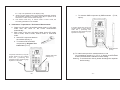
8. PC
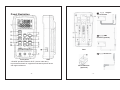
(IR to USB case is optionel. Measuring
data can be transferred to PC with it. )
IR to USB case
USB socket
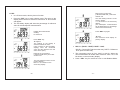
y Snap on IR to USB case and connect
with USB cable to PC.
y Press “ PC ” key to start data
transmission, and the “PC” will appear on
display. Press the “ PC ” key again to
cancel the transmission.
9.
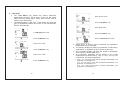
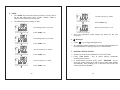
D/Q/ESR/ș
y In LCR Auto mode, this key has no function
y The “D/Q/ESR/ș ”key selects the secondary parameter
measurement function. Each press of the key will select
either dissipation (D), quality (Q), ESR or phase angel (ș).
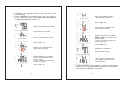
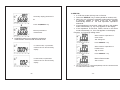
Example : In Cs testing mode
Secondary display parameter is
D.
Display the measurement reading
Press “ D/Q/ESR/ș ” key
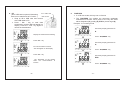
Press “ PC ” key
Secondary display parameter is
Q.
PC communication is active.
“PC” will appear on the display
Press “ D/Q/ESR/ș ” key
Press “ PC ” key
Secondary display parameter is
ESR.
“PC” disappear on the display
when PC communication is
inactive
- 26 -
Press “ D/Q/ESR/ș ” key
- 27 -