1
71
To edit a profile
In the Profiles choose the one you want to edit, then select Menu > Edit to modify the
settings.
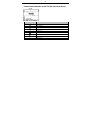
The profile settings include: name of the profile, ring type and volume, reminder type and volume,
notification type and volume, and system sound volume.
To cancel without saving changes, press Cancel.
To revert to the default profile settings, select Menu > Reset to default.
Set the Owner Information
Select Owner Information to enter the owner name, telephone number, E-mail address and
notes.
Set the Device Name
Select Device Name to enter the device name and description. This name will show in the
Bluetooth pairing.
Power Management
Select Power Management to check the main battery power level and set the options
including:
•
Backlight time out on battery: Set backlight timeout while your phone is powered by the
battery.
•
Backlight time out on AC: Set backlight timeout while your phone is charged by AC.