1
O T H E R C O N V E N I E N T F E AT U R E S
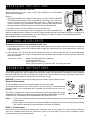
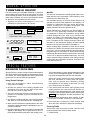
MINUTE PLUS
DEMONSTRATION MODE
Minute Plus allows you to cook for a minute at 100%
by simply touching the Minute Plus pad. You can also
extend cooking time in multiples of 1 minute by
repeatedly touching the Minute Plus pad during manual
cooking.
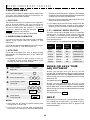
To demonstrate, touch Kitchen Timer/Clock, the
number 0 and touch Start/Touch On and hold for 3
ON will appear in the display.
seconds. .DEMO
Cooking operations and specific special features can
now be demonstrated with no power in the oven. For
example, touch Stop/Clear and touch Minute Plus,
and the display will show ... 1.00
and count down
quickly to END.....
• Suppose you want to heat a cup of soup for one
minute.
PROCEDURE
To cancel, touch Kitchen Timer/Clock, then the number
0 and Stop/Clear. If easier, unplug the oven from the
electrical outlet and replug.
Minute
Plus
Touch Minute Plus pad.
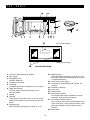
KITCHEN TIMER
NOTE:
• Suppose you want to time a 3 minute long distance
phone call.
1. To use Minute Plus, touch pad within 1 minute after
cooking, closing the door, touching the Stop/Clear
pad or during cooking.
PROCEDURE
2. Minute Plus cannot be used with Special Features.
1
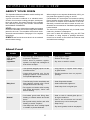
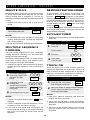
MULTIPLE SEQUENCE
COOKING
Sometimes cooking directions tell you to start on one
power level and then change to a different power
level. Your oven can do this automatically.
• Suppose you want to cook roast beef for 5 minutes
at 100% and then continue to cook for 30 minutes
at 50%.
2
3
Then enter second
cooking time.
Touch Power Level pad.
Touch number pad 5 for
50% power.
Touch Start/Touch On pad.
5
0
3
0
2
Enter time.
3
Touch Start/
Touch On pad.
Power
Level
PRESS 1
1
3 0
0
Start
Touch On
• Suppose you want to melt cheese on toast.
PROCEDURE
x2
0
TIMER
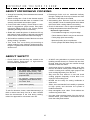
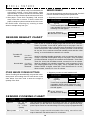
Touch On allows you to cook at 100% power by
touching the Start/Touch On continuously. Touch On is
ideal for melting cheese, bringing milk to just below
boiling etc. The maximum cooking time is 3 minutes.
0
Power
Level
KITCHEN
TOUCH ON
PROCEDURE
First enter cooking time.
Then touch Power Level
pad twice for 100%
power.
TO SET
Press number 1.
Your oven can be programmed for up to 4 automatic
cooking sequences, switching from one power level
setting to another automatically.
1
Touch Kitchen Timer/
Clock pad.
0
5
Start
Touch On
1
Continuously touch Start/
Touch On pad. The cooking
time will begin counting up.
2
When the cheese is melted to desired degree,
remove finger from Start/ Touch On pad.
Oven stops immediately.
Start
Touch On
NOTE:
NOTE:
1. Note time it takes for frequently used foods and
program that time in the future.
1. If Power Level pad is touched twice, HIGH will be
displayed.
2. Touch Touch On pad within 1 minute after cooking,
opening and closing the door or touching the Stop/
Clear pad.
2. If 100% is selected as the final sequence, it is not
necessary to touch the Power Level pad.
3. Touch On can only be used 3 times in a row. If more
times are needed, open and close door or touch
Stop/Clear.
3. If you wish to know power level, simply touch the
Power Level pad. As long as your finger is touching
the Power Level pad, the power level will be
displayed.
19