1
QUICK START GUIDE
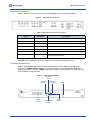
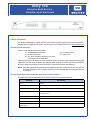
Table 2: Unity 550 Front Panel Controls
Item
Description
LCD
Activates automatically by certain status conditions, such as loss of signal.
To manually activate, press the ENTER button.
Arrow buttons
Push buttons activates LCD and selects options displayed.
ENTER
Push button enters options selected on LCD.
LCD Menu Navigation
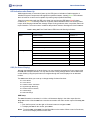
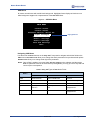
Operate the Unity 550 from the front panel using the arrow buttons and the LCD as shown in Figure 2.
Menu screens on the LCD direct you to screens that control various operating functions including:
programming
audio
Front Panel Functions
Programming Setup
1. Use the right or left arrow buttons to navigate to Prgm:Prog1.
2. To edit, press Enter.
3. To navigate to Prog2 or Prog3, use the top and bottom arrow buttons.
4. To change, press Enter.
Audio Setup
Use to setup Audio 1 or Audio 2 as indicated on the rear of the unit chassis.
1. Use the right or left arrow buttons to navigate to Aud:A01 or Aud:A02
2. To edit, press Enter.
3. To change, press Enter.
Closed Captioning (CC) Setup
1. Use the right or left arrow buttons to navigate to Sub:CC1.
2. To edit, press Enter.
3. To navigate to Sub:CC2 or Sub:CC3 or Sub:CC4, use the top and bottom arrow buttons.
4. To change, press Enter.
4
800072-02B
www.wegener.com