1
5.3.3 ASUS PC Probe
The ASUS PC Probe is a convenient utility to continuously monitor the vital
system information, such as fan rotations, voltages, and temperatures.
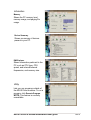
This utility also allows you to check other information about your computer,
including hard disk space, memory usage, and CPU type, CPU speed, and
internal/external frequencies through the DMI Explorer.
Starting ASUS PC Probe
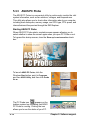
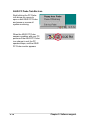
When ASUS PC Probe starts, a splash screen appears allowing you to
select whether to show the screen again when you open PC Probe or not.
To bypass this startup screen, clear the Show up in next execution check
box.
To launch ASUS PC Probe, click the
Windows Start button, point to Programs,
and then ASUS Utility, and then click Probe
Vx.xx.
appears on the
The PC Probe icon
taskbar system tray indicating that ASUS
PC Probe is running. Clicking the icon
allows you to see the status of your PC.
5-10
Chapter 5: Software support