1
IN/OUT OF GROUP
DISA SECURITY
Any station assigned to a station group can remove itself from that group and
then reenter the group at a later time. When out of the group, a station can
receive calls to its extension number but not to the group. There are 30 groups
and the access codes are 500–529.
To create a backup or relief operator position, assign the main operator and one
or more backup individuals to the operator group. All but the main operator
should be out of the group. When it is necessary to use a backup operator, put
the desired backup station in the group and remove the main operator. When
incoming call traffic is heavy, you can have another station put itself in the
operator group along with the main operator to handle the extra call load.
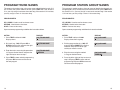
If the station does not have an IN/OUT key:
• Lift the handset and dial 53.
• Dial the group number.
• Dial 0 to be out of the group or dial 1 to be in the group.
• Receive confirmation tone and hang up.
If the station has an IN/OUT key:
• Press the IN/OUT key. It will light red when the station is in the group.
• Press the IN/OUT key again. The light is off when the station is out of the
group.
NOTE: A station can be in more than one group.
A common practice among hackers is to repeatedly dial a known DISA access
number (usually with a computer) and try a different passcode each time. The
hacker hopes to eventually chance upon the correct passcode and thus gain
access to your system. The SAMSUNG DCS’ security feature counts the number of sequential incorrect passcode attempts. If a certain number is reached,
DISA is disabled and the system sends an alarm to designated display stations. The number of passcode attempts and the disable duration are both programmable. In addition, the DCS system will print an SMDR record (a customerprovided printer and a SIM are required) each time an incorrect passcode is
entered.
The DISA alarm will ring for a programmable time before canceling the ringing;
however, the DISA alarm display will remain until the alarm is cleared. To clear
the DISA alarm, follow the following procedure:
• Lift the handset and dial 58.
• Enter the DISA alarm passcode (see your service company).
• Replace the handset.
DIRECT INWARD SYSTEM ACCESS (DISA)
From outside of the office, selected individuals can call into the SAMSUNG
DCS system on special DISA line(s). A security code must be entered to gain
access. Once these individuals are in the system, they can make outside calls
using the office lines or call stations within the system. Individuals who will use
DISA must have their stations assigned for DISA access and must change
their station passcodes. The default passcode 1234 cannot be used.
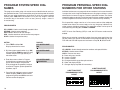
• Call in on the DISA line from any phone with tone dialing.
• You will hear DCS dial tone. Dial your security code (your extension number plus your station passcode).
• If you are allowed access, you will receive DCS dial tone.
• Dial any line access code, receive outside dial tone and then dial a telephone number
OR
Dial any extension number to call a station in the system.
• To make another call, press ✱, receive dial tone and dial another number.
• Press # and hang up when finished.
NOTE: Outgoing DISA calls are controlled by the dialing class of the station
identified by the security code. The DISA line must have disconnect supervision from the central office. Insist that this service is verified by your installation/service company.
4
WARNING
As it is impossible to prevent unauthorized access to your telephone
system by hackers, we suggest that you do not turn the DISA feature on
unless you intend to use it. If you do use this feature, it is good practice
to frequently change passcodes and periodically review your telephone
records for unauthorized use.
FORCED ACCOUNT CODES
Account codes are used to provide accountability for the incoming and outgoing
calls. If you do not have SMDR running, you can not use this information. These
account codes can be either forced or optional:
•
•
When forced, they are always verified from a system list of 500 entries.
When optional, the account code is only verified from the system list of
500 when the ACCT key is pressed before the call is made. If the ACCT
key is pressed during a call the account number is not verified. They can
include digits 0–9, star (✱) and #.
USING FORCED ACCOUNT CODES
•
•
•
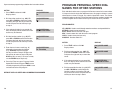
Lift the handset and press the ACCT CODE key or dial 47.
Enter the account code.
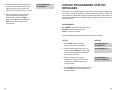
Press the account code button again, press TRSF or hookflash (on an
SLT). If a correct code is entered, you will hear DCS dial tone and you
can make an outside call in the usual manner. If an incorrect code is
entered, the station returns error tone.
5