1
C
ongratulations on your purchase of The Wine Enthusiast Wine
Master SE! You’ve acquired the finest electronic guide to wine
available—thanks to the team effort of Wine Enthusiast
Magazine and Excalibur Electronics. Wine Master SE contains all the
essential information you’ll need to fully enjoy the experience of drinking
wine. Wine Master SE offers an impressive volume of knowledge normally reserved for the true wine connoisseur, yet this information is available
to you with just the press of a button. And thanks to its compact design,
Wine Master SE slips conveniently into your pocket or purse, always ready
to be your personal wine sommelier, a wine expert to guide you in a restaurant or wine shop.
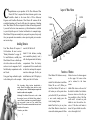
Layout of Wine Master
Display
UP
ENTER
HOME
SAVE
DOWN
Installing Batteries
ment lid, lift the lid off.
Your Wine Master SE requires 2
AAA batteries. Be sure to review
“Battery Information” on page 18.
To install batteries, carefully turn
Wine Master SE over so that the top
side is face-down on a soft surface,
such as a towel or magazine. You’ll
find the battery compartment on the
unit’s back.
Install 2 AAA batteries, making
sure to match the polarity (+ and -)
with the diagram inside the battery
compartment. Place the battery
compartment lid’s two smaller tabs
in their slots and snap the compartment door shut again. If, after you
install batteries, the LCD display is
blank, press the RESET button.
Using your finger or thumb to push
in the locking tab on the compart-
The legendary King Arthur brandished a
magic sword, Excalibur, from which we take
our company name. With this unique weapon in his
hands, he could not be vanquished.
Although Excalibur Electronics can’t claim
the magical secrets of Merlin, King Arthur ’s
court wizard, sometimes our patented technology may make it seem as if we could. Wine
Master SE is another unmatched innovation of
Excalibur Electronics.
We make you think .
4
BACK
ON/OFF
ABC
3X
RESET
Functions of Buttons
Wine Master SE’s buttons are easy
to use.
Master. An icon of a house appears
in the upper left corner when
you’ve returned to the home
screen..
ON/OFF Use
this button to turn Wine
Master SE on or off. (When you
turn Wine Master SE back on, it
will return you to the point where
you last left off.) If you wish to start
a new search, simply press the
HOME (starting) button.
HOME Push this key at any time
when Wine Master is turned on to
return to the starting menu for Wine
Push down on the neck of
the bottle for ENTER. Use ENTER to
choose an item in a list after you
have scrolled to it. Also, if the "line
scroll mode" is turned on, push
ENTER to view the next line of a
review. If the line scroll mode is
turned off, press ENTER to scroll a
review from right to left.
ENTER
5