1
UHF (403-470MHz) Tuning Procedure
5A.2
1.0
UHF (403-470MHz) Tuning Procedure
1.1
General
The recommended hardware platform is a 386 or 486 DX 33 PC (personal computer) with 8 MBytes
RAM, MS-DOS™ 5.0, Windows™ 3.1, and RSS (Radio Service Software). These are required to
align the radio. Refer to your RSS Installation Manual for installation and setup procedures for the
required software; the user manual is accessed (and can be printed if required) via the RSS.
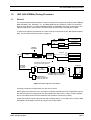
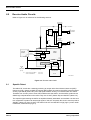
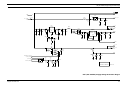
To perform the alignment procedures, the radio must be connected to the PC, RIB (Radio Interface
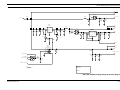
Box), and Universal Test Set as shown in figure 2-1.
30 dB PAD
SERVICE MONITOR
OR COUNTER
30 dB PAD
WATTMETER
TRANSMIT
BNC
RF GENERATOR
SMA-BNC
58-80348B33
RECEIVE
AUDIO IN
MIC IN
TX
AUDIO GENERATOR
TEST SET
RTX-4005B/
GTF180B
RADIO
RX
TEST CABLE
GTF-376A
SINAD METER
AC VOLTMETER
Note: Battery can be used in RIB
making power supply optional
PROGRAM/
TEST CABLE
GTF-374A
25PIN
COMPUTER
15PIN
DATA
RIB
RLN-4008B
GND
COMPUTER INTERFACE CABLE
30-80369B72 (IBM "AT" 9PIN ONLY)
30-80369B71 (IBM "XT" 25PIN ONLY)
RIB POWER SUPPLY
EPN4041A (230 VAC. Euro)/
EPN4040A (230 VAC. UK)
Figure 2-1 Radio Alignment Test Setup.
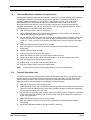
All tuning procedures are performed from the Service menu.
Before going into the Service menu, the radio must first be read using the File / Read Radio menu (if
the radio has just been programmed with data loaded from disk or from a newly created codeplug,
then it must still be read so that the RSS will have the radio’s actual tuning values).
All Service windows read and program the radio codeplug directly; you do NOT have to use the RSS
Read Radio / Write Radio functions to program new tuning values.
Radio Tuning Procedure
5A.2-1