1
Routing the AAP Cables
Bezels
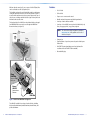
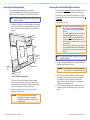
The AAP cables must have freedom of movement to permit opening
and closing the surface mount enclosure. At the same time, they need
to be restrained to prevent them from rubbing against the edges of
the enclosure cable access hole in the underside of the surface mount
enclosure. Cables can be damaged by rubbing against the cable access
hole edges. Route and secure the AAP cables as follows:
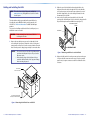
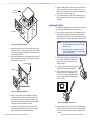
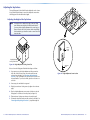
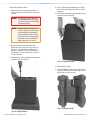
1. Open the top panel to extend the AAP cables to their maximum
pull.
2. Experiment with AAP cable positioning to ensure that the cables
do not rub against the edges of the AAP cable hole and to ensure
that the cable pull does not restrict the movement of the top
panel. Figure 11 shows the cables routed to the side, which proved
effective in tests at Extron.
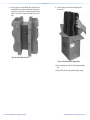
3. Use tie wraps to secure the AAP cables to the tie-down holes in
the clamshell and enclosure in the locations shown on figure 11.
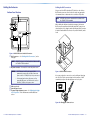
View from one side
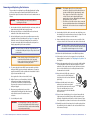
The HSA 822 ships with RJ-45 connector bezel plug-ins in a variety of
colors and a black, blank bezel.
Bezel
To change to a different color RJ-45 connector bezel
or if an RJ-45 connector is not needed or desired,
replace the connector bezel plug-in on the AAP panel
with a bezel of a different color or a blank plug-in.
See “Replacing the Bezels” in the "Maintenance and
Modifications" section.
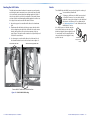
If no RJ-45 connector is desired, snap the
interior RJ-45 cable onto the rear of the
blank bezel plug-in (shown at right) to hold
it conveniently out of the way. Retain the
removed connector bezel plug-in for any
possible later use.
Blank Bezel
Plug-in in AAP
Panel
View from the opposite side
Secure the AAP cables at the circled locations.
Figure 11. HSA 822 AAP Cable Routing
14
HSA 822 Hideaway Enclosure • Installation
HSA 822 Hideaway Enclosure • Installation
15