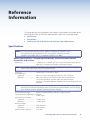
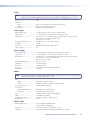
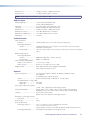
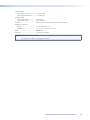
1
User Guide
PowerCage Fiber Optic Extenders
PowerCage™
FOX Tx/Rx AV
Fiber Optic Transmitter and Receiver
68-1914-01 Rev. A
09 10
Safety Instructions • English
Warning
This symbol is intended to alert the user of important operating and maintenance (servicing) instructions in the literature provided with the equipment.
Power sources • This equipment should be operated only from the power source indicated on the product. This
equipment is intended to be used with a main power system with a grounded (neutral) conductor. The third
(grounding) pin is a safety feature, do not attempt to bypass or disable it.
This symbol is intended to alert the user of the presence of uninsulated
dangerous voltage within the product’s enclosure that may present a risk of
electric shock.
Power disconnection • To remove power from the equipment safely, remove all power cords from the rear of
the equipment, or the desktop power module (if detachable), or from the power source receptacle (wall plug).
Caution
Read Instructions • Read and understand all safety and operating instructions before using the equipment.
Retain Instructions • The safety instructions should be kept for future reference.
Follow Warnings • Follow all warnings and instructions marked on the equipment or in the user information.
Avoid Attachments • Do not use tools or attachments that are not recommended by the equipment
manufacturer because they may be hazardous.
Consignes de Sécurité • Français
Ce symbole sert à avertir l’utilisateur que la documentation fournie avec le
matériel contient des instructions importantes concernant l’exploitation et la
maintenance (réparation).
Ce symbole sert à avertir l’utilisateur de la présence dans le boîtier
de l’appareil de  tensions dangereuses non isolées posant des risques
d’électrocution.
Attention
Lire les instructions• Prendre connaissance de toutes les consignes de sécurité et d’exploitation avant
d’utiliser le matériel.
Conserver les instructions• Ranger les consignes de sécurité afin de pouvoir les consulter à l’avenir.
Respecter les avertissements • Observer tous les avertissements et consignes marqués sur le matériel ou
présentés dans la documentation utilisateur.
Eviter les pièces de fixation • Ne pas utiliser de pièces de fixation ni d’outils non recommandés par le
fabricant du matériel car cela risquerait de poser certains dangers.
Sicherheitsanleitungen • Deutsch
Power cord protection • Power cords should be routed so that they are not likely to be stepped on or pinched
by items placed upon or against them.
Servicing • Refer all servicing to qualified service personnel. There are no user-serviceable parts inside. To prevent
the risk of shock, do not attempt to service this equipment yourself because opening or removing covers may
expose you to dangerous voltage or other hazards.
Slots and openings • If the equipment has slots or holes in the enclosure, these are provided to prevent
overheating of sensitive components inside. These openings must never be blocked by other objects.
Lithium battery • There is a danger of explosion if battery is incorrectly replaced. Replace it only with the
same or equivalent type recommended by the manufacturer. Dispose of used batteries according to the
manufacturer’s instructions.
Avertissement
Alimentations • Ne faire fonctionner ce matériel qu’avec la source d’alimentation indiquée sur l’appareil. Ce
matériel doit être utilisé avec une alimentation principale comportant un fil de terre (neutre). Le troisième
contact (de mise à la terre) constitue un dispositif de sécurité : n’essayez pas de la contourner ni de la
désactiver.
Déconnexion de l’alimentation• Pour mettre le matériel hors tension sans danger, déconnectez tous les
cordons d’alimentation de l’arrière de l’appareil ou du module d’alimentation de bureau (s’il est amovible) ou
encore de la prise secteur.
Protection du cordon d’alimentation • Acheminer les cordons d’alimentation de manière à ce que personne
ne risque de marcher dessus et à ce qu’ils ne soient pas écrasés ou pincés par des objets.
Réparation-maintenance • Faire exécuter toutes les interventions de réparation-maintenance par un
technicien qualifié. Aucun des éléments internes ne peut être réparé par l’utilisateur. Afin d’éviter tout danger
d’électrocution, l’utilisateur ne doit pas essayer de procéder lui-même à ces opérations car l’ouverture ou le
retrait des couvercles risquent de l’exposer à de hautes tensions et autres dangers.
Fentes et orifices • Si le boîtier de l’appareil comporte des fentes ou des orifices, ceux-ci servent à empêcher les
composants internes sensibles de surchauffer. Ces ouvertures ne doivent jamais être bloquées par des objets.
Lithium Batterie • Il a danger d’explosion s’ll y a remplacment incorrect de la batterie. Remplacer uniquement
avec une batterie du meme type ou d’un ype equivalent recommande par le constructeur. Mettre au reut les
batteries usagees conformement aux instructions du fabricant.
Vorsicht
Dieses Symbol soll dem Benutzer in der im Lieferumfang enthaltenen
Dokumentation besonders wichtige Hinweise zur Bedienung und Wartung
(Instandhaltung) geben.
Stromquellen • Dieses Gerät sollte nur über die auf dem Produkt angegebene Stromquelle betrieben werden.
Dieses Gerät wurde für eine Verwendung mit einer Hauptstromleitung mit einem geerdeten (neutralen) Leiter
konzipiert. Der dritte Kontakt ist für einen Erdanschluß, und stellt eine Sicherheitsfunktion dar. Diese sollte nicht
umgangen oder außer Betrieb gesetzt werden.
Dieses Symbol soll den Benutzer darauf aufmerksam machen, daß im Inneren
des Gehäuses dieses Produktes gefährliche Spannungen, die nicht isoliert sind
und die einen elektrischen Schock verursachen können, herrschen.
Stromunterbrechung • Um das Gerät auf sichere Weise vom Netz zu trennen, sollten Sie alle Netzkabel aus der
Rückseite des Gerätes, aus der externen Stomversorgung (falls dies möglich ist) oder aus der Wandsteckdose
ziehen.
Achtung
Lesen der Anleitungen • Bevor Sie das Gerät zum ersten Mal verwenden, sollten Sie alle Sicherheits-und
Bedienungsanleitungen genau durchlesen und verstehen.
Aufbewahren der Anleitungen • Die Hinweise zur elektrischen Sicherheit des Produktes sollten Sie
aufbewahren, damit Sie im Bedarfsfall darauf zurückgreifen können.
Befolgen der Warnhinweise • Befolgen Sie alle Warnhinweise und Anleitungen auf dem Gerät oder in der
Benutzerdokumentation.
Keine Zusatzgeräte • Verwenden Sie keine Werkzeuge oder Zusatzgeräte, die nicht ausdrücklich vom
Hersteller empfohlen wurden, da diese eine Gefahrenquelle darstellen können.
Instrucciones de seguridad • Español
Este símbolo se utiliza para advertir al usuario sobre instrucciones importantes de operación y mantenimiento (o cambio de partes) que se desean
destacar en el contenido de la documentación suministrada con los equipos.
Este símbolo se utiliza para advertir al usuario sobre la presencia de elementos con voltaje peligroso sin protección aislante, que puedan encontrarse
dentro de la caja o alojamiento del producto, y que puedan representar
riesgo de electrocución.
Schutz des Netzkabels • Netzkabel sollten stets so verlegt werden, daß sie nicht im Weg liegen und niemand
darauf treten kann oder Objekte darauf- oder unmittelbar dagegengestellt werden können.
Wartung • Alle Wartungsmaßnahmen sollten nur von qualifiziertem Servicepersonal durchgeführt werden.
Die internen Komponenten des Gerätes sind wartungsfrei. Zur Vermeidung eines elektrischen Schocks
versuchen Sie in keinem Fall, dieses Gerät selbst öffnen, da beim Entfernen der Abdeckungen die Gefahr eines
elektrischen Schlags und/oder andere Gefahren bestehen.
Schlitze und Öffnungen • Wenn das Gerät Schlitze oder Löcher im Gehäuse aufweist, dienen diese zur
Vermeidung einer Überhitzung der empfindlichen Teile im Inneren. Diese Öffnungen dürfen niemals von
anderen Objekten blockiert werden.
Litium-Batterie • Explosionsgefahr, falls die Batterie nicht richtig ersetzt wird. Ersetzen Sie verbrauchte Batterien
nur durch den gleichen oder einen vergleichbaren Batterietyp, der auch vom Hersteller empfohlen wird.
Entsorgen Sie verbrauchte Batterien bitte gemäß den Herstelleranweisungen.
Alimentación eléctrica • Este equipo debe conectarse únicamente a la fuente/tipo de alimentación eléctrica
indicada en el mismo. La alimentación eléctrica de este equipo debe provenir de un sistema de distribución
general con conductor neutro a tierra. La tercera pata (puesta a tierra) es una medida de seguridad, no
puentearia ni eliminaria.
Desconexión de alimentación eléctrica • Para desconectar con seguridad la acometida de alimentación
eléctrica al equipo, desenchufar todos los cables de alimentación en el panel trasero del equipo, o desenchufar
el módulo de alimentación (si fuera independiente), o desenchufar el cable del receptáculo de la pared.
Protección del cables de alimentación • Los cables de alimentación eléctrica se deben instalar en lugares
donde no sean pisados ni apretados por objetos que se puedan apoyar sobre ellos.
Precaucion
Reparaciones/mantenimiento • Solicitar siempre los servicios técnicos de personal calificado. En el interior no
hay partes a las que el usuario deba acceder. Para evitar riesgo de electrocución, no intentar personalmente la
reparación/mantenimiento de este equipo, ya que al abrir o extraer las tapas puede quedar expuesto a voltajes
peligrosos u otros riesgos.
Conservar las instrucciones • Conservar las instrucciones de seguridad para futura consulta.
Ranuras y aberturas • Si el equipo posee ranuras o orificios en su caja/alojamiento, es para evitar el
sobrecalientamiento de componentes internos sensibles. Estas aberturas nunca se deben obstruir con otros
objetos.
Leer las instrucciones • Leer y analizar todas las instrucciones de operación y seguridad, antes de usar el
equipo.
Obedecer las advertencias • Todas las advertencias e instrucciones marcadas en el equipo o en la
documentación del usuario, deben ser obedecidas.
Evitar el uso de accesorios • No usar herramientas o accesorios que no sean especificamente
recomendados por el fabricante, ya que podrian implicar riesgos.
Batería de litio • Existe riesgo de explosión si esta batería se coloca en la posición incorrecta. Cambiar esta
batería únicamente con el mismo tipo (o su equivalente) recomendado por el fabricante. Desachar las baterías
usadas siguiendo las instrucciones del fabricante.
Advertencia
安全须知 • 中文
这个符号提示用户该设备用户手册中有重要的操作和维护说明。
这个符号警告用户该设备机壳内有暴露的危险电压,有触电危险。
注意
阅读说明书 • 用户使用该设备前必须阅读并理解所有安全和使用说明。
保存说明书 • 用户应保存安全说明书以备将来使用。
遵守警告 • 用户应遵守产品和用户指南上的所有安全和操作说明。
避免追加 • 不要使用该产品厂商没有推荐的工具或追加设备,以避免危险。
警告
电源 • 该设备只能使用产品上标明的电源。 设备必须使用有地线的供电系统供电。 第三条线
(地线)是安全设施,不能不用或跳过 。
拔掉电源 • 为安全地从设备拔掉电源,请拔掉所有设备后或桌面电源的电源线,或任何接到市
电系统的电源线。
电源线保护 • 妥善布线, 避免被踩踏,或重物挤压。
维护 • 所有维修必须由认证的维修人员进行。 设备内部没有用户可以更换的零件。为避免出现
触电危险不要自己试图打开设备盖子维修该设备。
通风孔 • 有些设备机壳上有通风槽或孔,它们是用来防止机内敏感元件过热。 不要用任何东西
挡住通风孔。
锂电池 • 不正确的更换电池会有爆炸的危险。必须使用与厂家推荐的相同或相近型号的电池。按
照生产厂的建议处理废弃电池。
FCC Class A Notice
This equipment has been tested and found to comply with the limits for a Class A digital device, pursuant to part 15
of the FCC Rules. Operation is subject to the following two conditions:
1. This device may not cause harmful interference.
2. This device must accept any interference received, including interference that may cause undesired operation.
The Class A limits are designed to provide reasonable protection against harmful interference when the equipment is
operated in a commercial environment. This equipment generates, uses, and can radiate radio frequency energy and,
if not installed and used in accordance with the instruction manual, may cause harmful interference to radio communications. Operation of this equipment in a residential area is likely to cause harmful interference, in which case the
user will be required to correct the interference at his own expense.
NOTE: This unit was tested with shielded cables on the peripheral devices. Shielded cables must be used with the
unit to ensure compliance with FCC emissions limits.
For more information on safety guidelines, regulatory compliances, EMI/EMF compliance, accessibility, and
related topics, click here.
Notational Conventions Used in this Guide
TIP: A tip provides a suggestion to make setting up or working with the device easier.
NOTE: A note draws attention to important information.
CAUTION: A caution warns of things or actions that might damage the equipment.
WARNING: A warning warns of things or actions that might cause injury, death, or
other severe consequences.
Copyright
© 2010 Extron Electronics. All rights reserved.
Trademarks
All trademarks mentioned in this guide are the properties of their respective owners.
Contents
Introduction.......................................................1
About this Guide................................................. 1
About the PowerCage FOX Tx/Rx AV Transmitter
and Receiver....................................................... 1
System Compatibility....................................... 2
Cable Transmission Modes............................... 2
General System Operation............................... 2
Features............................................................... 3
PowerCage FOX Tx/Rx AV Connection
Diagram............................................................. 4
Installation and Operation...............................5
Installing the PowerCage FOX Tx/Rx AV............... 5
Rear Panel Connections and Indicators................. 5
Video Connections........................................... 6
Audio Connections.......................................... 7
RS-232 Connections........................................ 8
Alarm............................................................ 10
Fiber Optic Connection.................................. 10
Power Indicator.............................................. 11
PowerCage 1600 Front Panel Port, Control, and
Indicators.......................................................... 12
Operation.......................................................... 14
FOX Extenders Control Program......................... 24
Installing the Software from the DVD............. 24
Downloading and Installing the Software
from the Web............................................... 25
Starting the Control Program......................... 26
FOX Extenders Main Window......................... 27
Updating Firmware............................................ 30
Downloading the Firmware from the
Website........................................................ 30
Loading the Firmware to the Transmitter and
Receiver........................................................ 31
Reference Information....................................35
Specifications..................................................... 35
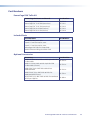
Part Numbers..................................................... 39
PowerCage FOX Tx/Rx AV ............................. 39
Included Parts................................................ 39
Optional Accessories...................................... 39
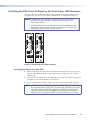
Installing the FOX Tx/Rx AV Board in the
PowerCage 1600 Enclosure.............................. 40
Inserting the Board into the Slot..................... 40
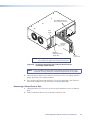
Removing a Board from a Slot........................ 41
Remote Communication and Control............15
RS-232 Ports...................................................... 15
Remote Port on the PowerCage FOX Tx/Rx
AV Board...................................................... 16
Configuration Port on the PowerCage Front
Panel............................................................ 16
SIS Control......................................................... 16
Host-to-Unit Instructions................................ 16
Introduction to SIS......................................... 16
Symbols Used in this Guide............................ 17
Error Messages.............................................. 18
Command/Response Table for SIS
Commands................................................... 19
SIS Command Validity Table........................... 24
PowerCage FOX Tx/Rx AV • Contents
v
PowerCage FOX Tx/Rx AV • Contents
vi
Introduction
This section gives an overview of the Extron PowerCage FOX Tx/Rx AV fiber optic extender
boards, describes their significant features, and provides a sample application diagram.
zz
About this Guide
zz
About the PowerCage FOX Transmitter and Receiver
zz
Features
WARNINGS: The PowerCage FOX Tx/Rx AV outputs continuous invisible light (Class 1
rated), which may be harmful and dangerous to the eyes; use with caution.
• Do not look into the rear panel fiber optic cable connectors or into the fiber optic cables themselves.
• Plug the attached dust caps into the optical transceivers when the fiber
optic cable is unplugged.
About this Guide
This guide contains information about the PowerCage FOX Tx/Rx AV fiber optic extenders,
with instructions for experienced installers to install, configure, and operate the
equipment. Unless otherwise specified, references in this manual to the “AV board” or
“PowerCage FOX AV” relate to the features or operation of the PowerCage FOX Tx/Rx AV.
The term “transmitter” refers to both multimode and singlemode transmitters and
“receiver” refers to both multimode and singlemode receivers.
About the PowerCage FOX Tx/Rx AV Transmitter and Receiver
The Extron PowerCage FOX Tx/Rx AV Fiber Optic Extenders consist of a modular transmitter
and receiver board pair for the PowerCage enclosure, providing long distance transmission
of standard definition video, audio, and data (RS-232) signals over a fiber optic cable at rates
of up to 2 Gbps.
The double-slot board design of the PowerCage FOX Tx/Rx AV allows for up to eight
transmitters or receivers to be installed in the PowerCage enclosure. The PowerCage
FOX Tx/Rx AV transmitter and receiver are hot-swappable, meaning that the boards can be
replaced or upgraded without the need to power down the system.
The 1310 nm singlemode module of the PowerCage FOX Tx/Rx AV board carries signals
up to 30 km (18.75 miles) while the 850 nm multimode module carries signals up to 2 km
(6561 feet).
NOTE: The transmitter and receiver must be compatible. Both must be singlemode or
both must be multimode in order to transmit a readable signal.
PowerCage FOX Tx/Rx AV • Introduction
1
System Compatibility
The PowerCage FOX Tx/Rx AV video units are compatible with the FOX Tx/Rx AV fiber
optic video transmitter and receiver and with the FOX Series distribution amplifiers,
switchers, and matrix switchers. However, they are not compatible with the following
Extron products:
zz
FOXBOX
zz
FOX 500 (RGB) and FOX 500 DVI
zz
FOX 500 DA6
zz
FOX 3G HD‑SDI
zz
PowerCage FOX 3G HD-SDI Series
zz
PowerCage FOX VGA and DVI
Cable Transmission Modes
The transmitters and receivers are further categorized by the type of fiber optic cable,
multimode or singlemode, which defines the effective range of transmission:
zz
zz
Multimode — Long distance: up to 2 km (6,561 feet) (depending on the fiber cable)
zz
PowerCage FOX Tx AV MM
zz
PowerCage FOX Rx AV MM
Singlemode — Very long distance: up to 30 km (18.75 miles)
zz
PowerCage FOX Tx AV SM
zz
PowerCage FOX Rx AV SM
NOTE: The multimode and singlemode products are physically and functionally
identical, except for the effective range of transmission. In this guide, any
reference applies to either transmission mode unless otherwise specified.
General System Operation
The PowerCage FOX Tx/Rx AV transmitter accepts a single low resolution video signal
(composite, S-video, or low resolution component video). It accepts audio and one-way
(transmitter-to-receiver) RS-232 serial communication (for applications such as projector
control). The transmitter converts all of its incoming signals into a proprietary format
signal, which it outputs on a single fiber optic cable to the PowerCage FOX Rx AV
receiver. An optional return (receiver-to-transmitter) stream of serial RS-232
communications, such as projector responses, requires a second fiber optic cable. Instead
of the return RS-232 communications, the receiver can be configured to output a
daisy-chained primary fiber optic signal to another receiver.
The PowerCage FOX Tx/Rx AV receiver outputs a single low resolution video signal
(composite, S-video or low resolution component video), which is not compatible with
RGB or HDTV 480p, 720p, or 1080i component video signals. The receiver converts the
proprietary signal back to video, audio, and serial RS-232 communication (matching the
display requirements) and outputs the signals locally. The Extron Simple Instruction Set
(SIS™) commands are used to configure the receiver to convert between signal formats. If
either RS-232 return or daisy-chained communications are implemented (a second fiber
optic cable is installed), the receiver outputs a proprietary signal on the second fiber cable.
The transmitter and receiver have image and audio adjustments available under RS-232
control. Both units have fiber light status indicators and lost-light alarm connectors.
The receivers have built-in alternating pixels, color bars, and grayscale test patterns to
assist in setting up the display equipment.
PowerCage FOX Tx/Rx AV • Introduction
2
Features
Digitized signal transmission — Digitized transmission ensures perfect signal
transmission. The non-linearity of the fiber components does not affect signal quality.
Light can be distributed and repeated without signal degradation or compression.
Long distance transmission — Signals may be transmitted up to 2 km (6561 feet) over
multimode (MM) fiber or up to 30 km (18.75 miles) over singlemode (SM) fiber.
Daisy chain capability — The system can be expanded to provide output for up to 10
display devices.
Integration friendly — A variety of connectors permits input and output of composite,
S-video, or low resolution component video signals. Compatibility with the Extron fiber
matrix switchers allows the units to be integrated into more complex A/V systems.
Transmits multiple signal types — Video, audio and data signals can all be transmitted
simultaneously over one fiber. The units transmit composite, S-Video, or low resolution
component video signals and are compatible with NTSC, PAL, and SECAM standards.
All digital, zero compression technology — The PowerCage FOX Tx/Rx AV delivers
uncompressed pixel-for-pixel transmission of video signals to ensure optimal image quality.
Auto Input Format Detection — The PowerCage FOX Tx/Rx AV transmitter can be set
to detect the incoming video signal format, automatically reconfiguring itself to transmit
the signal. This feature can reduce the number of required outputs for a matrix switcher,
lowering system cost while improving manageability.
Encoding and decoding — The PowerCage FOX Tx AV converts incoming signals to a
proprietary format that is passed along the fiber optic cable to the PowerCage FOX Rx AV.
At the other end of the cable, the receiver converts the signal to the low resolution format
that matches the needs of the display device.
Output Video Formatting — You can set the output video signal format (composite,
S-Video, or component) or follow the format of the source device (video follow).
Picture and audio adjustments — Available picture adjustments include color, tint,
contrast, and brightness. Audio adjustments include input gain and attenuation, and
output level. Both audio and video can be muted.
Troubleshooting features — A variety of LED signals and indicators allow easy diagnosis
of problems.
Easy configuration — The units can be configured using SIS commands or the FOX
Extenders Control Program.
PowerCage FOX Tx/Rx AV • Introduction
3
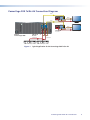
PowerCage FOX Tx/Rx AV Connection Diagram
Fiber
FOX 300 Rx
RS-232 RS-232
OVER FIBER REMOTE
POWER
12V
0.8A MAX
O
U
T
P
U
T
S
Y/VID
B-Y/C
Tx Rx
R-Y
OPTICAL
Tx Rx
Tx
Rx
AUDIO
L
R
ALARM
S-VID
1
2
Fiber
Rx
Tx
1 2
Tx Rx
Tx Rx
12V
0.8A MAX
O
U
T
P
U
T
S
Y/VID
B-Y/C
Tx Rx
R-Y
OPTICAL
Tx Rx
Tx
AUDIO
L
S-VID
4
3
VIDEO INPUT
1
FOX 300 Rx
RS-232 RS-232
OVER FIBER REMOTE
POWER
L
AUDIO
R
REMOTE
RS-232 ALARM
RS-232
OVER FIBER
Tx
1 2
Tx Rx
Tx Rx
REMOTE
RS-232 ALARM
RS-232
OVER FIBER
R
AUDIO
L
3
4
2
VIDEO INPUT
1
100-240V
50/60Hz
5A MAX.
Flat Panel Display
PowerCage
FOX 2G Tx AV
Rx
PowerCage
FOX 2G Tx AV
R
ALARM
1
2
Rx
Audio
Component
FOX Rx AV
2
PowerCage 1600
Power Supply
Audio
Component
Receivers
Extron
PowerCage 1600
FOX Tx AV
Boards
Audio
Component
DVD Player
Flat Panel Display
Audio
Component
DVD Player
Figure 1. Typical Application for the PowerCage FOX Tx/Rx AV
PowerCage FOX Tx/Rx AV • Introduction
4
Installation and
Operation
This section describes the installation and operation of the PowerCage FOX Tx/Rx AV Tx/
Rx, including:
zz
Installing the PowerCage FOX Tx/Rx AV
zz
Rear Panel Connections and Indicators
zz
PowerCage Front Panel Port, Control, and Indicators
zz
Operation
CAUTION: Installation and service must be performed by authorized personnel only.
Installing the PowerCage FOX Tx/Rx AV
The PowerCage FOX transmitter and receiver boards must be installed in an Extron
PowerCage 1600 enclosure. See “Installing the FOX Tx/Rx AV Board in the
PowerCage 1600 Enclosure” in the “Reference Information” section for the procedure.
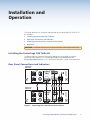
Rear Panel Connections and Indicators
PowerCage
FOX Tx AV
RS-232
OVER FIBER
VIDEO
B-Y/C
Tx Rx
R-Y
S-VID
L
AUDIO
R
2
Rx
6
7
Tx
Rx
REMOTE
RS-232 ALARM
1 2
Tx Rx
1
Tx
PowerCage
FOX Tx AV
Y/VID
3
4
5
PowerCage
FOX Rx AV
RS-232
OVER FIBER
VIDEO
B-Y/C
Tx Rx
R-Y
S-VID
L
AUDIO
R
PowerCage
FOX Rx AV
Y/VID
REMOTE
RS-232 ALARM
Tx Rx
1 2
Figure 2. PowerCage FOX Tx/Rx AV Rear Panel Features
PowerCage FOX Tx/Rx AV • Installation and Operation
5
Video Connections
a Video connectors — Three BNC connectors and one 4-pin mini DIN S-video
connector are available for video input and output.
The PowerCage FOX Tx/Rx AV inputs and outputs a single low resolution video signal
(composite, S-video and low resolution component video). It is not compatible with
RGB or HDTV 480p, 720p, or 1080i component video signals.
The transmitter converts incoming signals to a proprietary format and passes them
along the fiber optic cable to the PowerCage FOX Rx AV. The receiver converts the
signal to a format that matches the display requirements. SIS commands are used to
configure the receiver to convert between signal formats.
Component video
To input or output a low resolution component video signal, connect
a device to the Y/VID, B-Y/C, and R-Y receptacles on the back panel of
the unit, as shown at right.
Y/VID
B-Y/C
R-Y
S-VID
Component
S-video
There are two alternative methods to input or output an S-video signal:
zz
Connect a device to the female Y/VID and B-Y/C BNC receptacles
on the back panel.
Y/VID
B-Y/C
R-Y
S-VID
S-video
zz
Connect a device to the female 4-pin mini DIN S-VID receptacle on
the back panel.
NOTE: In addition to the selected output type, using BNC
connectors, a transcoded S-video signal is always
output from the receiver S-VID socket.
Y/VID
B-Y/C
R-Y
S-VID
S-video
Composite video
To input or output a composite video signal, connect a device to the
female Y/VID BNC receptacle on the back panel of the unit, as shown
at right.
Y/VID
B-Y/C
R-Y
S-VID
Composite
Signal priorities
In the table below the colored cells indicate which signal has the highest priority when
both the BNC connectors and the 4-pin mini DIN provide simultaneous video input.
BNC Input
Mini DIN Input
Component
S-video
S-video
S-video
Composite
S-video
PowerCage FOX Tx/Rx AV • Installation and Operation
6
Audio Connections
b Audio connector — Audio is input to the PowerCage FOX AV transmitter and output
from the PowerCage FOX AV receiver through this 3.5 mm, 5-pole, captive screw
connector. Input and output can be either two discrete mono or one stereo and can
be balanced or unbalanced, depending on the wiring connections. The illustrations
below show how to wire the audio sources and outputs.
Do not tin the wires!
R
Tip
Sleeve
Balanced Audio
Figure 3.
Unbalanced Audio
Audio Input Connections
Unbalanced Stereo Output
R
Sleeve(s)
Tip
NO GROUND HERE.
L
Tip
Ring
Sleeve(s)
Tip
Ring
Tip
NO GROUND HERE.
Figure 4.
R
Tip
Sleeve
L
L
Tip
Ring
Sleeves
Tip
Ring
Balanced Stereo Output
Audio Output Connections
CAUTIONS: The length of the exposed wires in the stripping process is critical.
The ideal length is 3/16 inch (5 mm). If it is any longer, the exposed
wires may touch, causing a short circuit between them. If the stripped
portion is any shorter, the wires can be easily pulled out even if tightly
fastened by the captive screws.
Do not tin the wires. Tinned wire does not hold its shape and can
become loose over time.
The table below shows the initial gain differences between audio input and output
using captive screw connectors. The gain for unbalanced output from the captive
screw connector is half (-6 dB), regardless of input.
Input
Output
Gain
Balanced
Balanced
0 dB (unity)
Balanced
Unbalanced
-6 dB (half)
Unbalanced
Balanced
0 dB
Unbalanced
Unbalanced
-6 dB
You can make additional adjustments to audio gain and attenuation using SIS
commands. See “SIS Control” in the “Remote Communication and Control” section.
PowerCage FOX Tx/Rx AV • Installation and Operation
7
RS-232 Connections
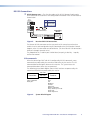
c RS-232 Remote port — The first three poles of the RS-232 Remote 5-pole captive
screw connector are used for RS-232 configuration and control. Wire the connector as
shown below.
RS-232
OVER FIBER
Tx Rx
Pin
Tx
Rx
Gnd
Tx Rx
Function
Transmit data
Receive data
Signal ground
Controlling
Device
Do not tin the wires!
Receive (Rx)
Transmit (Tx)
Ground ( )
Bidirectional
Figure 5.
Receive (Rx)
Transmit (Tx)
Ground ( )
Rear Panel RS-232 Remote Port
The Remote RS-232 connectors on the rear panels of the transmitter and receiver
enable the units to be configured using SIS commands or the FOX Extenders Control
Program, when it is connected to a control device. (The Over Fiber RS-232 connections
allow pass-through to remote units.)
The protocol for the Tx and Rx ports is 9600 baud, no parity, 8 data bits, 1 stop bit,
and no flow control.
SIS commands
When the PowerCage FOX Tx/Rx AV is configured by RS-232 commands, some
commands are processed by the transmitter and others, by the receiver. The SIS
commands do not distinguish between the two units. The system routes the
commands based on where they are processed.
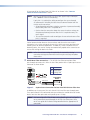
The following system block diagram shows which functions are processed by the
transmitter and which are processed by the receiver.
Fiber Link 1
Transmitter
Process
Input configuration
Audio gain
Figure 6.
Fiber Link 2
(optional)
Receiver
Process
Color
Tint
Brightness
Contrast
Video mute
Output configuration
Daisy chain/loop out mode
Audio mute
Audio output level
System Block Diagram
PowerCage FOX Tx/Rx AV • Installation and Operation
8
SIS commands for the PowerCage FOX Tx/Rx AV are shown in the “Remote
Communication and Control” section.
NOTE: Both RS-232 Remote and RS-232 Over Fiber signals require fiber optic
Link 1 and Link 2 for full functionality.
If only Link 1 is enabled, the ability to configure the system through
SIS commands is limited by the lack of return communication from the
receiver to the transmitter.
• All configuration carried out using the transmitter is processed normally because only fiber Link 1 is required for it.
• Queries from the transmitter about the status of receiver settings are
not processed correctly because fiber Link 2 is required to carry the return signal.
• The receiver cannot be used to configure the transmitter because fiber
Link 2 is required.
Lack of communication between the transmitter and the receiver can result in
mismatches in the value settings of the two units, which may cause confusion with
control systems or software applications. To avoid this, within 4 seconds of Link 2
becoming active, the receiver settings are automatically copied to the transmitter to
ensure that settings for both units match.
NOTE: When the receiver settings are copied to the transmitter, existing
transmitter settings are overwritten and it may be necessary to update
those values.
d RS-232 Over Fiber connections — The RS-232 Over Fiber connections allow
pass-through to remote units. Wire the Over Fiber portion of the 5-pole captive screw
connector as shown below:
RS-232
OVER FIBER
Tx Rx
Pin
Tx
Rx
Gnd
Tx Rx
Do not tin the wires!
Ground ( )
Receive (Rx)
Transmit (Tx)
Figure 7.
Bidirectional
Function
Transmit data
Receive data
Signal ground
Controlling
Device
Ground ( )
Receive (Rx)
Transmit (Tx)
Captive Screw Connection for Rear Panel RS-232 Over Fiber Port
In addition, on the rear panel, the units have RS-232 Over Fiber pass-through ports.
These ports allow RS-232 commands to be passed from the control device to remote
devices over the fiber optic cable with speeds up to 115 kbps.
NOTE: The PowerCage FOX Tx/Rx AV does not respond or generate a response
to any commands passed through the RS-232 Over Fiber ports. Refer
to the user guide of the device being controlled for the appropriate SIS
commands.
PowerCage FOX Tx/Rx AV • Installation and Operation
9
Alarm
e Alarm connector — When an alarm is connected to it, a warning
REMOTE
RS-232 ALARM
signal is issued through the two rightmost poles of the 5-pole RS-232
Remote/Alarm captive screw connector when light signals have been
disconnected, lost, or broken.
1 2
The alarm pins, labeled 1 and 2, (see the illustration at right) of this
contact closure port act are shorted together when the signal is lost.
The port does not produce any discrete on and off voltage signals but
acts as an internal relay that either connects or disconnects an external
alarm circuit.
zz
For the PowerCage FOX AV transmitter, the alarm state is activated
when link 2 is absent.
zz
For the PowerCage FOX AV receiver, the alarm state is activated
when link 1 is absent.
zz
When power is lost, the alarm state is activated for both units.
NOTE: Strip the wires using the same methods shown for the audio
connections, earlier in this section.
Fiber Optic Connection
f Optical connector — An LC duplex SFP connector links the transmitter and
receiver. An LED above each port lights when the port receives a signal.
zz
The optical Rx port on the receiver unit lights when a signal from fiber
link 1 reaches the receiver.
zz
The optical Rx port on the transmitter unit lights when a signal from
link 2 reaches the transmitter.
OPTICAL
Tx
Rx
The transmitter and receiver units of the PowerCage FOX Tx/Rx AV are
connected by an LC duplex SFP connector. Fiber optic link 1 connects the Tx
port of the transmitter and the Rx port of the receiver. It carries video, audio,
and data output from the transmitter to the receiver.
Fiber optic link 2 connects the Tx port of the receiver with the Rx port of the
transmitter. It carries only the responses to RS-232 commands and is not
required for transmitting video and audio signals.
OPTICAL
Tx
Rx
However, if link 2 is not enabled, the ability to configure the system through
SIS commands is limited by the lack of communication from the receiver to the
transmitter. All commands issued through the transmitter are valid but
responses to status queries may return invalid data.
Signals can be transmitted 2 km (6561 feet) over multimode (MM) fiber and
30 km (18 miles) over singlemode fiber (see the “Operating distance” specification
in the “Reference Information” section). A MM transmitter must always be connected
to a MM receiver and a SM transmitter can only be connected to a SM receiver.
WARNINGS: The PowerCage FOX Tx/Rx AV outputs continuous invisible light
(Class 1 rated), which may be harmful and dangerous to the eyes;
use the product with caution.
• Do not look into the rear panel fiber optic cable connectors or
into the fiber optic cables themselves.
• Plug the attached dust caps into the optical transceivers when the
fiber optic cable is unplugged.
PowerCage FOX Tx/Rx AV • Installation and Operation
10
Daisy chain connection
PowerCage FOX Rx AV receivers have a loop-out mode that allows a signal to be passed
from the receiver along a daisy chain of to up to ten receivers, with a display device
attached to each receiver. The loop-out mode is set using RS-232 commands (see the
Daisy Chain command in the “SIS Control” section) or the FOX Extenders control
program (refer to the program help file) for more information.
All receivers in the daisy chain must be compatible; that is, they must all be SM or all be
MM models, connected with the appropriate fiber optic cables. Each receiver receives a
signal at its Rx fiber optic port and passes the signal to the next unit through its Tx port.
NOTES: • In daisy chain mode, the Tx port is used to pass audio and video signals
to the next receiver in the daisy chain. As a result, the Tx port is not
available for bidirectional communication and there are limitations on
system configuration with SIS commands.
• When multiple receivers are in daisy chain mode, RS-232 commands
issued through the transmitter are passed to every receiver; however,
commands issued through a receiver apply only to that receiver.
Configuring each receiver independently matches each output signal to
the unique needs of the display device.
Rx
Rx
Tx
From Transmitter
or Daisy-Chained
Receiver
Tx
Receiver
Receiver
Figure 8. Connections for Daisy Chain Mode
Power Indicator
g Power LED — This LED lights when the unit is receiving power.
PowerCage FOX Tx/Rx AV • Installation and Operation
11
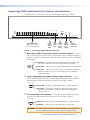
PowerCage 1600 Front Panel Port, Control, and Indicators
The following features are on the front panel of the PowerCage 1600 enclosure.
1
2
3
4
5
6
7
8
9
10
11
COMM
POWER
ALARM
12
13
14
15
16
PSU
1
PSU
2
FAN
1
FAN
2
COMM
SELECT
CONFIG
TEMP
PowerCage 1600
1
Board Status LEDs
for Multi-function Boards
(up to 16 optional boards)
2
Power
Supply
Status
LEDs
3
4
5
Fan Communi- ConfigStatus
cation
uration
LEDs Selection
Port
Button
(RS-232)
6
System
Temperature
Status LED
Figure 9. PowerCage 1600 Enclosure Front Panel
a Board status LEDs: Comm, Power, Alarm (16 board locations) — There is
one set of these LEDs for each of the 16 rear panel slots that is available for boards. If
a board is installed in the identically-numbered slot, the LEDs light under the following
circumstances:
1
COMM
POWER
ALARM
Comm LED — Lights when the corresponding board is selected and
can be communicated with via the front panel Config port.
Power LED — Lights when the corresponding board is receiving power.
Alarm LED — Lights when the fiber link on a PowerCage FOX board is
broken or disconnected. This feature depends on the model of
PowerCage board.
b Power supply (PSU) status LEDs (2 power supply locations) — These
pairs of LEDs correspond to the primary (included) power supply and the redundant
(optional) power supply. For each power supply, the LEDs light as follows:
PSU
1
PSU
2
Power LED — Lights when the power supply is receiving power.
Alarm LED — Lights when the power supply malfunctions, such as
providing an overvoltage (14 VDC or more) or an undervoltage
(10.5 VDC or less).
c Fan status LEDs (2 fan locations) — These pairs of LEDs indicate whether the
two fans are functioning correctly. For each fan, the LEDs light as follows:
FAN
1
FAN
2
Power LED — Lights when the corresponding fan is receiving power.
Alarm LED — Lights when the corresponding fan malfunctions.
CAUTION: If a power supply or fan status Alarm LED lights, remove power from
the unit and contact Extron S3 Sales & Technical Support Hotline.
PowerCage FOX Tx/Rx AV • Installation and Operation
12
d Comm Select button — Repeatedly press this button as necessary to select the board
to be connected to the Configuration port (item e). The Comm LED (item a) for the
selected board lights.
e Config port — This 2.5 mm mini stereo jack serves the same serial communications
function as the Remote RS-232 port on the transmitter or receiver board, but is easier
to access than the ports on the boards after the units have been installed and cabled.
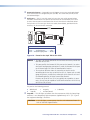
The 9-pin D to 2.5 mm mini jack TRS RS‑232 cable (shown below), provided with the
enclosure, can be used for this connection.
6 feet
(1.8 m)
1
Part #70-335-01
6
9
5
Tip
Ring
Sleeve (Gnd)
9-pin D
Connection
TRS Plug
Pin 2
Pin 3
Pin 5
Computer Rx line
Computer Tx line
Computer signal ground
Tip
Ring
Sleeve
Figure 10. Pinout for the 9-pin TRS RS-232 Cable
NOTES: • This port is for remote control of the transmitter or receiver, not for the
over fiber RS-232 link.
• This port parallels the Remote RS-232 ports on the boards. If an active
front panel configuration connection is made, the Remote RS-232 port
on the PowerCage FOX Tx/Rx AV board becomes inactive.
• The maximum distances from the transmitter or receiver to the
controlling device can vary up to 200 feet (61 m). Factors such as cable
gauge, baud rates, environment, and output levels (from the unit and
the controlling device) all affect transmission distance.
Distances of up to 50 feet (15 m) are typically not a problem. In some
cases, the unit may be capable of serial communications via RS‑232 up
to 250 feet (76 m) away.
This port has the following protocols:
zz
zz
9600 baud
1 stop bit
• no parity
• no flow control
• 8 data bits
f Temp LED — This LED lights to indicate that the temperature within the PowerCage
enclosure is at a dangerously high temperature (approximately 167 °F [75 °C]) and
that equipment damage is imminent.
CAUTION: If this LED lights, remove power from the unit and contact Extron S3
Sales & Technical Support Hotline.
PowerCage FOX Tx/Rx AV • Installation and Operation
13
Operation
After the transmitter, all receivers, and their connected devices are powered up, the
system is fully operational. If any problems occur, verify that the cables are routed and
connected properly and that all display devices have identical resolutions and refresh rates.
If problems persist, call the Extron S3 Sales & Technical Support Hotline. See the contact
numbers on the last page of this guide for the Extron office nearest you.
To take advantage of the various adjustments and test patterns available on the
PowerCage FOX Tx/Rx AV, connect a computer or other RS-232 capable device to the
Remote/RS-232 port on either board or to the Config port on the PowerCage 1600 front
panel and operate the system using either SIS commands or the FOX Extenders Control
Program.
PowerCage FOX Tx/Rx AV • Installation and Operation
14
Remote
Communication
and Control
This section describes the remote control operation of the PowerCage FOX Tx/Rx AV,
including:
zz
SIS Control
zz
FOX Extenders Control Program
RS-232 Ports
The transmitter and receiver boards each have an RS-232 serial port on a 3-pin captive
screw connector that can be connected to a host device such as a computer running
the HyperTerminal utility, an RS-232 capable PDA, or a control system. The PowerCage
enclosure has a Configuration port, a 2.5 mm mini stereo jack, that parallels the board
ports. These ports make serial control of the transmitter and receiver possible.
The protocol for both ports is:
zz
zz
9600 baud
1 stop bit
• no parity
• no flow control
• 8 data bits
NOTES: • For each PowerCage FOX Tx/Rx AV board, the Remote RS-232 port is active
only if the Config port on the PowerCage enclosure is not active. If an
active configuration port connection is made, the Remote RS-232 port on
the board becomes inactive.
• Only one fiber optic cable, transmitter-to-receiver, is required for video,
audio, and serial command transmission. However, if you connect only one
fiber optic cable, you do not receive RS-232 reports from the controlled
device, and there is reduced RS-232 command and control program
functionality on the Rx unit. To receive responses from the controlled device
and for full functionality, install both fiber optic cables and set the receiver
to its normal configuration (via the Enable return link SIS command for
the PowerCage FOX Rx AV).
PowerCage FOX Tx/Rx AV • Remote Communication and Control
15
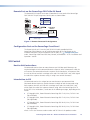
Remote Port on the PowerCage FOX Tx/Rx AV Board
The Remote RS-232 captive screw port is located on the rear panel of the PowerCage
FOX Tx/Rx AV. The pin assignments for this port are shown below.
Pin
Tx
Rx
Gnd
REMOTE
RS-232 ALARM
Tx Rx
1 2
Function
Transmit data
Receive data
Signal ground
Do not tin the wires!
Ground ( )
Receive (Rx)
Transmit (Tx)
NOTE:
Bidirectional
Controlling
Device
Ground ( )
Receive (Rx)
Transmit (Tx)
Cross the Tx and Rx lines once between the source
and the target.
Figure 11.Remote Connector Pin Assignments
Configuration Port on the PowerCage Front Panel
The Extron 9-pin D to 2.5 mm mini jack TRS RS‑232 cable, provided with the
PowerCage 1600 Enclosure, can be used for connection to the Config port on the
enclosure front panel. For pin assignments for this port, see “e Configuration port”
under “PowerCage 1600 Front Panel Port, Control, and Indicators” in the “Installation and
Operation” section.
SIS Control
Host-to-Unit Instructions
SIS commands consist of one or more characters per field. No special characters are
required to begin or end a command character sequence. When a command is valid, the
unit executes the command and sends a response to the host device. All responses from
the unit to the host end with a carriage return and a line feed (CR/LF = ]), which signals
the end of the response character string. A string is one or more characters.
Introduction to SIS
SIS commands consist of a string of one or more characters per command field.
Commands do not require any special characters to begin or end the command string.
Each response from the unit ends with a carriage return and a line feed (CR/LF = ]),
which signals the end of the response character string. When the PowerCage FOX Tx/
Rx AV unit is first switched on, it sends one of the following messages, depending on the
model:
zz
(C) Copyright 2010, Extron Electronics PowerCage FOX Tx AV, Vx.xx, 70-702-11]
(for multimode)
zz
(C) Copyright 2010, Extron Electronics PowerCage FOX Tx AV, Vx.xx, 70-702-12]
(for singlemode)
zz
(C) Copyright 2010, Extron Electronics PowerCage FOX Rx AV, Vx.xx, 70-702-21]
(for multimode)
zz
(C) Copyright 2010, Extron Electronics PowerCage FOX Rx AV, Vx.xx, 70-702-22]
(for singlemode)
where V x.xx is the firmware version number and 70-702-xx is the product number.
PowerCage FOX Tx/Rx AV • Remote Communication and Control
16
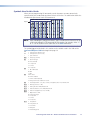
Symbols Used in this Guide
When you are programming SIS commands, certain characters are most conveniently
represented by the hexadecimal equivalent of their ASCII value. The table below shows the
hexadecimal equivalent of each ASCII command:
ASCII to Hex Conversion Table
Space
•
NOTE: Apart from G (gain) and g (attenuation), upper- and lowercase characters can be
used interchangeably in SIS commands for this product. For example, either “C”
or “c” can be used to set the color value in the Color commands.
The symbols (X/ values) defined in this section are the variables used in the fields of the
Command/Response Table that begins on page 19.
] = carriage return with line feed
} = carriage return (no line feed)
• = space character
E
X!
= Input video type
0 = auto (default)
4 = component
5 = S-video
= Escape key (hex 1B)
6 = composite
X%
= On or Off status
0 = Off
1 = On
0 = Link 2 disabled
1 = Link 2 enabled (default)
X^
Link 2 status
2 = Daisy chain mode enabled on receiver
X*
X1)
X1!
X1@
X1#
X1%
= Output video format
0 = Follow input type
6 = Component
7 = S-video
= Picture adjustment: color, tint, contrast, or brightness (0 to 127). Default is 64.
= Memory presets (1 to 30)
= Audio gain (0 to 10 dB) Default is 0.
= Audio attenuation (-18 to 0 dB) Default is 0.
= Audio level adjustment (-18 to +10 dB)
8 = Composite
X1&
= Test patterns
0 = Test pattern off
1 = Color Bars
2 = Grayscale
3 = Alternating pixels
PowerCage FOX Tx/Rx AV • Remote Communication and Control
17
X1*
X1(
X2!
X2@
X2#
= Audio gain response (0 to 18)
= Audio attenuation response (0 to -18)
= SM (singlemode) or MM (multimode)
= Tx (transmitter) or Rx (receiver)
= Internal temperature in degrees Fahrenheit and Celsius: (xxxF xxC)
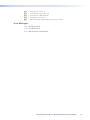
Error Messages
E10 — Invalid command
E13 — Invalid parameter
E14 — Not valid for this configuration
PowerCage FOX Tx/Rx AV • Remote Communication and Control
18
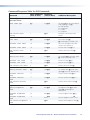
Command/Response Table for SIS Commands
ASCII Command
(Host to Unit)
Response
(Unit to Host)
Input video type
X!\
TypX!]
Set format X! for the selected input
video signal type. For X!:
0 = Auto (default)
4 = Component
5 = S-video
6 = Composite
View current input
setting
\
X!]
Display the current input video
format.
Color value
X*C
ColX*]
Select color value X*.
X* = 0 through 127. Default = 64.
Increment color value
+C
ColX*]
Select the next higher color value
(increase color value by 1).
Decrement color value
–C
ColX*]
Decrease color value X* by 1.
View current color
value
C
X*]
Display current color value X*.
Specify tint value
X*T
TinX*]
Set tint value X* for the video signal.
X* = 0 to 127. Default = 64.
Increment tint value
+T
TinX*]
Increase tint value X* by 1.
Decrement tint value
–T
TinX*]
Decrease tint value X* by 1.
View current tint value
T
X*]
Display current tint value X*.
Specify contrast value
X*^
ConX*]
Set contrast value X* for the video
signal. X* = 0 to 127. Default = 64.
Increment contrast
value
+^
ConX*]
Increase contrast value X* by 1.
Decrement contrast
value
–^
ConX*]
Decrease contrast value X* by 1.
View current contrast
value
^
X*]
Display current contrast value X*.
Specify brightness
value
X*Y
BrtX*]
Set brightness value X* for video
signal. X* = 0 through 127.
Default = 64.
Increment brightness
value
+Y
BrtX*]
Increase brightness value X* by 1.
Decrement brightness
value
–Y
BrtX*]
Decrease brightness value X* by 1.
View current brightness
value
Y
X*]
Display current brightness value X*.
Command
Additional Description
Picture adjustments
Input video format:
Color:
Tint:
Contrast:
Brightness:
PowerCage FOX Tx/Rx AV • Remote Communication and Control
19
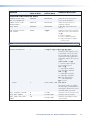
Command
ASCII Command
(Host to Unit)
Response
(Unit to Host)
Additional Description
Picture adjustments, continued
Video mute:
Enable mute
1B
Blk1]
Mute the selected input.
Disable mute
0B
Blk0]
Disable mute on the selected input.
View current blanking
status
B
X%]
Display current blanking status X%.
For X%:
0 = Disable blanking or mute.
1 = Enable blanking or mute.
Specify output format
6*X1%#
SynX1%]
Set format X1% of the output video
signal. For X1%:
0 = Follow input type (default)
6 = Component
7 = S-Video
8 = Composite
View current output
setting
6#
X1%]
Display current output video format
X1%.
Recall Preset
X1).
RprX1)]
Recall memory preset X1).
A period (.) follows X1) in the
command. X1) = 1 through 30
Save Preset
X1),
SprX1)]
Save memory preset X1).
A comma (,) follows X1) in the
command.
Enable audio mute
1Z
Amt1]
Mute the audio.
Disable audio mute
0Z
Amt0]
Unmute the audio.
View mute status
Z
X%]
Display current audio mute status X%.
For X%:
0 = Unmute audio.
1 = Mute audio.
Output video format
Memory presets
Audio mute
Audio gain and attenuation
Set audio gain
X1!G
Aud X1*]
Set value X1! of the audio gain. Use
only uppercase G for configuring
gain. The unit responds with gain
level X1*.
X1! = 0 through 10 dB
X1* = 0 through 10
Default = 0.
Set audio attenuation
X1@g
AudX1(]
Set value X1@ of audio attenuation.
Use only lowercase g for configuring
attenuation. The unit responds with
attenuation level X1(.
X1@ = 0 through –18 dB
X1( = 0 through –18
Default = 0.
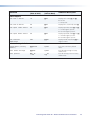
PowerCage FOX Tx/Rx AV • Remote Communication and Control
20
Command
ASCII Command
(Host to Unit)
Response
(Unit to Host)
Additional Description
Audio gain and attenuation, continued
Increment audio level
+G
+g
AudX1#]
AudX1#]
Increase the gain (G) or attenuation
(g) of audio level X1# by 1 dB.
X1# = –18 through +10 dB.
Default = 0.
Decrement audio level
-G
-g
Aud X1#]
Aud X1#]
Decrease the gain (G) or attenuation
(g) by 1 dB. Audio level X1# = –18
through +10 dB.
View current audio
level
G
g
Aud X1#]
Aud X1#]
Display current value Audio level X1#
for gain (G) or attenuation (g).
Set to consumer level
40*0#
Lvl0]
Set the audio output to the
consumer level: –10 dBV
(default level).
Set to professional
level
40*1#
Lvl1]
Set the audio output to the
professional level: +4 dBu
View current output
level status
40#
Audio output level
X%]
Display current audio output level X%.
For X%:
0 = consumer level
1 = professional level
Auto Memory
Disable Auto Memory
55*0#
Img0]
Disable Auto Memory.
Enable Auto Memory
55*1#
Img1]
Enable Auto Memory (default).
Parameters saved are color, tint,
brightness, and contrast.
View current Auto
Memory setting
55#
X%]
View current Auto Memory setting
X%. For X%: 0 = disabled; 1 = enabled
55*2#
Img]
Trigger Auto-Image for the current
input. Parameters adjusted are color,
tint, brightness, and contrast.
Color Bars
1J
Tst1]
Select the Color Bars pattern.
Grayscale
2J
Tst2]
Select the grayscale pattern.
Alternating pixels
3J
Tst3]
Select the alternating pixels pattern.
Off
0J
Tst0]
Select no test pattern.
View current test
pattern status
J
X1&]
Show current test pattern X1&. For
X1&:
0 = Test pattern off (default)
1 = Color Bars
2 = grayscale
3 = alternating pixels
Auto-Image™
Trigger
Test pattern
PowerCage FOX Tx/Rx AV • Remote Communication and Control
21
Command
ASCII Command
(Host to Unit)
Response
(Unit to Host)
Additional Description
Disable and enable return link (link 2)
Disable return link
back to transmitter
66*0*0#
Rle*0*0]
Disable the return link from the
receiver to the transmitter.
Enable return link
(normal mode)
66*0*1#
Rle*0*1]
Enable the return link to the
transmitter (default).
Daisy chain
66*0*2#
Rle*0*2]
Enable daisy chain mode on the
receiver.
View current return
link status
66*0#
0*X^]
Display the status of the return link
from the receiver to the transmitter.
For X^:
0 = Link 2 is disabled.
1 = Link 2 is enabled (default).
2 = Daisy chain mode is enabled
on the receiver.
NOTE:
This command is available only on the receiver unit; the transmitter responds with an E14 error code.
Information Requests
General information
I
1LnkX%•2LnkX%•VidX%•AudX%•X2!•X2@]
Display the status (signal presence)
of optical links 1 and 2, the video
link, the audio link, the fiber optic
transmission mode (singlemode or
multimode), and the device type (Tx
or Rx).
1Lnk and 2Lnk — for X%:
1 = an active signal is present.
0 = no signal is present.
Vid — for X%:
1 = video signal is enabled.
0 = video signal is disabled.
Aud — for X%:
1 = audio signal is enabled.
0 = audio signal is disabled.
X2! = SM (singlemode) or
MM (multimode).
X2@ = Tx or Rx.
Example
I
1Lnk1 2Lnk1 Vid1 Aud0 MM RX
Optical links 1 and 2 are enabled.
The video signal is enabled and the
audio signal is disabled. The unit is a
multimode (MM) receiver (Rx).
Query firmware version
Q
x.xx]
Display the current firmware version.
Query part number
N
70-702-nn]
Display the unit part number.
Query other unit part
number
1N
70-702-nn]
Display the part number of other
connected unit.
PowerCage FOX Tx/Rx AV • Remote Communication and Control
22
ASCII Command
(Host to Unit)
Response
(Unit to Host)
View Link 1 Status
1S
X%]
Displays Link 1 status X%. For X%:
0 = no link
1 = link present
View Link 2 Status
2S
X%]
Display Link 2 (return link) status X%.
View input video status
3S
X%]
Display input video status X%. For X%:
1 = a video signal is present.
0 = no video signal is present.
View input audio status
4S
X%]
Display input audio status X%. For X%:
1 = an audio signal is present.
0 = no audio signal is present.
View internal
temperature
20S
X2#]
Display internal temperature X2# in
degrees F and C.
System Reset (factory
default)
EZXXX}
Zpx]
Reset unit to all factory default
values.
Reset audio settings
EZA}
Zpa]
Reset all audio settings to factory
default values
Reset presets
EZG}
Zpg]
Reset all memory presets to factory
default values
Command
Additional Description
Status Request
Reset to factory defaults
PowerCage FOX Tx/Rx AV • Remote Communication and Control
23
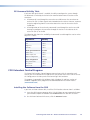
SIS Command Validity Table
If only one fiber optic channel is enabled, the ability to configure the system through
SIS commands is limited by the lack of return communication from the receiver to the
transmitter.
zz
All commands issued through the transmitter are valid because the transmitter-toreceiver link (link 1) allows signals to be forwarded to the receiver. However, responses
to queries originating from the transmitter about the status of the receiver return
invalid data.
zz
All configuration of the receiver by commands issued through the receiver are valid.
Attempts to configure the transmitter through the receiver in the absence of the
return link (link 2) are invalid.
The following table shows the availability of commands issued through the receiver when
only link 1 is active:
Adjustment
Validity
Color
Valid
Tint
Valid
Brightness
Valid
Contrast
Valid
Audio gain/attenuation
Invalid
Audio mute
Valid
Audio output level
Valid
Output configuration
Valid
Input configuration
Invalid
Daisy chain mode
Valid
Test pattern
Valid
Video mute
Valid
FOX Extenders Control Program
The Extron FOX Extenders Control Program communicates with the transmitter and
receiver pair via the Remote RS-232 port on the rear panel of either FOX Tx/Rx AV unit or
the Config port on the front panel of the PowerCage 1600 enclosure.
The program is compatible with Windows 2000, Windows XP, and later versions of
Windows. Upgrades to the program can be downloaded from the Extron website
(www.extron.com).
Installing the Software from the DVD
If you have an Extron software disk, install the FOX Extenders software from it as follows:
1. Insert the disk into your computer drive. If the disk does not start automatically, open
your Windows Explorer and double-click Launch.exe on the disk drive to start it.
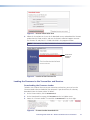
2. On the Extron Software DVD screen, click the Software button.
PowerCage FOX Tx/Rx AV • Remote Communication and Control
24
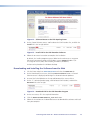
Figure 12. Software Button on the Disk Opening Screen
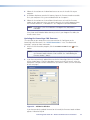
3. On the Control Software screen, scroll to locate the FOX Extenders line, and click the
Install link in the far right column.
Figure 13. Install Link for the FOX Extenders Software
4. Follow the on-screen instructions to complete the installation.
By default, the installer program creates a folder for the software at C:\Program
Files\Extron\FOX_Extenders (all Windows systems except Windows 7) or
C:\Program Files (x86)\Extron\FOX_Extenders (Windows7).
An icon can be placed on the Windows desktop.
Downloading and Installing the Software from the Web
1. Visit the Extron website at www.extron.com and select the Download tab.
2. On the Download Center screen, click the Control Software button. A Control
Software screen is displayed, containing a list of control software products.
3. In one of the linked alphabets at the top and bottom of the screen, click F.
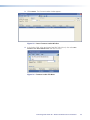
4. On the “F” software products page, scroll to locate FOX Extenders, and click the
Download link at the far right.
Figure 14. Download Link for the FOX Extenders Program
5. On the next screen, fill in the required information.
6. Click the Download FOXExtendercs_vnxn.exe button.
7. Follow the instructions on the download screens to download the software and install
it on your computer.
PowerCage FOX Tx/Rx AV • Remote Communication and Control
25
Starting the Control Program
Start the Extron FOX Extenders Control Program as follows:
1. Set up and power on the units as described in the Installation and Operation
section. Connect the computer to one of the control ports on either the transmitter or
receiver.
2. Click Start > All Programs > Extron Electronics >
FOX Extender WCP > FOX Extender WCP or click on the desktop icon (shown
at right). The Communication Setup window opens.
Figure 15. Communication Setup window
3. Select the Com port to which your transmitter or receiver is connected and click
Connect. The Communication Setup window closes and the FOX Extenders Control
Program window opens.
NOTE: Only Link 1, connecting the Tx port of the transmitter to the Rx port of the
receiver, is required for video, audio, and serial command transmission. Link 2
(the return link) is not required; however, if it is not enabled, the ability to
configure the system is limited by a lack of communication from the receiver
to the transmitter.
PowerCage FOX Tx/Rx AV • Remote Communication and Control
26
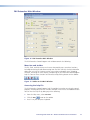
FOX Extenders Main Window
Figure 16.FOX Extenders Main Window
The FOX Extenders Control Program main window contains the following:
Menu bar and toolbar
The File, Tools, and Help menus on the menu bar provide access to various functions,
including connecting to and disconnecting from the FOX Tx/Rx AV; viewing information
about your unit such as firmware version, part number, and model name; uploading
firmware; refreshing the status display; and opening the FOX Extenders control program
help file. Some of these functions are also accessed by clicking buttons on the toolbar.
Figure 17.Toolbar on the Main Window
Accessing the help file
The FOX Extenders Control Program help file provides instructions on using the control
program, including details on the functions available via the menus and toolbar buttons.
You can view the help file by doing any of the following:
zz
From the Help menu, select Contents.
zz
Click the Help
zz
Press F1 on your computer keyboard.
button on the toolbar.
PowerCage FOX Tx/Rx AV • Remote Communication and Control
27
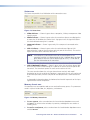
Status area
The Status area provides visual indications of the connection status:
Figure 18.Status Area
zz
Video indicator — Shown in green when a composite, S-video, or component video
signal is present
zz
Audio indicator — Shown in green when the transmitter detects an audio signal at
or more than 35 dB below the nominal level. Stays green until the signal falls below
this threshold continuously for 10 seconds.
zz
Loop-out indicator — Shown in green only if the computer is connected to the
receiver
zz
Link 1 indicator — Shown in green when the receiver detects light on Link 1
(connecting the Tx port of the transmitter to the Rx port of the receiver). The receiver
reports the status to the transmitter over Link 2.
NOTE: If the computer is connected to either of the control ports on the
transmitter and Link 2 is disconnected, the Link 1 indicator does not show
green because when the receiver detects light on Link 1, it is not able to
pass that information to the transmitter.
zz
Link 2 (Optional) indicator — Shown in green when the transmitter detects light
on Link 2, the return link connecting the Tx port of the receiver to the Rx port of the
transmitter. The transmitter reports the status to the receiver via Link 1.
The status area also shows the unit type (transmitter or receiver) and model
description for the unit to which the computer is connected, the unit at the other end
of the fiber optic cable, and the Com port on the computer that is connected to the
unit.
It also provides information about the horizontal and vertical frequencies of the input
signal and the internal temperature.
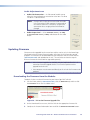
Memory Preset area
The Memory Preset area provides tools to save and recall memory presets. The parameters
saved in a preset include color, tint, brightness, and contrast.
Figure 19.Memory Preset Area
zz
To save a preset, select a number from the Preset Number drop-down menu and
click Save. The current values of color, tint, contrast, and brightness are saved as a
memory preset.
zz
To recall a saved preset, select a number from the Saved Number drop-down menu
and click Recall.
PowerCage FOX Tx/Rx AV • Remote Communication and Control
28
Mute area
Select a radio button in the Mute area to mute or unmute the video
or audio signal.
Video Adjustment area
Use the sliders to adjust the Color, Tint, Contrast, and
Brightness of the picture that is displayed. All four of these
variables can be adjusted to between 0 and 127, with the
current value displayed in the text box to the right of the
corresponding slider.
Video Format area
Select the radio buttons in the Video Format area to specify the
input video format (Auto, Component, S-video, or Composite)
and the output video format (Follow input type, Component,
S-video, or Composite).
When there are two video sources, S-video through the 4-pin
mini DIN connector and another format through the BNC
connectors, the choice of radio button determines which input
format is transmitted. When Auto is selected, the transmitter
detects and sends the signal with the highest level format detected:
component video first, S-video second, and composite video third.
When Follow input type is selected for the output format, the
output signal is in the same format as the input signal.
NOTE: The transmitter converts the input signal into a proprietary signal type, which
passes through Link 1 to the receiver. The receiver converts the signal back to
the required type. This enables the input signal to be transcoded to meet the
output device requirements.
Advanced Configuration area
Select the radio buttons in the following fields to perform additional configuration:
zz
Link 2/Daisy Chain Mode — Select Enable Link 2 or
Disable Link 2 to enable or disable the return link from the
receiver to the transmitter. Alternatively, you can select Enable
Daisy Chain and connect the receiver to another receiver.
zz
Auto Memory — When Auto Memory is on, previously saved
values such as color, tint, contrast, and brightness are applied
whenever the vertical field rate of the input changes. Auto
Memory can be switched on or off using the radio buttons.
zz
Auto Image — Returns the video adjustment settings of color,
tint, contrast, and brightness back to their default values (64).
zz
Test Patterns — If desired, select one of the built-in test
patterns (color bars, grayscale, or alternating pixels) from the
drop-down menu, for help calibrating the display device. When
Off is selected, the receiver outputs the video signal from the
source device.
PowerCage FOX Tx/Rx AV • Remote Communication and Control
29
Audio Adjustment area
zz
Audio Gain/Attenuation — A slider control enables you to
adjust the input audio gain or attenuation value from –18 dB to
+10 dB in 1.0 dB increments.
NOTE: Changes to the input gain or attenuation are made
in the transmitter. If your computer is connected to
the receiver and Link 2 is not active, the gain and
attenuation values are grayed out and cannot be
changed.
zz
Audio Output Level — Select Consumer Level (–10 dBV)
or Professional Level (+4 dBu) radio button for the audio
output.
Updating Firmware
Firmware can be upgraded for the transmitter and the receiver unit via the PowerCage
Config port using the Extron Firmware Loader utility from the FOX Extenders control
program. The firmware can be downloaded to your computer from the Extron website
(www.extron.com) and uploaded to the unit. The transmitter and receiver require
different firmware and must both be upgraded separately.
NOTES: • When firmware upgrades are available, they are unique to the unit — a
transmitter firmware upgrade for the Tx unit and a separate receiver
upgrade for the Rx unit.
• Your computer must be connected directly to the unit for the firmware to be
updated.
Downloading the Firmware from the Website
To obtain the latest version of firmware for your PowerCage FOX Tx/Rx AV:
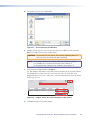
1. Visit the Extron website, www.extron.com, click the Download tab, and then click
the Firmware link on the left sidebar menu.
1
1
Figure 20. Link to the Firmware Upgrade Files
2. On the Download Center screen, click the links for the appropriate firmware file.
3. Complete the Personal Information form and click the Download filename button.
PowerCage FOX Tx/Rx AV • Remote Communication and Control
30
Figure 21. Personal Information Form
4. Follow the instructions on the rest of the download screens to download the firmware
update from the Extron website, and start the Extron Installation Program to extract
the firmware file and place it in a folder identified in the program window.
NOTE: Take note of the folder to which the firmware file is saved.
Folder where
firmware is
installed
Figure 22. Location of the Firmware File
Loading the Firmware to the Transmitter and Receiver
Downloading the Firmware Loader
To load a new version of firmware to your transmitter and receiver, you must have the
Firmware Loader software loaded on your computer. If you do not have this software,
download it from the Extron website as follows:
1. On the Extron website, click the Download tab.
2. On the Download Center page, click Software on the left sidebar menu.
3. Locate the “Firmware Loader” line and click the Download link at the far right.
Figure 23. Firmware Loader Download Link
PowerCage FOX Tx/Rx AV • Remote Communication and Control
31
4. Follow the instructions on the download screens to save the installer file to your
computer.
5. In Windows Explorer or another file browser, locate the Firmware Loader executable
file in your computer’s file system and double-click on it to open it.
6. Follow the instructions on the Installation Wizard screens to install the Firmware
Loader on your computer. Unless you specify otherwise, the installer program places
the Firmware Loader file, “FWLoader.exe” at C:\Program Files\Extron\FWLoader.
NOTE: In Windows 7, the file is located at C:\Program Files (x86)\Extron\
FWLoader.
If the Extron and FWLoader folders do not yet exist in your Program Files folder, the
installer creates them.
Updating the PowerCage FOX firmware
The serial port on your computer must be connected to the Config port on the
PowerCage 1600 front panel. See “RS-232 Connections” in the “Installation and
Operation” section for more information.
1. Within the FOX Extenders program, click the Firmware Loader button
toolbar.
on the
NOTE: If the Firmware Loader button does not appear on the program toolbar,
the Firmware Loader software is not installed. See “Downloading the
Firmware Loader,” above.)
2. If you have not previously updated firmware for the PowerCage FOX unit, the Add
Device window opens. From the drop-down menus on the RS-232 screen, select the
appropriate Com port number and baud rate (the default is 9600). (See the illustration
on the next page.)
Figure 24. Add Device Window
If you have previously updated firmware for this model,the Firmware Loader window
appears. Proceed to step 4.
PowerCage FOX Tx/Rx AV • Remote Communication and Control
32
3. Click Connect. The Firmware Loader window appears.
Figure 25. Extron Firmware Loader Window
4. In the Devices field, select your PowerCage FOX Tx/Rx AV unit, then select New
Firmware for Selected Devices from the File menu.
Figure 26. Firmware Loader File Menu
PowerCage FOX Tx/Rx AV • Remote Communication and Control
33
5. The Choose Firmware File window opens.
Figure 27. Choose Firmware File Window
6. Navigate to and select the new firmware file, which has a .bin extension, and click
Open. The Choose Firmware File window closes.
CAUTION: The firmware file must have a .bin extension. Uploading other file
types can cause the switcher to stop functioning.
NOTE: When downloaded from the Extron website, the firmware is placed
in a subfolder of C:\Program Files\Extron\Firmware or
C:\Program Files (x86)\Extron\Firmware (for Windows 7).
7. In the Firmware Loader window, click Begin.
The Total Progress and Progress status bars show the progress of the firmware upload.
The upload to the switcher may take several minutes. After the status bars have
progressed from 0% to 100%, and Status is listed as Completed, the firmware loader
utility resets the unit.
7
Figure 28. Progress Status Bars on the Firmware Loader Screen
8. Click Exit to close the Firmware Loader.
PowerCage FOX Tx/Rx AV • Remote Communication and Control
34
Reference
Information
This section discusses the specifications, part numbers, and installation instructions for the
PowerCage FOX Tx/Rx AV Tx/Rx Fiber Optic Extenders. Topics that are covered include:
zz
Specifications
zz
Part Numbers
zz
Installing the FOX Tx/Rx AV Board in the PowerCage 1600 Enclosure
Specifications
NOTES:The PowerCage FOX Tx/Rx AV boards are available in singlemode or multimode versions.
The optional PowerCage FOX boards are class 1 laser products. They meet the safety
regulations of IEC-60825, FDA 21 CFR 1040.10, and FDA 21 CFR 1040.11.
Optical specifications — PowerCage FOX boards, interconnection between
transmitter and receiver
Number/type���������������������������������� 1 singlemode or 1 multimode fiber optic input and output per board, up to 16
single space or 8 double space boards per PowerCage enclosure
NOTE: Only one fiber is required to transmit video, audio, and unidirectional data. A second fiber is required to
transmit return data for bidirectional control/communication.
Connectors������������������������������������ 2 bidirectional LC connectors per board
Operating distance
Singlemode����������������������������� 30 km (18.75 miles) with singlemode (SM) cables with a SM board
Multimode������������������������������� 300 m (985') with 62.5 µm multimode (MM) cable and a MM board
1 km (3280') with 50 µm multimode (MM) cable and a MM board
2 km (6561') with 50 µm 2000 MHz bandwidth laser optimized MM cable and a
MM board
NOTE: Operating distances are approximate. These are typical distances. The maximum distance may be greater
than these typical numbers depending on factors such as fiber type, fiber bandwidth, connector splicing,
losses, modal or chromatic dispersion, environmental factors, and kinks.
Nominal peak wavelength�������������� 850 nm for multimode (MM), 1310 nm for singlemode (SM)
Transmission power, singlemode or multimode
-5 dBm, typical
Maximum receiver sensitivity
Singlemode����������������������������� -18 dBm, typical
Multimode������������������������������� -12 dBm, typical
Optical loss budget
Singlemode����������������������������� 13 dB, maximum
Multimode������������������������������� 7 dB, maximum
Maximum channel data rate����������� 2.125 Gbps
PowerCage FOX Tx/Rx AV • Reference Information
35
Video NOTE: For PowerCage FOX Tx/Rx AV boards, the analog video input signal is digitized pixel for pixel in the
transmitter, sent digitally through the fiber cable, and converted back to analog video in the receiver.
Gain����������������������������������������������� Unity
Standards
Input��������������������������������������� NTSC 3.58, NTSC 4.43, PAL, SECAM, autodetected
Output������������������������������������ NTSC 3.58, PAL (follows vertical rate)
Decoder type���������������������������������� Adaptive 2D, digital comb filter
Video input
Number/signal type������������������������ 1 component (Y, R-Y, B-Y), S-video, composite video
Connectors������������������������������������ 1 x 3 female BNC or 1 female 4-pin mini DIN for S-video
Nominal levels�������������������������������� 1.0 Vp-p for Y of component video and S-video, and for composite video
0.7 Vp-p for R-Y, B-Y of component video
0.3 Vp-p for C of S-video
Minimum/maximum levels�������������� Analog: 0.3 V to 1.5 Vp-p with no offset
Impedance������������������������������������� 75 ohms
Return loss������������������������������������� -30 dB for Y/VID, B-Y/C, R-Y @ 5 MHz
Input coupling�������������������������������� AC
Video output
Number/signal type������������������������ 1 component (Y, R-Y, B-Y) video, S-video, composite video
Connectors������������������������������������ 1 x 3 female BNC or 1 female 4-pin mini DIN for S-video
Nominal levels�������������������������������� 1.0 Vp-p for Y of component video and S-video, and for composite video
0.7 Vp-p for R-Y, B-Y of component video
0.3 Vp-p for C of S-video
Minimum/maximum levels�������������� 0.3 V to 1.5 Vp-p
Impedance������������������������������������� 75 ohms @ 5 MHz
Return loss������������������������������������� <-40 dB @ 5 MHz
DC offset��������������������������������������� +350 mV, maximum, with input at 0 offset
Video delay������������������������������������ 1-2 frames
Audio NOTE: In PowerCage FOX boards, the analog audio signals is digitized in the transmitter, sent through the fiber
cable, and converted back to analog audio in the receiver.
Gain
Range�������������������������������������� Adjustable, -18 dB to +10 dB
Default������������������������������������ Unbalanced output: -6 dB; balanced output: 0 dB
Frequency response������������������������ 20 Hz to 20 kHz, ±0.5 dB
THD + Noise
VGA and DVI boards���������������� 0.10% @ 1 kHz at nominal level
AV boards�������������������������������� 0.15% @ 1 kHz at nominal level
S/N������������������������������������������������� >80 dB at maximum output (unweighted)
CMRR�������������������������������������������� 65 dB @ 20 Hz to 20 kHz
Audio bits per sample��������������������� 18 bits per channel, 2 channels (L, R)
Sampling rate��������������������������������� 48 kHz
Audio input Number/signal type������������������������ 1 stereo, balanced/unbalanced or
2 mono, balanced/unbalanced
Connector�������������������������������������� (1) 3.5 mm captive screw connector, 5 pole
Impedance������������������������������������� >10k ohms unbalanced, >20k ohms balanced, DC coupled
PowerCage FOX Tx/Rx AV • Reference Information
36
Nominal levels�������������������������������� +4 dBu (1.23 Vrms), -10 dBV (316 mVrms)
Maximum level������������������������������� +17 dBV, (unbalanced) at 1% THD+N
NOTE: 0 dBu = 0.775 Vrms, 0 dBV = 1 Vrms, 0 dBV ≈ 2 dBu
Audio output
Number/signal type������������������������ 1 stereo, balanced/unbalanced or
2 mono, balanced/unbalanced
Connector�������������������������������������� (1) 3.5 mm captive screw connector, 5 pole
Impedance������������������������������������� 50 ohms unbalanced, 100 ohms balanced
Nominal levels�������������������������������� +4 dBu (1.23 Vrms), -10 dBV (316 mVrms)
Maximum level (Hi-Z)���������������������� >+19 dBu, unbalanced at 1% THD+N
Maximum level (600 ohm)�������������� >+15 dBm, unbalanced at 1% THD+N
Audio delay������������������������������������ 1.5 frames
Control/remote
Serial control ports
Enclosure��������������������������������� 1 bidirectional RS-232, 2.5 mm mini stereo jack (front panel)
PowerCage FOX boards
Control������������������������������ 1 bidirectional RS-232, 3.5 mm captive screw connector, 5 pole (uses 3 poles;
shared with the alarm port)
Pass-through���������������������� 1 RS-232, 3.5 mm captive screw connector, 5 pole (3 pins are used, "RS-232 Over
Fiber")
Baud rate and protocol
PowerCage FOX boards
Control������������������������������ 9600 baud, 8 data bits, 1 stop bit, no parity
Pass-through���������������������� 9600 to 115,200 baud
Serial control pin configurations
Captive screw connector���������� 1 = Tx, 2 = Rx, 3 = GND
Mini stereo jack����������������������� RS-232: tip = Tx, ring = Rx, sleeve = GND
Program control����������������������������� Extron FOX Extenders Control Program for Windows®
Extron Simple Instruction Set (SIS™)
General
Power consumption*��������������������� 1 or 2* (positive-negative), 100 VAC to 240 VAC, 50-60 Hz; internal,
hot-swappable
*
A redundant power supply is optional.
System������������������������������������� Enclosure without boards: 12.40 watts at 115 VAC, 60 Hz
Each FOX board at 115 VAC, 60 Hz
FOX Tx AV������������������������� 6.89 watts
FOX Rx AV������������������������� 5.57 watts
Power input requirements (boards)
12 VDC, 1.0 A, supplied by the PowerCage enclosure
Temperature/humidity�������������������� Storage: -40 to +158 °F (-40 to +70 °C) / 10% to 90%, noncondensing
Operating: +32 to +122 °F (0 to +50 °C) / 10% to 90%, noncondensing
Cooling������������������������������������������ Enclosure: fans, front to back
Boards: convection, within the PowerCage enclosure
Mounting — PowerCage enclosure
Rack mount����������������������������� Yes
Enclosure type�������������������������������� Metal
Enclosure dimensions
PowerCage enclosure�������������� 5.25" H x 17.0" W x 12.25" D (3U high, full rack wide)
13.3 cm H x 43.2 cm W x 31.2 cm D
(Depth excludes connectors on the optional boards. Width excludes rack ears.)
PowerCage FOX boards����������� Fits a double slot opening in a PowerCage enclosure.
PowerCage FOX Tx/Rx AV • Reference Information
37
Product weight
PowerCage enclosure�������������� 11.6 lbs (5.3 kg)
PowerCage FOX boards����������� 1.1 lbs (0.5 kg)
Shipping weight
PowerCage enclosure�������������� 13 lbs (6 kg)
PowerCage boards������������������� 2 lbs (1 kg) each
Vibration���������������������������������������� ISTA 1A in carton (International Safe Transit Association)
Regulatory compliance
Safety�������������������������������������� CE, c-UL, FDA Class 1, UL
EMI/EMC��������������������������������� CE, C-tick, FCC Class A, ICES, VCCI
MTBF��������������������������������������������� 30,000 hours
Warranty���������������������������������������� 3 years parts and labor
NOTES:All nominal levels are at ±10%.
Specifications are subject to change without notice.
PowerCage FOX Tx/Rx AV • Reference Information
38
Part Numbers
PowerCage FOX Tx/Rx AV
PowerCage Enclosure and Boards
Part Number
PowerCage 1600 Enclosure
60-978-01
PowerCage FOX Tx AV MM (transmitter)
70-702-11
PowerCage FOX Tx AV SM (transmitter)
70-702-12
PowerCage FOX Rx AV MM (receiver)
70-702-21
PowerCage FOX Rx AV SM (receiver)
70-702-22
Included Parts
Included Parts
Part Number
MM or SM fiber patch cable
5-pole 3.5 mm blue captive screw
2-pole 3.5 mm blue captive screw
PowerCage FOX Tx/Rx AV Setup Guide
Audio Connector Wiring Instruction Card
Optional Accessories
Accessory
Part Number
MHR-2 SV M-M Series: Male to Male 4-pin Mini DIN
S-video cables
26-316-0x
MHR-2P SVM-M: Male to Male 4-pin Mini DIN
S-video cables (Plenum)
26-522-0x
MHR-4 BNC Series: BNC Male to Male four
conductor MHR
26-210-0x
MHR-5P BNC Series: BNC Male to Male five
conductor MHR (Plenum)
26-378-xx
RG6-5 BNC Series: BNC Male to Male five conductor
RG6 Super High Res.
26-369-xx
PowerCage FOX Tx/Rx AV • Reference Information
39
Installing the FOX Tx/Rx AV Board in the PowerCage 1600 Enclosure
Up to 16 single slot or 8 dual slot boards can be inserted into the PowerCage enclosure.
The boards may vary with each installation depending on the configuration and use.
NOTES: All boards are “hot-swappable,” meaning that they can be installed
or removed without turning off or disconnecting the power to the
PowerCage Enclosure.
Use ESD precautions when installing the FOX 3G HD-SDI board to avoid
damaging it. Keep the board in the anti-static bag until it is needed. Use
proper grounding techniques during installation.
PowerCage
FOX Rx AV
Rx
Tx Rx
1 2
Tx
B-Y/C
S-VID
R-Y
L
AUDIO
R
Tx Rx
REMOTE
RS-232 ALARM
1 2
Tx Rx
RS-232
OVER FIBER
VIDEO
S-VID
R-Y
Y/VID
B-Y/C
VIDEO
Y/VID
L
AUDIO
R
Tx Rx
REMOTE
RS-232 ALARM
RS-232
OVER FIBER
Tx
Rx
PowerCage
FOX Tx AV
Figure 29.PowerCage FOX TX/RX AV Boards
Inserting the Board into the Slot
1. Hold the board with the signal connectors towards you and the LED at the top, and
align the top and bottom grooves of the board with the slide posts in the selected
enclosure slot.
2. Carefully slide the board into the slot, aligning the two tabs on the lower front end of
the board with the matching ports in the enclosure.
3. Push the board firmly into place. Tighten the screws to secure the board in position.
NOTE: In addition to the 16 single board slots (8 dual board slots) are 2 dual slots that
are reserved for power supplies only. The PowerCage 1600 comes with a dual
slot power supply board already installed, but an optional redundant power
supply board may be added using only the dual slot position immediately
adjacent to the existing power supply. See the illustration on the next page.
PowerCage FOX Tx/Rx AV • Reference Information
40
16 Available Single Board
Slots (8 double board slots)
Tx
Tx
REMOTE
RS-232 ALARM
Tx Rx
RGB
OUTPUT
SHARP GAIN
1
2
Y/VID
HD/SDI OUTPUTS
Tx Rx
Tx
REMOTE
RS-232 ALARM
1 2
Rx
e
ag
rC
we AV
Po X Rx
FO
VIDEO
1
2
3
4
Tx Rx
MODE
HD/SDI INPUT
MONO
AUDIO OUTPUT
Tx Rx
Align board
and slide
into slot.
RS-232
OVER FIBER
Hz
/60
50
V X.
40
MA
5A
0-2
10
ED
LI ST
23
1T .
.E
I.T
AUDIO
L
R
78
REMOTE
RS-232 ALARM
Tx Rx
Tx
57
RGB
RS-232
OVER FIBER
AUDIO
L
R
OUTPUT
US
C
N1
1 2
Rx
C
AUDIO
L
R
Rx
RS-232
OVER FIBER
INPUT
e
ag
rC -SDI
we
Po HD
X 3G
FO
e
ag
rC B
we RG
Po RX
X
FO
Tx Rx
Power
Supply
1 2
Rx
e
ag
rC B
we RG
Po RX
X
FO
e
ag
rC
we AV
Po P R
MT
Optional
Redundant Power
Supply Slot
Screws
(2 per board)
NOTE: Power supplies can occupy only these two power supply
slots. (Each power supply can be mounted in either slot.)
Figure 30. Inserting a PowerCage FOX Tx/Rx AV Board into the
PowerCage 1600 Enclosure
NOTE: Use a screwdriver or other tool to fully tighten the screws after initial
installation and any subsequent removal and replacement of the board.
4. If desired, connect power to the enclosure and verify that the fans, board, and LEDs
power up correctly; then disconnect power.
5. Finish installing the PowerCage Enclosure. Refer to the PowerCage 1600 Enclosure
User Guide, available on the Extron website at www.extron.com.
Removing a Board from a Slot
1. Completely loosen the two screws on the rear panel board that secure the board in
place.
2. Slide the board out from the rear and remove it from the slot.
PowerCage FOX Tx/Rx AV • Reference Information
41
Extron® Warranty
Extron Electronics warrants this product against defects in materials and workmanship for a period of three years
from the date of purchase. In the event of malfunction during the warranty period attributable directly to faulty
workmanship and/or materials, Extron Electronics will, at its option, repair or replace said products or components,
to whatever extent it shall deem necessary to restore said product to proper operating condition, provided that it is
returned within the warranty period, with proof of purchase and description of malfunction to:
USA, Canada, South America,
and Central America:
Extron Electronics
1001 East Ball Road
Anaheim, CA 92805
U.S.A.
Japan:
Extron Electronics, Japan
Kyodo Building, 16 Ichibancho
Chiyoda-ku, Tokyo 102-0082
Japan
Europe, Africa, and the Middle
East:
Extron Europe
Hanzeboulevard 10
3825 PH Amersfoort
The Netherlands
China:
Extron China
686 Ronghua Road
Songjiang District
Shanghai 201611
China
Asia:
Extron Asia
135 Joo Seng Road, #04-01
PM Industrial Bldg.
Singapore 368363
Singapore
Middle East:
Extron Middle East
Dubai Airport Free Zone
F12, PO Box 293666
United Arab Emirates, Dubai
This Limited Warranty does not apply if the fault has been caused by misuse, improper handling care, electrical or
mechanical abuse, abnormal operating conditions, or if modifications were made to the product that were not
authorized by Extron.
NOTE: If a product is defective, please call Extron and ask for an Application Engineer to receive an RA (Return
Authorization) number. This will begin the repair process.
USA: (714) 491-1500
Asia: +65.6383.4400
Europe:
Japan:
+31.33.453.4040
+81.3.3511.7655
Units must be returned insured, with shipping charges prepaid. If not insured, you assume the risk of loss or damage
during shipment. Returned units must include the serial number and a description of the problem, as well as the
name of the person to contact in case there are any questions.
Extron Electronics makes no further warranties either expressed or implied with respect to the product and its quality,
performance, merchantability, or fitness for any particular use. In no event will Extron Electronics be liable for direct,
indirect, or consequential damages resulting from any defect in this product even if Extron Electronics has been
advised of such damage.
Please note that laws vary from state to state and country to country, and that some provisions of this warranty may
not apply to you.
Extron USA - West
Extron USA - East
Extron Europe
Extron Asia
Extron Japan
Extron China
Extron Middle East
+800.633.9876
Inside USA/Canada Only
+800.633.9876
Inside USA/Canada Only
+800.3987.6673
Inside Europe Only
+800.7339.8766
Inside Asia Only
+81.3.3511.7655
+81.3.3511.7656 FAX
+400.883.1568
Inside China Only
+971.4.2991800
+971.4.2991880 FAX
+1.714.491.1500
+1.714.491.1517 FAX
+1.919.863.1794
+1.919.863.1797 FAX
+31.33.453.4040
+31.33.453.4050 FAX
+65.6383.4400
+65.6383.4664 FAX
Headquarters
+86.21.3760.1568
+86.21.3760.1566 FAX
© 2010 Extron Electronics. All Rights Reserved. www.extron.com