1
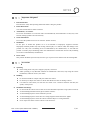
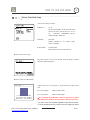
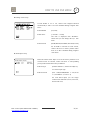
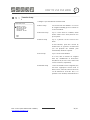
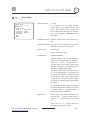
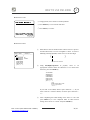
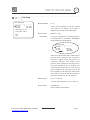
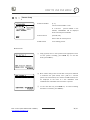
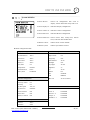
HOW TO USE OSD MENU 4 Camera Setup Setup the general functions of zoom camera module. Focus Mode CAMERA SETUP -------------------------FOCUS MODE SEMIAUTO DIGITAL ZOOM ON IMAGE FLIP OFF <WHITE BALANCE SETUP> <AUTO EXPOSURE SETUP> [AUTO/MANUAL/SEMIAUTO] Sets camera focus mode. SEMIAUTO Mode This mode toggles focus mode automatically between Manual Focus mode and Auto Focus mode. Manual Focus mode activates in preset operation and Auto Focus mode activates when BACK EXIT jog operation starts. With Manual mode at presets, Focus data is memorized in each preset in advance and camera calls focus data in correspondence with presets as soon as camera arrives at a preset. Digital Zoom [ON/OFF] Sets digital zoom function to ON/OFF. If this is set to OFF, optical zoom function runs but zoom function stops at the end of optical zoom magnification. Image Flip [ON/OFF] To display Upside down image. White Balance Setup WB Mode [AUTO/MANUAL] In Manual mode, Red and Blue level can be set up manually. DWC-PTZ10x [Mini SPEED DOME CAMERA] www.Digital-Watchdog.com Red Adjust [10~60] Blue Adjust [10~60] 42/49