1
User and Installation Guide
Technical Specifications:
Audio transmission: Digital
Transmitter frequency: 5.8 GHz
Number of wireless audio channels: 4
Operating range:
R
R
User and Installation Guide
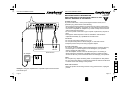
Step 2 Placing the transmitter
Ideally, the transmitter should be placed at an elevation such that there
are no obstacles between the transmitter and wireless receivers or
amplifiers (line of sight) in an area where there will be the least amount
of traffic. We suggest that you place the transmitter on top of your audio
source.
- max. 200 ft line of sight
- max. 50 ft through walls and obstacles
Compatible wireless receivers:
- Model 400 wireless audio receiver
- Model 480 wireless audio amplifier
Audio inputs:
- 4 x speaker-level input
- 2 x stereo line-level input
Signal-to-noise ratio: typ. 96 dB (A-weighted)
Frequency response: 2 Hz - 20 kHz
Audio latency: < 1 ms
Total harmonic distortion: -90 dB (0.003%)
Transmitted data rate: 6 Mbps
Error correction: 1/2 rate FEC
Channel separation: 95 dB
Audio input level: max. 3 Vrms
Automatic power-down feature
Step 3 Operating the transmitter
The green transmit light of the transmitter will be on when audio is
transmitted.
If you are using the speaker outputs, adjust the audio level of your audio
source to the maximum level where no clipping / distortion occurs at the
wireless receivers.
If the audio level supplied to the transmitter is too high, then distortion
will occur. If the audio level is too low, the dynamic range of the
transmission will not be used and the audio level at the receiver may be
too low.
If you are using a line-level audio output and the audio level is too low,
try instead using an audio output with audio volume regulator such as a
headphone output. The transmitter can connect to a headphone output
by using a phone jack-to-phone jack cable.
If audio reception is poor, try raising the transmitter and changing the
transmitter location until reception is acceptable.
If no audio signal is present, the transmitter will go into standby mode
after approximately two minutes. The transmitter will wake up as soon as
an audio signal is present.
100
95
75
25
5
0
Page 9
Page 6