1
ADJUSTMENTS
TO DECREASE
TORQUE
20
5
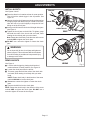
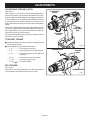
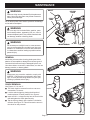
See Figure 6.
When using your drill-driver for various driving applications,
it becomes necessary to increase or decrease the torque in
order to help prevent the possibility of damaging screw heads,
threads, workpiece, etc. In general, torque should correspond
to the intensity of the screw diameter. If the torque is too
high or the screws too small, the screws may be damaged or
broken.
The torque is adjusted by rotating the torque adjustment ring.
The torque is greater when the torque adjustment ring is set
on a higher setting. The torque is less when the torque adjustment ring is set on a lower setting.
The proper setting depends on the type of material and the
size of screw you are using.
24
ADJUSTABLE TORQUE CLUTCH
TORQUE
ADJUSTMENT
RING
TO INCREASE
TORQUE
TO ADJUST TORQUE
BIT
STORAGE
AREA
SCREWDRIVER BIT
20
) ....For heavy drilling.
BIT STORAGE
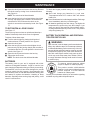
See Figure 7.
When not in use, bits provided with your drill can be placed
in the storage area located on the top of your drill.
5
• 21 - 24 (
Fig. 6
24
■ Identify the twenty four torque indicator settings located
on the front of the drill.
■ Rotate adjusting ring to the desired setting.
• 1 - 4 ..................For driving small screws.
• 5 - 8 ..................For driving screws into soft material.
• 9 - 12 ................For driving screws into soft and hard
materials.
• 13 - 16 ..............For driving screws in hard wood.
• 17 - 20 ..............For driving large screws.
SCREWDRIVER BIT
Fig. 7
Page 12