1
ZyWALL 2
5.
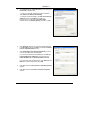
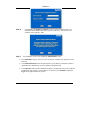
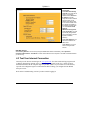
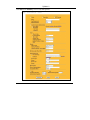
The Internet Protocol TCP/IP Properties screen opens (the
General tab in Windows XP).
- To have your computer assigned a dynamic IP address,
click Obtain an IP address automatically.
-To configure a static IP address, click Use the following IP
Address and fill in the IP address (choose one
from192.168.1.2 to 192.168.1.254), Subnet mask
(255.255.255.0), and Default gateway (192.168.1.1) fields.
6.
Click Advanced. Remove any previously installed gateways
in the IP Settings tab and click OK to go back to the Internet
Protocol TCP/IP Properties screen.
7.
Click Obtain DNS server address automatically if you do
not know your DNS server IP address(es).
If you know your DNS server IP address(es), click Use the
following DNS server addresses, and type them in the
Preferred DNS server and Alternate DNS server fields.
If you have more than two DNS servers, click Advanced, the
DNS tab and then configure them using Add.
8.
Click OK to close the Internet Protocol (TCP/IP) Properties
window.
9.
Click OK to close the Local Area Connection Properties
window.
8