1
2.
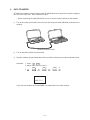
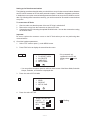
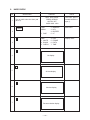
Press 4 to select DATA COMM.
4
1
2
3
SEND
RECEIVE
SET UP
CAPS
3.
Press 1 to select SEND.
1
1
2
3
ONE ITEM
MODE DATA
ALL DATA
- SEND -
CAPS
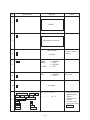
4.
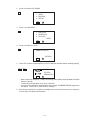
Press 3 to select ALL DATA.
3
SEND ALL DATA?
SET/ESC
CAPS
5.
Press SET to start the send operation or ESC to abort the operation without sending anything.
SET or ESC
DATA
SENDING
TO STOP
PRESS (ESC)
CAPS
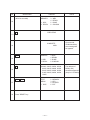
• Data is send in the sequence: Telephone Directory, Memo Mode, Reminder Mode, Schedule
Keeper, Calendar.
• To abort the send operation at any time, press ESC.
• If an error occurs during the send operation, the message “TRANSMIT ERROR!” appears on
the display. Press ESC to clear the error message.
6.
After the send operation is complete, the display returns to the initial screen of the mode you
were in when you started this procedure.
—9—