1
EPICenter Client Requirements
Sun Solaris
The system requirements for the EPICenter client under Solaris are as follows:
●
A monitor that supports at least 1024 x 768 resolution, and 16-bit color. Your system display settings
must be set for at least 65536 colors.
●
512 MB RAM minimum.
●
A browser is required to log on to EPICenter, display reports, and view the EPICenter on-line Help.
Red Hat Enterprise Linux
The system requirements for the EPICenter client under Red Hat Enterprise Linux version 5 are as
follows:
●
A monitor that supports at least 1024 x 768 resolution, and 16-bit color. Your system display settings
must be set for at least 65536 colors.
●
512 MB RAM minimum (1 GB recommended).
●
A browser is required to log on to EPICenter, display reports, and view the EPICenter on-line Help.
The Client
The EPICenter client can be launched by logging on to the server from a browser. EPICenter uses signed
applets: you will be prompted to accept the security certificate from Extreme Networks the first time
you try to launch the applet.
NOTE
The Java Plug-In version 1.6.0_10 is required by the EPICenter client. If this version of the plug-in is not already
installed, you will be prompted to download it the first time you try to launch the EPICenter client.
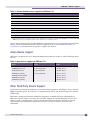
Table 1 lists the browsers that are supported by the EPICenter 7.0 release. A browser is also required to
display EPICenter reports and the EPICenter on-line Help.
Table 1: EPICenter 7.0 supported browsers
Platform
Minimum Browser Configuration
Windows Vista, Windows XP, Windows 2003 server
Internet Explorer™ 6.0, 7.0, Mozilla Firefox 1.5, 2.0,
3.0
Sun Solaris 10
Mozilla Firefox 1.5, 2.0, 3.0
Red Hat Enterprise Linux 5
Mozilla Firefox 1.5, 2.0, 3.0
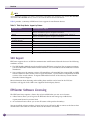
NOTE
For the Mozilla Firefox browser, you must install the Java Plug-In, then link the plug-in to the Firefox browser. See
the EPICenter Installation and Upgrade Guide for instructions.
EPICenter Release Note
11