1
00588A(00)-VR320-2/XAA-eng
3/3/05
7:27 PM
Page 44
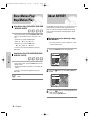
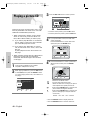
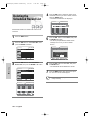
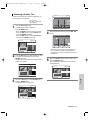
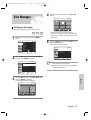
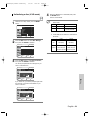
Playing back a Marker
Using the Markers
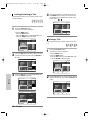
1
Press the MARKER button during playback.
2
Press the œ √ buttons to select a marked scene.
Marker
(VR mode)
1
N:0
Marker
SELECT
Press the ENTER button when the desired scene
appears.
01
PLAY
CANCEL
RETURN
RETURN
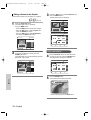
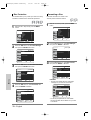
3
Marker
Playback
N:2
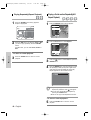
Press the MARKER button during playback.
MOVE
2
01 02
N:1
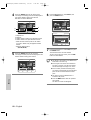
Press the ENTER or √l l button to start playing
from the selected scene.
• If you press the NEXT SKIP (√√l )button or the
PREVIOUS SKIP(lœœ)button in marker mode,
and the next or current marked point plays for
shorter than three seconds, playback starts from
the previous marked point.
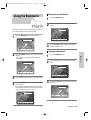
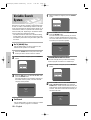
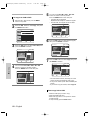
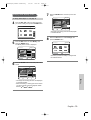
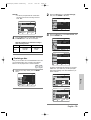
Clearing a Marker
MOVE
PLAY
CANCEL
RETURN
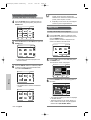
• The number 01 is displayed and the scene is
memorized.
3
4
Press the œ √ button to move to the next position.
Press the ENTER button again when the desired
scene appears.
Marker
MOVE
01 02
PLAY
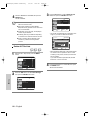
Press the MARKER button during playback.
2
Press the œ √ buttons to select a marked scene.
Press the CLEAR button to delete the selected
mark.
Marker
01 02 03 04 05 06 07 08 09 10 N:10
Marker
01 02 03 04 05 06 07 08 09
N:2
CANCEL
N:9
RETURN
• The number 02 is displayed and the scene is
memorized.
• DVD-RAM or DVD-RW (VR Mode) discs have
the Marker function instead of the Bookmark
function. The Marker function allows you to mark
up to 99 scenes. Since the scenes may be displayed as many different pages, numbering is
necessary. If a disc in use is encoded with Disc
Protect, Markers cannot be set or deleted. Only
playback is available.
44 - English
1
MOVE
PLAY
CANCEL
RETURN
• When a marker is cleared while DVD-RAM/
DVD-RW(VR mode) is playing, marker numbers
will change. For example, if the 7th marker is
cleared after ten markers are registered, the
marker numbers after the eighth will automatically move ahead by one and the 8th marker
becomes the 7th.