1
Targus USB 2.0 Laptop Docking Station with Video
Table of Contents
Introduction ............................................................................................. 3
Package Contents................................................................................... 4
System Requirements.............................................................................. 4
Installing the Device and Drivers......................................................... 5
Installing the Docking Station Drivers................................................... 5
Connecting Docking Station to Your Computer................................... 6
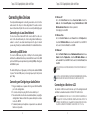
Docking Station Ports............................................................................... 7
Connecting New Device ......................................................................... 8
Controlling the Display using Docking Station’s Video Menu Options............ 10
Controlling the Display using Windows Display Properties ....................... 14
Automatic Updates ................................................................................... 21
Disconnecting the Docking Station ........................................................... 21
Using USB Devices That Require More Power ......................................... 21
Supported Resolution............................................................................... 22
Troubleshooting ....................................................................................... 24
Product Limitations................................................................................... 24
Verifying Devices are Installed................................................................. 25
FAQ - DisplayLink................................................................................... 25
Technical Support ................................................................................... 26
Product Registration................................................................................. 26
Warranty.................................................................................................... 26
Regulatory Compliance............................................................................. 26
2
Targus USB 2.0 Laptop Docking Station with Video
Introduction
Thank you for your purchase of the Targus USB 2.0 Laptop Docking
Station with Video. This portable expansion module allows you to
connect through a single USB connection up to 4 USB devices,
monitor, network (Ethernet/LAN) connection, speakers and
microphone.
The docking station also offers two, Targus Power Ports providing
twice the USB spec for high power devices, and USB ports that are
widely spaced for larger adapters.
The Docking Station provides the
following ports:
• DVI Single Link (supports up to 2048 x 1152 at 32 bit color)
• Two 3.5 mm Audio: (1) stereo out (1) microphone in
• RJ-45 Ethernet 10/100
• Two USB 2.0 (White)
• Two USB Power Ports (Black) - providing current up to 1 Ampere
3