1
Each PCI-based SCSI bus has its own set of
unique SCSI IDs from 0 through 6 and 8
through 15.
◆
• If you are connecting only DigiDrive enclosures to the SCSI bus, use any of the available SCSI IDs from 0 through 6 and 8
through 15.
Setting the DigiDrive SCSI ID
To set a DigiDrive SCSI ID:
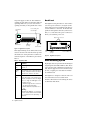
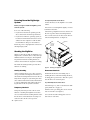
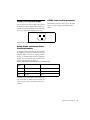
1 Locate the SCSI ID switch on the front of the
DigiDrive (see Figure 17).
• If you are connecting a mix of wide and
narrow drives to the SCSI bus, use SCSI IDs
0 through 6 for the narrow drives and SCSI
IDs 8 through 15 for the wide drives.
MediaDrive
rS18 Plus
2
You cannot have two SCSI drives with the
same SCSI ID on the same SCSI bus.
◆
SCSI ID switch
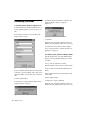
Figure 17. DigiDrive SCSI ID Switch Location
SCSI IDs on Windows Systems
For each SCSI hard drive you connect to the
Windows operating system, you must assign a
SCSI ID so the system can find and access the
drive. When you are setting the SCSI IDs, remember the following:
Each Digidesign PCI-based SCSI bus has its
own set of unique SCSI IDs from 0 through 6
and 8 through 15 (for a maximum of eight
drives).
◆
• If you are connecting only DigiDrive enclosures to the SCSI bus, use any of the available SCSI IDs from 0 through 6 and 8
through 15.
• If you are connecting a mix of wide and
narrow drives to the SCSI bus, use SCSI IDs
0 through 6 for the narrow drives and SCSI
IDs 8 through 15 for the wide drives.
You cannot have two SCSI drives with the
same SCSI ID on the same SCSI bus.
◆
Be sure the drive power is off when changing
the SCSI ID switch. When the drive is
turned on it will read the new SCSI ID.
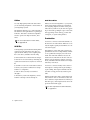
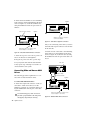
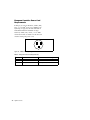
2 Set the SCSI ID to an available SCSI ID on the
SCSI bus by using the SCSI ID switch (see
Figure 18). The current SCSI ID number appears
in the window in the middle of the switch.
• Press the top button to decrement the SCSI
ID.
• Press the bottom button to increment the
SCSI ID.
-
2
+
Decrement ID
Current SCSI ID
Increment ID
Figure 18. DigiDrive SCSI ID Switch
Chapter 3: Installation
17