1
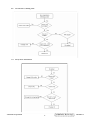
Press Up Button to the previous item or Down Button to the next item.
1) H./V. Position Item
Press “2” Button to enter H./V. Position item.
Press “1” Button to exit H./V. Position item.
a) Horizontal Position Option:
Press “2” Button to enter the Vertical Position option.
Press “1” Button to exit Horizontal Position option.
Press Up Button to make current option high.
Press Down Button to make current option low
b) Vertical Position Option:
Press “2” Button to enter the Horizontal Position option.
Press “1” Button to exit Vertical Position option.
Press Up Button to make current option high.
Press Down Button to make current option low
2) Horizontal Size Item
Press “2” Button to enter Horizontal Size item.
Press “1” Button to exit Horizontal Size item.
Press Up Button to make current item high.
Press Down Button to make current item low.
3) Fine tune Item
Press “2” Button to enter Fine tune item.
Press “1” Button to exit Fine tune item.
Press Up Button to make current item high.
Press Down Button to make current item low.
4) Sharpness Item
Press “2” Button to enter Sharpness item.
Press “1” Button to exit Sharpness item.
Press Up Button to make current item high.
Press Down Button to make current item low.
(6) Setup Menu Page:
Press “2” Button to enter Setup Menu page.
Press “1” Button to exit Setup Menu page.
Press Up Button to the previous item or Down Button to the next item.
1) Language Select Item
Press “2” Button to enter Language Select item.
Press “1” Button to exit Langua ge Select item.
Press Up Button to the previous option or Down Button to the next
option.
English,French Option
Press “2” Button to select the language.
Press “1” Button to exit the option.
2) Resolution Notice Item
Press “2” Button to enter Resolution Notice item.
Press “1” Button to exit Resolution Notice item.
ViewSonic Corporation
16
Confidential - Do Not Copy
VE710b/s-1