1
!AR-FX13_sec.book
65 ページ
2009年5月11日 月曜日 午後2時24分
HOW TO USE THE FAX FUNCTION
RECEIVE REDUCE
You may on occasion receive faxes that are larger than the paper loaded in the machine. To ensure that you do not
lose any part of the original, you should use the Receive Reduce function, which scales the fax to the printing paper
size.
Note
In some cases the size or resolution of a received fax may not permit reduction. When this happens the fax will be
printed at full size and divided onto multiple sheets of paper.
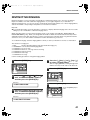
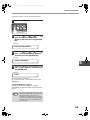
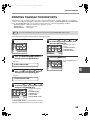
To use this feature, follow this procedure:
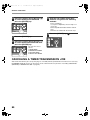
1
Press the [MENU] key.
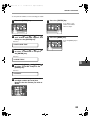
5
Press the [ENTER] key.
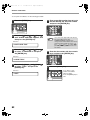
2
Press the [ ] key ( ) or [ ] key ( )
until "4:USER PROGRAM" appears,
and then press the [ENTER] key.
6
Press the [MENU] key.
Press the [MENU] key to
exit.
Selection
"4:USER PROGRAM"
3
Press the [ ] key ( ) or [ ] key ( )
until "16:RCV REDUCE" appears, and
then press the [ENTER] key.
Selection
"16:RCV REDUCE"
4
Press the [ ] key ( ) or [ ] key (
to select "1:ON" or "2:OFF".
)
If you "2:OFF" (No
reduction) large faxes will
be printed on two sheets
of paper.
65
4