1
User Guide
Multimedia Notebook Computer
45
46
Contents
NOTE ...................................................................................................... 49
IMPORTANT SAFETY INFORMATION .................................................. 52
Wireless LAN ................................................................................................ 54
Additional safety notes for units with wireless LAN ...................................... 55
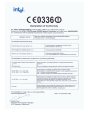
CE-labelling for units with wireless LAN ....................................................... 56
Restrictions ................................................................................................... 57
Radio frequencies for units with wireless LAN .............................................. 58
Frequencies .............................................................................................. 58
Legal requirements - exception clauses for units with Wireless LAN ............ 59
SHIPPING CONTENTS .......................................................................... 60
PREPARATION ....................................................................................... 61
INSERTING THE BATTERY ............................................................................ 62
REMOVING THE BATTERY ............................................................................ 62
POWER SUPPLY ........................................................................................... 63
Switching the Computer On .......................................................................... 64
Powermanagement ....................................................................................... 65
SYSTEM OVERVIEW .............................................................................. 66
LEFT AND RIGHT SIDES ............................................................................... 66
REAR VIEW .................................................................................................. 67
UNDERSIDE .................................................................................................. 67
EXPLANATION OF LED DISPLAYS ................................................................ 68
Hot Keys ....................................................................................................... 69
The Quick Launch KEYS ................................................................................ 70
The Keyboard ................................................................................................ 71
The TouchPad ................................................................................................ 72
The CD-ROM/DVD DRIVE ............................................................................. 73
Volume .....................................................................................................74
The PC - CARD Slot ...................................................................................... 75
The Memory Stick/ SD/ MMC -Slot ............................................................... 75
The DATA / Fax Modem ................................................................................ 76
The LAN-Port ................................................................................................. 76
INSTALLATION INSTRUCTIONS ........................................................... 77
Restoring the drivers ..................................................................................... 77
Utility CD ...................................................................................................... 77
Setting the Resolution .............................................................................. 78
SPECIFICATIONS ................................................................................... 79
FAULT DIAGNOSIS AND TROUBLESHOOTING ................................... 83
47
48
NOTE
The company reserves the right to make unadvertised modifications to
this document. Information contained in this document is intended solely
for reference purposes and in no way constitutes a basis for asserting
obligations on the part of the manufacturer or vendor. Neither the
manufacturer nor the vendor accept liability for any errors or inaccuracies
that this document may contain. Nor is liability accepted for damages or
losses that arise from the incorrect application of this guide. No part of
this document and the accompanying software may be copied, translated,
or distributed without the prior permission of the dealer, manufacturer, or
authors. Archive copies for private use are excepted from this rule. Brand
or product names mentioned in this document may be names protected
by copyright law or registered trademarks of other companies. These are
mentioned only for identification purposes and have no recommendatory
character in respect of the product or manufacturer.
© MAXDATA 2004
Legal Information
You can find additional legal information and conditions in the text files on
the device drivers and utilities CD-ROM (Utility CD).
Acrobat and the Acrobat logo are trademarks of Adobe Systems
Incorporated or its subsidiaries. In certain jurisdictions these trademarks
may be registered.
Intel and Pentium are registered trademarks of Intel Corporation. MS-DOS,
Windows, Windows 95, Windows 98, Windows Me, Windows 2000,
Windows XP, and Windows NT are registered trademarks of Microsoft.
Application & References
This user guide offers an introduction and is intended to provide instructions
for your first steps with your new computer. If you wish to use an operating
system that is not mentioned in these documents, consult the ReadMe
files on the CD-ROM for the relevant information. Please also consult
your dealer to make sure that it is possible to run your chosen operating
system on your notebook. The operating system is not contained on the
device drivers and utilities CD-ROM.
49
Note: Some or all system configurations may have been made already. If
this is not the case or if parts of the system need to be reconfigured,
please consult the device drivers and utilities CD-ROM for instructions on
how to do this.
Declaration:
This device meets the EN 55022 product standard for interference
emissions, the EN 50082-1 basic standard for interference, and the
EN 60950 low voltage directive standard.
If any modification that has not been agreed with the manufacturer is
made to the device, adherence to these standards can no longer be
guaranteed.
To ensure electromagnetic compatibility (EMC), please observe the
information given in the handbook.
Sound Power Level
The workplace-based sound power level is less than 55 dB A.
Federal Communications Commission (FCC) Note
This device has been tested and found to comply with the limits for a
Class B digital device, pursuant to Part 15 of the FCC Rules.
Operator Note:
This device has been carefully RF suppressed and tested to avoid radio
interference. However, please pay attention to the following concerning
external data cables:
If it becomes necessary to replace a data cable specified by the
manufacturer, then for correct radio interference suppression the operator
must ensure that replacement cables match the original cable also as
pertains to screening quality.
Use only screened cables and external devices that are identical with this
product in safety level and EMC behavior.
In case of non-observance, compliance with the standards mentioned
above is no longer guaranteed!
50
CD-ROM Drive:
The built-in CD-ROM drive is a Class 1 laser product. Do not open the
device and do not look into the beam, not even with optical instruments.
Unless the drive is expressly designated for the simultaneous use of more
than one CD, never insert more than one CD into the drive.
Returning the Device
We offer a return guarantee: We use materials
that allow professional reprocessing or disposal.
This means that your notebook is fully recyclable.
The outside packaging and all inner parts of the
box can be disposed of as waste paper.
51
Safety Information
IMPORTANT SAFETY INFORMATION
Although the notebook is highly robust, it is not indestructible. To prevent
damage from occurring, please pay attention to the following:
• Avoid exposing the notebook to strong shocks or vibrations.
• Keep it away from intense heat (radiators, direct sunlight).
• Protect the notebook from electromagnetic interference.
This will also prevent data loss.
• Do not expose it to moisture. This is an electrical device!
• Be sure to use the correct power supply.
Always use an approved power adapter.
The power adapter requires a fluctuation-free and
uninterrupted power supply. If you have any questions,
consult your local electricity supply company.
The power adapter must be fitted with a grounded
(earthed) plug.
Never pull the cable to unplug the power supply – always
pull the plug itself.
Disconnect the external power supply (power adapter or car adapter)
before cleaning the computer.
• Notes on Using Batteries
Only ever use batteries designed for use with this computer.
Recharge batteries via the notebook.
Do not attempt to repair faulty batteries yourself. Entrust
repairs to your dealer or qualified service personnel.
Keep damaged batteries away from children and dispose
of them properly as soon as possible. Exercise caution in
handling damaged batteries. Batteries may explode if
exposed to fire or improperly handled or disposed of.
The notebook is provided with a battery. The battery is recyclable. It is
prohibited by law to dispose of the battery in ordinary household waste. If
you have questions concerning proper disposal, consult your garbage
collection service.
52
Safety Information
• Note on the System Clock Battery
Caution: There is a risk of explosion if batteries are installed incorrectly.
Replace the battery only with a battery recommended by
the manufacturer or with a battery of the same type.
Dispose of the battery according to the manufacturer’s
instructions.
• Servicing
Do Not Service Your Computer Yourself! You could invalidate your
warranty rights and expose yourself and the device to the risk of
electrical shock. If servicing is required, consult qualified service
personnel. Disconnect the computer from the power supply. If the
following problems occur, consult qualified service personnel:
- Power adapter or power cable is damaged or frayed.
- Liquid has entered the computer.
- Despite operating it correctly, the computer is not
functioning properly.
- The computer has been dropped or damaged.
• Cleaning
Never apply cleaning agents directly to the computer. Use only a soft, lintfree cloth. Never use volatile (petroleum distillates) or scouring cleaning
agents.
53
WIRELESS LAN
(wireless network- abbreviation = WLAN)
Your Notebook contains a Wireless LAN module of the type „Intel® Pro
Wireless Mini PCI“. This module allows you to set up a wireless-based
network, and to connect with an existing wireless network. It works
according to the IEEE802.11b+g standard.
WLAN technology allows users to set up wireless connections inside a
local area (e.g. in a company or campus building, or in a public building
such as an airport). WLANs can be used in temporary offices, in
locations where it is not possible to set up extensive cable installations,
or to extend an existing LAN so that users in different parts of a building
can work at different times.
There are two different ways to operate a WLAN.
In fixed WLANs, wireless stations (devices with radio network cards or
external modems) set up connections with wireless access points,
which act as bridges between the stations and the existing network
backbone. In Peer-to-Peer (ad hoc) WLANs several users can set up a
temporary network within a limited area such as a conference room,
without using access points, and providing there is no need to use
network resources.
In 1997 the IEEE confirmed the standard 802.11 for WLANs; this set a
data transfer rate of from 1 to 2 Mbit/s (Megabits per second). With
802.11b+g, the new governing standard, the maximum data transfer rate
is 54 Mbit/s over a frequency band of 2.4 GHz (Gigahertz).
54
ADDITIONAL SAFETY NOTES FOR UNITS WITH WIRELESS LAN
A wireless LAN component is integrated into your
Notebook. For this reason you must make sure that
you comply with the following notes on safety:
•
Switch off the Notebook when you are in an
aircraft or while driving a car.
•
If you are in a hospital, an operating room or
close to an electronic medical system, switch
off the wireless components in the Notebook!
The radio waves which are transmitted could
disrupt the working of the medical equipment.
•
Keep the Notebook at least 20 cm away from a
heart pacemaker, otherwise there is a risk that
the radio waves could disrupt the normal
working of the pacemaker.
•
The radio waves which are transmitted could
give rise to interference noise in hearing aids.
•
When its radio components are switched on, do
not place the Notebook close to inflammable
gases or in an environment which could be at
risk of explosion (e.g. paint shop), since the
radio waves which are trans mitted could set
of a fire or an explosion.
•
The range of the wireless connection depends
on the environmental and other ambient
conditions.
•
When transferring data over a wireless
connection, unauthorized Third Parties can also
receive the data.
55
MAXDATA Computer AG is not responsible for disruptions to radio or
television reception which are caused by unauthorized alterations to this
unit. MAXDATA also accepts no responsibility for the replacement or
the exchange of connecting cables and units which were not specified
by MAXDATA Computer AG. The user alone is responsible for the
elimination of disruptions caused by this type of unauthorized alteration;
he is also responsible for the replacement or the exchange of the units.
CE-LABELLING FOR UNITS WITH WIRELESS LAN
As delivered, this device complies with the requirements of the
Guideline 1999/5/EG of the European Parliament and of the Council
dated the 9. March 1999 concerning radio equipment and
telecommunications facilities, and the mutual recognition of conformity.
This Notebook may be used in Belgium, Denmark, Germany, Finland,
France, Greece, Great Britain, Ireland, Italy, Luxembourg, the
Netherlands, Austria, Portugal, Sweden, Switzerland, Spain, Iceland,
Liechtenstein and Norway.
Current information on any possible restrictions in its operation can be
obtained from the appropriate authorities in each country. If your
country is not included in the above list, then please contact the
appropriate supervising authority, in order to check whether the use of
this product is permitted in your country.
Belgium - www.bipt.be,
Denmark - www.tst.dk,
Germany - www.regtp.de,
Finland - www.ficora.fi,
France - www.art-telecom.fr,
Greece - www.eett.gr,
England - www.oftel.gov.uk,
Ireland - www.comreg.ie,
Italy - www.agcom.it,
Luxembourg - www.etat.lu/ILT,
56
Netherlands - www.opta.nl,
Austria - www.rtr.at,
Portugal - www.urt.gov.pt,
Sweden - www.pts.se,
Switzerland - www.bakom.ch,
Spain - www.cmt.es,
Iceland - www.pta.is,
Liechtenstein - www.ak.li
Norway - www.npt.no
RESTRICTIONS
•
FRANCE
Restricted frequency range: In France, you may only use channels 10 to
11 (2457 MHz or 2462 MHz). It is forbidden to use the unit outside of
enclosed areas.
Info: www.art-telecom.fr
•
ITALY
An official authorization is also required to use the unit in internal areas.
For more detailed information about the necessary procedure to do this,
please contact your provider.
It is forbidden to use the unit outside of enclosed areas.
Info: www.agcom.it
•
NETHERLANDS
A licence is required to use the unit in the open. For more detailed
information about the procedure to be followed for this, please contact
your provider.
Info: www.opta.nl
57
RADIO FREQUENCIES FOR UNITS WITH WIRELESS LAN
The following information was correct at January 2002. You can obtain
current information from the appropriate authorities in your country (e. g.
www.regtp.de).
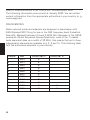
FREQUENCIES
Radio network cards and adapters are designed in accordance with
IEEE-Standard 802.11b+g for use in the ISM frequency band (Industrial,
Scientific, Medical) between 2.4 and 2.4835 GHz. Because of the DSSSprocedure (Direct Sequence Spread Spectrum), each of the 11 usable
radio channels takes up a width of 22 MHz; this means that up to three,
independent channels are available (e.g. 3, 8 and 11). The following table
lists the authorised channels in your country:
Channel
MHz
Europe, R&TTE
1
2412
X
2
2417
X
3
2422
X
4
2427
X
5
2432
X
6
2437
X
7
2442
X
8
2447
X
9
2452
X
10
2457
X
X
11
2462
X
X
58
France, R&TTE
LEGAL REQUIREMENTS - EXCEPTION CLAUSES FOR UNITS
WITH WIRELESS LAN
The installation and use of an unit with Wireless LAN may only take
place when in accordance with the instructions contained in the user
documents. The user documents are included in the material supplied
with the product. All alterations or modifications made to this unit which
are not expressly authorised by the manufacturer may lead to
cancellation of the right of the user to operate the unit. The manufacturer
is not liable for radio disruptions during the reception of radio and
television signals which are due to non-authorised alterations to the unit
or to the exchange or connection of cables and accessories, where
these are not in accordance with the recommendations of the
manufacturer. It is the responsibility of the user to remove any
interference which may arise as a result of any non-authorised
alterations, or the addition or replacement of components. Neither the
manufacturer nor his authorised dealer and wholesaler are liable for
damages or breaches of legal regulations which result from an
infringement of these guidelines.
59
Shipping Contents
SHIPPING CONTENTS
Before you begin installing your notebook, make sure that all
components are present.
If any item listed in the shipping contents is missing from your
computer package, please contact your dealer immediately.
• Notebook
• Battery
• Utility CD
• Power adapter
• Power cable
• User guide
• CD- or DVD/DVD-RW- ROM or Combo- drive (built in)
• Modem cable
Please retain the original packaging in case you need to send the device
for repairs or upgrades. Please store the packaging safely.
60
Preparation
PREPARATION
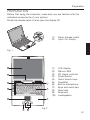
Before first using the computer, make sure you are familiar with the
individual components of your system.
Press the release catch (1) and open the display (2).
(1)
(2)
Press release catch
Open the display
(1)
(2)
(3)
(3)
(4)
(5)
(6)
(7)
(8)
(9)
(10)
LCD display
Status LEDs
CD player controls
Power button
Quick launch keys
TouchPad
Built-in microphone
Keys and scroll pad
Hand rest
Keyboard
Loudspeaker
Fig. 1
Fig. 2
61
Preparation
INSERTING THE BATTERY
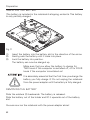
(The battery is included in the notebook’s shipping contents. This battery
is only partially charged.
Fig. 3
(1)
(2)
(3)
Insert the battery into the battery slot in the direction of the arrow.
Gently push the battery until it locks into place.
Lock the battery into position.
The battery can now be charged up.
Make sure that you allow the battery to charge for
TWO hours if the computer is switched off, or for FOUR
hours if the computer is switched on!
It is absolutely essential that the first time you charge the
battery you fully charge it! Do not unplug the notebook
from the power adapter until the battery is fully charged.
REMOVING THE BATTERY
Slide the catches (3) backwards. The battery is released.
Slide the battery out of the holder and lift it upwards out of the battery
slot.
You can now run the notebook with the power adapter alone!
62
Preparation
POWER SUPPLY
You can choose to
run the notebook via
battery or power
supply.
The first time you
use the computer,
you need to use the
power adapter. Use
only the supplied
power adapter.
Using the wrong
power adapter can
cause damage to
the computer.
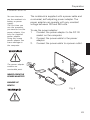
The notebook is supplied with a power cable and
a universal, self-adjusting power adapter. The
power adapter can operate with any constant
voltage between 100 and 240 volts.
To use the power adapter:
1.
Connect the power adapter to the DC IN
socket on the computer.
2.
Connect the power cable to the power
adapter.
3.
Connect the power cable to a power outlet.
The power adapter
contains no
serviceable parts.
NEVER OPEN THE
POWER ADAPTER !
DANGER OF
DEATH !
Fig. 4
63
Preparation
SWITCHING THE COMPUTER ON
You’ve completed the preparation.
Now operate the on/off button to
switch the notebook on.
Once the computer is switched on, the
on/off switch can perform several
functions depending on the energy
settings.
In the standard settings, pressing it
again will switch off the computer.
Tip:
Fig. 5
Note:
Please note that with the Windows
operating systems you should always
switch off the computer as follows:
Click the Start button
Select Shut Down
Click OK
This avoids any problems with the
hard disk and operating system.
If you experience a program or system catch,
press the buttons: Ctrl + Alt + Del. If you’re
fortunate this will enable you to end only the
task that has crashed and/or restart the
computer.
(Warm start). If this does not work, hold down
the on/off button for more than four seconds –
this will switch off the computer. You can now
start up the computer as normal (cold start).
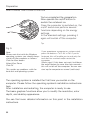
The operating system is installed the first time you switch on the
computer. Please follow the operating system’s installation instructions
here.
After installation and restarting, the computer is ready to use.
The basic graphics functions allow you to modify the resolution, color
depth, and desktop appearance.
You can find more detailed information on this point in the installation
instructions.
64
Powermanagement
POWERMANAGEMENT
Your system is compatible with APM and the
newer (and more efficient) ACPI energy saving
system.
Note on PC Cards
Never unplug a PC card
while the system is in
save-to-disk mode. This
would deactivate the
slot and problems could
occur with a modified
system configuration
the next time you start
up the computer
HARDWARE (Battery Status & Warnings)
After completing the POST (power-on self-test),
the battery status display shows the charge state
of the battery. The symbol flashes when the
battery charge is low. Save your data immediately
and connect the power adapter.
Low charge level & SUSPEND
When the battery runs low (without the power
adapter connected), one of these two protective
functions is automatically activated:
Without hibernate
If there is no save-to-disk file or partition set up on
your system, then current data will be stored in
RAM and the system automatically switches into
suspend mode.
With hibernate
Data is saved in the special file or partition on the
hard disk reserved for this purpose. The computer
then automatically switches off. If there is no
save-to-disk file or partition available, the system
switches into suspend mode.
65
System Overview
SYSTEM OVERVIEW
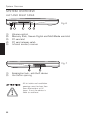
LEFT AND RIGHT SIDES
Fig. 6
(1)
(2)
(3)
(4)
(5)
Volume control
Memory Stick, Secure Digital and MultiMedia card slot
PC card slot
PC card release catch
Infrared sender/ receiver
Fig. 7
(1)
(2)
Kensington lock - anti-theft device
Ventilation opening
All air intake and ventilation
openings must be kept free
from obstructions at all
times. If not, the device is
liable to overheat.
66
System Overview
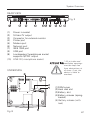
REAR VIEW
Fig. 8
(1)
(2)
(3)
(4)
(5)
(6)
(7)
(8)
(9)
(10)
Power in socket
S-Video TV output
Connector for external monitor
Printer port
Modem port
Network port
IEEE 1394 port
USB port
Loudspeaker/ headphones socket
supports S/PDIF output
LINE IN / microphone socket
UNDERSIDE
* All air intake and
ventilation openings
must be kept free
from obstructions at
all times. If not, the
device is liable to
overheat.
(1) RAM cover
(2) Hard disk slot
(3) Battery slot
(4) Battery release (springloaded)
(5) Battery release (with
lock)
Fig. 9
67
System Overview
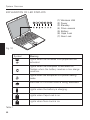
EXPLANATION OF LED DISPLAYS
(1) Wireless LAN
(2) Power
(3) Standby
(4) Drive access
(5) Battery
(6) Caps Lock
(7) Num Lock
Fig. 10
Symbol
Meaning
Lights when the wireless LAN properties are
activated.
Lights when the computer is switched on.
Flashes when the battery reaches a low charge
condition.
Lights when the computer is in power saving
mode
Hard disk or CD-ROM drive is being accessed.
Lights when the battery is charging.
Lights when Caps Lock is on.
Lights when Num Lock is on.
Table 1
68
System Overview
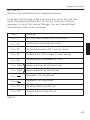
HOT KEYS
(Shortcut key combinations with special functions)
To activate the hot keys, press and hold down the Fn key and then
press the desired additional key. For certain functions it may be
necessary to install the Launch Manager. You can find additional
information on this on the next page.
Keys
Meaning
Fn + F1
Hot Key Help shows a list of hot keys
Fn + F2
Switches to power saving mode
Fn + F3
Switches between LCD / monitor / both
Fn + F4
Switches the LCD to black to save energy
Fn + F5
Switches the loudspeaker off / on
Fn + PgUp
Same operation as the Home key
Fn + PgDn
Same operation as the End key
Fn +
Increases LCD brightness
Fn +
Reduces LCD brightness
Fn + F11
Switches Num Lock off / on
Fn + F12
Switches Scroll Lock off / on
Table 2
69
System Overview
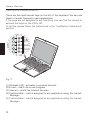
THE QUICK LAUNCH KEYS
There are five quick launch keys on the left of the keyboard. You can use
these to launch frequently used applications.
If the keys are not assigned to any functions, you can find the drivers to
activate the keys on the Utility CD.
To do this, please follow the instructions in the “Installation Instructions”
section.
Fig. 11
(1) Wireless LAN - activates a wireless network
(2) E-mail – starts the e-mail program
(3) Internet – starts the Internet browser
(4) Customizable – can be assigned to any application using the Launch
Manager
(5) Customizable – can be assigned to any application using the Launch
Manager
70
System Overview
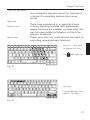
THE KEYBOARD
Your notebook’s keyboard has all the functions of
a normal AT-compatible keyboard plus some
extras:
Typewriter Function keys -
Special keys -
These keys correspond to a typewriter’s keys.
In many operating systems (and applications),
special functions are available via these keys. You
can find more detailed information on this in the
relevant handbooks.
These keys (and key combinations) are used for
controlling various hardware functions.
Press Fn + Num Lock
to activate this field
The
LED lights up
Fig. 12
Hot Keys:
For the functions, see
table 2 – Hot Keys
Fig. 13
71
System Overview
THE TOUCHPAD
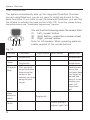
The system automatically sets up the integrated TouchPad. Provided
you are using Windows, you do not need to install any drivers for the
basic functions. If you wish to use the advanced functions, you can find
the drivers to activate the keys on the Utility CD. To do this, please follow
the instructions in the “Installation Instructions” section.
You will find the following under the sensor field:
(1) Left „mouse“ button
(2) Scroll button – works like a mouse wheel
(3) Right „mouse“ button
Note for left-handers: Most operating systems
enable reversal of the mouse buttons.
Fig. 14
Left button
Run
Double-click
Double-touch
Select
Single-click
Single-touch
Drag and
Drop
Click and hold
down the button,
then move the
cursor to the
position you want,
using the pad.
Let go.
Double-touch,
and on the
2nd touch keep
your finger on
the pad and
move it to the
position you
want. Lift
finger from
pad
Open
short-cut
menu
Scroll
72
Right button Scroll button
Sensor field
Function
Single-click
Click at the top /
bottom / right / left
System Overview
When using the TouchPad make sure your finger is clean and dry. The
TouchPad reacts to finger movements. The lighter it is touched, the
better it reacts. Pressing hard will not increase its accuracy.
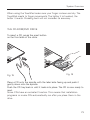
THE CD-ROM/DVD DRIVE
To insert a CD, press the eject button
on the front side of the drive.
Fig. 15
Fig. 16
Place a CD onto the spindle with the label side facing up and push it
gently down onto the spindle.
Push the CD tray back in until it locks into place. The CD is now ready to
read.
Some CDs have an autostart function. This means that installation
programs or music CDs automatically run after you place them in the
drive.
73
SYSTEM OVERVIEW
VOLUME
(1) Volume down
(2) Volume up
Fig. 17
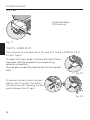
THE PC - CARD SLOT
The computer is provided with a PC card slot. This is a PCMCIA 3.3 V/
5 V slot, Type II.
To insert a PC card, push it into the slot until it locks
into place. Set the connection you require (e.g.
network connection).
You can also consult the documents for the relevant
card.
Fig. 18
To remove the card, push the eject
button next to the slot. The button
will pop outwards. Pressing the slot
again releases the PC card.
Fig. 19
74
SYSTEM OVERVIEW
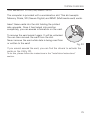
THE MEMORY STICK/ SD/ MMC -SLOT
The computer is provided with a combination slot. This slot accepts
Memory Sticks, SD (Secure Digital) and MMC (Multimedia card) cards.
Insert these cards into the slot holding the printed
side upwards. Once it has locked into position
completely, you can access information on the card.
To remove the card press it again. It will be unlocked.
You can then remove the card from the slot.
Never remove the card while data is being read from
or written to the card!
Fig. 20
If you cannot access the card, you can find the drivers to activate the
cards on the Utility CD.
To do this, please follow the instructions in the “Installation Instructions”
section.
75
SYSTEM OVERVIEW
THE DATA / FAX MODEM
The system automatically sets up the integrated analog modem. To use
the modem functions, connect the modem socket to an analog
telephone socket (not ISDN) using the telephone cable.
Proper Use:
The modem can be connected to all analog sockets (TBR 21) in Europe.
It is to be used solely for data communication purposes.
Do not attempt to connect the
modem to an ISDN telephone
socket! This would result in serious
damage to the device.
Fig. 21
THE LAN-PORT
The built-in network adapter enables your
computer to connect to the Internet via a 10/100
Mbps network or DSL.
The connection is made via an Ethernet network
cable and RJ45 connectors. These are inserted
on the back of the computer and into an available
network hub or DSL socket.
Under no circumstances should you confuse a network cable RJ45
connector with an ISDN connector! NEVER attempt to connect the
LAN adapter to an ISDN telephone socket!
This would result in serious damage to the device.
76
Fig.22
Software
INSTALLATION INSTRUCTIONS
RESTORING THE DRIVERS
Your system is supplied in a preloaded condition. This means that all the
data and drivers that the system requires are already on the hard disk.
In case you erase and/or format your hard disk drive, the system
drivers are stored on the Utility CD supplied with the computer.
After reinstalling the operating system (for example, with the Recovery
CD), this allows you to restore your notebook to a usable condition.
THE UTILITY CD
The Utility CD will run automatically after you place it in the drive. If this
is not the case, you can run the CD as follows: select <My Computer”>
<CD Drive> and then the “utility.exe” file.
You can select the driver that you want to install in the “Drivers”
-section. Recommended: All of the dri-vers listed from top to bottom.
In addition, you can later install the advanced functions you require in
the “Utility” section.
When using the Utility CD, please follow the menu instructions.
77
Software
SETTING THE RESOLUTION
After installing the graphics drivers, set the resolution to 1024 x 768
pixels.
You do this in the following way:
Right-click on any free area of the desktop
Select <Properties>
In the Display Properties window, click the Settings tab.
Here you can set the slider to 1024 x 768.
Click <Apply> to set the resolution.
78
SPECIFICATIONS
Appendix A Specifications
Processor
●
Intel® Centrino™ Mobile Technology
- Intel® Pentium® M Processor 1.3 GHz to 2 GHz or
- Intel® Celeron® M Processor to 1,7 GHz
RAM
•
•
Main memory expandable up to 1 GB DDR SDRAM
Two PC2100 (DDR-266) soDIMM sockets
Display and Video
•
•
•
•
•
15.0 inch XGA TFT display. Supported resolution 1024 x 768
with up to 16.7 million colors
Intel® 855 Graphics Controller - AGP 4X support
Simultaneous LCD/external monitor
External monitor:
Supports up to 1280 x 1024, 16.7 million colors, 85 Hz
or
1600 x 1200, 16.7 million colors, 60 Hz
S-Video output
Storage Capacity
•
•
•
One external USB floppy disk drive (3.5", 1.44 MB) (optionally
available)
One E-IDE hard disk drive (2.5", 9.5 mm)
One internal CD- or DVD- or DVD-RW/ combo drive
One Memory Stick / Secure Digital combo slot
Audio
•
•
•
Sound Blaster Pro and Windows Sound System compatible
Built-in loudspeaker and microphone
LINE IN and LINE OUT (supports S/PDIF)
79
Appendix A - Specifications
Modem
•
High-speed 56 Kbps V.90 fax/data software modem
LAN
•
•
Fast Ethernet for 10Base-T and 100Base-TX network standards
802.11b+g wireless LAN
•
•
•
84/85/88-key Windows keyboard
Ergonomically positioned TouchPad with scroll button
Quick launch keys
•
•
•
•
•
•
•
•
•
•
•
•
One 15-pin VGA connector
One stereo output socket with S/PDIF
One microphone input socket
Infrared port (FIR)
Three USB ports
One standard telephone socket (RJ-11)
One standard network port (RJ-45)
One DC IN socket
One S-Video OUT port
One IEEE1394 i.Link port
One Type II/I PC card slot
One parallel port (ECP) printer port
Input Devices
Ports
Power Supply
•
•
•
•
•
Main battery Li-Ion 65 W
AC power adapter 100-240 V AV, 50-60 Hz, 70 W.
Recharging System OFF: 2 hours (95%)
System ON: 4 hours (95%)
Battery power low warning
Suspend/restore capability
•
O/S Microsoft Windows 2000 / XP
Operating System
80
Appendix A - Specifications
Other Data
•
•
•
•
•
Dimensions 270 (D) x 327 (W) x 29.8 (H) mm
Weight 2.8 kg (depending on model)
Operating temperature: 5 to 35°C
Operating humidity: 20 to 80 % RH
Storage temperature: -10 to 65 °C
81
Appendix A - Specifications
82
Appendix B - Troubleshooting
FAULT DIAGNOSIS AND TROUBLESHOOTING
If a problem occurs while working with your computer, first of all try
using the following information to solve the problem. If the problem
cannot be solved in this way, you can find additional information in the
advanced service handbook (on the device drivers and utilities CDROM). If the problem persists, switch off the system for several
minutes and then restart it. You will lose all unsaved data, but the
system may work properly again. Subsequently contact your dealer or
customer support agent.
Although I’m pressing the power switch the computer stays
switched off.
Possible cause of the problem: The battery is missing or is incorrectly
installed.
Note: The power on LED is not lit.
Troubleshooting:
o
Make sure that the battery is in the battery compartment and
installed properly.
o
Check that the battery terminals are making direct contact.
o
Connect your notebook to the power adapter so that the battery
(if
present) can recharge.
Possible cause of the problem: Battery level low.
Note: The battery display LED flashes.
Troubleshooting:
Operate the computer using the power adapter. If the system does not
immediately start up, switch off the computer and then restart it.
83
Appendix B - Troubleshooting
The screen is not working.
Possible cause of the problem: The energy saving mode is activated.
Note: The suspend LED flashes.
Troubleshooting:
o
Operate the on/off button.
Possible cause of the problem: The screen settings are incorrect.
Troubleshooting:
o
Press the spacebar, several times if necessary.
o
If an external monitor is connected, switch it on.
Possible cause of the problem: In the system settings, a different
screen type to the existing one is set.
Troubleshooting:
o
Press the Fn + F3 key combination.
o
If an external monitor is connected, connect it to a power
supply and switch it on. Also check the brightness and contrast
settings (you can find additional information on this topic in the
advanced service handbook).
The system stops working.
Possible cause of the problem: An energy saving function has been
activated.
Note: The screen switches itself off.
Troubleshooting:
Press any key, or press the on/off button if none of the status LEDs are
lit.
84
Appendix B - Troubleshooting
Possible cause of the problem: A software error has caused a system
crash.
Troubleshooting:
o
Additional information is available in the operating system
handbook.
o
If you cannot remedy the problem, then restart the system. You
will lose any unsaved data! If this doesn’t work either, briefly
switch off the computer and then switch it back on again.
Warnings
Each time the system starts, it carries out a self-test (POST). If an error
occurs, an error message appears, briefly describing the problem.
85