1
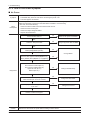
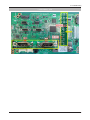
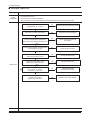
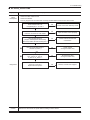
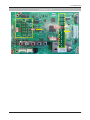
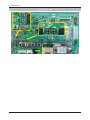
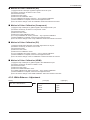
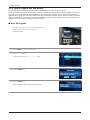
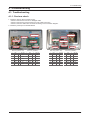
4. Troubleshooting 4-1-2. How to check fault symptom No Power -- The LEDs on the front panel do not work when connecting the power cord. Symptom -- The SMPS relay does not work when connecting the power cord. -- The units appears to be dead. Major checkpoints The IP relay or the LEDs on the front panel does not work when connecting the power cord if the cables are improperly connected or the Main Board or SMPS is not functioning. In this case, check the following: -- Check the internal cable connection status inside the unit. -- Check the fuses of each part. -- Check the output voltage of SMPS. -- Replace the Main Board. Power indicator LED on? No Check an AC power connection. Yes Check the 14P power cable No Change 14p power cable or SMPS. Yes Check ‘Stand-By 5V’ DC5V appear at BD207(middle)/BD214(small)? No Yes Check ‘Power input of Main Assy’ ? DC B13V, B5V appear at BD209(M)/BD221(S) (B13V), BD208, BD213(M)/BD210, 212(S)(B5V)? Change SMPS. No Yes Diagnostics Check ‘Power of main IC(B1.1V)’ Check ‘Power of DDR IC(B1.9V)’ appear at L201 (B1.1V) BD1012 (B1.9V) ? No Change the Main Assy. Yes Check ‘Power of LVDS (13V)’ appear at LVDS connector Pin #1~5 of T-con b’d? No Change the LVDS cable. Yes Does proper DC B13V appear at F1 of T-con b’d? No Yes Please, Contact tech support. Caution 4-2 Make sure to disconnect the power before working on the IP board. Change the T-con b’d.