1
Quick start guide
CL82101/CL82201/CL82301/
CL82351/CL82401/CL82451/
CL82501/CL82551/CL82601
DECT 6.0 cordless telephone/
answering system with
caller ID/call waiting
Installation
You must install and
charge the battery before
using the telephone.
STOP!
See page 3
for easy instructions.
Install the telephone base close to a telephone jack and a power outlet not
controlled by a wall switch. The telephone base can be placed on a flat surface
or vertically mounted on the wall. For optimum range and better reception,
place the telephone base in a central and open location.
If you subscribe to high-speed Internet service (DSL - digital subscriber line)
through your telephone line, you must install a DSL filter between the telephone
line cord and the telephone wall jack (see the following page). The filter prevents
noise and caller ID problems caused by DSL interference. Please contact your DSL
service provider for more information about DSL filters.
Your product may be shipped with a protective sticker covering the handset
or telephone base display - remove it before use.
For customer service or product information, visit our website at
www.telephones.att.com or call 1 (800) 222-3111. In Canada, dial
1 (866) 288-4268.
Avoid placing the telephone base too close to:
• Communication devices such as television sets, VCRs, or other
cordless telephones.
• Excessive heat sources.
• Noise sources such as a window with traffic outside, motors, microwave
ovens, refrigerators, or fluorescent lighting.
• Excessive dust sources such as a workshop or garage.
• Excessive moisture.
• Extremely low temperature.
• Mechanical vibration or shock such as on top of a washing machine
or workbench.
Telephone base and charger installation
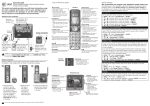
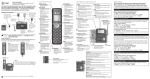
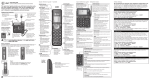
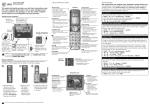
Install the telephone base and charger as shown below.
The telephone base is ready for tabletop use.
Telephone base installation
•
Plug the other end
of the telephone
line cord into a
telephone jack or
a DSL filter.
•
Raise the antenna.
•
Plug one end of the
telephone line cord
into the telephone jack
on the back of the
telephone base.
•
Plug the small end of
the telephone base
power adapter into the
power adapter jack
on the back of the
telephone base.
•
Route the power
adapter cord through
this slot.
•
Plug the large end
of the power adapter
into a power outlet
not controlled by a
wall switch.
Telephone line cord
If you have DSL high-speed
Internet service, a DSL filter
(not included) is required.
Charger installation
Plug the power adapter into an electrical outlet
not controlled by a wall switch.
IMPORTANT INFORMATION
1. Use only the power adapter(s) supplied with this product. To order a replacement
power adapter, visit our website at www.telephones.att.com or call
1 (800) 222-3111. In Canada, dial 1 (866) 288-4268.
2. The power adapters are intended to be correctly oriented in a vertical or floor
mount position. The prongs are not designed to hold the plug in place if it is
plugged into a ceiling, under-the-table or cabinet outlet.
Battery installation and charging
Once you have installed the battery, the screen indicates the battery
status. For best performance, keep the handset in the telephone base or
charger when not in use. The battery is fully charged after 10 hours of
continuous charging.
Step 1
Plug the battery
connector securely
into the socket inside
the handset battery
compartment, matching
the color-coded label.
Insert the supplied
battery with the label
THIS SIDE UP facing up
as indicated.
Step 2
Align the cover flat
against the battery
compartment, then
slide it upwards until
it clicks into place.
BT183342/BT283342
2.4V 400mAh Ni-MH
BY 1021
NOTE: If you are on a phone call in low battery mode, you hear four short beeps
every minute.
CHARGE light
Step 3
Charge the handset by placing it face forward in the
telephone base or charger. The CHARGE light on the
top of the handset is on during charging.
After you install your telephone or power returns following a power outage,
the handset will prompt you to set the date and time. To skip setting the date
and time, press OFF/CANCEL.
IMPORTANT INFORMATION
1. Use only the supplied rechargeable battery or replacement battery (model BT166342).
To order, visit our website at www.telephones.att.com or call
1 (800) 222-3111. In Canada, dial 1 (866) 288-4268.
2. If you do not use the handset for a long time, disconnect and remove the battery
to prevent possible leakage.
Quick reference guide - handset
pDIR/VOLUME
Press pDIR to show directory entries.
Press to scroll up while
in menus.
While entering names or numbers, press to move the cursor to the right.
Press to increase the listening volume when on a call, or to increase the message playback volume.
CHARGE indicator
On when the handset is
charging in the telephone base
or charger.
qCID/VOLUME
Press qCID to show
caller ID history.
Press to scroll down while
in menus.
While entering names or
numbers, press to move the
cursor to the left.
Press to decrease the listening
volume when on a call, or to
decrease the message
playback volume.
PUSH TO TALK
Press to initiate a one-to-one or one-to-group broadcast.
Press and hold to broadcast to a group of handsets.
MENU/SELECT
Press to show the menu.
While in the menu, press to select an item or save an entry or setting.
MUTE/DELETE
During a call, press to mute the
microphone.
While reviewing the caller ID
history, the directory or the redial
memory, press to delete an
individual entry.
While predialing, press to
delete digits.
OFF/CANCEL
����������
During a call, press to hang up.
While in a menu, press to cancel an operation, back up to the previous menu,
or exit the menu display, or press and hold to exit to
idle mode.
Press and hold while the telephone is not in use to
erase the missed call indicator.
PHONE/FLASH
Press to make or answer a call.
During a call, press to answer
an incoming call when you
receive a call waiting alert.
# (pound key)
1
Press repeatedly to display
other dialing options when reviewing a caller ID log entry.
While reviewing a caller ID
log entry, press repeatedly to
add or remove 1 in front of
the telephone number before
dialing or saving it in
the directory.
EQ
During an outside call, intercom call, message or
announcement playback,
press to change the audio quality to best suit
your hearing.
TONE
Press to switch to tone dialing
temporarily during a call if you
have pulse service.
REDIAL/PAUSE
/�������
SPEAKER
Press to switch between the
speakerphone and the handset.
Press repeatedly to view the last 10 numbers dialed.
While entering numbers,
press and hold to insert a dialing pause.
Quick reference guide - handset
Main menu
Main menu
The > symbol highlights
a menu item.
Play messages
Answering sys
Directory
Caller ID log
Intercom
Ringers
Set date/time
Settings
Website
>Play messages
Answering sys
p
q
Using menus:
•
•
•
•
Press MENU/SELECT to show the menu.
Press qCID or pDIR to scroll through menu items.
Press MENU/SELECT to confirm or save changes to a highlighted menu item.
Press
OFF/CANCEL to cancel an operation, back up to the previous
menu, or exit the menu display.
Quick reference guide - telephone base
X/DELETE
/ANSWER ON
Press to delete the
message currently
playing.
Press twice to delete all
old messages when the
phone is not in use.
Press to turn the built-in
answering system on or off.
Message counter
Shows the number
of messages or other
answering system
information.
q/VOL/p
During message
playback, press to
adjust the listening
volume.
While in idle mode,
press to adjust the base
ringer volume.
/REPEAT
Press to repeat a message.
Press twice to play the
previous message.
IN USE indicator
/SKIP
On when the handset is in use, or when
the answering system is answering an
incoming call.
On when a handset is being registered.
Flashes when there is an incoming call or
when a handset is being deregistered.
Flashes when another telephone is in use
on the same line.
Press to skip a message.
/PLAY/STOP
Press to start or stop
message playback.
Telephone settings
Caller ID announce
By default, the caller ID announce feature is programmed On.
To turn on/off the caller ID announce on your handset or base:
1. Press MENU/SELECT in idle mode to enter the main menu.
2.Use qCID or pDIR to scroll to >Settings, then press
MENU/SELECT.
3.Use qCID or pDIR to scroll to >Caller ID annc, then
press MENU/SELECT.
4. Use qCID or pDIR to highlight >HANDSET or >BASE, then
press MENU/SELECT.
LCD language
>Caller ID annc
p
q
CALLER ID ANNC
>HANDSET
p
q
5. Use qCID or pDIR to highlight >On or >Off, then press
MENU/SELECT.
NOTES:
• See your user’s manual for complete instructions on using all features of
this telephone.
• Pronunciation of names may vary with this feature. Not all names may be
pronounced correctly.
HS CID ANNOUNCE
>Off
p
q
Telephone operation
Making a call
Press PHONE/FLASH or /�������
SPEAKER, then enter the
telephone number.
The screen displays the elapsed time as you talk (in hours,
minutes and seconds).
Elapsed time
Phone
0:00:30
10/15
10:01
AM
NOTE: Pressing
PHONE/FLASH to access services from your
telephone service provider does not affect the elapsed time.
Answering a call
Press PHONE/FLASH or /�������
SPEAKER.
-ORPress any dialing key (0-9, TONE or #).
Ending a call
Press
OFF/CANCEL or return the handset to the telephone base or charger.
Answering system operation
Turn the answering system on or off
You must turn on the answering system to answer and
record messages. When it is turned on, the /ANSWER ON
light on the telephone base turns on and ANS ON displays
on the handset.
Press /ANSWER ON on the telephone base to turn the
answering system on or off.
Record a new outgoing announcement
You can use a system handset to record a new announcement
that lasts up to 90 seconds.
1.When the handset is in idle mode, press MENU/SELECT to
enter the main menu.
2.Press qCID or pDIR to scroll to >Answering sys, then
press MENU/SELECT.
3. Press MENU/SELECT again to select >Announcement.
4.Scroll to >Record annc and press MENU/SELECT. The
system announces, “Record after the tone. Press 5 when
you are done.”
5.Facing the handset, record your announcement and press
5 to end recording. Your recorded announcement plays.
Play messages
>Answering sys
p
q
>Announcement
Delete all old
p
q
Play annc
>Record annc
To listen to the recorded announcement again, wait until
after playback is completed, then scroll to >Play annc and
press MENU/SELECT.
p
q
Listen to messages at the telephone base
Press
/PLAY/STOP on the telephone base to listen to the messages.
The system announces the number of messages, then begins playback.
Options during playback:
• Press q/VOL/p to adjust the message playback volume.
• Press /SKIP to skip to the next message.
• Press /REPEAT to repeat the message. Press twice to hear the
previous message.
• Press X/DELETE to delete the message.
• Press
/PLAY/STOP to stop the playback.
www.telephones.att.com
© 2010-2011 Advanced American Telephones. All Rights Reserved.
AT&T and the AT&T logo are trademarks of AT&T Intellectual Property licensed to
Advanced American Telephones, San Antonio, TX 78219.
Printed in China. Issue 4 AT&T 02/11.