1
R-480J
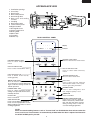
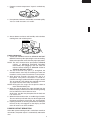
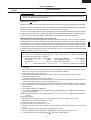
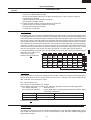
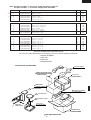
APPEARANCE VIEW
1.
2.
3.
4.
5.
6.
Ventilation openings
Oven lamp
Door hinges
Door safety latches
See through door
Door seals and sealing
surfaces
7. Coupling
8. Door open button
9. Touch control panel
10.Digital readout
11.Waveguide cover
12.Power supply cord
13.Rating label
14.Menu label
15.Turntable
16.Roller stay
6
14
2
10
9
3
12
15
1
8
4
5
7
11
4 13
16
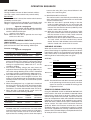
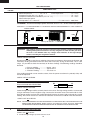
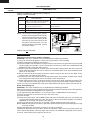
TOUCH CONTROL PANEL
Display
SENSOR DEFROST
COOK HELP
Indicator
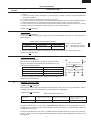
SENSOR COOK PADS
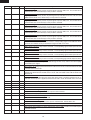
Press to select Sensor Cook menus.
EXPRESS MENUS PADS
Press to select "Express Menus"
menus.
HEALTHY MENU PADS
Press to select "Healty Menu" menu.
QUICK AND EASY PAD
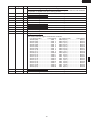
Press to select Quick and Easy
menus.
EASY DEFROST PAD
Press to defrost frozen food by
entering quantity.
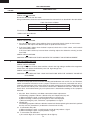
SENSOR REHEAT PAD
Press to select reheat menu.
MORE, LESS PADS
Press to increase/ decrease the time
in one minute increments during cooking or to alter the cooking result for automatic operations.
HELP PAD
Press to select auto start, child lock,
demonstration modes or info on pads.
Press to get cooking information.
NUMBER PADS
Press to enter cooking times, clock
time, weight or quantity of food.
POWER LEVEL PAD
Press to select microwave power
setting. If not pressed, HIGH is automatically selected.
TIMER PAD
Press to set Timer
CLOCK PAD
Press to set Clock.
INSTANT COOK/START PAD
Press once to cook for 1 minute on
HIGH or increase by 1 minute multiples each time this pad is pressed
during cooking. Press to start the
oven after setting programmes.
STOP/CLEAR PAD
Press to clear during programming.
Press once to stop operation of oven
during cooking; press twice to cancel
cooking programme.
NOTE:
Some one-touch cooking features such as "Instant Cook" are disabled after three minutes when the
oven is not in use. These features are automatically enabled when the door is opened and closed or
the STOP/ CLEAR pad is pressed.
3