1
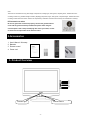
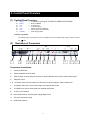
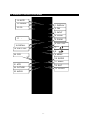
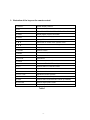
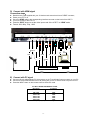
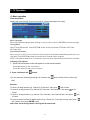
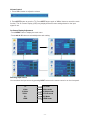
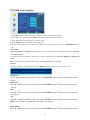
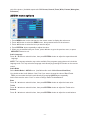
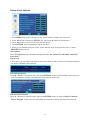
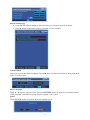
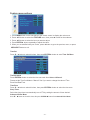
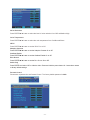
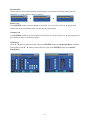
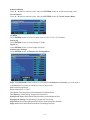
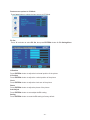
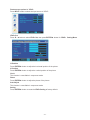
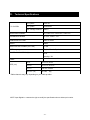
OPERATING INSTRUCTIONS MODEL:LD 1919 Please read this manual before connection and use INDEX 1 2 3 4 5 6 7 8 9 Safety notice items.................................................................................................. 2-4 Accessories ................................................................................................................ 4 Product Overview....................................................................................................... 4 Control Panel Overview ............................................................................................. 5 Remote Control Overview ...................................................................................... 6-7 Connections between different input signals....................................................... 8-9 Menu operations.................................................................................................. 10-21 Technical Specifications ......................................................................................... 22 Warranty.................................................................................................................... 23 Introduction Thank you for choosing this product. This manual will guide you for proper operation. Before operating the TV, please read this manual properly. Please do keep this manual in a safe place for future references. This portable TV has been designed for private use only. -1- 1- Safety notice items Preparation For ventilation, leave a space of at least 10cm free all around the set. To prevent any fault and unsafe situations, please do not place any objects on top of the set. Use this apparatus in moderate climates. Please read the following recommended safety precautions carefully for your safety. 1. Power Source The TV set should be operated only from a 120 V AC, 60Hz outlet. Ensure that you select the correct voltage setting for your convenience. 2. Power Cord Do not place the TV where the power cord is subject to wear or abuse, pinch, bend or twist the cord excessively. The cord lines may be bared and cut, and cause a short-circuit, resulting in a fire or an electric shock. Do not convert or damage the power cord. Do not allow anything to rest on or roll over the power cord. Do not move the TV with the power cord plugged in. Keep the power cord away from heat sources. Be sure to grasp the plug when disconnecting the power cord. 3. Moisture and Water Do not use this equipment in a humid and damp place (avoid the bathroom, the sink in the kitchen, and near the washing machine). Do not expose this equipment to rain or water, as this may be dangerous and do not place objects filled with liquids, such as flower vases, on top. Avoid from dripping or splashing. If any solid object or liquid falls into the cabinet, unplug the TV and have it checked by qualified personnel before operating it any further. 4. Cleaning Before cleaning, unplug the TV set from the wall outlet. Do not use liquid or aerosol cleaners. Use soft and dry cloth. 5. Ventilation The slots and openings on the TV set are intended for ventilation and to ensure reliable operation. To prevent overheating, these openings must not be blocked or covered in anyway. 6. Heat and Flames The set should not be placed near to naked flames and sources of intense heat, such as an electric heater. Ensure that no naked flame sources, such as lighted candles, are placed on top of the TV. Batteries shall not be exposed to excessive heat such as sunshine, fire or the like. -2- 7. Lightning In case of storm and lightning or when going on holiday, disconnect the power cord from the wall outlet. 8. Replacement Parts When replacement parts are required, be sure the service technician has used replacement parts which are specified by the manufacturer or have the same specifications as the original one. Unauthorized substitutions may result in fire, electrical shock, or other hazards. 9. Servicing Please refer all servicing to qualified personnel. Do not remove the cover yourself as this may result in an electric shock. 10. Waste Disposal Instructions for waste disposal: • Packaging and packaging aids are recyclable and should principally be recycled. Packaging materials, such as foil bag, must be kept away from children. • Battery, including those which are heavy metal-free, should not be disposed of with household waste. Please dispose of used battery in an environmentally sound manner. Find out about the legal regulations which apply in your area. • Cold cathode fluorescent lamp in LCD PANEL contains a small amount of mercury; please follow local ordinates or regulations for disposal. Information for users applicable in European Union countries This symbol on the product or on its packaging means that your electrical and electronic equipment should be disposed at the end of life separately from your household wastes. There are separate collection systems for recycling in EU. For more information, please contact the local authority or the dealer where you purchased the product. 11. Disconnect Device The mains plug is used to disconnect TV set from the mains and therefore it shall remain readily operable. 12. To prevent injury, this device must be securely attached to the wall in accordance with the installation instructions when mounted to the wall (if the option is available). Operating Safety Instructions When displaying the same still picture for more than 2 hours without any interruption, the picture contours of the continuously displayed contents may remain visible on screen, i.e. a persistent image remains. The same applies, when displaying for more than 2 hours: • the same background/wallpaper • logos, video games, computer images, Teletext • contents with a non-filling aspect ratio (e.g. 4:3 format) -3- Note: This device is not suitable for a long-time display of still pictures, including logos, video games, computer games, Teletext and screen non-filling contents. Any persistent images caused by displaying still pictures, logos, video games, computer images, Teletext and screen non-filling contents cannot be erased. These do not represent any malfunction and will not be covered by the manufacturer’s warranty." PE Connection to mains Be sure to ground the connection properly. Connect the ground terminal of TV with the ground terminal provided at the power outlet using the enclosed power cord. If the provided plug does not fit your outlet, consult an electrician for replacement of the obsolete outlet. 2-Accessories ain functions 1. User’s Manual / Warranty 2. Batteries 3. Remote control 4. Power cord 3- Product Overview 1 2 3 4 5 6 7 Indicator light Remote sensor -4- 4- Control Panel Overview (1) Control Panel Functions: 1234567- INPUT MENU CH+ CHVOL+ VOLPOWER – – – – – – – To select the input signal: TV/VIDEO/S-VIDEO/YPbPr/PC/HDMI Enter into MENU TV channel up TV channel down Volume up / Right orientation Volume down / Left orientation Power supply switch Indicator Light Status The indicator light is red when the TV is in standby mode. The indicator light is green when you press the‘ (2) 1 ‘ Key Illustration of Connectors 2 3 4 5 6 7 8 9 10 11 12 Connectors descriptions: 1: Power On/Off button 2: Power receptacle AC120V 60Hz 3: Antenna input, connect antenna connector or aerial interface here to receive cable / aerial signal 4: Earphone output 5, 6: L/R audio inputs (AV) from exterior AV devices such as DVD players, Video Camera’s etc. 7: Composite video input, connect video input from external device here 8: S-VIDEO input, connect video input from external device here 9: Y Pb Pr input interface 10: DB15 VGA interface, connect power supply adaptor here 11: PC sound card audio inputs 12: HDMI input interface -5- 5- Remote Control Overview 14. MUTE 15. POWER 1. DISPLAY 16. 0-9 2. FAV 3. INPUT 4. GUIDE 17. - 5. ZOOM 6. CH+ / CH- 18. RECALL 7. 19. VOL+/ VOL- 8. 20. CCD 9. MENU 10. ENTER 11. SLEEP 21. MTS 12. EXIT 22. PICTURE 13. CH.LIST 23. AUDIO -6- 1- Illustration of the keys on the remote control: 1. DISPLAY Screen Display ON/OFF 2. FAV Favorite channel 3. INPUT Select TV / VIDEO / S-VIDEO / YPbPr / PC / HDMI 4. GUIDE Display digital program information 5. ZOOM Switch to different display mode 6. CH + / CH- Change TV channels 7. ▲ ▼ Control the on-screen menu up/down cursor 8. ◀ ▶ Control the on-screen menu left/right cursor 9. MENU Display on-screen menu 10. ENTER Press to confirm 11.SLEEP Press to set sleep timer 12. EXIT Exit menu 13. CH.LIST Channel list 14. MUTE Turn the sound on or off. 15. POWER Press to set TV ON/OFF standby mode 16. 0-9 Press to select TV channel number 17. - Digital channel substation selector 18. RECALL Last channel viewed 19. VOL+ / VOL- Adjusts the volume up/down 20. CCD Press to select closed caption 21. MTS Press to select a second audio channel (if available) 22. PICTURE Press to adjust picture mode 23. AUDIO Press to adjust audio mode Table 1 -7- 6- Connecting Input Signals to TV A) Connect with TV signal Connection steps: Power your LCD TV off. Connect an antenna cable (CATV) to the corresponding interface connector (75 Ω ANT) on the back of the LCD-TV. Connect the other end of the antenna cable to the antenna connector on the wall or on your digital cable / satellite receiver. Now you are able to view regular cable TV. Turn on the power of the LCD-TV. Press the INPUT button to set the video input mode of the LCD-TV to “TV” mode. The channel number appears in the top right side of the screen. You can use key CH+ / CH- button or the number keys on the remote control to select the channel you want to watch. B) Connect to external AV devices using Composite and S-Video inputs Connection steps: Read the user guide supplied with your AV devices and ensure that it has Composite or S-Video connectors; Power your LCD TV and your AV device off. Connect a Composite video cable (not supplied) to the yellow composite video connector input on the back of the LCD-TV. Now insert the other end of the composite cable into the yellow composite connector output on the AV device. Alternatively connect a S-Video Cable (not supplied, provide better image quality) to the S-Video connector on the back of the LCD-TV. Now insert the other end of the S-Video cable into the S-Video connector on the AV device. Connect the RCA audio cables (not supplied, white and red connectors) from the AV devices’ RCA audio output connectors to the RCA audio input connectors on the back of the LCD-TV. Connect an antenna cable (CATV) to the corresponding interface connector (75 Ω ANT) on the back of the LCD-TV. Connect the other end of the antenna cable to the antenna output connector on the VCR or DVD recorder. Now you are able to view and record a TV signal at the same time. Turn on the power of the LCD-TV first, and then turn on the power of the AV device. Press the INPUT button to set the video input mode of the LCD-TV to “S-VIDEO” mode or “VIDEO” mode. C) Connect with YPbPr signal Connection steps: Read the user guide supplied with your AV devices and ensure that it has a “YPbPr” connector; Power your LCD TV off. Connect a YPbPr cable to the corresponding interface connector on the back of the LCD-TV. Turn on the power of the LCD-TV. Press the INPUT button to set the video input mode of the LCD-TV to “YPbPr” mode. Format: 480i, 480p, 720p, 1080i. -8- D) Connect with HDMI signal Connection steps: Read the user guide supplied with your AV devices and ensure that it has a “HDMI” connector; Power your LCD TV off. Connect a HDMI cable to the corresponding interface connector on the back of the LCD-TV. Turn on the power of the LCD-TV. Press the INPUT button to set the video input mode of the LCD-TV to “HDMI” mode. Format: 480i, 480p, 720p, 1080i Earphon e ANTeee VIDE O L R Pr P b Y VG A PC AUDIO HDM I S-Vide o E) Connect with PC signal Connect a D-sub cable between PC IN connector on the TV and Video Output connector on your PC Connect an audio cable between the PC IN (Audio) jack on the TV and the audio out jack on our PC Press the INPUT button on the remote control to select PC mode. PC INPUT SIGNAL REFERENCE CHART Resolution Frequency 800 x 600 1024 x 768 1280 x 768 1360 x 768 1440 x 900 60Hz 60Hz 60Hz 60Hz 60Hz Frequency may vary based on PC signal. -9- 7- TV Operation (1) Basic operation Initial Setup Menu NOTE: If this is the first time you turn on the LCD TV, the Initial Setup Menu will display. Menu Language Select the preferred language when viewing on screen menus. Use the ENTER/► to select language. Tuning Band Select Tuning Band mode. Press ENTER/► button to select Air/Cable STD/Cable HRC/Cable IRC/Cable Auto. Auto Channel Search When using your LCD TV for the first time. Please scan for all available broadcasting channels in your local area. Press ENTER/► button to enter the Auto Channel Search Program. NOTE: Auto Channel Search for TV channels in your local area may take several minutes to complete. Choosing a TV channel 1. Press CH+/CH- button on the side panel or on the remote control. Press CH+ button for the next channel Press CH - button for the previous channel. 2. Press 0-9 buttons and button. You can select the channel by pressing 0 to 9 buttons and button directly for the channel you want. Example: To select 1-Analog channel (e.g. Channel 5): Press the 5, then press and 0 button. To select 2- Analog channel (e.g. Channel 20): Press the 2 and 0 buttons , then press button. and 0 To select 3- Analog channel (e.g. Channel 103): Press the 1 and 0 and 3 button, then press 0 button. To select a channel number for digital channel (e.g. Channel 2-1): Press the 2 button, then press and 1 button, then press ENTER button. Note: After select the digit button, the digit will be memorized. - 10 - and Volume Control 1. Press VOL+/-button to adjust the volume 2. Press MUTE button to mute the TV, Press MUTE button again or VOL+/- button to cancel the mute function. The On Screen Display (OSD) may display different screen settings based on the input signal of use. On Screen Display Adjustment - Press MENU button to display the main menu. - Press◄/►/▲/▼buttons to select/adjust the each setting. Selecting input source You can select the input source by pressing INPUT button on the remote control or on the front panel. TV Video TV mode Video mode S-Video S-Video mode YPbPr Y Pb Pr mode PC HDMI PC Mode HDMI mode - 11 - PICTURE menu options 1. Press MENU button on the side panel or the remote control to display the main menu. 2. Press ▲/▼ button to select the PICTURE menu, then press ► button for the submenu. 3. Press ▲/▼ button to select the item you want to adjust. 4. Press ENTER/► button repeatedly to adjust the value. 5. When you are satisfied with your choice, press ◄ button to go to the previous menu, or press MENU/EXIT button to exit. Picture Mode Select Picture Mode in PICTURE menu accordingly to your viewing requirement. (Available picture mode: Standard, Vivid, Bright, User.) You should set the Picture Mode to “User” first if you want to change the value of Contrast / Brightness / Sharpness / Color TIPS: you can select the picture mode directly by pressing PICTURE button repeatedly. Contrast Press ▼ / ▲ button to select this item, then press ENTER/► button to adjust the contrast of the picture. Brightness Press ▼ / ▲ button to select this item, then press ENTER/► button to adjust the brightness of the picture. Sharpness Press ▼ / ▲ button to select this item, then press ENTER/► button to adjust the sharpness of the picture. Color Press ▼ / ▲ button to select this item, then press ENTER/► button to adjust the color saturation of the picture. Tint Press ▼ / ▲ button to select this item, then press ENTER/► button to adjust the tint of the picture. NOTE: The Tint item is not available but in NTSC color system. Aspect Ratio Press ▼ / ▲ button to select this item, then press ENTER/► button to adjust the aspect the aspect - 12 - ratio of the picture. (Available aspect ratio: Full Screen, Normal, Zoom, Wide, Cinema, Waterglass, Fullscreen) AUDIO menu options 1. Press MENU button on the side panel or the remote control to display the main menu. 2. Press ▲/▼ button to select the AUDIO menu, then press ► button for the submenu. 3. Press ▲/▼ button to select the item you want to adjust. 4. Press ENTER/► button repeatedly to adjust the value. 5. When you are satisfied with your choice, press ◄ button to go to the previous menu, or press MENU/EXIT button to exit. Audio Language Press ▼ / ▲ button to select this item, then press ENTER/► button to adjust the aspect the audio language. NOTE: The Language selection may not be available if the programs system does not include the language code. You may select the language mode directly by pressing MTS button on the remote control. Audio Mode Select Audio Mode in AUDIO menu. (Available audio mode: Voice/Concert/Jazz/User) You should set the Audio Mode to “User” first if you want to change the value of Bass/Treble. TIPS: you can select the Audio mode directly by pressing AUDIO button repeatedly. Audio mode must be set to “User” in order to change “Base/Tremble/Balance” Bass Press ▼ / ▲ button to select this item, then press ENTER/► button to adjust the bass value. Treble Press ▼ / ▲ button to select this item, then press ENTER/► button to adjust the Treble value Balance Press ▼ / ▲ button to select this item, then press ENTER/► button to adjust the sound balance. - 13 - Setup menu options 1. Press MENU button on the side panel or the remote control to display the main menu. 2. Press ▲/▼ button to select the SETUP menu, then press ► button for the submenu. 3. Press ▲/▼ button to select the item you want to adjust. 4. Press ENTER/► button repeatedly to adjust the value. 5. When you are satisfied with your choice, press ◄ button to go to the previous menu, or press MENU/EXIT button to exit. Tuning Band Select Tuning Band mode. (Available tuning band mode: Air, Cable STD, Cable HRC, Cable IRC, Cable Auto.) Signal Level In DTV mode, you can refer the strength of the current channel, and you can tune manually and adjust the angle, orientation of the antenna. Auto Channel Search Press ▼ / ▲ button to select this item, then press ENTER/► button to scan available channels in your area. The channels found are automatically saved into the channel list. Add On Channel Search Press ▼ / ▲ button to select this item, then press ENTER/► button to enter the Add On Channel Search Program. This function will add additional channels to channel list previously not found. - 14 - Manual Channel Set 1. Press ENTER button to display a channel list that you can select channel as below: 2. Press ► button to label each channel “Viewable” or “Not Viewable” Channel labels Allows you to name the channel selected. Press ◄/► button to select the position of letter, press ▲/▼ button to set the name. Menu Language Press ▼ / ▲ button to select this item, then press ENTER/► button to select the On Screen Display (OSD) language. (Available Language: English, Spanish, and French) Reset Press ENTER/► button to reset all items to the default value. - 15 - Feature menu options 1. Press MENU button on the side panel or the remote control to display the main menu. 2. Press ▲/▼ button to select the FEATURE menu, then press ► button for the submenu. 3. Press ▲/▼ button to select the item you want to adjust. 4. Press ENTER/► button repeatedly to adjust the value. 5. When you are satisfied with your choice, press ◄ button to go to the previous menu, or press MENU/EXIT button to exit. Time Set Press ▼ / ▲ button to select this item, then press ENTER/► button to enter Time Set Menu. Time Set Mode Press ENTER/► button to select the time set mode from Auto and Manual. Please set the Time Set Mode to “Manual” first if you want to change the value of Time Zone/Year/Date/Time. Time Zone Press ▼ / ▲ button to select this item, then press ENTER/► button to select the time zone. Sleep Timer Select the sleep timer to automatically turn off TV by setting the amount of time desired. Advanced Video Menu Press ▼ / ▲ button to select this item, then press ENTER/► button for Advanced Video Menu. - 16 - Noise Reduction Press ENTER/◄/► button to select the level of noise reduction from Off/Low/Medium/High. Color Temperature Press ENTER/◄/► button to select the color temperature from Cool/Normal/Warm. 3D/YC Press ENTER/◄/► button to set the 3D/YC On or Off. Adaptive Contrast Press ENTER/◄/► button to set the Adaptive Contrast On or Off. Gradient Enable Press ENTER/◄/► button to set the Gradient Enable On or Off. Blue Screen Press ENTER/◄/► button to set the Blue Screen On or Off. Audio Only Press ENTER and select “OK” to hide the video. Press and hold the power button for 3 seconds to restore to factory default settings. Parental Control Please enter a password to set Parental Control. The factory default password is 0000 - 17 - Password Set Please enter the correct old password before setting a new password, and after setting the new password, you need to enter it again to confirm it. Master Lock Press ENTER/► button to set the Master Lock On/Off. If you set this function on, all the parental control lock will be unavailable and it can play all kinds of programs. Unrated Lock Press ENTER/► button to set the Unrated Lock On/Off. If you set this function on, all the programs will be locked even they are unrated programs. US Ratings Press ▼ / ▲ button to select this item, then press ENTER/► button for US Ratings Menu. Canadian Rating Menu Press ▼ / ▲ button to select this item, then press ENTER/► button for Canadian Rating Menu. - 18 - Advanced Rating Press ▼ / ▲ button to select this item, then press ENTER/► button to set advanced rating on/off. Closed Caption Press ▼ / ▲ button to select this item, then press ENTER/► button for Closed Caption Menu. CC Mode Press ENTER/► button to select CC Mode from CC Off / CC On / CC ON Mute. Analog CC Press ENTER/► button to select Analog CC Mode. Digital CC Press ENTER/► button to select Digital CC Mode. Advanced CC Settings Press ENTER/► button for Advance CC Settings Menu. Style: Press ENTER/► button to select CC Style between Automatic and Custom, you need to set it to Custom first if you want to change the value of items below. Size: Normal/Large/Small. Font: Default/Font1 to Font7. Text Color: Red/Green/Blue/Yellow/Magenta/Cyan/Black/White. Text Opacity: Solid/Flashing/Transparent/Translucent. Background Color: Black/White/Red/Green/Blue/Yellow/Magenta/Cyan. Background Opacity: Solid/Flashing/Transparent/Translucent. Edge Effect: None/Raised/Depressed/Uniform/Left Shadow/Right Shadow. Edge Color: Black/White/Red/Green/Blue/Yellow/Magenta/Cyan. - 19 - Feature menu options in PC Mode Press Input button to select the input source to PC Mode. PC Set Press ▼ / ▲ button to select PC Set, then press ENTER/► button for PC Setting Menu. H-Position Press ENTER/► button to adjust the horizontal position of the picture. V-Position Press ENTER/► button to adjust the vertical position of the picture Clock Press ENTER/► button to adjust the clock rate of the picture. Phase Press ENTER/► button to adjust the phase of the picture. Auto Adjust Press ENTER/► button to auto adjust the PC setting. Setting Press ENTER/► button to reset the PC setting to factory default. - 20 - Feature menu options in YPbPr Press INPUT button to select the input source to YPbPr. YPbPr Set Press ▼ / ▲ button to select YPbPr Set, then press ENTER/► button for YPbPr H-Position Press ENTER/► button to adjust the horizontal position of the picture. V-Position Press ENTER/► button to adjust the vertical position of the picture Clock This function is unavailable in component mode. Phase Press ENTER/► button to adjust the phase of the picture. Auto Adjust This function is unavailable in component mode. Setting Press ENTER/► button to reset the YPbPr Setting to factory default. - 21 - Setting Menu. 8- Technical Specifications TV-SYSTEM ATV system NTSC-M DTV system 8VSB/QAM Max. Storage Channel 800CH RECEIVING CHANNEL Air, Cable STD, Cable HRC, Cable IRC PROGRAM CHANNES Air 2-69, Cable 1-135* OPERATING VOLTAGE 120V AC, 60Hz AUDIO Stereo AUDIO OUTPUT POWER (%10 THD) OSD Languages 2 x 3W English, French, Spanish POWER CONSUMPTION(W) 60 W standby< 3W 16:10 wide screen, 19-inch screen PANEL SIZE (mm) WIDE 19.3” Inch ,49 cm HEIGHT 15.9” Inch ,40.4 cm DEPTH 9.8” Inch ,24.9cm WEIGHT (LB) 15.4 lbs, 7Kg *Cable channels may vary depending on your cable provider. NOTE: Apex Digital Inc. reserves the right to modify the specifications shown without prior notice. - 22 - Limited North American Warranty Apex Digital Inc. LD1919 Apex Digital, Inc. expresses the following limited warranty. This warranty extends to new APEX LD1919 purchased from an authorized Apex U.S. reseller/retailer and used within the U.S. by the original purchaser or consumer received the new product as a gift and no other purchaser or transferee. You must retain the original bill of sale for proof of purchase. Limited One (1) Year Warranty Apex Digital warrants the parts in this product against defects in material or workmanship for a period of one (1) year from the date of original purchase. During this period, Apex Digital will replace a defective part with a new or refurbished part without charge to you. It is the responsibility of the consumer to retain original packaging or provide like packaging in order to facilitate the warranty process. Apex Digital, Inc. will incur no liability whatsoever to provide packaging for warranty items. Upon receipt of the warranty item, should it be determined that the packaging was insufficient, Apex Digital Inc., at its discretion, may void the warranty. The consumer is responsible for the transportation (cost) and insurance charges (if applicable) for the set to the Service Center or Apex Digital. The consumer will be responsible for all tariffs, duty and taxes imposed to ship or receive warranty or warranty replacement units to and from the U.S. You must receive a return authorization number before sending a unit in for service. Limited Ninety (90) Days Labor Warranty Apex Digital warrants it will be responsible for labor charges for repair or replacement of parts on this product for a period of ninety days from the date of original retail purchase. During this period, Apex Digital will repair or replace a defective part at its sole option, with a new or refurbished part or product without charge to you, except for the shipping charges incurred by the consumer, if any, to the Service Center. Your Responsibility The above warranties are subject to the following conditions: You must retain the original bill of sales to provide proof of purchase. There are no exceptions. You must call the provided phone number for an assessment of the problem. No service or shipment of product will be accepted unless an RMA# is provided, attached or printed to shipping carton along with bill of sale. You are responsible for all tariffs and taxes imposed to ship or receive warranty or warranty replacement units to and from the U.S. These warranties are effective only if product is purchased through an Authorized retail reseller and the unit is operated in North America. Labor service charges for set installation, setup, adjustment of consumer controls and installation or repair of any type of antenna or cable systems are not covered by this warranty. Reception problems caused by inadequate antenna or cable systems are your responsibility. Warranties extend only to defects in materials or workmanship as limited above and do not extend to any other products or parts that have been lost, discarded or damaged by misuse, accident, neglect, acts of God, such as lightning or voltage surges in the home, improper installation, improper maintenance or use in violation of instructions provided or product which has been modified, have had the serial number removed, altered, or rendered illegible. Warranties do not cover cosmetic damage or lost accessories. How to Obtain Warranty Service If after following the operating instructions, the Troubleshooting Guide and the FAQ pages on televisions, found at our website, www.apexdigitalinc.com. 1. Should it be necessary to contact Customer Service Center directly, call (800) 880-1227 Monday through Friday, 8am to 6pm (Pacific Time). You will be instructed on how your claim will be processed. 2. Have your pertinent information available including proof of purchase and an understanding of the complaint. Limitations Your LCD panel is an innovative device that is manufactured to precise tolerances with active performing pixels of at least 99.99%. As such, it is NOT a malfunction to view multiple non-performing pixels on your screen. All warranties implied by state law are expressly limited to the duration of the limited warranties set forth above with the exception of warranties implied by state law as herby limited, the foregoing warranty is exclusive and in lieu of all other warranties, guarantees, agreements etc., with respect to repair or replacement of any parts. Apex Digital shall not be liable for consequential or incidental damage. The warranty gives you specific rights and you may also have these rights that may vary from state to state. Some states do not allow limitation on how long a warranty lasts, or the exclusions or limitation of incidental or consequential damages, so the above may not apply to you. - 23 -